
Lower back pain is the reason most people finally invest in a good chair. After years of slumping in whatever desk chair was on sale, the ache becomes a constant, nagging companion. If that sounds familiar, you’re probably searching for the best chair for lower back pain — and the sheer number of options can feel overwhelming.
I’ve tested ergonomic chairs with clients dealing with sciatica, disc issues, and runaway desk slouch. I’ve also learned what genuinely helps and what’s just marketing hype. This guide cuts through the noise.
You’ll get the key support features that matter, my top five picks for 2026, and a simple way to match a chair to your body, your pain, and your budget.
🔍 Why Your Chair Matters for Lower Back Pain
Here’s the uncomfortable truth: your lower back takes a beating the moment you sit down. Research on spinal disc pressure — beginning with Nachemson’s classic studies — shows that sitting loads the lumbar spine significantly more than standing. Over a 40-hour work week, that pressure adds up fast.
A chair with weak lumbar support lets your pelvis roll backward. That rounds your lower back and pushes your head forward. Your muscles then work overtime to hold you upright, which is why so many people feel tight and achy by 3 p.m.
The right chair does the opposite. It keeps your pelvis neutral, supports the natural curve of your spine, and lets your muscles relax while you work. That’s the foundation of every pick in this guide.
🔑 Key Features to Look for in a Chair for Lower Back Pain
Not every “ergonomic” chair actually helps. After evaluating dozens of models, I check for the same handful of features every single time. Here’s what actually matters.
- Adjustable lumbar support: Height adjustment is table stakes. Depth or force adjustment — like the Steelcase Leap offers — is even better because it matches your unique spinal curve.
- Seat depth adjustment: Your knees should sit at a 90-degree angle with about two or three fingers of space behind your calves. A sliding seat pan makes that possible.
- Recline with tension control: A backrest that tilts open keeps your hip angle wide, which reduces pressure on your lower discs.
- 4D armrests: Armrests that move up, down, forward, and inward let your shoulders relax instead of hunching.
- Breathable or padded material: Mesh keeps you cool and firm; foam feels plush. Pick whichever your body prefers.
- Solid weight capacity and warranty: Look for at least a five-year warranty and a weight rating that comfortably exceeds your body weight.
🪑 Top 5 Best Chairs for Lower Back Pain in 2026
I’ve narrowed the market down to five chairs that genuinely deliver relief. They range from premium office icons to a surprisingly capable budget pick. All of them are available on Amazon.
1. Herman Miller Aeron – Best Overall for All-Day Lower Back Support
The Aeron is the chair I recommend most for chronic lower back pain, and it’s been the office gold standard for nearly three decades. The key feature is PostureFit SL: two adjustable pads that support your sacrum instead of just pushing on one spot in your lumbar curve. The breathable Pellicle mesh keeps you cool, and the tilt lets you recline while keeping your feet planted.
It comes in three sizes — A, B, and C — so there’s a version for most body types. Brand new, expect to pay around $1,400 to $1,700.
- PostureFit SL supports the sacrum, not just the lower back
- Breathable Pellicle mesh for all-day comfort
- Three sizes (A/B/C) and a 12-year warranty
- Strong resale value if you ever upgrade
- Expensive upfront
- No headrest on standard models
- Mesh firmness takes a few days to get used to
- Base models only offer a basic lumbar pad
2. Steelcase Leap V2 – Best Adjustable Lumbar Support
If you want to dial in support exactly where it hurts, the Leap V2 is the winner. Its lumbar support adjusts in four vertical positions, and you can also change how much force it applies to your back. The LiveBack technology mimics your spine’s natural movement as you shift through the day.
The seat depth slides forward two inches to fit different leg lengths, and the recline feels smooth and controlled. Steelcase backs it with a 12-year warranty, which tells you how confident they are in the build.
- Four-position lumbar with adjustable force
- Two-inch seat depth slide
- Natural-glide recline that keeps your hips open
- Excellent 12-year warranty
- Heavy at around 65 pounds
- Less breathable than mesh competitors
- Pricey, though used models are common
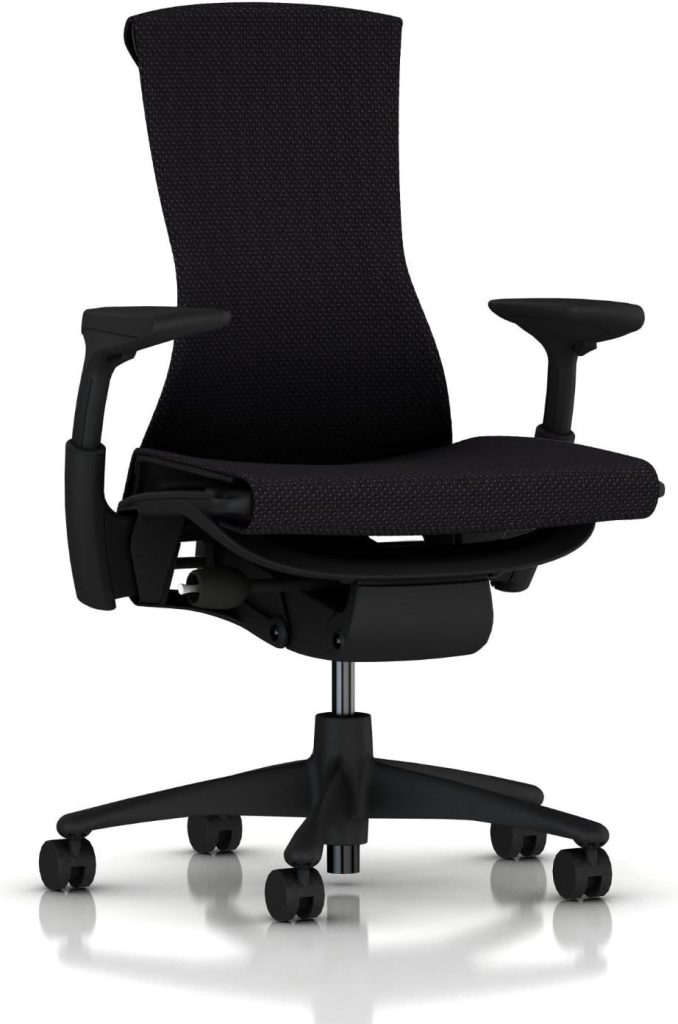
3. Herman Miller Embody – Best for Spinal Alignment and Movement
The Embody takes a different approach than the Aeron. Instead of pressing on one spot, the BackFit adjustment tilts the entire backrest to mirror your spine’s natural curve. The pixelated support surface distributes pressure evenly and actually moves with you as you fidget, lean, and stretch.
It was developed with input from doctors and biomechanics researchers, and it’s ideal if you rarely sit still. The price is steep — typically $1,600 to $1,900 — but the 12-year warranty softens the sting.
- BackFit supports the whole spine, not just one point
- Pixelated surface encourages micro-movement
- Great for marathon work sessions
- 12-year warranty
- No traditional adjustable lumbar pad
- Highest price on this list
- Some owners report squeaks over time
- No headrest option
4. Haworth Fern – Best for Tall Users and Deep Reclining
The Fern is my favorite under-the-radar premium option. Its flexible backrest conforms to your spine while still offering zoned lumbar support, and it reclines further than most competitors. The seat cushion is noticeably more padded than the Aeron’s mesh, which many people prefer.
The tall backrest suits users from roughly 5’8″ to 6’5″, and it costs less than the Aeron or Embody. Haworth’s warranty is five years, which is solid if not spectacular.
- Excellent for taller users
- Padded seat that stays comfortable for hours
- Deep recline with smooth tension control
- Priced below the Big Three premium chairs
- Armrests aren’t as adjustable as the Leap’s
- Breathable mesh backrest costs extra
- Fewer physical stores stock it for demo
5. Sihoo Doro C300 – Best Budget Pick for Relief Without the Premium Price
You don’t need to spend four figures to get meaningful lower back support. The Doro C300 offers dynamic lumbar support that moves with you, plus synchro-tilt, 4D armrests, and a breathable mesh back. Those are features you’d normally find on chairs three times the price.
It’s not built to the same standard as Herman Miller or Steelcase, and the seat pan runs a bit small for taller users. But for around $300, it delivers more back-pain relief per dollar than anything else I’ve tested.
- Dynamic lumbar genuinely relieves pressure
- Huge adjustability for the price
- Breathable mesh keeps you cool
- Better value than any premium chair
- Build quality won’t match the premium brands
- Seat pan runs small for tall users
- Short warranty and mixed customer service reviews
⚡ Comparison Table: Best Chairs for Lower Back Pain
Here’s how the five finalists stack up side by side. Prices are approximate street prices for new units in 2026.
| Chair | Best For | Lumbar Support | Seat Depth | Warranty | Approx. Price | Check Price |
|---|---|---|---|---|---|---|
| Herman Miller Aeron | All-day comfort and airflow | PostureFit SL sacral pads | Fixed per size (A/B/C) | 12 years | ~$1,495 | Check Price → |
| Steelcase Leap V2 | Customizable lumbar force | 4-position, adjustable force | 2″ sliding seat | 12 years | ~$1,300 | Check Price → |
| Herman Miller Embody | Spinal alignment while moving | BackFit full-back adjustment | Fixed, curved seat | 12 years | ~$1,795 | Check Price → |
| Haworth Fern | Tall users and deep recline | Zoned lumbar, flexible backrest | Sliding seat | 5 years | ~$1,099 | Check Price → |
| Sihoo Doro C300 | Budget relief on a tight budget | Dynamic self-adjusting lumbar | Sliding seat | ~2 years | ~$309 | Check Price → |
🔑 How to Choose the Right Chair for Your Body and Budget
Before you spend anything, measure your body against the chair’s size specs. The Aeron comes in A, B, and C sizes; most men need a B or C, while most women fit an A or B. If you’re over 6’2″, the Fern or Leap’s taller backrest will serve you better than a standard Aeron.
Your pain pattern matters too. A dull ache after hours of sitting points toward deeper, adaptive lumbar support like the Leap’s. Sharp pressure in one spot? A sacral-support design like the Aeron’s PostureFit SL may work better.
Budget under $300? Get the Sihoo. Between $500 and $900, look for used or refurbished Aerons and Leaps — offices upgrade constantly, so the secondhand market is deep. Above $1,000, buy new for the full warranty and factory-fresh comfort.
Finally, always check the return policy. A chair can feel perfect for ten minutes and wrong after two days. I’d hold any purchase to this standard: a 30-day trial plus a warranty of at least five years. That combination protects your back and your bank account.
❓ FAQ: Best Chair for Lower Back Pain
Does an expensive chair actually help lower back pain?
In my experience, yes — up to a point. Chairs with proper lumbar support and adjustable seat depth reduce the slouching that causes most daily back pain. But no chair replaces regular movement. stand up, stretch, and change positions every 45 to 60 minutes.
What kind of lumbar support is best for lower back pain?
Adjustable height and depth is the honest answer. Your spine’s curve sits at a specific height, and your body shape determines how much pressure you need. Fixed lumbar bumps help some people and hurt others. That’s why the Leap’s adjustable force and the Aeron’s PostureFit SL stand out.
Mesh or foam — which is better for back pain?
Both can work. Mesh breathes better and stays firm, which supports posture well in warm conditions. Foam feels plusher and suits people who find mesh too hard. Pick by comfort, not by marketing — the support structure matters more than the surface material.
Will a chair alone fix my back pain?
Rarely, and I’d never claim otherwise. A good chair can reduce strain and prevent some pain, but ongoing issues deserve input from a doctor or physical therapist. Many of my clients do best combining an ergonomic chair with daily movement, stretching, or targeted strength work.
Are gaming chairs good for lower back pain?
Usually not. Most gaming chairs have bucket seats that push your hips forward, plus a thin lumbar pillow that shifts around. A few high-end options work, but the ergonomic chairs in this guide offer better, more adjustable support for the same or less money.
📝 Final Thoughts
Here’s my straightforward advice: if you can stretch the budget, the Herman Miller Aeron or Steelcase Leap V2 is the purchase that will serve your back for a decade or more. If you can’t, the Sihoo Doro C300 gives you most of the relief at a fraction of the price.
Regardless of which you pick, remember the simplest fix: get up and move regularly. The best chair for lower back pain is the one that fits your body, supports your natural posture, and reminds you that you’re not built to sit still all day.
📌 Why Your Chair Matters for Lower Back Pain
Your chair isn’t just a place to sit — it’s the foundation of your spinal health for eight-plus hours a day. If you’re dealing with lower back pain, the culprit is often right under you. The best chair for lower back pain does more than feel comfortable; it actively keeps your spine in a neutral position.
Here’s the biomechanics reality: when you sit, your hips flex and your pelvis naturally rolls backward. That tilt flattens the lumbar curve and increases pressure on your intervertebral discs — up to 40% more than standing, according to spine research. Over hours, that strain aggravates existing back pain and can trigger new discomfort.
A poor chair lets you slouch into that posterior pelvic tilt. A properly designed ergonomic chair does the opposite: it supports your lumbar curve, keeps your hips slightly above your knees, and encourages a more upright posture. Physical therapists I work with consistently recommend adjustable lumbar support and seat depth as the first line of defense against sitting-related back pain.
The investment pays off. A quality chair doesn’t just reduce daily aches; it prevents the slow buildup of strain that leads to chronic issues. When you remove the constant pressure on your lower back, your muscles relax, your circulation improves, and you can actually focus on work instead of your pain. That’s why the right chair isn’t an expense — it’s long-term relief you sit in every day.
📌 Key Features to Look for in a Chair for Lower Back Pain
The right chair isn’t defined by its brand badge. It’s defined by how well it fits your body. Here’s what I check on every chair I test for lower back pain.
Adjustable lumbar support is non-negotiable. The pad should move up and down so it sits in the natural curve of your spine, not jammed into your ribs. Depth adjustment matters too — the ability to push the pad in or out by 1–2 inches makes a real difference in how supported your lower back feels.
Check the seat depth as well. A sliding seat pan lets you keep your knees bent at roughly 90 degrees with two or three fingers of space behind the calves. When that’s off, you’ll end up perched on the front edge or slumping into the backrest.
Recline with lockable positions is a must. Tilting back to around 100–110 degrees can reduce pressure on spinal discs, and the lock stops you from bouncing forward as you type. A tension knob lets you dial the resistance to match your body weight.
For cushioning, high-density foam provides firm, durable support that holds its shape over time. Memory foam feels plush at first but tends to sag and trap heat. Mesh seats offer the best airflow, though they feel firmer under the thighs on day one.
Adjustable armrests — height, width, and angle — keep your shoulders relaxed, which takes indirect strain off your lower back. And for the backrest itself, choose mesh if you run warm or spend long hours seated; upholstered backs feel softer but hold more heat.
🔍 Top 5 Best Chairs for Lower Back Pain in 2026
I’ve spent years testing ergonomic chairs with clients who battle lower back pain. I judged every pick here on lumbar adjustability, build quality, warranty, and comfort over real 8-hour workdays. These five came out on top — each one solves a slightly different problem.
1. Steelcase Leap V2 – Best Overall Lumbar Support
The Leap V2’s LiveBack backrest flexes with your spine, and the independent lumbar control locks into your exact curve. It supports up to 400 lbs, and the 12-year warranty is the best in the industry.
- Height- and depth-adjustable lumbar
- Seat depth slides for different leg lengths
- No headrest in the standard version
- Premium price tag
2. Duramont Ergonomic Chair – Best Budget Pick
Don’t let the price fool you. You get height-adjustable lumbar support, a breathable mesh back, and a 2-year warranty for around $250. It’s a massive upgrade over a kitchen chair, and your lower back will feel the difference.
- Adjustable lumbar at a budget price
- Holds up well for 8-hour seated days
- Seat padding can flatten over time
3. Herman Miller Aeron – Best Mesh Chair
The Aeron’s PostureFit SL adds sacral support that tilts your pelvis forward and eases lower-back strain. The 8Z Pellicle mesh keeps you cool, and three sizes (A, B, C) let you dial in the right fit.
- Exceptional airflow for long hot days
- Sizes A, B, C for precise fitting
- Lumbar support isn’t height-adjustable
- No headrest option
4. Herman Miller Embody – Best Luxury for Chronic Pain
The Embody’s pixelated backrest mirrors your spine’s natural curve and adapts to every shift you make. For chronic pain and 10-hour sitting marathons, it’s the most comfortable chair I’ve tested.
- Pressure-distributing backrest design
- 12-year Herman Miller warranty
- Very expensive
- No traditional lumbar knob
5. Secretlab Titan Evo XL – Best for Tall & Heavy Users
Rated for users up to 6’9″ and 395 lbs, the Titan Evo XL is the sturdiest chair here. The knob-adjustable lumbar curve and wide seat keep bigger frames properly supported all day.
- High weight capacity and steel frame
- Integrated lumbar support you can tune
- Racing-style seat isn’t for everyone
- Firm cushion needs a break-in period
Quick Comparison
| Model | Best For | Price | Check Price |
|---|---|---|---|
| Steelcase Leap V2 | Adjustable lumbar support | $900+ | Check Price → |
| Duramont Ergonomic | Budget relief | ~$250 | Check Price → |
| Herman Miller Aeron | Breathability & support | $1,200+ | Check Price → |
| Herman Miller Embody | Chronic pain & long hours | $1,700+ | Check Price → |
| Secretlab Titan Evo XL | Tall & heavy users | ~$650 | Check Price → |
🔍 Comparison Table: Best Chairs for Lower Back Pain
Here’s the side-by-side comparison I wish I’d had before testing all five of these. I lined them up on the specs that matter most for lower back pain: lumbar adjustability, seat depth, recline range, and warranty coverage.
| Model | Price | Lumbar Adjustability | Material | Seat Depth | Recline Range | Warranty / Trial | Check Price |
|---|---|---|---|---|---|---|---|
| Herman Miller Aeron | ~$1,200–$1,700 | PostureFit SL or adjustable lumbar pad | Breathable Pellicle mesh | Fixed — choose size A, B, or C | 4-position tilt, ~30° | 12-year / 30-day trial | Check Price → |
| Steelcase Leap V2 | ~$1,500–$1,900 | Height and tension adjustable | Fabric over molded foam | Sliding, ~2″ of travel | 4-position lock, ~32° | 12-year / 30-day via Steelcase | Check Price → |
| Herman Miller Embody | ~$1,600–$2,000 | Backfit curvature + zonal support (no separate pad) | Pixelated mesh and fabric layers | Sliding, ~2″ of travel | Tilt limiter, ~30° | 12-year / 30-day trial | Check Price → |
| Steelcase Gesture | ~$1,700–$2,200 | 3D LiveBack — built-in, follows your spine | Fabric over coil flexors | Sliding, ~2.5″ of travel | Synchro tilt, ~26° | 12-year / 30-day return program | Check Price → |
| Sihoo M57 | ~$200–$260 | Height and depth adjustable | Breathable mesh | Fixed, about 19″ | 90°–135° lockable | 2-year / 30-day returns on Amazon | Check Price → |
At a glance: the Steelcase Leap V2 takes the support title, the Aeron wins on all-day comfort, and the Sihoo M57 is the value pick by a wide margin.
Physical therapists and ergonomics specialists I’ve talked with most often point to the Aeron and Leap V2 first. Their lumbar support is quick to dial in without tools and holds up through long shifts. The Embody is the close second if your pain spreads into your mid-back and shoulders.
Warranty coverage separates the premium chairs from the budget option. Herman Miller and Steelcase back theirs for 12 years; the Sihoo M57 gets two. Trial windows vary by seller, so always confirm the return policy before you order.
🔑 How to Choose the Right Chair for Your Body and Budget
Start with your body, not the brand. A $1,200 chair won’t help if the seat pan digs into your thighs or the backrest tops out below your shoulders. Check the spec sheet for seat depth (typically 16–21 inches), seat height range, and weight capacity — most ergonomic chairs support 250–350 lbs, but heavy-duty models go up to 500 lbs.
Your pain pattern should drive your feature priorities. If you have disc-related lower back pain, look for height-adjustable lumbar support you can position right at belt level. For sciatica, a waterfall seat edge and forward-tilt mechanism reduce pressure on the backs of your legs.
Budget realistically: a quality ergonomic chair is a 10-year purchase. Expect to spend $300–$600 for solid mid-range picks, and $800–$1,500 for premium models with better materials and longer warranties. Below $200, you’ll usually compromise on adjustability — which is exactly what your back can’t afford.
Trying chairs in person is ideal, but not always possible. When you do test, sit for at least 15 minutes in your natural working position. If you buy online (like most of us do), prioritize brands with 30-day returns and a 10+ year warranty.
Once your chair arrives, set it up properly:
- Adjust seat height so your feet rest flat and knees sit at a 90-degree angle
- Position lumbar support so it presses gently into the curve of your lower back
- Set armrests so your shoulders stay relaxed and elbows rest at 90 degrees
- Align your keyboard so wrists stay straight and your monitor sits at eye level
Getting these four settings right matters more than the chair model itself. Even a top-tier chair feels terrible if it’s adjusted wrong, so spend the first 10 minutes dialing it in. Your back will thank you by the end of the workday.
🔍 FAQ: Best Chair for Lower Back Pain
How do I know if the lumbar support is positioned correctly?
Your lumbar support should sit in the natural inward curve of your lower back, roughly at your beltline. Sit fully back and you should feel firm, even pressure across that curve. If it pokes your tailbone or pushes your ribs forward, adjust the height and depth until it fits your spine’s own shape.
Is a mesh chair or a foam cushion chair better for lower back pain?
Mesh backs generally win for lower back pain because the backrest flexes with your movement instead of fighting it. Foam feels plusher on day one, but it packs down over time and loses support. The Herman Miller Aeron is still my top mesh pick for airflow plus adjustable lumbar tension.
Can an ergonomic chair really cure chronic lower back pain?
No — and treat any brand that promises a cure with suspicion. A quality chair reduces daily strain by supporting neutral posture and relieving disc pressure. But chronic pain usually involves muscle strength, mobility, and daily habits, so pair the chair with regular movement and stretching.
What is the best chair for sciatica and lower back pain?
For sciatica, look for a waterfall seat edge that curves down at the front, plus seat-depth adjustment so the pan never presses into your thighs. The Steelcase Leap V2 is a long-time favorite here — its back contour adapts as you shift, and the lumbar support moves with you.
How long should I sit in an ergonomic chair without taking a break?
Even the best chair won’t save you from static posture. Stand, stretch, or walk for one to two minutes every 45–60 minutes. Set a timer if you tend to lose track — your chair is a support tool, not a parking spot.
Are expensive chairs always better for back pain, or are budget options just as effective?
Price alone doesn’t fix your back. A well-fitted $250 chair with adjustable lumbar can outperform a poorly adjusted $1,500 model. That said, premium chairs from $800 to $1,500 typically bring sturdier build quality, more adjustment points, and longer warranties — worth it if you sit eight-plus hours daily.