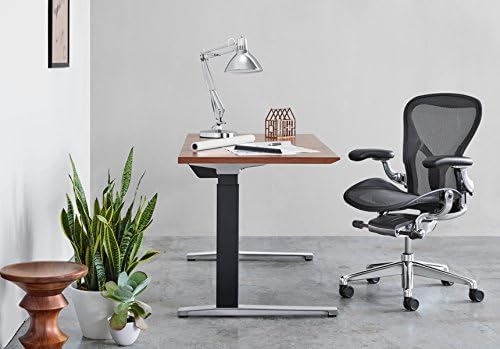
If sitting at your desk makes your back uncomfortable, the chair may be part of the problem — but it is rarely the whole story. When looking for chairs best for back pain, the goal should not be to find a chair that “cures” back pain. Instead, look for a chair that fits your body, supports a comfortable working position, and makes it easier to change posture throughout the day.
This 2026 guide focuses on the features that matter when comparing ergonomic office chairs: adjustable lumbar support, seat depth, seat height, armrests, recline, backrest design, and overall fit. These features should be viewed as ergonomic considerations rather than medical treatments.
Below, you’ll find practical buying criteria, several chairs worth considering, budget options, setup instructions, and answers to common questions about choosing an office chair when back discomfort is part of your workday.
For a broader overview of back-pain-related office chair topics, visit our
Office Chairs for Back Pain Hub
,
which brings together guides for lower back, upper back, neck and back, sciatica, herniated discs, and other seating needs.
Quick Take: What Matters Most
- Fit comes first: seat height and seat depth should match your body rather than forcing you into a fixed position.
- Adjustability matters: lumbar support, armrests and recline allow you to personalize the chair.
- Movement matters too: changing position and taking regular activity breaks is more realistic than trying to maintain one “perfect” posture all day.
- Comfort is individual: a chair that feels excellent to one person may feel too firm, too deep or too narrow for another.
- Don’t expect a chair to treat a medical condition: persistent or severe symptoms should be evaluated by an appropriate healthcare professional.
Table of Contents
What to Look For in a Chair for Back Pain
A comfortable office chair is not necessarily the softest chair in the room. For desk work, the more useful question is whether the chair can be adjusted to your body and whether it allows you to work without constantly fighting the seat.
A useful ergonomic setup should support the body without forcing you into one rigid posture. The exact combination of adjustments you need depends on your height, proportions, desk and working habits.
1. Adjustable Lumbar Support
A lumbar mechanism that can be adjusted or shaped to your body gives you more control than a completely fixed backrest. Look for comfortable contact with the lower back rather than aggressive pressure.
2. Correct Seat Depth
The seat should support your thighs without pressing into the backs of your knees. Adjustable seat depth is especially useful if you are shorter, taller, or sharing the chair with another person.
3. Useful Seat Height Range
You should be able to place your feet securely on the floor or on a suitable footrest while keeping your thighs reasonably supported.
4. Adjustable Armrests
Armrests can help you position your arms without unnecessarily lifting your shoulders. Height adjustment is a useful starting point; additional directions can be helpful depending on your workstation.
5. Recline and Backrest Movement
A backrest that allows comfortable movement can make it easier to vary your position instead of staying rigidly upright. There is no single recline angle that is ideal for every person or task.
6. Seat and Backrest Comfort
Mesh can be useful if you run hot, while a well-shaped foam seat may be preferable if you want a softer feel. Material alone does not determine whether a chair will work for your back.
7. Weight Capacity and Dimensions
Check the manufacturer’s current weight rating, seat width, seat depth and height range. A chair that supports your weight can still be a poor fit if the seat is too narrow or too deep.
Important:
Lumbar support should not be treated as a guaranteed treatment for low back pain. A chair is one part of a larger workstation and movement strategy.
Ergonomic Office Chairs Worth Considering in 2026
There is no single chair that works for every person with back discomfort. The models below represent different approaches: a premium office chair, a gaming-oriented chair with ergonomic features, and a mid-priced mesh chair with extensive adjustability.
| Chair | Key Ergonomic Features | Potential Fit | Check Price |
|---|---|---|---|
| Steelcase Gesture | Adjustable seat depth and height, highly adjustable arms, recline mechanism and LiveBack backrest design. | People who want a premium office chair with extensive adjustment options. | Check Price → |
| Secretlab TITAN Evo | Integrated lumbar adjustment, adjustable armrests, recline and a deeper gaming-chair design. | Users who prefer a gaming aesthetic, firmer cushioning or a larger seat. | Check Price → |
| SIHOO Doro C300 | Self-adaptive lumbar support, 4D armrests, adjustable seat depth and a flexible mesh back. | Users looking for a highly adjustable mesh chair without moving into premium office-chair pricing. | Check Price → |
Steelcase Gesture
The Gesture is designed around a wide range of seated positions and has a particularly adjustable armrest system. Its LiveBack backrest is designed to move with the user rather than behave like a completely rigid back panel.
- Useful if arm and shoulder positioning is an important consideration.
- Seat-depth adjustment can help users who struggle with overly deep office chairs.
- Its premium positioning makes it more relevant for shoppers who expect to use a chair extensively.
- People who strongly prefer very soft cushioning may want to compare the seat feel with alternatives.
Check Steelcase Gesture Price →
Secretlab TITAN Evo
The TITAN Evo takes a different approach from a traditional mesh office chair. It combines a gaming-oriented seat with adjustable lumbar support, recline and adjustable armrests. That makes it worth considering for people who spend time gaming as well as working.
- Integrated lumbar adjustment gives users more control than a fixed lumbar cushion.
- The seat has a firmer, more structured feel than many soft office chairs.
- The deeper gaming-chair shape may not suit people who prefer a short seat pan.
- Check the current size options and manufacturer’s measurements before ordering.
Check Secretlab TITAN Evo Price →
SIHOO Doro C300
The Doro C300 is a more affordable option for shoppers who want extensive adjustability. The listed configuration includes features such as a flexible backrest, self-adaptive lumbar support, 4D armrests and adjustable seat depth. Specifications can vary by version, so verify the exact configuration before purchasing.
- Mesh construction can be appealing for users who dislike warm foam seats.
- Adjustable seat depth is useful when matching the chair to different leg lengths.
- A multi-adjustable headrest is available on listed C300 configurations.
- Check the exact model, version and current price because C300 variants can differ.
Budget Chairs for Back Pain: What to Prioritize Under $200
You do not necessarily need a four-figure office chair to build a more comfortable workstation. At lower prices, however, you may need to accept fewer adjustments, simpler mechanisms or less refined cushioning.
For a budget chair, prioritize the following:
- Correct seat height. Your feet should be supported comfortably.
- Usable lumbar support. Avoid paying extra for decorative cushions that cannot be positioned properly.
- Seat depth and width. A good-looking chair can still be a poor fit.
- Basic recline. The ability to change your back angle is useful for varying your position.
- Return policy. This becomes especially important when buying a chair online without trying it first.
| Model / Category | What to Check | Potential Match | Check Price |
|---|---|---|---|
| HBADA Office Chairs | Compare the exact model for lumbar adjustment, seat depth, armrests and recline. | Small home offices and value-focused shoppers. | Check Price → |
| Dowinx Office Chairs | Check the exact model’s lumbar system, seat dimensions and any massage feature before buying. | Users who prefer gaming-style seating. | Check Price → |
| Amazon Basics Office Chairs | Focus on basic dimensions, height adjustment, seat comfort and return options. | Light-duty use and very tight budgets. | Check Price → |
Budget buying tip:
Don’t automatically spend the budget on a headrest, massage function or decorative upholstery. For desk work, basic fit and adjustability are usually more important purchasing criteria.
When a Recliner May Make More Sense
An office chair is designed around active desk work. A recliner serves a different purpose: resting, reading, watching TV or changing the angle of your hips and trunk when you are not working.
If sitting upright at a desk is uncomfortable, a recliner may feel better for some activities because it allows a different body position. That does not mean a recliner is automatically better for a specific medical condition.
- For desk work: use an adjustable office chair that lets you position your keyboard and monitor correctly.
- For reading or watching TV: a supportive recliner may offer a more relaxed alternative.
- For prolonged discomfort: don’t keep changing chairs indefinitely without addressing the underlying issue.
If you are specifically researching lower-back-friendly office chairs, see our
Best Office Chairs for Lower Back Pain
guide.
How to Adjust Your Chair for a More Comfortable Sitting Position
Even a highly adjustable chair can feel uncomfortable if it is configured poorly. Start with the basics rather than trying to optimize every control at once.
- Set seat height.
Adjust the chair so your feet are supported comfortably. If your desk is fixed and the chair must be raised, consider a footrest rather than allowing your feet to dangle. - Set seat depth.
Make sure the front edge of the seat does not create uncomfortable pressure behind your knees. Adjustable seat depth can make this easier to correct. - Adjust lumbar support.
Position the support where it feels comfortably supportive in your lower back. Avoid assuming that more pressure automatically means more support. - Adjust armrests.
Set them high enough to support your arms while keeping your shoulders relaxed. If the armrests force your shoulders upward, they are too high. - Set recline tension.
Choose a setting that allows you to lean back comfortably without fighting the mechanism. - Check your desk and monitor.
A well-adjusted chair cannot compensate for a monitor that is too low, a keyboard that is too far away or a desk that forces you into an awkward position.
Don’t Ignore Sitting Habits
One of the biggest mistakes in ergonomic-chair shopping is assuming that buying a better chair solves everything. Sitting behavior, workstation setup, posture and the amount of time spent sitting can all be relevant to how comfortable desk work feels.
In practical terms, don’t try to sit in one rigid position all day. Change your position, stand when appropriate, walk during breaks and adjust the backrest when you need a different working angle.
Change Position
Use the chair’s recline and height controls rather than staying fixed in one position for the entire work session.
Take Activity Breaks
Stand up, walk or perform a brief movement break when practical. Regular movement also helps prevent your workstation from becoming the only position you use during a long workday.
Watch for Symptoms
If a particular chair position repeatedly increases symptoms, don’t assume you need to “push through” it. Adjust the setup or discuss the problem with a qualified healthcare professional.
Gaming Chair vs. Office Chair for Back Pain
Neither category is automatically better for every person. What matters is the actual design and how well it fits your body.
| Feature | Office Chair | Gaming Chair |
|---|---|---|
| Seat shape | Often flatter and more work-oriented | Often deeper with a more structured seat |
| Lumbar support | Varies by model; often integrated | Can be integrated or cushion-based |
| Armrests | Often highly adjustable on premium models | 4D options are common on higher-end models |
| Ideal use | People prioritizing workstation ergonomics | People combining gaming and desk work |
Explore Our Back Pain Chair Guides
Start with our
Office Chairs for Back Pain Hub
for a broader overview, then explore the specific guides below.
Best Office Chairs for Lower Back Pain
— focused on lumbar support, seat fit and lower-back comfort.
Best Office Chair for Lower Back and Hip Pain
— covers seat depth, hip room and lower-back/hip comfort.
Best Office Chair for Sciatica Under $300
— a more specific guide for shoppers researching sciatica-related seating.
Best Office Chair for Herniated Disc
— focuses on chair considerations for users researching disc-related back discomfort.
Best Ergonomic Chair for Upper Back Pain
— covers upper-back support and workstation fit.
Best Ergonomic Chair for Neck and Back Pain
— for shoppers researching combined neck and back comfort.
Best Office Chair for Coccyx Pain
— focused on tailbone and coccyx seating considerations.
Frequently Asked Questions About Chairs for Back Pain
Are ergonomic office chairs good for back pain?
An ergonomic chair can make desk work more comfortable by allowing you to adjust the seat, backrest, lumbar area and armrests to your body. However, ergonomic chairs should not be treated as a guaranteed treatment for low back pain. Chair design is one part of a broader workstation and movement strategy.
Are mesh chairs better than cushioned chairs for back pain?
Not necessarily. Mesh can provide airflow and a flexible feel, while foam can provide cushioning and a different type of pressure distribution. The more important question is whether the chair’s seat dimensions, backrest and adjustments fit you comfortably.
Is lumbar support necessary in an office chair?
A supportive backrest can be useful, but there is no reason to assume that stronger lumbar pressure is always better. The support should feel appropriate for your body and working position.
How often should I change position while sitting?
There is no universally established minute-by-minute schedule that works for everyone. A practical approach is to avoid staying in one position for very long periods and to incorporate standing, walking or brief movement breaks throughout the workday.
Can a gaming chair be used as an office chair?
Yes. A gaming chair can work for office use if the seat dimensions, lumbar support, armrests and recline fit your body. Pay particular attention to seat depth because some racing-style designs are deeper and more structured than typical office chairs.
How do I know if my office chair is too deep?
If the front edge of the seat presses uncomfortably into the area behind your knees or prevents you from using the backrest comfortably, the seat may be too deep. An adjustable seat pan can make this easier to correct.
Can an office chair cure lower back pain?
No chair should be marketed as a guaranteed cure for back pain. A well-fitting chair may improve comfort or help you maintain a workable position, but persistent pain may require assessment beyond a chair change.
Should I buy a back-pain office chair online?
You can, but check the current return policy before ordering. Chair fit is highly individual, so a generous trial or return period can be more valuable than choosing a chair based only on specifications or online ratings.
Before You Buy: 8-Point Chair Checklist
- Measure your current seat height and compare it with the new chair.
- Check seat depth, especially if you are shorter or taller than average.
- Look for adjustable lumbar support rather than a decorative fixed cushion.
- Check whether the armrests can be positioned without lifting your shoulders.
- Look at the recline mechanism and whether tension can be adjusted.
- Check the manufacturer’s weight capacity and seat width.
- Confirm the warranty and return period.
- Compare the total workstation setup, not just the chair.
When a Chair Isn’t the Main Issue
If your back pain is persistent, severe, worsening, follows an injury, or is accompanied by concerning symptoms, changing office chairs may not be enough. Consider discussing your symptoms with a qualified healthcare professional rather than relying on ergonomic equipment alone.
Final Takeaway
The chairs best for back pain are not necessarily the most expensive, softest or most heavily advertised. The better starting point is a chair that fits your body and lets you adjust the parts that matter: seat height, seat depth, lumbar support, armrests and recline.
If your main concern is lower-back discomfort, continue with our
Best Office Chairs for Lower Back Pain
guide. For the complete topic cluster, return to the
Office Chairs for Back Pain Hub
.
More importantly, think beyond the chair. A well-arranged workstation, regular position changes and movement breaks are part of a more complete approach to comfortable desk work. If back discomfort continues despite changing your setup, the next step should be understanding the symptoms rather than simply buying another chair.
Sources & Further Reading
- Mayo Clinic — Office ergonomics and workstation setup guidance.
- Mayo Clinic — Desk stretches and activity breaks.
- PubMed — Research and systematic reviews concerning office-chair interventions and low back pain.
- PubMed — Research concerning sitting behavior, posture and low back pain among office workers.
This article provides general information about ergonomic seating and is not a substitute for individualized medical advice.
2 thoughts on “Chairs Best for Back Pain: 2026 Top Picks”