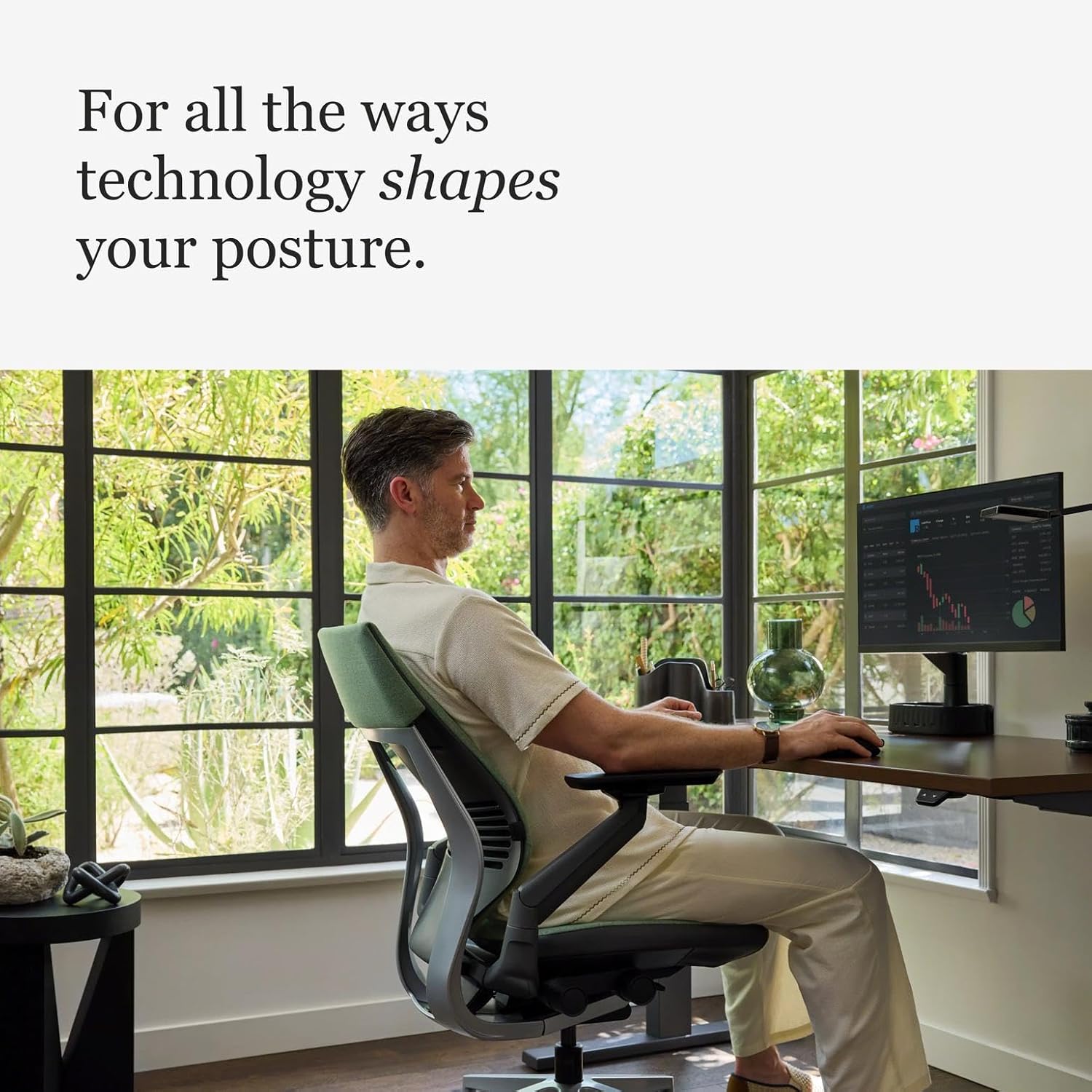
Steelcase is one of the most respected names in ergonomic seating, and two of their chairs consistently rise to the top of “best office chair” lists: the Leap v2 and the Gesture.
Both are exceptional chairs. Both cost over $1,000. Both come with 12‑year warranties. But they are fundamentally different chairs designed for different sitting styles and body types.
In this guide, I will break down every difference between the Leap and Gesture: lumbar support, seat comfort, armrests, recline, build quality, and who each chair is actually for.
By the end, you will know exactly which Steelcase chair belongs in your home office.
Quick Answer: Leap vs Gesture – Which One Is Better?
Here is the short version if you are in a hurry:
- Buy the Leap if: You prioritize lower back pain relief, want a more pronounced lumbar support, prefer a lighter chair (48 lbs vs 78 lbs), and want better value for money (starting ~$1,128).
- Buy the Gesture if: You use multiple devices (laptop, phone, tablet), need the most adjustable armrests on the market (360° rotation), have a modern multi‑posture workflow, and can afford the premium (~$1,353+).
Now let me explain exactly why.
Quick Comparison: Leap vs Gesture
| Feature | Steelcase Leap v2 | Steelcase Gesture |
|---|---|---|
| Price (starting) | ~$1,128 – $1,399 | ~$1,353 – $1,499 |
| Weight | 48 lbs | 78 lbs |
| Weight Capacity | 400 lbs (500 lbs for Plus version) | 400 lbs |
| Seat Depth Range | 15.75″ – 18.75″ | 15.75″ – 18.5″ |
| Seat Width | 19.25″ | 20″ |
| Backrest Height | 23.5″ | 24.06″ |
| Backrest Technology | LiveBack® with adjustable lumbar firmness | 3D LiveBack® with Core Equalizer |
| Armrest Adjustment | 4D (height, width, depth, pivot) | 360° full rotation with 10.25″ width range |
| Recline Range | 120° with 4 stop settings | 125° with 3 stop settings |
| Lumbar Support | Height adjustable + firmness dial (standard) | Optional height adjustable (not firmness) |
| Headrest Option | Aftermarket only | $239 factory option |
| Warranty | 12 years, multi‑shift (24/7 usage) | |
| Where to Buy | Amazon | Steelcase.com | Amazon | Steelcase.com |
Steelcase Leap v2: The Back Pain Specialist
The Leap has been a top‑rated ergonomic chair for over two decades. First launched in 1999 and continuously improved, it has developed a cult following among people with back pain and those who spend 8+ hours a day at a desk [citation:4].
Key Features of the Leap:
1. LiveBack Technology
This is the heart of the Leap. The backrest mimics your spine’s natural movement — it flexes and changes shape as you move. The upper backrest flexes back and out of the way, while the lower lumbar area stays in place, providing consistent lower back support [citation:2]. This is why many users with back pain prefer the Leap.
2. Adjustable Lumbar Support with Firmness Dial
The Leap offers one of the most customizable lumbar systems on the market. You can adjust the lumbar height (up/down) AND firmness (via a dial). This lets you dial in exactly how much pressure you want on your lower back — from gentle support to aggressive pressure [citation:2][citation:5].
3. Natural Glide System (Recline)
When you recline, the seat pan slides forward slightly, keeping your eyes level with your screen. This prevents the “awkward reach‑forward” feeling common in other chairs. You get 4 stop settings for recline angles, with a maximum of 120° [citation:5].
4. 4D Armrests
The Leap’s armrests adjust in height, width, depth, and pivot. They are comfortable for elbows and forearms and have been rated the best in class for armrest comfort by BTOD (85 out of 100) [citation:2].
5. Flexible Seat Pan
The front portion of the seat pan flexes as you move, reducing pressure on the backs of your legs. This is a subtle feature that makes a big difference during long sitting sessions [citation:2].
Leap Specifications:
- Weight capacity: 400 lbs (500 lbs for Plus version) [citation:2]
- Seat depth: Adjustable (15.75″ – 18.75″)
- Backrest height: 23.5″
- Armrests: 4D adjustable
- Recline: 120° with 4 lock positions
- Warranty: 12 years (24/7 usage rated)
- Made in: Mexico
✅ Leap Pros:
- Excellent lower back support — best in class for back pain [citation:2]
- Highly customizable lumbar (height + firmness dial)
- Lighter weight (48 lbs) — easier to move around [citation:5]
- Better value — starting price ~$200 less than Gesture [citation:2]
- BTOD ranked it #1 for seat comfort (83/100) [citation:2]
- BTOD ranked it #2 for back support overall [citation:2]
- Flexible seat pan reduces leg pressure
❌ Leap Cons:
- Firmer seat cushion — some users find it too hard after hours [citation:5]
- Narrower seat width (19.25″) — may feel snug for larger frames [citation:5]
- No factory headrest option (aftermarket only)
- Less recline angle than Gesture (120° vs 125°)
- Armrests don’t rotate 360° like Gesture [citation:1]
- Basic design — functional but not flashy
Who is the Leap for?
The Leap is best for people who suffer from lower back pain, prefer a more pronounced lumbar support, want better value, and don’t need extreme armrest adjustability. It is the better choice for traditional desk workers who sit upright and focus on a single monitor [citation:5].
Steelcase Gesture: The Multi‑Device Master
The Gesture was designed after Steelcase conducted a global posture study with over 2,000 participants on six continents [citation:2]. They observed how people actually sit while using laptops, tablets, and smartphones — not just desktop computers. The result is a chair designed for the modern, multi‑device workflow [citation:3].
Key Features of the Gesture:
1. 3D LiveBack Technology
Similar to the Leap but with a contoured back that encourages more movement. The backrest supports your spine’s natural S‑shape while allowing you to twist, lean, and shift positions. Unlike the Leap, the Gesture’s backrest is designed to support over nine seated positions — whether you’re upright, reclined, or leaning sideways to view a second monitor [citation:3].
2. Core Equalizer Lumbar Support
The Gesture’s lumbar support adapts automatically as you recline. This is more passive than the Leap — you don’t need to manually adjust it. Some users find this convenient; others prefer the Leap’s hands‑on control [citation:5].
Important note: The optional adjustable lumbar on the Gesture is height‑adjustable only — it does NOT have a firmness dial like the Leap [citation:6].
3. 360‑Degree Armrests (Best in Class)
This is the Gesture’s signature feature. The armrests rotate fully — mimicking natural arm movement — and offer a staggering 10.25 inches of width adjustment range (from 10.25″ to 22.5″) [citation:9]. You can position them to support your elbows while typing, using a tablet, or holding a phone. These are widely considered the best armrests on any office chair [citation:2].
4. Optional Factory Headrest
Unlike the Leap (which has no factory headrest), the Gesture offers a $239 headrest option. However, user reviews are mixed — some find it comfortable, others say it’s not worth the cost [citation:6][citation:8].
5. Seat Slider with Knob Adjustment
The Gesture uses a knob (rather than a lever) to adjust seat depth. Some users find this more precise and easier to use [citation:9].
Gesture Specifications:
- Weight capacity: 400 lbs [citation:2]
- Seat depth: Adjustable (15.75″ – 18.5″)
- Seat width: 20″ (wider than Leap) [citation:5]
- Backrest height: 24.06″ (taller than Leap) [citation:2]
- Armrests: 4D with 360° rotation, 10.25″ width range
- Recline: 125° with 3 lock positions
- Warranty: 12 years (24/7 usage rated)
- Made in: Mexico
✅ Gesture Pros:
- Best armrests on the market — 360° rotation with massive range [citation:2][citation:9]
- Designed for multi‑device use — supports 9+ seated postures [citation:3]
- Taller backrest (24.06″) — better for tall users [citation:2]
- Wider seat (20″) — more room for shifting positions [citation:5]
- Optional factory headrest available (Leap has none)
- BTOD ranked it #1 for scope of users (fits widest range) [citation:2]
- BTOD ranked it #1 for ergonomic adjustments (90/100) [citation:9]
- Cleaner underside finish compared to Leap [citation:9]
❌ Gesture Cons:
- Very heavy (78 lbs) — difficult to move [citation:5]
- More expensive — starting ~$200+ higher than Leap [citation:2]
- Less pronounced lumbar support — may not be enough for back pain sufferers [citation:2]
- Upright lock still has some give (cannot lock perfectly upright) [citation:2]
- Optional headrest is mixed in reviews [citation:6]
- Some users report thigh/leg discomfort after extended use [citation:6]
Who is the Gesture for?
The Gesture is best for people who use multiple devices (laptop, phone, tablet, multiple monitors), change postures frequently, need the most adjustable armrests possible, and are willing to pay a premium for those features. It is excellent for programmers, streamers, and anyone with a modern multi‑screen setup [citation:3][citation:5].
Direct Comparison: Leap vs Gesture (Feature by Feature)
1. Back Support (Winner: Leap)
The Leap’s LiveBack technology with adjustable lumbar firmness provides more pronounced lower back support. BTOD ranked the Leap #2 for back support (82/100) and the Gesture #6 (80/100) [citation:2]. If you have lower back pain, the Leap is the clear winner.
One user on Chiphell summarized it well: “Leap may be the most comfortable chair ever made. Gesture’s back structure forces you into a more constrained sitting posture.” [citation:8]
2. Armrests (Winner: Gesture)
The Gesture’s 360° rotating armrests with 10.25″ width range are simply unmatched. They support any position — typing, using a tablet, holding a phone, reclining with a laptop. The Leap’s 4D arms are excellent, but they don’t rotate fully [citation:1][citation:5].
BTOD’s armrest comfort scores: Leap 85/100 (ranked #1), Gesture 84/100 (ranked #2) — both are excellent, but the Leap’s arm pads are slightly softer [citation:2].
3. Seat Comfort (Winner: Leap – slight edge)
Both chairs use seat pads less than 2″ thick — a testament to Steelcase’s foam quality. BTOD ranked the Leap #1 for seat comfort (83/100) and the Gesture #5 (81/100) [citation:2][citation:9].
However, some users find the Leap’s seat too firm. One Chiphell user noted: “Leap v2’s seat cushion is the best seat cushion I’ve ever used — I give it 9/10.” Another disagreed: “The Gesture seat is more accommodating for multiple positions because of its wider width and softer bolstering.” [citation:5][citation:8]
4. Adjustability (Winner: Gesture)
The Gesture has more overall adjustability range, particularly in the armrests. BTOD ranked the Gesture #1 for ergonomic adjustments (90/100) [citation:9]. However, the Leap offers more lumbar control (height + firmness dial vs just height on the Gesture).
For multi‑device users, the Gesture’s ability to support side‑leaning and reclined device use is a major advantage [citation:3].
5. Weight and Portability (Winner: Leap)
The Leap is 48 lbs; the Gesture is 78 lbs [citation:5]. That’s a 30‑pound difference. If you need to move your chair between rooms or adjust its position frequently, the Leap is much easier to handle.
6. Price and Value (Winner: Leap)
The Leap starts at ~$1,128 vs the Gesture at ~$1,353 — a difference of about $225 [citation:2][citation:5]. For that extra money, you get better armrests, a taller backrest, and an optional headrest. But if you don’t need those features, the Leap is better value.
7. Build Quality (Tie – Gesture slightly ahead)
BTOD gave the Gesture 91/100 and the Leap 90/100 for build quality. Both are excellent. The Gesture’s underside is finished more cleanly (custom molded plastic covering the mechanism), but both chairs use high‑quality plastic components designed for flexibility and durability [citation:2].
8. Headrest (Winner: Gesture – has one)
The Leap has no factory headrest option — only aftermarket. The Gesture offers a $239 factory headrest. However, user reviews on the headrest are mixed: “Gesture headrest is mediocre — better to buy aftermarket” [citation:8]. Some recommend skipping the headrest entirely.
Leap vs Gesture: Which One Should You Buy?
Choose the Leap if:
- You have lower back pain and need pronounced lumbar support
- You prefer a lighter chair (48 lbs vs 78 lbs)
- You want better value for your money (~$200 less)
- You work primarily at a desk with a single monitor setup
- You don’t need a headrest
- You want a chair with a proven 20+ year track record
- You prefer hands‑on lumbar control (firmness dial)
Choose the Gesture if:
- You use multiple devices (laptop, phone, tablet, multiple monitors)
- You change postures frequently throughout the day
- You need the most adjustable armrests on the market (360° rotation)
- You have a modern multi‑screen or streaming setup
- You want a factory headrest option (even if mixed reviews)
- You are taller (Gesture’s backrest is 24.06″)
- You don’t mind the extra weight (78 lbs)
- You have a higher budget
Frequently Asked Questions (FAQ)
Is the Leap or Gesture better for back pain?
Leap is better for back pain. Its lower back support is more pronounced, and the firmness dial lets you customize exactly how much pressure you want. The Gesture’s lumbar is less aggressive and more passive [citation:2][citation:5].
Is the Leap or Gesture more comfortable?
This is subjective. BTOD ratings show the Leap slightly ahead in seat comfort (83 vs 81) and back support (82 vs 80) [citation:2]. However, the Gesture’s wider seat (20″ vs 19.25″) and softer bolstering make it more accommodating for shifting positions [citation:5].
Which chair has better armrests?
Gesture has better armrests. They rotate 360° and offer 10.25″ of width adjustment — unmatched by any other chair [citation:2][citation:9]. The Leap’s 4D arms are excellent, but they don’t rotate fully [citation:1].
Which chair is better for tall people?
Gesture is slightly better due to its taller backrest (24.06″ vs 23.5″) and wider seat (20″ vs 19.25″). Both chairs fit users up to about 6’4″ comfortably, but very tall users (over 6’4″) may find the Gesture’s upper back support better [citation:2].
Which chair is better for gaming?
The Gesture is often recommended for gamers because of its superior armrests (for controller and mouse positioning) and its ability to support multiple postures. The optional headrest is also useful for leaning back between matches [citation:3][citation:7].
Which chair is lighter and easier to move?
Leap is much lighter — 48 lbs vs 78 lbs. If you need to move your chair between rooms or adjust its position frequently, the Leap is significantly easier to handle [citation:5].
Does the Leap or Gesture come with a headrest?
The Leap has no factory headrest option — you must buy aftermarket. The Gesture offers a $239 factory headrest; however, user reviews are mixed, with some calling it “mediocre” and not worth the cost [citation:6][citation:8].
Which chair has better lumbar adjustability?
Leap has better lumbar adjustability. It offers height adjustment AND a firmness dial. The Gesture’s optional lumbar is height‑adjustable only (no firmness control) [citation:2][citation:6].
Can I buy these chairs on Amazon?
Yes. Both are available from authorized Steelcase sellers on Amazon. The Leap is available at this link and the Gesture at this link. Make sure to verify the seller is authorized to ensure warranty coverage.
What is the price difference between Leap and Gesture?
The Leap starts at ~$1,128–$1,399. The Gesture starts at ~$1,353–$1,499 [citation:2][citation:5]. The difference is about $225 — the Gesture is the more expensive chair.
Final Verdict: Leap vs Gesture — Which One Should You Buy?
After comparing every feature, here is my honest recommendation:
Buy the Leap if: You have back pain, want pronounced lumbar support, prefer a lighter chair, and want better value. It is the best chair for traditional desk workers who sit upright and focus on a single monitor. It has a 20+ year track record for a reason.
Buy the Gesture if: You use multiple devices (laptop, phone, tablet), change postures frequently, need the best armrests on the market, and have a modern multi‑screen setup. It is the best chair for programmers, streamers, and anyone who works across multiple devices [citation:3][citation:5].
Both chairs are excellent. You cannot go wrong with either. The right choice depends on your posture habits, your back pain situation, and whether you need extreme armrest adjustability.
👉 See today’s price for Steelcase Leap on Amazon →
👉 See today’s price for Steelcase Gesture on Amazon →
Disclosure: This post contains affiliate links. If you purchase through our links, we may earn a commission at no extra cost to you. We only recommend products we have researched thoroughly.