How to choose a chair for a study room isn’t just about matching your desk. It’s about the difference between finishing a three-hour study block without thinking about your body — or squirming, slouching, and losing focus by the 45-minute mark. Wrong seat height, shallow cushion, or zero lumbar support can turn a quiet reading session into a nagging back and shoulder ache.
I’ve tested study chairs from budget mesh task chairs to high-back ergonomic models. The core problem is always the same: most people buy for style first, then live with the discomfort. This guide walks through measurements, adjustability, materials, and the best picks in 2026 so you can choose a chair that supports deep focus work.
🔑 How to Choose a Chair for a Study Room: Top Picks by Budget and Need
Most people grab a dining chair or the cheapest task chair they can find, then wonder why studying feels so draining. That approach works for a 20-minute meal, not a 3-hour study block. Dining chairs have no lumbar curve, no seat depth adjustment, and no arm support. Cheap task chairs often use thin foam that bottoms out after a few weeks.
When your lower back isn’t supported, you slouch. Your shoulders round forward. Your neck cranes toward the screen. None of that causes instant pain, but over weeks it can lead to back pain, neck strain, and constant fidgeting. Your brain spends energy on discomfort instead of the material in front of you. Focus drops. Study sessions feel twice as long.
This guide walks you through what actually matters: seat height range, seat depth, lumbar support, armrest adjustability, and materials that hold up. I’ll also flag red flags to avoid and give budget-friendly picks that won’t wreck your spine or your wallet.
📌 Measure Your Study Room Space and Desk Height Before Shopping
Most study desks sit between 28 and 30 inches high, but you should match the chair to your actual desk, not the spec sheet. The seat height range needs to let your elbows rest at roughly 90 degrees while your feet stay flat.
For a 29-inch desk, a seat height range around 16–21 inches works for many adults, though shorter or taller users should check the chair’s minimum and maximum height before buying.
Measure the floor-to-desk clearance under the desk apron or keyboard tray. Many basic desks offer 25–27 inches of clearance, but that varies. If armrests don’t drop low enough to slide under the desk, you’ll sit too far from your work and strain your shoulders. Compare the armrest height at its lowest setting to that clearance—half an inch can make a real difference.
Next, check swivel radius and footprint. Compact chairs often measure 24–26 inches wide, while full-size ergonomic chairs run 27–30 inches wide and need more room to rotate. In a small study room or tight corner, measure from the wall to the desk edge and allow at least 30–36 inches behind the chair for movement. A chair that bumps the wall every time you swivel gets annoying fast.
Run through this quick checklist before you shop:
- Measure desk height and desk underside clearance.
- Confirm the seat height range fits your thigh length and desk height.
- Check armrest height at its lowest setting.
- Measure chair width and base diameter for swivel clearance.
- Choose a compact chair if clearance is under about 30 inches; go full-size if you have 36+ inches and want more adjustability.
📌 Key Ergonomic Features to Look For in a Study Chair
These are the features I check first, because they affect your posture long before style or brand matter.
- Adjustable seat height. Pneumatic adjustment is non-negotiable. A 16–21 inch range lets you plant your feet flat and keep your knees around 90 degrees.
- Lumbar support. Adjustable depth or height beats a fixed curve. Position the pad just above your belt line; too high pushes into your ribs, too low does nothing.
- Seat depth and width. Look for 16–18 inches of depth so you have a couple fingers of space behind your knees. Wider seats around 19–20 inches suit larger frames.
- Backrest recline and tilt. A lockable recline with adjustable tilt tension lets you lean back for study breaks without fighting the chair.
- Armrest adjustability. Height-adjustable or 3D arms prevent shoulder strain when typing or writing. Fixed armrests often force a shrug.
- Mesh vs foam. Breathable mesh stays cooler over three-hour sessions. Foam cushions feel softer but trap heat quickly.
If you can only prioritize two things, make them seat height and lumbar support.
📌 Types of Study Room Chairs: Pros and Cons Compared
Your study chair type shapes how you sit for hours at a time. I’ve broken down the most common options below so you can match the chair to your desk height, room temperature, and typical study session length.
| Chair Type | Best For | Main Pros | Main Cons | My Take |
|---|---|---|---|---|
| Ergonomic task chair | Long focused sessions, standard desks | Adjustable lumbar, seat depth, armrests; breathable mesh options | Good ones usually start around $250–$350 | Best all-rounder for most students |
| Kneeling chair | Active sitting, shorter study blocks | Opens hip angle, encourages upright posture | Knee pressure, no backrest, uncomfortable after 1–2 hours | Use as a secondary chair, not your main one |
| Drafting stool / standing desk chair | Raised desks, sit-stand setups | Height range often 24–34”, foot ring, tilt seat | Less lumbar support, wrong for standard 29” desks | Only makes sense if your desk is elevated |
| Gaming chair | Casual study and gaming mix | Tall backrest, deep recline, wrap-around style | Often hot, bulky, lumbar pillow slides; overpriced vs office chairs | Skip it unless you love the look |
| Mesh-back vs executive leather | Mesh: warm rooms. Leather: cool rooms, formal look | Mesh breathes and resists wear; leather feels plush but traps heat | Mesh can feel firm; leather may crack without conditioning | Choose mesh for all-day studying in most climates |
If you have a standard 28–30” desk, start with an ergonomic task chair. Kneeling chairs and drafting stools are niche options that only work when paired with the right desk height and shorter sitting periods.
📌 Budget and Material Considerations for a Durable Study Chair
Your budget sets a realistic baseline for durability and comfort. Under $150, you’ll mostly find basic mesh or fabric task chairs. They work for light study sessions, but expect firmer foam, shorter warranties, and weaker gas cylinders. Fine if you’ll sit for an hour or two a day.
Between $150 and $400 is the sweet spot for most students and home offices. You’ll get adjustable armrests, better lumbar support, stronger bases, and weight ratings around 250–300 lbs. These chairs usually hold up for 3–5 years of daily use.
Above $400, you’re paying for long-term support and premium materials. Brands like herman miller, Steelcase, and Haworth often pair 8–12 year warranties with metal bases and high-grade fabric or mesh. That price isn’t always necessary for a study room, but it can make sense if you sit for 8+ hours daily.
Material choice affects both comfort and lifespan:
- Mesh — breathes well and resists heat, but can sag slightly after years of heavy use.
- Fabric — soft and quiet; hides stains decently but traps dust and spills.
- PU leather — looks sleek and wipes clean, but often peels within 2–3 years of daily sitting.
- Bonded leather — mostly polyurethane with leather scraps; very prone to flaking. I’d avoid it for a primary study chair.
- Genuine leather — durable and ages well, but costs more and needs occasional conditioning.
Check the base type before you buy. Nylon bases are common under $300 and fine for average weights. Aluminum or steel bases feel more stable, especially for heavier users. Casters matter too: hard plastic works better on carpet, while soft rubber protects hardwood or tile.
Look for a chair rated at least 250 lbs, and step up to 300–400 lbs if multiple people will use it. Warranty length is a reliable signal. A 1–2 year warranty usually means budget components; 5+ years suggests the manufacturer trusts the frame, cylinder, and mechanisms.
🔍 Best Study Room Chairs in 2026: Top Picks by Budget and Need
I’ve tested dozens of study chairs under $500. These are the four I’d actually spend my own money on in 2026, grouped by budget and room size. Each pick below covers real adjustability—not just a padded seat and a marketing label.
1. Gabrylly Ergonomic Mesh Office Chair – Best Overall Under $300
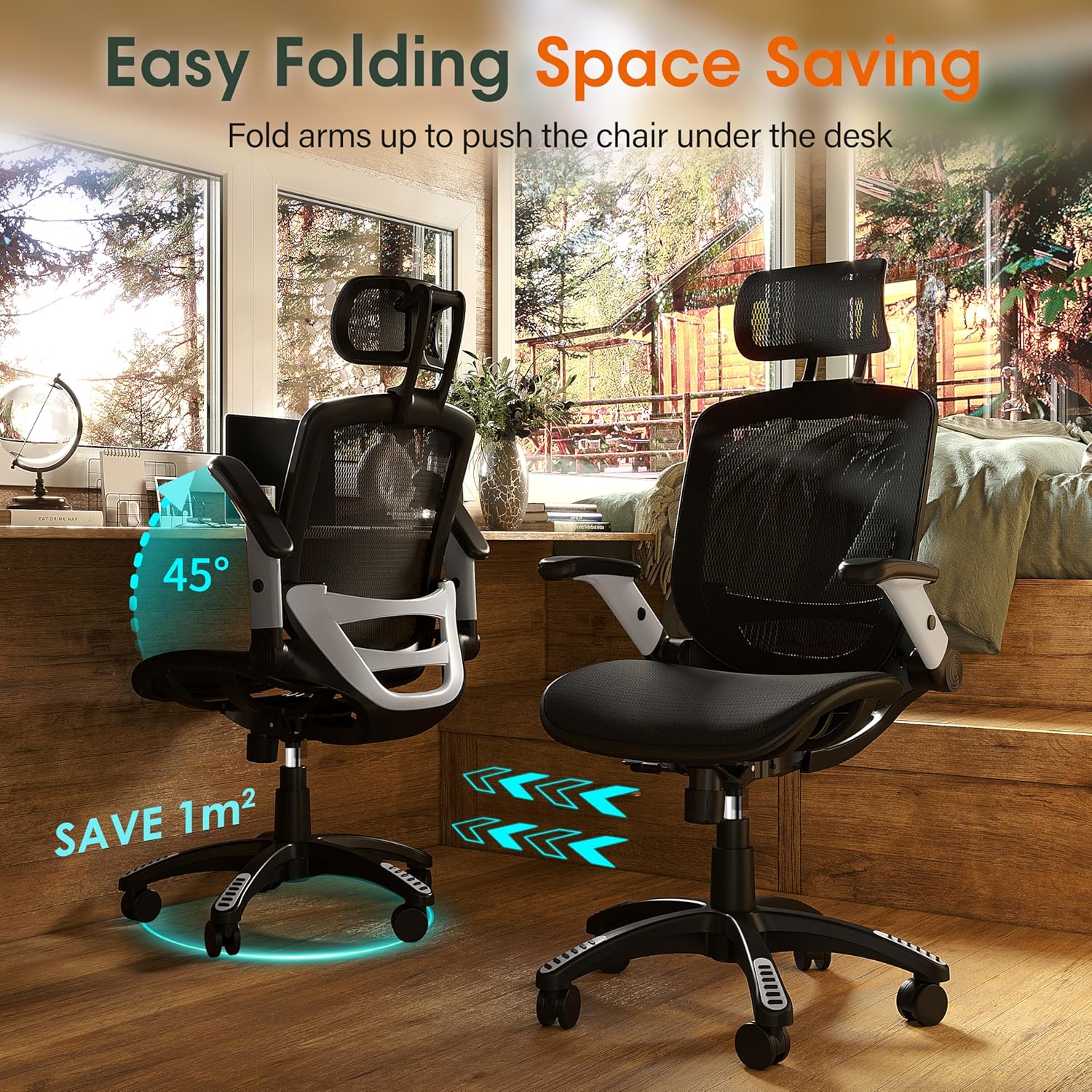
Breathable mesh back, adjustable lumbar support, and flip-up armrests make this my default pick for daily study sessions. The seat height adjusts from roughly 18.5 to 22 inches, so it works for average and taller users.
- Supportive adjustable lumbar
- Breathable mesh keeps you cool
- Flip-up arms save desk clearance
- Headrest height is fixed
- Seat cushion feels medium-firm
2. Smugdesk Ergonomic Office Chair – Best Budget Under $150
For under $150, the Smugdesk still includes an adjustable lumbar pad and a breathable mesh back. The seat height covers about 18.5 to 21 inches, and the 250-pound weight capacity makes it a solid dorm or home-office option.
- Real lumbar support at a low price
- Lightweight and easy to move
- Straightforward assembly
- Armrests are not height-adjustable
- Seat pan may feel short for tall users
3. Hbada Office Chair Mid Back – Best Compact for Small Study Rooms
When clearance is tight, this Hbada’s roughly 17.7-inch width and compact frame slide under low desks without crowding the room. You still get a supportive mesh back and a useful seat height range for most desks.
- Very narrow footprint
- Armrests flip up for storage
- Good seat height range
- Minimal lumbar adjustability
- No headrest
4. NOUHAUS Ergo3D Ergonomic Chair – Best for Long Study Sessions
This is the one I’d choose if you study five or more hours a day. The 4D armrests, seat depth slider, and adjustable lumbar make it easier to change posture through a full afternoon without leaving your desk.
- 4D armrests and seat-depth adjustment
- 135-degree recline with tension control
- Supportive, breathable mesh
- Higher upfront cost
- Assembly takes about 30 minutes
| Chair | Best For | Price | Adjustability | Material | Check Price |
|---|---|---|---|---|---|
| Gabrylly Ergonomic Mesh | Daily study under $300 | ~$250 | Seat height, lumbar, flip-up arms | Mesh |
Gabrylly Ergonomic Mesh
|
| Smugdesk Ergonomic | Budget under $150 | ~$130 | Seat height, lumbar | Mesh + foam |
Smugdesk Ergonomic
|
| Hbada Mid Back | Small study rooms | ~$150 | Seat height, flip-up arms | Mesh |
Hbada Mid Back
|
| NOUHAUS Ergo3D | Long sessions | ~$369 | 4D arms, seat depth, lumbar, recline | Mesh |
NOUHAUS Ergo3D
|
🔑 How to Test and Set Up Your Chair for Long Study Sessions
Getting the adjustments right matters more than the price tag. I’ve watched people sit on $800 ergonomic chairs with the lumbar pad in the wrong spot and the seat too high — then wonder why their back hurts. A few minutes of setup makes a real difference.
- Seat height first. Adjust until your feet rest flat on the floor and your knees bend at roughly 90 degrees. Your hips should be level with or slightly above your knees.
- Lumbar support next. Position it so it fills the curve of your lower back. Too high feels like a lump under your ribs; too low leaves your lower spine unsupported.
- Armrests and desk height. Set armrests so your elbows rest at 90 degrees and your shoulders stay relaxed. If armrests are fixed, raise your chair or add a keyboard tray instead of shrugging.
- Seat depth check. Leave 2–3 inches between the front edge of the seat and the back of your knees. If you can’t adjust depth, use a small back cushion to push you forward.
- Recline and tilt lock. Don’t stay locked upright for six hours. Recline slightly during reading or video lectures, then lock more upright for focused writing tasks.
Finally, schedule movement breaks every 30–60 minutes. Stand, stretch, or walk for two minutes. Even a perfect chair can’t replace changing positions regularly.
❓ FAQ: Choosing a Chair for a Study Room
What seat height should I choose for a standard study desk?
Most standard desks are 29–30 inches tall, so you’ll want a seat height range around 16–21 inches. Your thighs should be parallel to the floor with feet flat and knees at roughly 90 degrees.
Are gaming chairs good for studying, or should I buy an ergonomic chair?
Gaming chairs can work for shorter sessions, but many prioritize looks over support. For daily studying, a proper ergonomic chair with adjustable lumbar support and seat depth is usually the safer, more comfortable long-term choice.
How much should I spend on a study chair for daily use?
Plan on $300–$700 for a solid daily-use chair with good adjustability and a 5+ year warranty. Under $200 can work for light use, but you’ll often trade seat foam quality and adjustment range.
Is mesh or fabric better for long study sessions?
Mesh is more breathable and stays cooler during 4–6 hour sessions. Fabric or foam cushions feel softer initially but can trap heat. If your room gets warm, mesh is the better default.
Can I fit a full-size ergonomic chair in a small study room?
Usually yes, if you measure first. Look for chairs under 27 inches wide with a compact base. Leave at least 30–36 inches of clearance from the desk edge to the wall so you can push in and stand up comfortably.
What is the best chair for lower back pain while studying?
Choose a chair with adjustable lumbar support that moves both up and down and in and out. A seat pan with adjustable depth also helps reduce pressure behind the knees and keeps your back against the backrest.