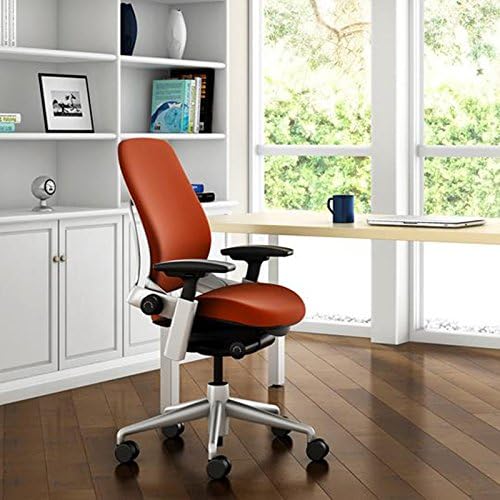
If you’re shopping for a used or refurbished office chair, Steelcase Leap V1 vs V2 is the decision that can make or break your back and your budget. Both look similar in photos. Sit in them for eight hours though, and the differences are real: seat edge pressure, armrest adjustments, recline tension, and long-term materials.
I’ve worked with both chairs on refurb lines and helped hundreds of buyers pick between a cheaper V1 and a newer V2. This guide cuts through the noise. You’ll learn exactly what changes, what doesn’t, and which Leap makes sense for your body and budget.
⚡ Steelcase Leap V1 vs V2: Key Differences at a Glance
The Leap V1 and Leap V2 share the same ergonomic DNA: adjustable seat depth, LiveBack recline, and a highly tunable lumbar system. The V2 is a lighter, sleeker refinement with a slimmer back profile, more adjustable arm caps, and a smoother recline motion. The V1 remains a sturdier, often cheaper used option that still outperforms most new chairs under $500.
Most shoppers land on these two because they’re the best-known high-end ergonomic chairs available used for $300–$600, versus $1,000+ new. You get real adjustability and long-hours comfort without paying flagship prices. Here’s how they stack up at a glance:
| Feature | Steelcase Leap V1 | Steelcase Leap V2 |
|---|---|---|
| Adjustability | Seat height, sliding seat depth, arm height/width/pivot, lumbar firmness, recline tension | Same core adjustments, but smoother seat-depth glide, more refined 4-way arm caps, and a more fluid recline range |
| Build materials | Thicker back shell, bigger arm pads, heavier overall frame | Slimmer composite back, lighter base, improved breathability on fabric options |
| Price (used) | $200–$400 typical, depending on condition and upholstery | $350–$650 typical; more if like-new or with headrest |
| Warranty | Original warranty expired; used units sold as-is or with short retailer coverage | 12-year manufacturer warranty when bought new; used V2 usually as-is or short retailer warranty |
| Weight capacity | ~300 lb; verify tag on older builds | 300 lb rated on standard V2 |
Below, I’ll break down seat comfort, back support, armrest feel, build quality, pricing, and a used-buying checklist so you can pick the right Leap for your body and desk setup.
⚡ Ergonomics and Adjustability: Leap V1 vs Leap V2 Compared
The biggest ergonomic leap between generations is LiveBack contouring. The V1 uses the original segmented flexor system — it follows your spine, but the contouring feels more segmented and slightly firmer at the sacrum. The V2 refines this with smoother flex zones and a more noticeable give in the lower back, which helps the chair stay in contact as you shift from upright to reclined.
Both chairs offer independent seat depth, seat height, and recline tension adjustments. The V2’s seat pan slides out about half an inch farther (roughly 15.5″–18.75″ vs 15.5″–18″), which matters if you have longer thighs. Height range is nearly identical at 15.5″–20.5″. Recline tension on the V1 feels firmer at the lightest setting; the V2 dials down more smoothly for lighter users.
| Model | LiveBack | Seat Depth | Seat Height | Recline Tension | Armrests | Lumbar | Check Price |
|---|---|---|---|---|---|---|---|
| Steelcase Leap V1 | Original LiveBack, segmented flexors, firmer sacral feel | 15.5″–18″ sliding pan | 15.5″–20.5″ pneumatic | Adjustable knob, firmer baseline | 4D but larger, squarer pads; slightly clunkier pivoting | Adjustable firmness, limited height movement | Check Price → |
| Steelcase Leap V2 | Refined LiveBack, smoother flex zones, better sacral support | 15.5″–18.75″ sliding pan | 15.5″–20.5″ pneumatic | Adjustable knob with wider range, smoother motion | 4D slimmer pads, more precise width/pivot/depth tuning | Adjustable firmness, repositionable pad on most builds | Check Price → |
Armrests are another clear V2 win. The V1’s pads are larger and squarer — comfortable, but the pivot points feel clunkier. The V2 uses slimmer pads with finer 4D tuning, so you’re less likely to knock your elbows when typing. Lumbar support on both adjusts in firmness; the V2’s pad can also be repositioned vertically on many builds, giving shorter and taller users a better fit.
Overall, the Leap V2 wins for most body types because of its smoother LiveBack, longer seat depth, and more precise armrests. The V1 remains a solid ergonomic pick if you prefer a firmer back feel and slightly larger arm pads — and you can often find it used for less.
⚡ Build Quality, Durability, and Warranty: Steelcase Leap V1 vs V2
Both generations share a steel internal frame and glass-reinforced nylon base, but the V2 refined several high-wear components. The V1’s arm pads are known to soften and feel sticky after a few years; V2 uses a more durable urethane formulation that holds up better with daily use.
After 5–8 years, the most common V1 issues are cylinder sag, loose arm mounts, and fabric pilling. The V2 still shows fabric wear and occasional cylinder fade, but its recline mechanism and arm adjusters generate fewer service calls in my experience.
| Component | Leap V1 | Leap V2 |
|---|---|---|
| Frame | Steel, very rigid | Steel, similar strength |
| Base | Nylon/glass, solid but older finish | Nylon/glass, improved molding |
| Arm pads | Prone to softening/stickiness | More durable urethane |
| Cylinder | Common sag after 5–7 yrs | Improved seal, fewer failures |
| Fabric/foam | Foam compresses over time | Denser foam options available |
| Warranty | Rarely transferable when used | Limited lifetime for original owner |
Warranty is the big differentiator for new purchases. Steelcase covers the frame, mechanisms, cylinder, and base with a limited lifetime warranty on the V2 — but only for the original buyer. Used V1 chairs have no transferable warranty, so you’re buying as-is.
Overall, the V2 has fewer reported mechanical failures after a decade of daily use. If you buy a used V1, check the cylinder height, arm pad texture, and recline tension before paying.
💰 Price and Value: Is the Leap V2 Worth Paying More Than the V1?
Short answer: it depends on your budget and how much you value modern adjustments. In 2026, a used Leap V1 typically sells for $150–$300, while a used Leap V2 runs $300–$600. That gap shrinks a bit with refurbished units.
| Condition | Leap V1 Typical Price | Leap V2 Typical Price |
|---|---|---|
| Used (private sale) | $150–$300 | $300–$600 |
| Refurbished | $350–$450 | $500–$800 |
| Open-box | Rare | $700–$950 |
| New | Discontinued / rare NOS $700+ | $1,200–$1,500 |
That price difference isn’t arbitrary. The V2 remains in production, so replacement parts, warranty support, and demand are stronger. Its redesigned arm pads, slimmer back, and adjustable lumbar also pull in more buyers. The V1 is older and heavier, but still a workhorse — many used units have years of life left.
If you plan to resell later, the V2 holds value better because buyers actively search for it. A V1 will likely resell near what you paid, but its ceiling is lower. Choose the V1 when your budget is tight and you can inspect the chair first. Pay more for the V2 if you want better arm adjustability, easier part sourcing, and stronger resale value.
📌 Which Steelcase Leap Should You Buy: V1 or V2?
If you’re torn, here’s my simple call: buy the Leap V2 if your budget allows it, but don’t dismiss a well-kept V1 if you’re under $500. The V1 is discontinued, so availability depends on the used and refurbished market, while the V2 is still in production and easy to find new.
- Budget under $400–$500: Get a used or refurbished Leap V1. You still get the signature LiveBack recline and solid adjustability for roughly half the cost of a new V2.
- Armrest comfort and seat padding: Pick the V2. Its 4D armrests adjust in more directions, and the thinner-but-denser seat foam holds up better over long sessions.
- Taller or heavier users: Lean toward the V2. It’s easier to find with a high-range cylinder, and the newer build tends to feel more stable under extra weight.
- Warranty and parts: The V2 wins here, especially new or authorized refurbished. V1 parts are common, but you’ll likely handle upkeep yourself.
Students and remote workers on a tight budget: a used V1 from a reputable office liquidator is my favorite value play. Just check the gas cylinder, arm pads, and seat foam before buying. If you plan to sit 8+ hours a day and want a chair that’ll last a decade, the V2 is the safer long-term purchase.
⚡ Frequently Asked Questions About Steelcase Leap V1 vs V2
Is the Steelcase Leap V2 better than the V1?
For most people, yes. The V2 improves seat comfort, back flex, and weight, but the V1 remains a strong value if you find a clean used model.
Can you still buy a new Steelcase Leap V1 in 2026?
No. Steelcase discontinued the V1 years ago. You’ll only find it through used or refurbished office furniture dealers, which can still be a good option if the chair is inspected and reupholstered.
Are Leap V1 and V2 armrests interchangeable?
Not directly. They use different mounting systems and shapes, so V1 arm pads won’t bolt onto a V2 frame without modification. Stick with the armrests designed for each version.
How long do Steelcase Leap chairs typically last?
With normal use, expect 10 to 15 years or more. Many refurbished V1 chairs from the late 2000s are still going strong, though seat foam and cylinder may need replacing eventually.
What is the main difference in seat comfort between the V1 and V2?
The V2 has a thinner, more flexible seat edge that reduces pressure behind the knees. The V1 uses thicker foam that feels firmer and less contoured, especially on longer sits.
Does the Leap V2 have more lumbar support than the V1?
Not necessarily more support, but more adaptive support. The V2’s LiveBack system flexes more evenly across your spine, while the V1’s lumbar pad feels slightly more localized and adjustable in firmness.
3 thoughts on “Steelcase Leap V1 vs V2: Full Ergonomic Chair Comparison & Buying Guide (2026)”