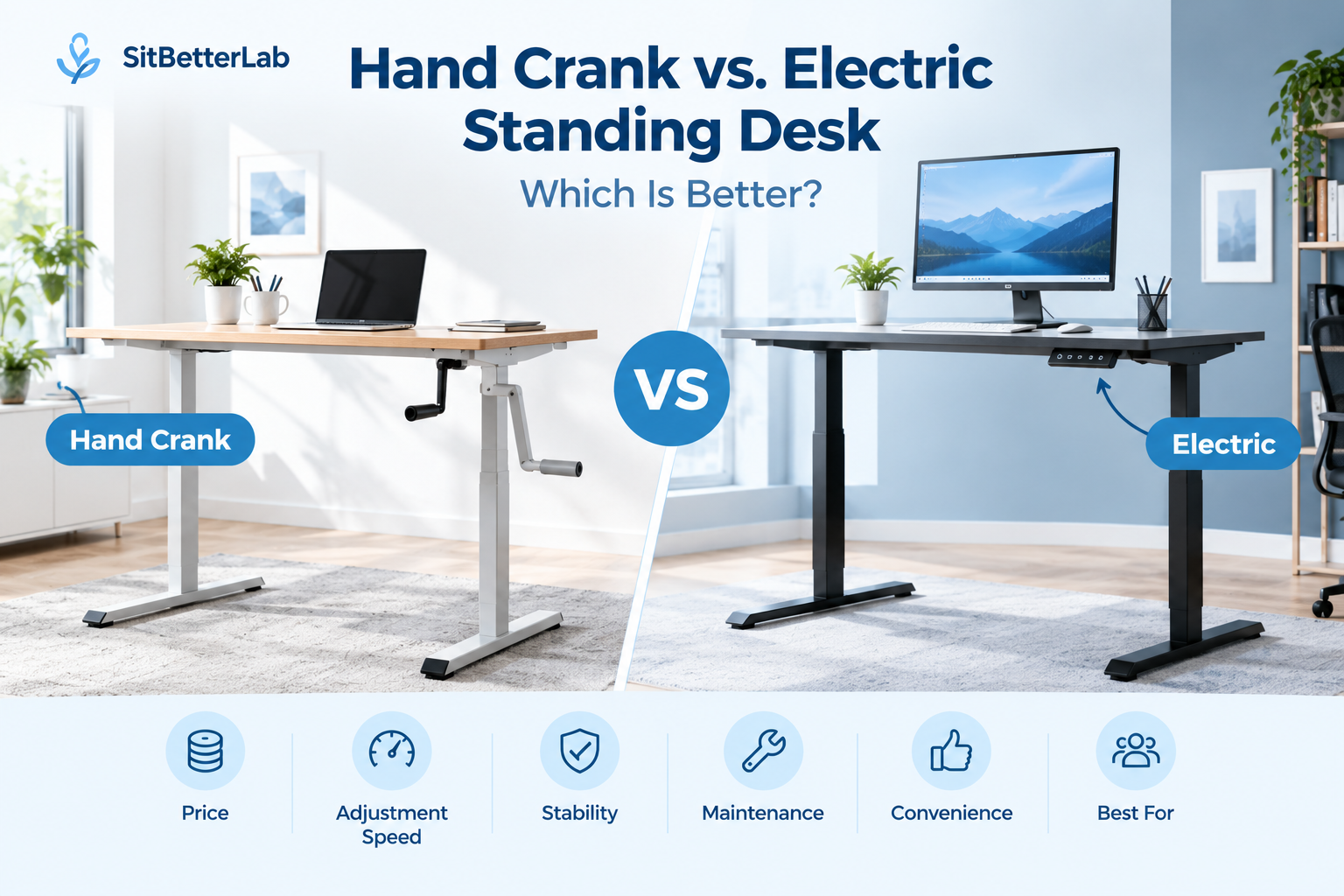
Standing Desk Comparison Guide
Hand crank vs. electric standing desk: which one offers better value?
Both types let you switch between sitting and standing, but they differ in adjustment effort, convenience, cost, and mechanical complexity. A hand crank desk can be a practical choice for budget-conscious users who adjust height occasionally. An electric desk is usually more convenient if you change positions several times throughout the workday.
Quick Verdict
- Choose a hand crank standing desk if upfront cost, a simple mechanism, and independence from electricity are your priorities.
- Choose an electric standing desk if you value quick height changes, push-button controls, and programmable presets on compatible models.
- For frequent sit-stand transitions: electric is usually more convenient because it requires less physical effort.
- For occasional adjustment: a hand crank model may offer enough functionality without paying for a motorized system.
If you are new to adjustable workstations, read our guide to what a standing desk is and how it works. You can also explore the complete Standing Desk Buying Guide for more options.
Hand Crank vs. Electric Standing Desk: Key Differences
The primary difference is how the desktop moves. A hand crank desk uses a manually operated handle to raise or lower the work surface. An electric standing desk uses one or more powered lifting columns controlled by a switch or keypad.
| Feature | Hand Crank | Electric |
|---|---|---|
| Adjustment | Turn a handle manually | Use powered controls |
| Effort | Requires repeated cranking | Minimal physical effort |
| Adjustment speed | Depends on crank ratio and handle turns | Usually faster and more convenient |
| Power required | No electricity required | Requires a suitable power source |
| Controls | Mechanical handle | Switch or keypad; presets on some models |
| Maintenance | Mechanical parts may need inspection | Motor, controls, and lifting components may need service |
| Best suited to | Occasional adjustments and simpler setups | Frequent daily height changes |
Neither mechanism automatically guarantees better stability or durability. Those qualities depend on the frame, lifting columns, construction, desktop size, load, and product quality. Compare the specifications of the actual models you are considering.
1. Price: Are Hand Crank Standing Desks Cheaper?
Hand crank desks often have a lower upfront cost because they do not require an electric motor, control box, or powered lifting system. However, the price difference varies by manufacturer, frame design, desktop material, and weight capacity.
Electric desks generally cost more, especially when they include dual motors, programmable height presets, anti-collision features, or premium desktops. For some buyers, the additional cost is worthwhile because powered adjustment makes the desk easier to use regularly.
When a Hand Crank Desk Offers Better Value
- You have a limited budget and want adjustable height without motorized controls.
- You expect to change the desk height only occasionally.
- You prefer a desk that does not depend on an electrical outlet.
- You are comfortable with the time and effort required to operate the crank.
When an Electric Desk Justifies the Extra Cost
- You regularly alternate between seated and standing work.
- You want to adjust the desk with minimal physical effort.
- You would benefit from programmable presets for seated and standing heights.
- You want the adjustment process to be convenient enough to use throughout the day.
For a fair comparison, consider the total cost of ownership rather than the purchase price alone. Check the warranty, replacement-part availability, return policy, and expected maintenance requirements for both types.
2. Convenience: Which Desk Is Easier to Adjust?
Electric standing desks have a clear convenience advantage for users who change positions frequently. Press a button, wait for the desktop to reach the desired height, and continue working. Some models let you save preferred heights, making repeated transitions even easier.
A hand crank desk requires you to turn a handle. Depending on its gear ratio and adjustment range, moving between seated and standing positions may take many turns. The crank can also require clearance around the desk, so consider where the handle sits and whether it can be folded away when not in use.
This difference matters most when the desk is adjusted several times a day. If you plan to raise the desk once in the morning and lower it at the end of the day, manual operation may be perfectly acceptable.
Practical tip: Think about how often you will actually change positions. A desk that is theoretically adjustable but inconvenient to operate may discourage you from using its full range.
3. Stability and Weight Capacity
It is a mistake to assume that every hand crank desk is more stable than an electric desk, or that every electric desk is sturdy because it has a motor. Stability depends on the complete frame design and how the desk behaves at different heights.
When comparing products, check these specifications:
- Published weight capacity: Include the desktop and all equipment placed on it. Follow the manufacturer’s guidance on how the rating is defined.
- Frame construction: Review the materials, crossbars, feet, and overall design.
- Stability at standing height: Look for reviews that specifically discuss wobble while typing or using a monitor.
- Desktop dimensions: Larger or deeper desktops can affect leverage and stability.
- Adjustment under load: Confirm that the desk is rated to raise the equipment you intend to use.
If you work with multiple monitors or heavier equipment, compare frame capacity and stability carefully. Our guide to standing desk frames for DIY desk builds can help if you plan to select a separate frame and desktop.
4. Maintenance and Long-Term Reliability
Both types have mechanical components, and neither is maintenance-free. A hand crank desk avoids motor and electronic-control components, but its crank, gears, shafts, and lifting mechanism can still wear or require attention.
An electric desk adds motors and electrical controls. Depending on the model, troubleshooting may involve checking the power supply, cables, controller, or lifting columns. Some desks also require a reset procedure after a power interruption or certain errors.
Before buying, review the warranty coverage for the frame, lifting mechanism, motor, and controller. Check whether replacement parts are available and whether the manufacturer provides troubleshooting instructions.
Do not assume that a simpler mechanism always lasts longer. Reliability depends on component quality, use, load, assembly, and support from the manufacturer.
5. Noise and Power Requirements
A hand crank desk does not need electricity to adjust its height. That makes it useful in a workspace where an outlet is inconvenient or where you want to avoid adding another powered device. The mechanical adjustment may still produce noise from the gears or moving parts.
An electric desk needs a suitable power connection, and its motors make some noise while moving. Noise levels vary between models, so look for reliable product reviews if you work in a quiet room or share a workspace with other people.
If you choose an electric desk, plan the cable route before installation. Make sure power and monitor cables have enough slack across the full adjustment range and cannot snag on the frame.
6. Ergonomics: Is One Type Healthier?
Neither the hand crank mechanism nor the electric motor inherently makes a desk healthier. The important advantage of either design is the ability to adjust the working height and alternate positions.
When seated, set the desk so your shoulders can remain relaxed, your elbows are near your sides, and your wrists are comfortable while typing. Your chair should support your posture, with your feet supported by the floor or a footrest as needed.
When standing, adjust the desktop again rather than simply raising it to an arbitrary height. Keep your shoulders relaxed and avoid reaching up or bending your wrists to use the keyboard. Position your monitor so you can view the screen without continually tilting your head.
Standing all day is not the goal. Alternate between sitting and standing, take movement breaks, and avoid remaining stationary for long periods. For a more flexible workstation, explore our standing desk guides.
7. Who Should Choose a Hand Crank Standing Desk?
A hand crank model is a reasonable choice for people who want adjustable height without paying for powered controls. It may suit a home office, a secondary workstation, or a budget-conscious setup where height changes are occasional.
Consider a hand crank desk if:
- You do not mind manual adjustment.
- You prefer not to depend on electricity to change desk height.
- You have a straightforward setup and do not need frequent presets.
- The desk meets your required height range and load capacity.
- You have enough room to operate the crank comfortably.
Before purchasing, check whether the crank can be positioned conveniently and whether it interferes with drawers, cabinets, or your chair. A low purchase price is less attractive if the desk is awkward to operate in your actual room.
8. Who Should Choose an Electric Standing Desk?
An electric model is usually the better fit for people who want frequent height changes with minimal effort. It can be particularly convenient for a primary home-office workstation used throughout the day.
Consider an electric desk if:
- You alternate between sitting and standing several times a day.
- You want quick adjustments at the touch of a button.
- You share the workstation and need to switch between different preferred heights.
- You value programmable presets, if available on the model you select.
- You are comfortable with the higher potential cost and additional electrical components.
Check the available height range, motor configuration, warranty, and weight capacity. If you are taller than average, verify that the desk reaches a comfortable standing height without relying on an excessive monitor stand to compensate for an unsuitable desk.
Start with our guide to standing desks for tall people if height range is a major concern.
What About Standing Desk Converters?
A standing desk converter sits on top of an existing desk and raises your keyboard, monitor, or other work equipment. It can be a useful alternative if you want to try alternating positions without replacing the entire desk.
However, converters differ in their height range, usable work surface, adjustment mechanism, and weight limits. Some models require more space than expected, and the existing desk must be deep and sturdy enough to support the converter and its equipment.
Compare a converter with a full standing desk if you want to minimize upfront spending or keep your current desk. If you need more workspace or a wider adjustment range, a complete adjustable desk may be a better long-term option.
Buying Checklist: Before You Choose
Compare these details for each model
- Minimum and maximum desktop height
- Weight capacity and any stated rating conditions
- Desktop dimensions and frame footprint
- Adjustment speed and effort
- Stability at your preferred working heights
- Warranty coverage for the frame and lifting mechanism
- Availability of replacement parts and customer support
- Return policy, shipping, and assembly requirements
- Clearance for cables, the crank handle, and nearby furniture
For a DIY workstation, compare the cost of a separate frame and desktop with the price of a complete desk. For smaller spaces, see our guide to the best narrow standing desks.
Frequently Asked Questions
Is a hand crank standing desk worth it?
It can be worth it if you want adjustable height at a lower upfront cost and do not mind turning a handle. It is less convenient for people who change positions frequently throughout the day.
Is an electric standing desk more reliable than a hand crank desk?
Not necessarily. Electric desks have motors and electronic controls, while manual desks have mechanical parts that can also wear. Overall reliability depends on the design, component quality, load, usage, and manufacturer support.
Can you raise a hand crank standing desk while equipment is on it?
Only if the desk’s instructions permit adjustment with that load. Check the manufacturer’s rated capacity and operating guidance, turn the crank smoothly, and avoid exceeding the specified load. Do not assume every model supports the same operating conditions.
Do electric standing desks need to stay plugged in?
Most electric desks need a power connection to raise and lower the desktop. The behavior of controls and presets when power is disconnected varies by model, so consult the manufacturer’s instructions.
Which type is better for a home office?
An electric desk is often more convenient for a primary home office where you adjust height throughout the day. A hand crank model may be a better fit for occasional use, tighter budgets, or spaces without a convenient outlet.
Are four-leg standing desks more stable?
A four-leg design may offer a stable platform, but the number of legs alone does not guarantee less wobble. Frame construction, joints, feet, desktop size, adjustment height, and load all matter. Compare real-world stability reports and the manufacturer’s specifications.
Final Verdict: Hand Crank or Electric?
Choose a hand crank standing desk if you want a simpler, potentially less expensive adjustable workstation and expect to change heights occasionally. Choose an electric standing desk if convenience matters more and you expect to alternate between sitting and standing throughout the day.
Before making the final decision, compare height range, stability, weight capacity, desktop dimensions, warranty, and the total purchase cost. The best desk is the one that fits your body, room, equipment, and working habits—not simply the one with the most features.
Explore More Standing Desk Guides
Compare desk sizes, frames, height ranges, and ergonomic setup options before choosing your next workstation.
Editorial note: Product features, specifications, warranties, and prices can change. Verify current details with the manufacturer before purchasing.