SitBetterLab Buying Guide
Best Standing Desks With Drawers: 4 Models Worth Comparing
The best standing desks with drawers give you room to work, a convenient place to store everyday supplies, and the flexibility to alternate between sitting and standing.
Our shortlist includes the FLEXISPOT Comhar EW8, FEZIBO electric standing desks with four drawers, AODK’s storage-focused models, and the OffiGo L-shaped standing desk. Each serves a different type of workspace, from compact home offices to larger multi-monitor setups.
Quick Picks
Best Overall: FLEXISPOT Comhar EW8
A built-in drawer and integrated charging features in a streamlined electric desk.
Best for More Storage: FEZIBO 48-Inch Desk With Four Drawers
A storage-oriented layout for office supplies and accessories.
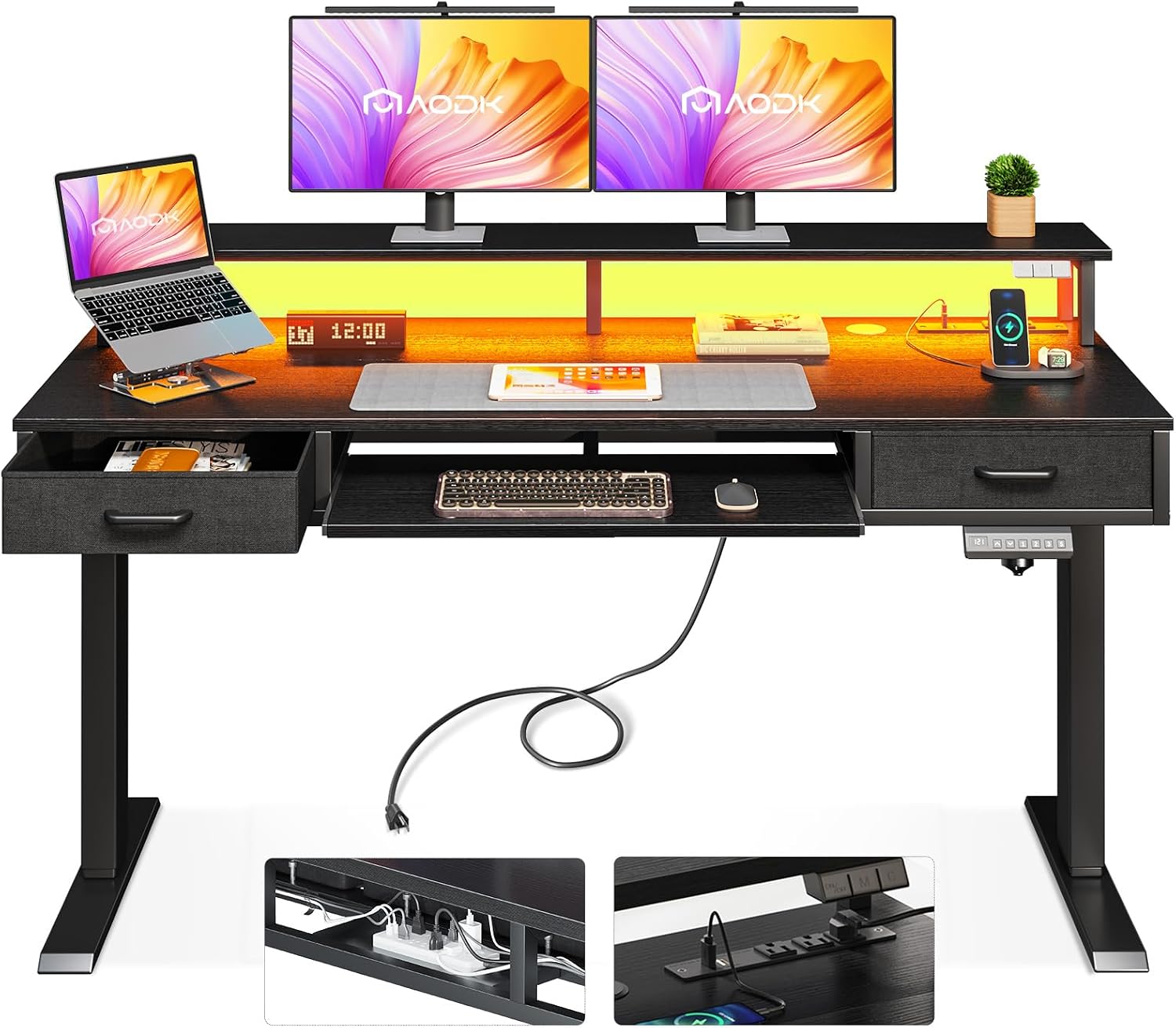
Best for a Feature-Rich Setup: AODK 55-Inch Standing Desk
A larger desk style to consider if you want drawers and additional workstation features.
Best for Corner Offices: OffiGo 63-Inch L-Shaped Standing Desk
An L-shaped layout with multiple fabric drawers for a more extensive workstation.
These recommendations are based on product specifications and available product information, not hands-on testing by SitBetterLab. Models and configurations can change, so verify the exact listing before purchasing.
How We Chose These Standing Desks
Not every standing desk with drawers offers the same kind of storage. Some have a shallow built-in drawer for pens and charging cables, while others use fabric drawers, monitor shelves, or a separate storage section.
For this roundup, we focused on four practical considerations:
- Storage design: Whether the desk offers a built-in drawer, multiple drawers, or a larger L-shaped storage arrangement.
- Work surface: Whether the desk format makes sense for a laptop, one or two monitors, or a larger workstation.
- Adjustability: Whether the model is designed for electric sit-stand use and what height range the current listing specifies.
- Practical trade-offs: Legroom, drawer capacity, assembly, cable management, and the amount of room the desk occupies.
We did not rank these desks based on invented stability tests or unverified durability claims. Product details and availability should be confirmed against the current manufacturer and retailer listings.
1. FLEXISPOT Comhar EW8 — Best Overall
2. FEZIBO 48-Inch Electric Standing Desk With Four Drawers — Best for Storage
3. AODK 55-Inch Electric Standing Desk With Drawers — Best for a Feature-Rich Workstation
4. OffiGo 63-Inch L-Shaped Electric Standing Desk — Best for Corner Workspaces
Standing Desks With Drawers Compared
The right choice depends on what you store. A single integrated drawer is convenient for small supplies, while a multi-drawer desk offers more compartments. An L-shaped desk makes sense when you need a larger work area, but it is not automatically the best choice for a small room.
What to Check Before Buying
Height Range and Ergonomic Fit
Make sure the desk reaches a comfortable height for both sitting and standing. Your shoulders should remain relaxed, and your elbows should be close to your sides when using the keyboard. Compare the desk’s stated height range with your own measurements rather than assuming every adjustable desk fits every user.
Drawer Capacity and Knee Clearance
Look at the actual drawer layout, not just the number of compartments. A shallow stationery drawer cannot replace a filing cabinet. Also measure the space between the floor and the underside of the drawer assembly to ensure you can sit comfortably without your knees hitting the storage structure.
Weight Capacity and Stability
The total moving load can include the desktop, monitors, monitor arms, computer equipment, and attached storage. Compare your setup with the manufacturer’s published lifting capacity. Remember that maximum load capacity and stability at standing height are different considerations.
Power and Cable Management
If the desk includes USB ports or power outlets, check which ports are provided and whether they meet your needs. Route cables so they have enough slack throughout the desk’s height range. Cables should not snag on drawers, crossbars, or other moving parts.
Warranty, Assembly, and Returns
Check the current warranty terms for the frame, motor, controller, desktop, and storage components. Review the assembly requirements and return policy as well. Warranty coverage and return shipping conditions can vary, so do not rely on a general brand assumption.
Frequently Asked Questions
What is the best standing desk with drawers?
The FLEXISPOT Comhar EW8 is a good starting point if you want a streamlined electric desk with an integrated drawer. If you need more compartments, compare the FEZIBO four-drawer configurations. The best choice depends on your workspace size and storage needs.
Are standing desks with drawers worth the extra cost?
They can be worthwhile if you regularly use office supplies and want to keep the desktop clear. If you need substantial storage for paperwork or equipment, a separate filing cabinet may provide better capacity and flexibility.
Do standing desk drawers move when the desk rises?
Drawers attached to the moving desktop generally rise and lower with it. A separate floor-standing filing cabinet usually remains in place. Verify the mounting design of the exact model, especially if it has a separate storage unit.
Is a built-in drawer better than a fabric drawer?
A built-in drawer can create a cleaner appearance and is convenient for small items. Fabric drawers may offer more compartments, but their construction and usable capacity vary. Consider what you want to store and check the dimensions before buying.
Can I add a drawer to an existing standing desk?
Yes, if the desk is compatible with an under-desk drawer or organizer. Check mounting clearance, legroom, the desktop construction, and any restrictions in the desk manufacturer’s instructions. A mobile filing cabinet is another option if you want more storage without attaching extra weight to the moving desktop.
Final Verdict
For a clean, compact workstation, start by comparing the FLEXISPOT Comhar EW8. If you prefer multiple compartments for small accessories, look at the FEZIBO 48-inch four-drawer configurations. The AODK 55-inch desk is worth considering for a larger setup with additional workstation features, while the OffiGo 63-inch L-shaped desk suits a corner office with more room.
Before placing an order, confirm the exact model, storage layout, desktop dimensions, height range, lifting capacity, warranty, and current price on the product listing. These details can differ between versions even when the product names look similar.
Explore More Standing Desk Guides
Disclosure: As an Amazon Associate, SitBetterLab may earn from qualifying purchases. Product features, prices, availability, and warranty terms can change. Product descriptions in this guide are based on available product information; SitBetterLab has not claimed hands-on testing of these models. Verify the current listing before purchasing.