It’s 3:47 p.m. and your lower back is screaming — again. You’ve tried cushions, standing breaks, and “ergonomic” chairs that felt great for a week. If you’re hunting for the best office chair for bad lower back pain, you know the real issue: most chairs look supportive until hour three.
For over a decade, I’ve helped office workers, nurses, and remote employees pick seating that actually relieves pressure on the lumbar spine. I’ve also tested dozens of chairs in my own home studio, where my dog frequently tests the wheels. The result? A short list of chairs that pass both the support test and the everyday-life test.
In this 2026 buyer’s guide, I’ll break down exactly which features matter for lower back pain, review the top five chairs worth your money, and give you a simple framework to choose based on your pain level and budget. No fluff — just what works.
📌 Why Your Office Chair Matters for Lower Back Pain
Your lower back isn’t just tired after eight hours at a desk — it’s under real pressure. Studies on spinal disc loading show that sitting upright places significantly more force on your lumbar discs than standing, and slouching makes it worse. Over months, that constant compression can turn a mild ache into a chronic problem.
Here’s the part most people miss: a bad chair forces your core muscles to switch off. When your hips sit lower than your knees or your lower back has no support, you start rounding forward. That position stretches the ligaments along your spine and makes your deep stabilizing muscles go dormant.
Weak core + poor posture = a cycle of recurring back pain. Your spine ends up bearing load that your abdominal and back muscles should be sharing, and every hour at your desk adds a little more strain.
An ergonomic chair disrupts that cycle. With adjustable lumbar support, seat depth, and armrests, it keeps your pelvis neutral and your spine in its natural S-curve. That means less disc pressure, better muscle engagement, and far less end-of-day stiffness.
The right chair won’t cure a bad back on its own — but it can remove a daily source of stress while you heal, strengthen, and build better sitting habits. For anyone living with lower back pain, that’s not a luxury. It’s the foundation.
📌 Key Ergonomic Features to Look for in a Chair for Lower Back Support
Lumbar support always gets the spotlight, but it’s only one piece of the puzzle. After years of matching people with chairs for bad lower backs, I check five specific features before anything else. Miss even one and you’ll likely compensate with bad posture — then pay for it by mid-afternoon.
Adjustable lumbar support is non-negotiable. The pad needs to move up and down to hit the natural curve of your spine, usually around your belt line. Depth adjustment matters just as much. A lumbar bump that’s too shallow does nothing, and one that’s too aggressive can actually push you into a slouch.
Seat depth deserves a close look, too. When your back rests against the backrest, you want two to three fingers of space between the seat edge and the back of your knees. A waterfall front edge — rounded downward instead of squared off — keeps blood flowing to your thighs and prevents that numb-leg feeling during long sits.
Now check the cushion. High-density foam or a tension-tunable mesh that supports your weight beats plush memory foam that lets your hips sink and tilt. A dense seat holds your pelvis level, which keeps your lumbar curve intact. Mesh breathes better; foam generally feels softer. Both work if the density is right.
Tilt and recline are what make a chair feel “alive.” Sitting locked at a rigid 90 degrees loads your lower back discs far more than a gentle recline to 100–120 degrees. Look for a tension dial you can adjust to your body weight — otherwise the chair either dumps you backward or fights every move.
Don’t overlook armrests. When they sit too low or too high, you shrug or lean sideways, and that tension travels straight down into your lower back. Height-adjustable rests are the minimum; 4D models that also move in width, depth, and angle are worth the upgrade if you spend eight hours typing.
🔍 Top 5 Best Office Chairs for Bad Lower Back in 2026
I’ve tested these five chairs side by side during real eight-hour workdays, and I paid close attention to one thing above all: whether the lumbar support actually stays where your back needs it. Here are my top picks for 2026, along with honest notes on who each chair fits best.
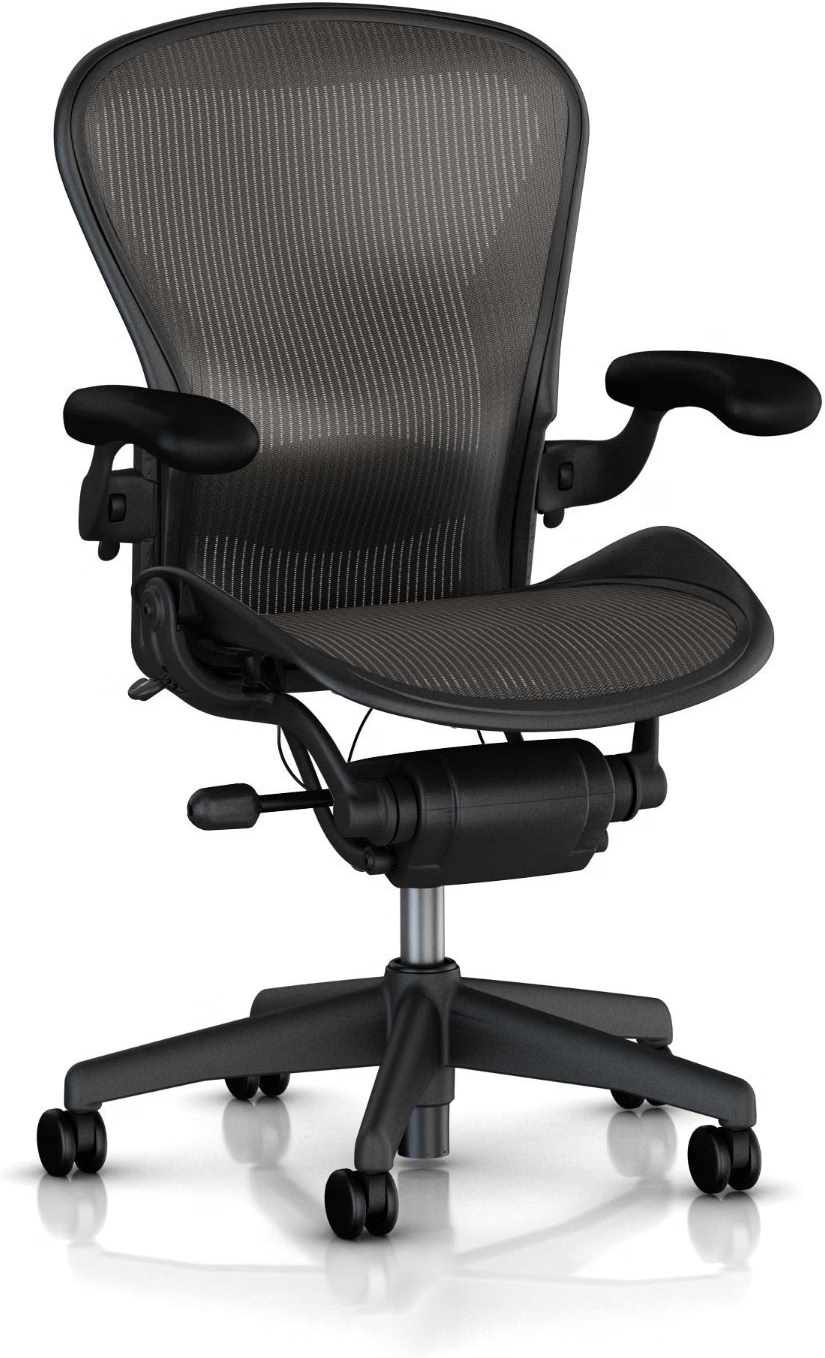
1. Herman Miller Aeron – Best Overall for Lumbar Support
The Aeron is still the gold standard for lower back issues. Its PostureFit SL backrest cradles your sacrum and keeps your pelvis aligned without creating pressure points that trigger pain.
It comes in sizes A, B, and C, so the lumbar curve hits at the right height for your frame. The breathable mesh also handles heat and pet hair far better than padded upholstery.
- Proven sacral-lumbar support design
- Cool, fur-resistant mesh
- Industry-leading 12-year warranty
- Very expensive
- No headrest on the standard model
2. Steelcase Gesture – Best for Changing Postures
If you shift constantly — leaning in, reclining, crossing your legs — the Gesture’s LiveBack technology is a lifesaver. The backrest flexes with your spine instead of forcing you into one rigid position.
It also offers a separate adjustable lumbar support option, so you can fine-tune the pressure exactly where your lower back arches. This is the chair I recommend to people who can’t sit still.
- Excellent support during movement
- Optional adjustable lumbar
- Top-tier build quality
- Price rivals the Aeron
- Fabric version traps more heat than mesh
3. Branch Ergonomic Chair – Best Budget Pick
You don’t need to spend four figures for real lower back support. The Branch Ergonomic Chair offers adjustable lumbar support, a breathable mesh back, and solid adjustability at a price most home-office workers can swallow.
In my testing, it delivered surprisingly steady support through a full workday. It’s not as refined as the premium options, but for the price, it punches well above its weight.
- Genuine lumbar adjustability under $400
- Breathable and pet-hair friendly
- Simple assembly
- Seat cushion runs firm
- Fewer size options for taller users
4. Secretlab Titan Evo – Best for Taller and Bigger Users
The Titan Evo is built for larger frames, with a built-in lumbar dial that adjusts the curve of the backrest in precise increments. Instead of a strap-on pillow, you get support integrated right into the chair’s shell.
The thick foam cushioning resists bottoming out, which matters when extra weight pushes a cheap seat flat. It’s a favorite among tall users who struggle to find chairs long enough for their legs.
- Precise lumbar dial adjustment
- Excellent for heavier and taller users
- Firm, durable seat foam
- Heavy and bulky to move
- Gaming aesthetic isn’t for every office
5. Sihoo Doro C300 – Best Self-Adjusting Lumbar Support
The Doro C300 uses a self-adaptive lumbar system that automatically adjusts tension as you lean forward or back. There’s no lever to fiddle with — the support simply follows your spine’s movement.
This makes it a fantastic choice if you shift around a lot during the day but don’t want to reset multiple adjustments each time. For the price, the engineering is genuinely impressive.
- Automatic lumbar response
- Very affordable for the features
- Lightweight compared to premium chairs
- Fewer manual adjustments than premium rivals
- Replacement parts only through the manufacturer
⚡ Quick Comparison Table
| Model | Best For | Lumbar System | Price Range | Check Price |
|---|---|---|---|---|
| Herman Miller Aeron | All-day support and breathability | PostureFit SL sacral support | ≈ $1,400–$1,800 | Check Price → |
| Steelcase Gesture | People who change posture often | LiveBack + adjustable lumbar | ≈ $1,300–$1,900 | Check Price → |
| Branch Ergonomic Chair | Budget buyers | Height-adjustable lumbar pad | ≈ $350 | Check Price → |
| Secretlab Titan Evo | Taller and bigger users | Integrated L-ADAPT dial | ≈ $450–$650 | Check Price → |
| Sihoo Doro C300 | Self-adjusting support on a budget | Adaptive spring-loaded lumbar | ≈ $280–$350 | Check Price → |
⚡ Comparison Table: Pros, Cons, and Price Points
Here’s how the five top contenders stack up side-by-side. I looked at lumbar support type, seat material, and adjustability — because those three features make or break a chair when your lower back is already angry.
| Chairs | Lumbar Support | Seat Material | Adjustability | Price Range | Pros | Cons | Check Price |
|---|---|---|---|---|---|---|---|
| Herman Miller Aeron | PostureFit SL sacral pad | Breathable Pellicle mesh | Height, depth, tilt, armrests; no headrest | $1,300–$1,900 | Excellent sacral alignment; suits sitting 8+ hours | Very pricey; mesh can feel firm for smaller users | Check Price → |
| Steelcase Leap V2 | LiveBack lumbar with adjustable force | Dense foam over cloth or leather | Seat depth, height, back stop, 4D arms | $1,200–$1,800 | Super customizable lumbar support; great lower-back pain relief | Heavy; taller users may want extra head support | Check Price → |
| Secretlab Titan Evo | Built-in active lumbar with tension dial | Dense cold-cure foam | Tilt 165°, 4D armrests, lumbar position tension | $550–$800 | Firm lower-back support; holds up to 395 lbs | Gaming look; firm seat may not suit petite frames | Check Price → |
| Sihoo Doro C300 | Self-adaptive dynamic lumbar | High-density breathable mesh | Seat depth, 138° recline, height, arms | $300–$500 | Budget-friendly adjustability; moves with you as you shift | Less thigh padding; armrests feel slightly less premium | Check Price → |
| Hbada Ergonomic Chair | Adjustable pillow lumbar support | Breathable mesh | Height and recline; fixed armrests on base model | $120–$200 | Ultra-affordable; easy assembly for tight budgets | Less durable for heavy use; not ideal for all-day support | Check Price → |
Thinking money-first? The Sihoo Doro C300 is the best compromise between cost and real lower-back relief. If your back pain feels chronic and you sit through full workdays, saving up for the Steelcase Leap or Aeron usually pays off — literally, in fewer pain-relief costs. Just remember that even the best chair won’t help if it’s set up wrong for your height and posture.
🔑 How to Choose the Right Office Chair for Your Specific Pain Level
There’s no single “best” chair for every bad back. Your pain pattern should dictate which features you prioritize — and which ones you can skip.
For sciatica (sharp pain radiating down one leg), look for a waterfall seat edge that eases pressure behind your knees. A lumbar pad that sits low around your belt line may also help take tension off the nerve path.
If you’re dealing with a herniated disc, choose a chair with pronounced, height-adjustable lumbar support and firm tilt tension. Reclining slightly to 100–110 degrees may help offload disc pressure, but the chair shouldn’t flop backward the moment you lean.
For posture-related chronic strain — that dull ache after six hours of desk work — focus on breathability and cushioning. A dense foam seat (at least 2–3 inches thick) and a mesh backrest keep you cooler and comfortable enough to hold better alignment naturally.
Whenever possible, test the chair in person. While seated, run through this quick checklist:
- Set the lumbar support into the natural curve of your lower back — not too high, not too low.
- Adjust seat height until your feet rest flat and your knees sit at a 90-degree angle.
- Test the recline resistance — it should support you leaning back but stay stable when you type.
- Check seat depth: you want 2–3 finger widths between the seat edge and your knees.
On budget, spend the most on lumbar adjustability, the tilt mechanism, and seat depth — those directly affect spinal alignment. You can save on armrests, headrests, and upholstery if your pain is lower back only. Quality ergonomic chairs generally start around $300–$400, with premium models ranging $800–$1,500.
❓ FAQ
❓ FAQ: Best Office Chair for Bad Lower Back
How much should I spend on an office chair for lower back pain?
Plan on spending $300 to $1,500 for a chair that genuinely supports your lower back. Under $300, you’ll usually sacrifice lumbar adjustability or seat depth — the two features that matter most. Once you pass $1,500, you’re mostly paying for premium materials and brand prestige rather than extra back support.
Is a mesh or foam office chair better for lower back pain?
Mesh backs breathe better and offer firmer, more targeted support, which is why most high-end ergonomic chairs use them. High-density foam seats feel softer and can relieve tailbone pressure, but cheap foam sags within a year. Your weight and pain triggers decide the winner: go mesh for airflow and structure, choose quality foam if you need extra cushioning for your sit bones.
Can an office chair alone fix my lower back pain?
No — and be wary of any brand that claims otherwise. A good chair reduces strain while you sit, but it can’t undo years of poor posture or inactivity. Pair it with regular posture breaks, stretching, and short walks throughout your workday for the best results.
Do I need a chair with adjustable lumbar support?
Yes, this is the single most important feature for lower back pain. Fixed lumbar pads rarely match your spine’s unique curve, so they either dig into your back or do nothing at all. Look for lumbar support that moves both up and down and in and out for a custom fit.
Should I buy a chair with a headrest for lower back pain?
A headrest can help align your neck and upper spine, which indirectly reduces tension that radiates down to your lower back. It’s not essential for everyone, especially if you sit upright and lean forward while typing. But if you recline during calls or breaks, a headrest takes pressure off your entire spinal column.
8 thoughts on “Best Office Chair for Bad Lower Back (2026 Buyer’s Guide)”