
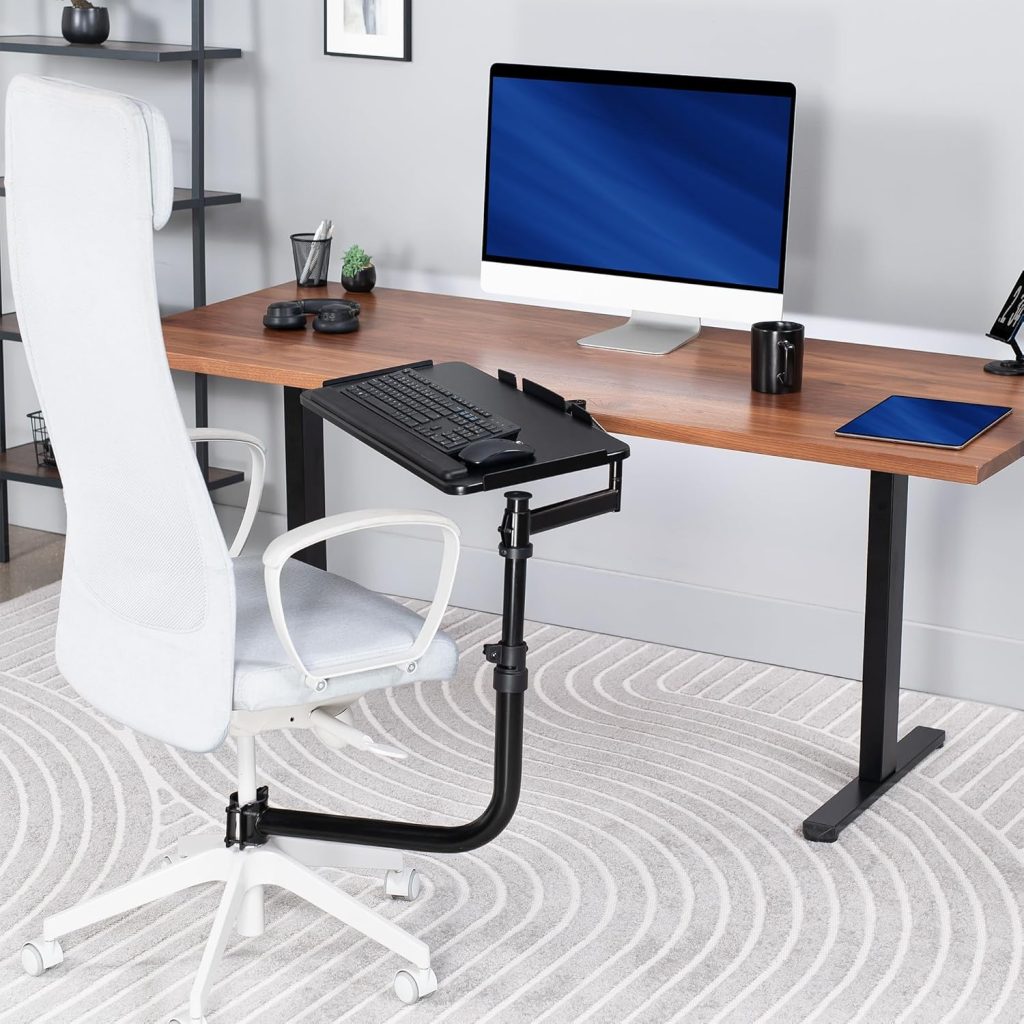
Standard desks are built for furniture standards, not human anatomy. Most desks position your keyboard 2–4 inches too high, forcing your shoulders to lift, your wrists to bend upward, and your neck to crane forward. The result? Wrist pain, shoulder tension, forearm fatigue, and eventual repetitive strain injuries like carpal tunnel syndrome[reference:0][reference:1]. An under-desk keyboard tray fixes the root cause by lowering your typing surface to the correct height, allowing neutral wrist posture and relaxed shoulders[reference:2].
In this guide, I’ve researched the best keyboard trays for a more ergonomic desk setup—focusing on height and tilt adjustability, stability, space savings, and real user feedback. All picks are available on Amazon US with genuine customer reviews.
Why Add a Keyboard Tray to Your Desk Setup?
A keyboard tray is one of the most overlooked but impactful ergonomic upgrades you can make. It moves your keyboard and mouse off the desk surface and positions them at elbow height, where your body works best. Here’s what a good tray accomplishes:
- Lowers typing height to the ideal ergonomic zone: With an adjustable under-desk tray, you can place your keyboard 2–4 inches below the desk, keeping elbows low and posture neutral. Your elbows should bend at a relaxed 90° angle, your forearms parallel to the floor, and your wrists straight—not bent up or down[reference:3][reference:4].
- Reduces wrist extension and carpal tunnel pressure: Typing on a desk forces wrists upward (dorsiflexion), compressing the carpal tunnel. A proper tray with negative tilt allows hands to float naturally without bending the wrists upward—a position research consistently associates with lower muscle activity and reduced fatigue[reference:5]. Neutral wrist posture significantly reduces compression of the median nerve and helps prevent repetitive strain injuries like carpal tunnel syndrome and tendinitis[reference:6].
- Frees up valuable desk space: A slide-out tray holds your keyboard, mouse, and small accessories beneath the desktop, instantly clearing clutter and creating a cleaner, more organized workspace[reference:7].
Benefits for Posture and Wrist Health
Keyboard placement affects far more than just your hands. When the keyboard is too high or too far away, users tend to shrug their shoulders, lean forward, or arch their lower backs to compensate[reference:8]. A well-designed keyboard tray:
- Keeps shoulders low and relaxed—not scrunched upward
- Prevents neck and upper back strain by eliminating forward head posture
- Reduces forearm and wrist tension by allowing a natural, neutral typing angle
- Helps maintain proper spine alignment through correct arm and hand positioning
For people who type 8+ hours a day, this chain reaction of posture improvements can mean the difference between ending the day pain‑free or battling chronic discomfort.
Types of Keyboard Trays
Understanding the different types of keyboard trays will help you match the right product to your workspace needs[reference:9].
1. Under-Desk Keyboard Trays
These trays mount beneath your desk and slide in and out. Best for permanent workstations where you want a clean, minimal setup. They save desk space and are generally more stable and professional‑looking. Most use clamp‑on or screw‑in mounting systems. The VIVO Mount‑KB05E and Uncaged Ergonomics KT1 are popular examples[reference:10].
2. Clamp-On Keyboard Trays
Clamp-on trays attach to the edge of your desk without drilling. Best for renters, shared offices, or anyone who needs a flexible, damage‑free setup. They’re easy to install and remove, and they don’t permanently alter your furniture. The KT4 from Uncaged Ergonomics is a clamp‑on model that requires no tools for installation[reference:11][reference:12].
3. Chair-Mounted Keyboard Trays
These trays attach directly to your office chair’s bottom tube, offering ergonomic typing without any desk attachment. They’re ideal for shared workspaces, portable seating arrangements, or users with multi‑monitor setups who need to position the keyboard independently of the desk[reference:13].
4. Freestanding Keyboard Stands
Freestanding trays sit on top of your desk and can be moved easily. Best for hybrid or mobile work setups where you frequently change positions. They require no installation but take up desk space and are less stable than under‑desk options[reference:14].
Best Keyboard Trays Reviewed
Here are the top keyboard trays for different needs, all available on Amazon US.
1. VIVO Large Keyboard Tray (MOUNT-KB05E) – Best Overall
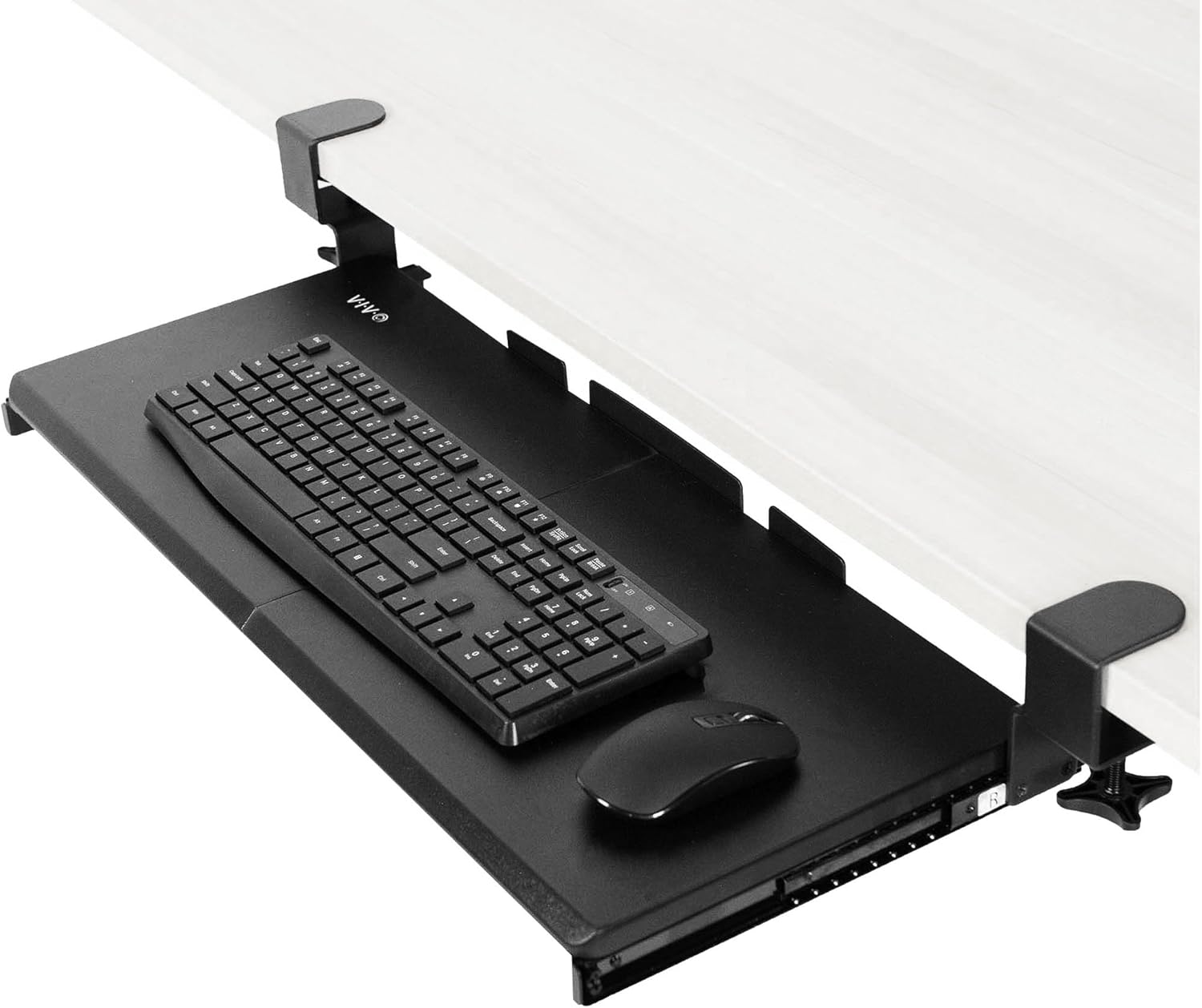

Price: ~$60–80 | Type: Under-desk clamp‑on | Tray size: 27″ x 11″ (33″ total clamp‑to‑clamp length) | Weight capacity: 11 lbs | Max desk thickness: 1.25″ | Tilt: Yes (storable angle)
The VIVO MOUNT-KB05E is the top pick for most users. It’s large enough to hold a full-size keyboard plus mouse, slides smoothly in and out, and clamps securely without drilling. The tray extends 8.5″ from the desk edge and is built with sturdy metal clamps with rubber pads to protect your desk surface[reference:15].
Users report that the tray is “rock solid” with “zero wobble or flimsiness” after installation[reference:16]. The clamps are wide and very sturdy, and the tray holds both a keyboard and an XL mousepad comfortably[reference:17][reference:18]. However, make sure your desk surface does not exceed 1.25″ in thickness and that you have at least 32.5″ of clear desk edge for the clamps to attach[reference:19]. This tray is not compatible with desks that have beveled edges[reference:20].
✅ Pros: Spacious 11″ wide platform; sturdy metal clamps with rubber padding; smooth sliding mechanism; holds up to 11 lbs; saves significant desk space; easy assembly (~10 minutes).
❌ Cons: Requires 32.5″ of desk edge clearance; not compatible with beveled edges or desks thicker than 1.25″; track length is fixed.
👉 Check price for VIVO MOUNT-KB05E on Amazon →
2. HUANUO Adjustable Keyboard Tray – Best Budget
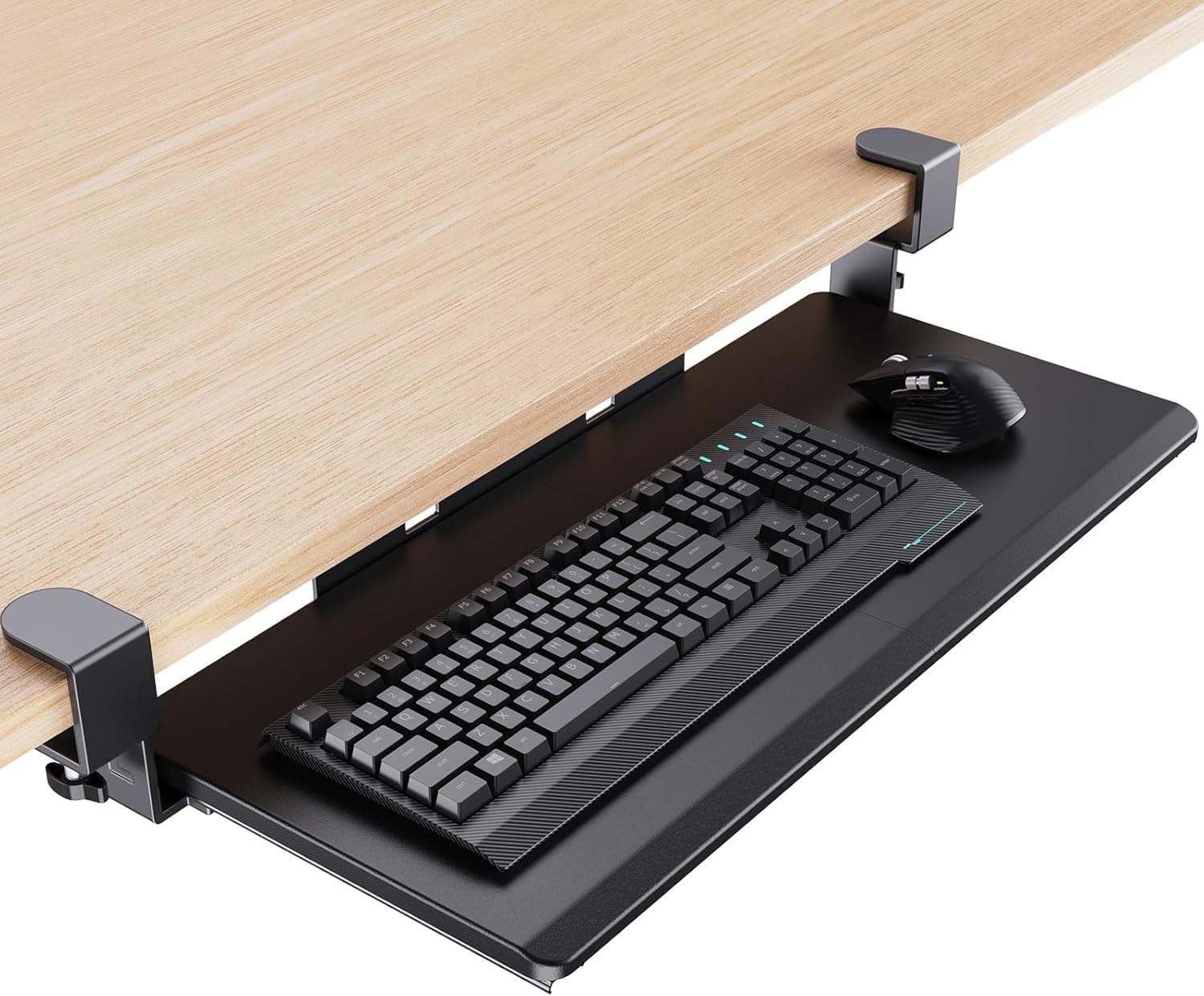

Price: ~$35–50 | Type: Under-desk clamp‑on | Tray size: 25″ x 9.84″ | Tilt: 22° down, 6° up | Swivel: 180° | Height adjustment: 6.3″ total
The HUANUO tray is a budget-friendly option that doesn’t skimp on essential adjustability. It offers a full 180° swivel, tilt adjustments (22° down, 6° up), and 6.3 inches of height adjustment, making it suitable for sit‑to‑stand workflows. A built‑in wrist rest adds extra comfort for extended typing sessions[reference:21].
It’s a straightforward, no‑nonsense tray that focuses on the core requirement: moving the keyboard off the desktop. Despite the low price, it includes basic height and tilt adjustments that are often missing from entry‑level trays. The smaller footprint (25″ x 9.84″) is a major win for compact workstations, making it a clear winner for students, remote workers, or anyone setting up a secondary workspace on a restricted budget[reference:22]. However, it is not designed to handle the heavy weight of a massive mechanical keyboard and a gaming mouse simultaneously[reference:23].
✅ Pros: Very affordable; full 180° swivel and tilt adjustments; includes a wrist rest; supports sit‑to‑stand workflows; compact footprint ideal for small desks.
❌ Cons: Smaller tray size; not for heavy mechanical keyboards plus gaming mouse; less premium build than VIVO.
👉 Check price for HUANUO Keyboard Tray on Amazon →
3. Uncaged Ergonomics KT1 – Most Adjustable (Negative Tilt)
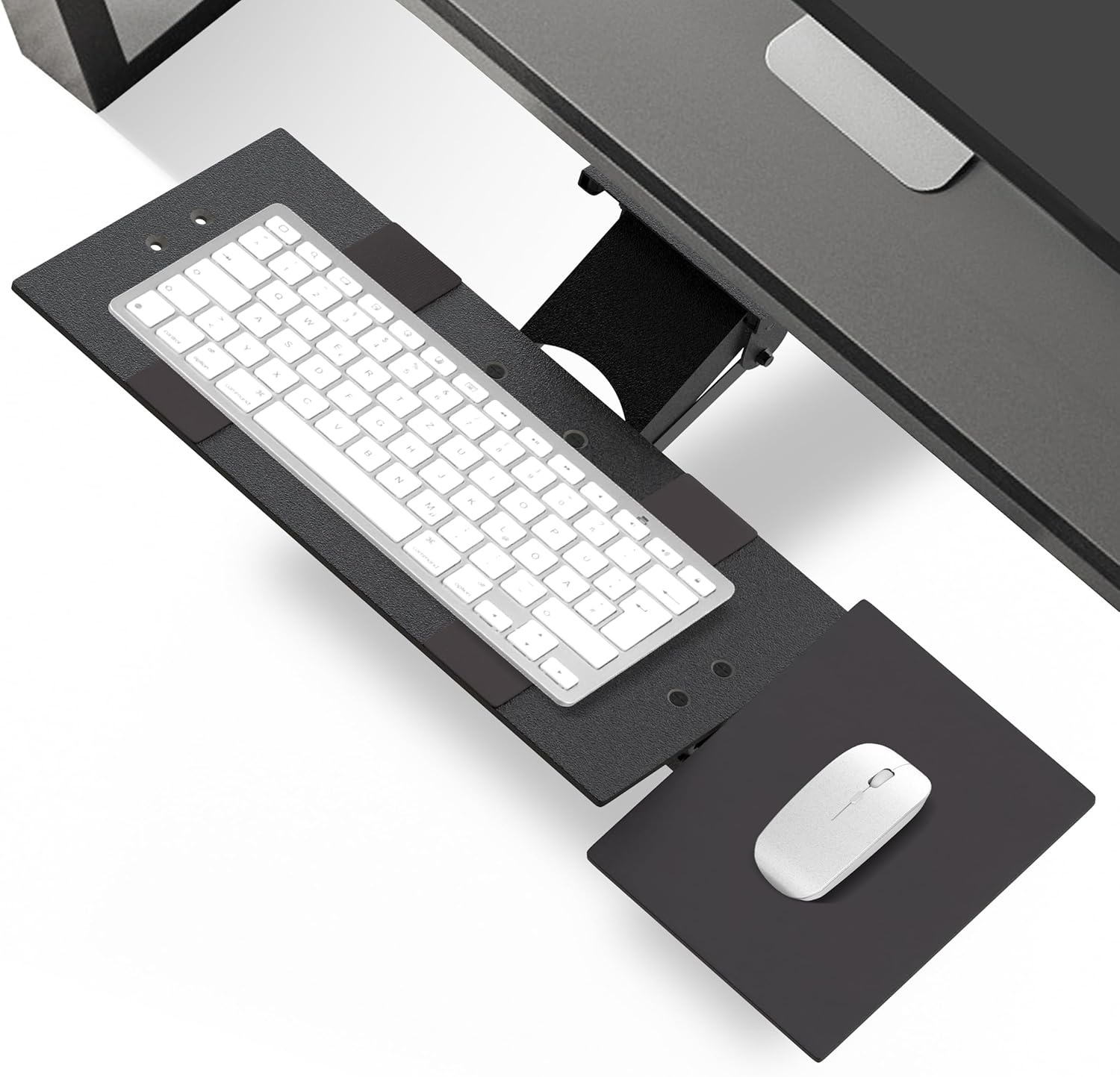

Price: ~$200 | Type: Under-desk clamp‑on | Tray size: 18.5″ x 8.75″ (keyboard) + 7″ x 8.75″ (mouse) | Height adjustment: 4.5″ below desk to desk level | Tilt: Neutral/negative only | Swivel: 360°
The Uncaged Ergonomics KT1 is designed for users who need precision ergonomics. It offers single‑lever height and tilt adjustment, independent mouse pad tilt, 360° swivel, and full stow‑under capability. The tray is made with a steel frame and premium molded composite panels for stability and durability[reference:24][reference:25].
What sets the KT1 apart is its negative tilt capability, which angles the keyboard slightly downward to keep wrists in a neutral position—essential for preventing carpal tunnel strain. The mouse pad adjusts in tilt independently, so your mouse stays level even when the keyboard is tilted[reference:26]. The ambidextrous design lets you mount the mouse pad on either side[reference:27]. This is the most fully adjustable tray on this list and the best choice for users with existing wrist issues or those who demand premium ergonomics.
✅ Pros: Fully adjustable (height, tilt, swivel, slide); independent mouse pad tilt; 360° swivel; negative tilt promotes wrist health; steel frame with composite panels; ambidextrous mouse pad.
❌ Cons: Expensive (~$200); smaller tray size than VIVO; shorter warranty (1 year).
👉 Check price for Uncaged Ergonomics KT1 on Amazon →
4. 3M Adjustable Keyboard Tray (AKT180LE) – Best for Sit‑Stand Desks
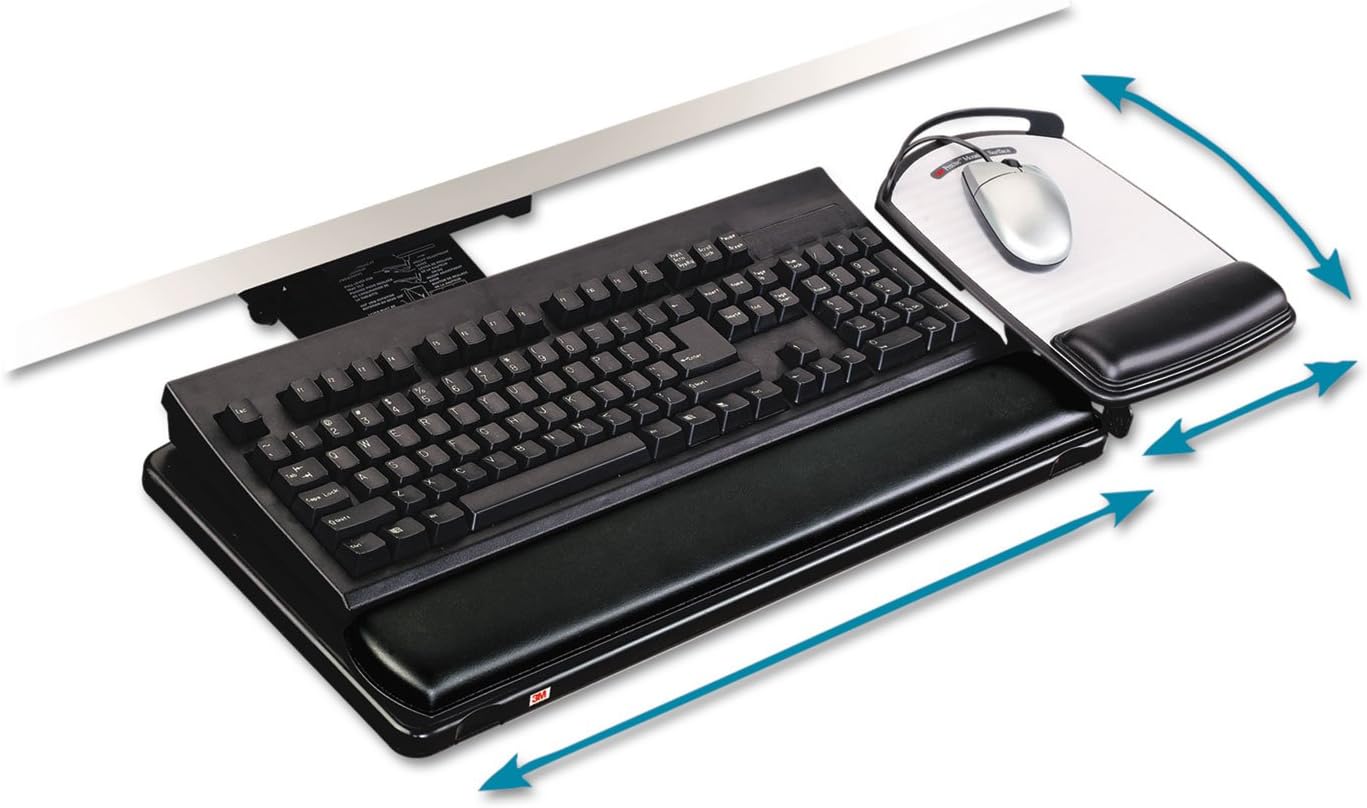

Price: ~$300–350 | Type: Under‑desk rail‑mounted | Tray size: Includes full‑width gel wrist rest and detachable mouse platform | Height: Sit‑stand range | Features: 23″ sliding track
The 3M AKT180LE is designed specifically for sit‑stand desk users who need a wide range of height adjustment. It offers an extra‑long 23″ sliding track and effortless height changes, making it ideal for users who alternate between sitting and standing. It includes a full‑width leatherette‑covered gel palm pad with antimicrobial protection and a detachable 3M Precise Optical Mousing Surface that can be positioned on the left or right[reference:28][reference:29].
Users report that it is “the most adjustable keyboard tray I have ever used” and “super ergonomic and comfortable”[reference:30]. The installation is drill‑free using adhesive strips and a front lip hook, taking less than 10 minutes[reference:31]. However, the tray does not fully stow under the desk (3.0″ protrusion), and the mouse platform is slightly higher than the keyboard, which may be an annoyance for some users[reference:32][reference:33].
✅ Pros: Designed for sit‑stand desks; extra‑long 23″ sliding track; full‑width gel wrist rest with antimicrobial protection; detachable mouse platform (left or right); drill‑free installation; very high adjustability.
❌ Cons: Expensive (~$300+); tray does not fully stow under desk (3.0″ protrusion); mouse platform height differs from keyboard; some users report missing hardware pieces.
👉 Check price for 3M AKT180LE on Amazon →
5. Uncaged Ergonomics KT4 – Best Value Clamp‑On (No Tools)
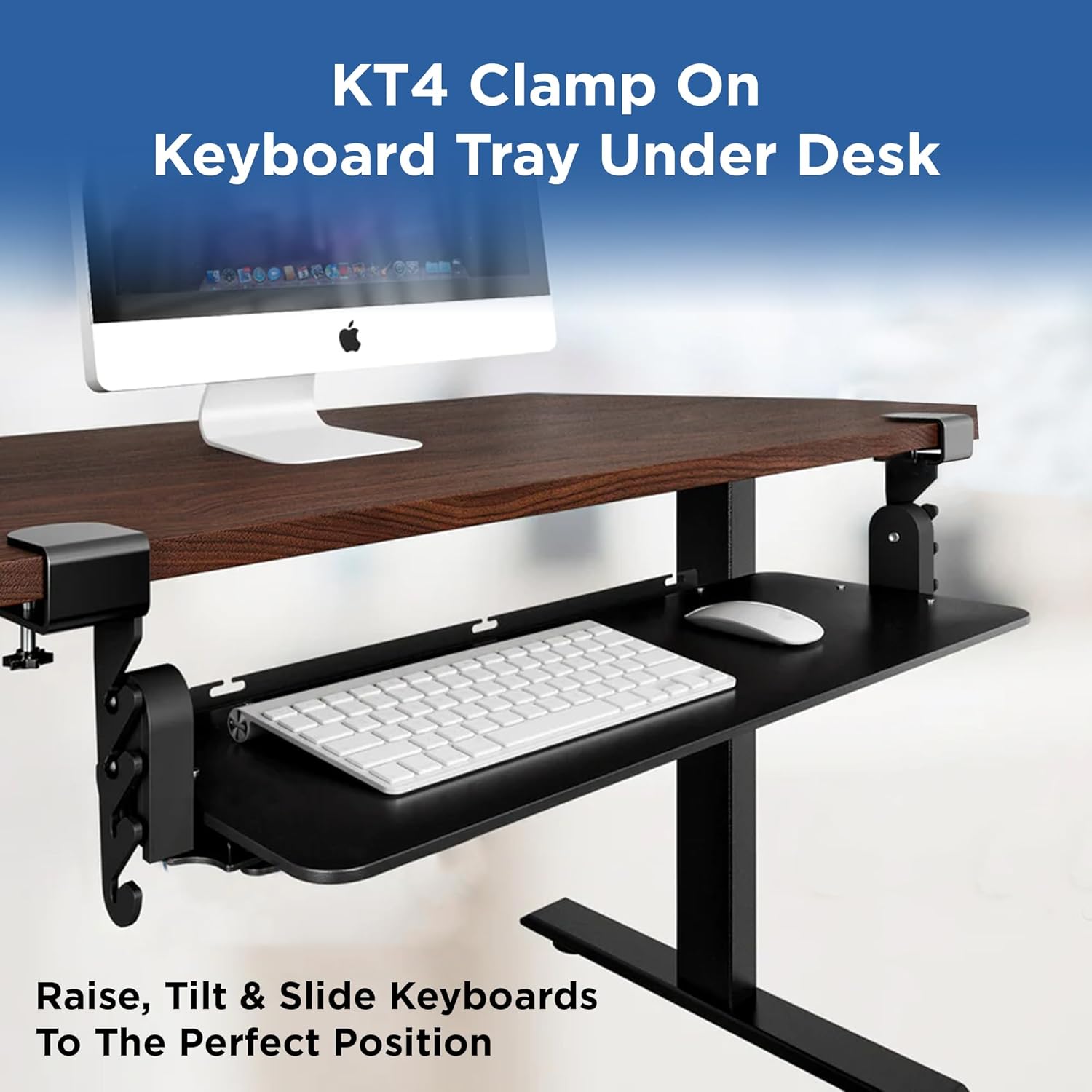

Price: ~$110 | Type: Clamp‑on | Tray size: 25.6″ x 9.7″ | Height adjustment: 4.1–6.6″ below desk | Tilt: Neutral/negative | Installation: No tools required
The KT4 is a truly ergonomic clamp‑on keyboard tray engineered from the ground up for easy installation and comfortable typing. It requires no tools—simply connect the screw clamps to your desk, slip in the tray, and you’re ready to type. The clamps fit most desks under 1.25″ thick, and a spacing guide is included to help with installation without measuring[reference:34].
Like the KT1, the KT4 allows you to type with a neutral or negative tilt and quickly change the typing position throughout the day. The reinforced steel frame creates a no‑shake typing environment, and the tray slides out for use and tucks completely under the desk when not needed[reference:35]. It’s a mid‑range option that balances price with premium features.
✅ Pros: No tools required for installation; reinforced steel frame prevents wobble; adjustable height (4.1–6.6″ below desk); neutral/negative tilt; slides completely under desk; clamp‑on design preserves desk surface.
❌ Cons: 1‑year limited warranty; smaller tray depth (9.7″) may not fit all full‑size keyboards with numeric keypad plus mouse.
👉 Check price for Uncaged Ergonomics KT4 on Amazon →
6. Fellowes Office Suites Underdesk Keyboard Drawer – Best Simple Setup
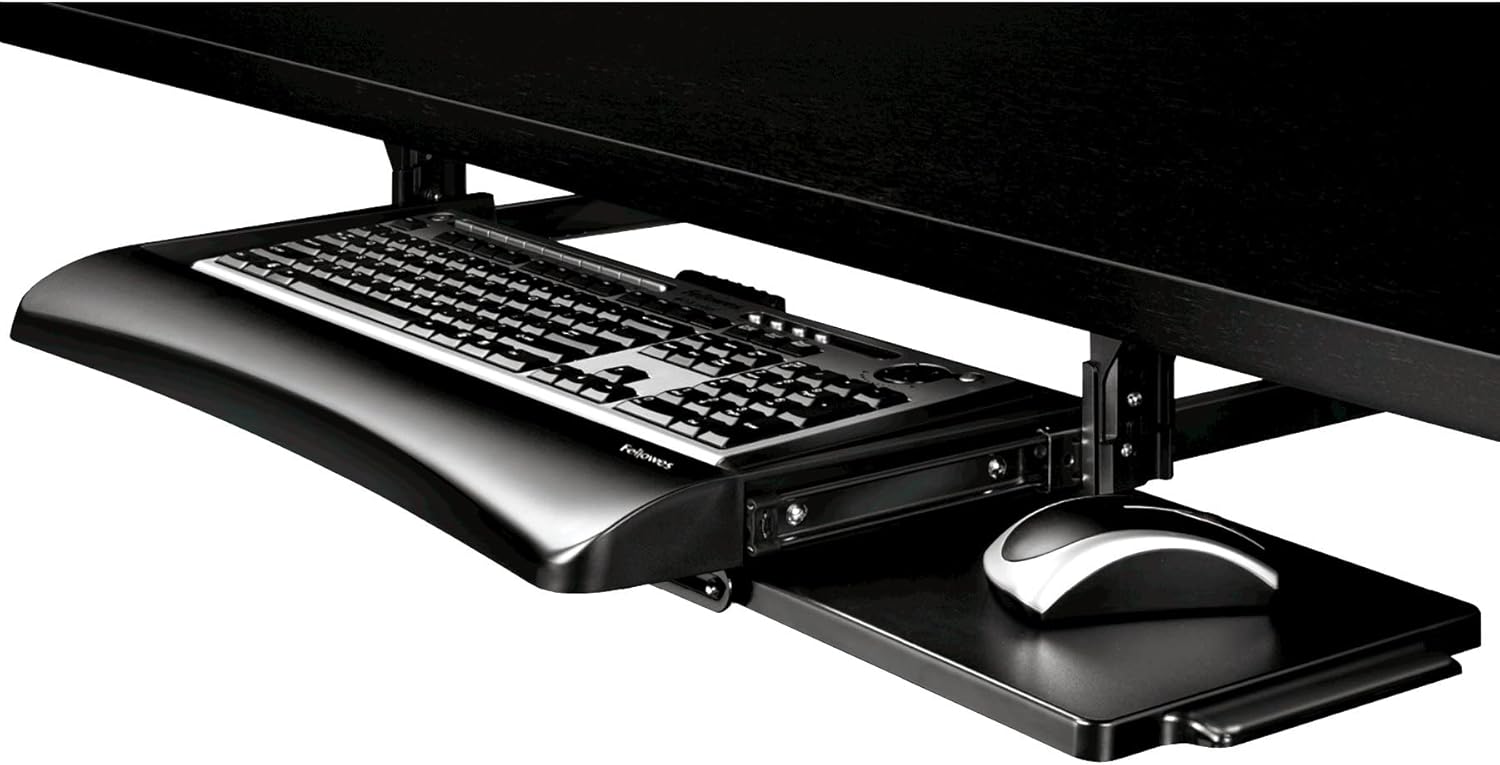

Price: ~$40 | Type: Under‑desk drawer (screw‑in) | Tray size: 22″ x 11.6″ (keyboard), 7.38″ x 7.63″ (mouse) | Height: 3 settings | Installation: 3 different heights
The Fellowes Office Suites is a simple, affordable under‑desk keyboard drawer designed for standard workstations. It installs at three different heights and includes a retractable mouse station that mounts on the right or left side or stows underneath when not in use. The keyboard tray features a keyboard stopper to keep your keyboard securely in place, and ball‑bearing glide tracks ensure smooth, silent drawer movement[reference:36].
This drawer is ideal for users who want a no‑frills, budget‑friendly under‑desk solution and don’t need advanced ergonomic features like tilt or swivel. It’s made of sturdy, high‑impact plastic and is rated for light to moderate daily use. The tray is 100% recycled content, making it an environmentally conscious choice. However, the plastic construction may feel less premium than steel‑framed trays, and height adjustments are limited to three preset positions rather than continuous adjustment[reference:37].
✅ Pros: Very affordable (~$40); 3 height positions; retractable mouse station (left/right/stowed); smooth ball‑bearing glide tracks; keyboard stopper included; 100% recycled content.
❌ Cons: Plastic construction (less durable than steel); no tilt or swivel adjustment; limited to three preset heights; requires screw installation (not clamp‑on).
👉 Check price for Fellowes Office Suites Drawer on Amazon →
7. VIVO Chair‑Mounted Keyboard Tray (MOUNT-KB18CP) – Best for Shared Workspaces


Price: ~$60 | Type: Chair‑mounted | Tray size: 26″ x 12″ | Tilt: Adjustable | Swivel: 360° | Mounting: Attaches to chair bottom tube
The VIVO MOUNT-KB18CP attaches directly to your office chair’s bottom tube, offering an ergonomic typing angle without any desk attachment. This is a game‑changer for shared workspaces, hot desks, or users who move between multiple workstations. The steel arm supports large chairs and provides a stable platform for keyboards and mice, with a patent‑pending design ensuring solid mounting and long‑term durability[reference:38].
The tray tilts and rotates a full 360°, supporting both left‑ and right‑handed users, making it suitable for gamers and professionals with multi‑monitor setups. Setup requires no desk or wall installation, making it ideal for shared workspaces or portable seating arrangements[reference:39]. However, you must ensure your chair’s bottom tube diameter matches the arm’s mounting range, and the tray itself does not include a mouse pad—you’ll need to use your own surface alongside or provide an external mouse platform.
✅ Pros: No desk attachment required (chair‑mounted); 360° rotation and tilt adjustment; supports both left‑ and right‑handed users; steel arm is stable and durable; perfect for shared workspaces or multi‑monitor setups.
❌ Cons: Requires chair bottom tube compatibility; no integrated mouse pad; tray may feel less stable than under‑desk mounted options for heavy typing.
👉 Check price for VIVO MOUNT-KB18CP on Amazon →
How to Choose the Right Size for Your Setup
Choosing the correct size keyboard tray ensures comfortable typing and proper ergonomics. Use these guidelines to find the right fit.
Measure Your Keyboard and Mouse
Start by measuring your keyboard width and depth. Full‑size keyboards (with numeric keypad) typically measure 17–18″ wide. Compact keyboards (tenkeyless, 75%, 60%) are smaller. Add 4–6 inches of mousing space to your keyboard width. If you prefer your mouse adjacent to the keyboard on the same level, look for trays at least 26″ wide. If you use a separate mouse platform or keep your mouse on your desk, a narrower tray (18–20″) may suffice.
Measure Your Desk for Compatibility
Under‑desk clamp‑on trays require a clear desk edge without obstructions. The VIVO KB05E has a total clamp‑to‑clamp length of 32.5″, meaning you need at least that much clear edge space. Also check your desk thickness—most clamp‑on trays accommodate up to 1.25″–2.4″, but always verify before purchasing. Desks with beveled edges are not compatible with many clamp‑on designs.
For screw‑in trays (like the Fellowes), you’ll need to drill into the underside of your desk, which may not be suitable for renters or glass desks.
Set Correct Typing Height
Once installed, adjust the tray so your elbows bend at a relaxed 90° angle, your forearms are parallel to the floor, and your wrists remain straight (not bent up or down). The tray should be positioned slightly below elbow height, typically 2–4 inches below your desk surface[reference:40][reference:41]. If your chair is already at the correct height, you’ll likely need the tray at its lowest or near‑lowest setting.
For users under 6 feet tall, a keyboard tray is often non‑negotiable—standard desks are simply too high for proper ergonomics[reference:42].
Final Verdict: Which Keyboard Tray Should You Buy for Your Desk Setup?
After researching dozens of keyboard trays and analyzing user reviews, ergonomic guidelines, and installation requirements, here is my final recommendation:
👉 Best overall for most users: VIVO MOUNT‑KB05E — Large 27″ x 11″ platform, sturdy metal clamps, smooth sliding mechanism, holds up to 11 lbs, saves desk space, easy assembly. The best combination of size, stability, and value.
👉 Best budget pick: HUANUO Adjustable Keyboard Tray — Full 180° swivel, tilt adjustments, 6.3″ height range, built‑in wrist rest, compact footprint. Excellent value for students and home office users.
👉 Best for precision ergonomics / existing wrist pain: Uncaged Ergonomics KT1 — Fully adjustable (height, tilt, swivel), independent mouse pad tilt, 360° swivel, negative tilt for wrist health. The most adjustable tray on this list.
👉 Best for sit‑stand desks: 3M AKT180LE — Designed for sit‑stand use, extra‑long 23″ track, full‑width gel wrist rest, detachable mouse platform, drill‑free installation.
👉 Best value clamp‑on (no tools): Uncaged Ergonomics KT4 — Reinforced steel frame, no‑shake typing, neutral/negative tilt, clamps fit desks under 1.25″ thick, no tools required.
👉 Best simple setup (no adjustability needed): Fellowes Office Suites Drawer — Affordable, 3 height positions, retractable mouse station, ball‑bearing glide tracks, 100% recycled content.
👉 Best for shared workspaces (chair‑mounted): VIVO MOUNT‑KB18CP — Attaches to chair (not desk), 360° rotation, tilt adjustment, supports both left‑ and right‑handed users, ideal for hot desks or multi‑monitor setups.
Most important advice: Measure your desk edge clearance and thickness before buying. For clamp‑on trays, ensure your desk edge is flat (not beveled) and at least 32.5″ wide for the VIVO KB05E. After installation, take the time to adjust the tray height and tilt—your elbows should be at 90°, your wrists straight, and your shoulders relaxed. And stand up every hour: even the best ergonomic tray can’t replace movement.
👉 See today’s price for VIVO MOUNT‑KB05E (Best Overall) on Amazon →