
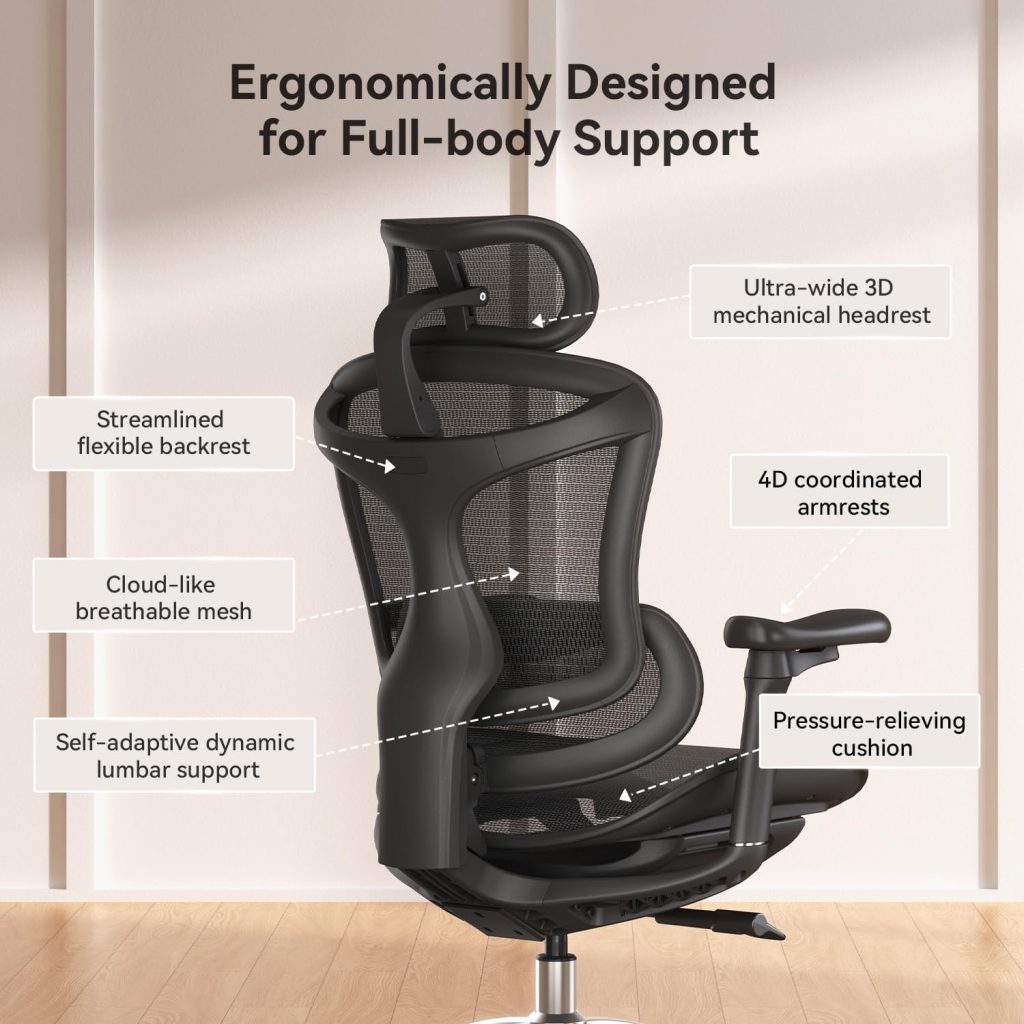
Walk into any office supply store or scroll through Amazon, and you will see dozens of chairs labeled “ergonomic.” But here is the truth: most of them are not actually ergonomic.
Manufacturers slap the word “ergonomic” on any chair with a lumbar pillow or a curvy backrest. But real ergonomics is about adjustability, fit, and support that matches YOUR body — not a one‑size‑fits‑all solution.
In this guide, I will teach you exactly how to choose an ergonomic chair that fits your body, your budget, and your pain points. No marketing fluff. Just practical advice you can use today.
Quick Answer: What Makes a Chair Truly Ergonomic?
Before we dive deep, here is the short version. A truly ergonomic chair must have:
- Adjustable lumbar support (height + depth is ideal)
- Adjustable seat height (standard on most chairs)
- Seat depth adjustment (or a size that fits your legs)
- Adjustable armrests (height at minimum, 4D is best)
- Recline capability (for spinal disc health)
- Breathable material (mesh > fabric > PU leather)
If a chair is missing any of these, it is not truly ergonomic — it is just a comfortable chair.
Why You Need to Choose Carefully (The Cost of a Bad Chair)
A bad chair does more than make you uncomfortable. Over time, it can cause:
- Chronic lower back pain – from lack of lumbar support
- Neck and shoulder tension – from poor armrest or headrest positioning
- Sciatica – from seats that compress the back of your thighs
- Poor circulation – from seats that are too deep or too hard
- Reduced productivity – because you cannot focus when you are in pain
The good news? You can avoid all of this by knowing what to look for. Let me walk you through the 7 most important features.
7 Critical Features to Look for in an Ergonomic Chair
1. Adjustable Lumbar Support (The Most Important Feature)
Your spine has a natural S‑curve. A flat backrest forces your spine into a C‑curve, which strains your lower back discs. Lumbar support fills that gap and maintains your spine’s natural shape.
What to look for:
- Height adjustment: The lumbar pad should move up and down to match your curve. Most people need support between your belt line and the bottom of your ribcage.
- Depth adjustment (ideal): Some chairs let you push the lumbar closer to your spine or pull it back. This is a premium feature found on $400+ chairs.
- Dynamic lumbar (best): A few chairs (like the Sihoo Doro C300) have lumbar that moves with you as you shift positions.
What to avoid:
- Fixed lumbar bumps that cannot move
- Detachable pillows that slide around
- No lumbar support at all
2. Seat Height Adjustment (Non‑Negotiable)
This is the only feature found on almost every office chair. But many people set it wrong.
How to set it correctly: Your feet should rest flat on the floor. Your thighs should be parallel to the floor (or slightly angled down). Your knees should be at a 90‑degree angle (or slightly more than 90°).
What to look for: Pneumatic gas lift with at least 4 inches of range. Most chairs fit people from about 5’0″ to 6’2″. If you are outside that range, look for chairs with extended height ranges.
3. Seat Depth (Most Overlooked Feature)
Seat depth is the distance from the backrest to the front edge of the seat. If the seat is too deep, the front edge presses into the back of your knees, cutting off circulation. If it is too shallow, your thighs lack support.
The test: Sit all the way back in the chair. You should have 2–3 fingers of space between the back of your knee and the front edge of the seat.
What to look for:
- Adjustable seat depth (best): Lets you slide the seat forward or backward. Common on $400+ chairs.
- Fixed depth (most common under $300): Look for a depth of 17–19 inches. Shorter people need 16–17 inches. Taller people need 19–21 inches.
4. Adjustable Armrests (Critical for Shoulder Health)
Poor armrest positioning forces you to hunch your shoulders or lean to one side, leading to neck and upper back pain.
Levels of armrest adjustability:
- 1D (height only): Basic. Better than nothing.
- 2D (height + width): Good. Lets you bring armrests closer or further apart.
- 3D (height + width + pivot/angle): Very good. Lets you angle armrests inward or outward.
- 4D (height + width + pivot + depth): Best. Adds forward/backward sliding.
How to test: With your shoulders relaxed, your elbows should rest at a 90‑degree angle. Your forearms should be parallel to the floor. Your wrists should be straight when typing.
5. Recline Mechanism (Spinal Disc Health)
Sitting completely upright all day is actually bad for you. Your spinal discs need movement to stay healthy. The ability to recline changes the pressure distribution on your discs.
What to look for:
- Tilt lock: Lets you lock the chair at different recline angles.
- Tilt tension: Adjusts how much force is needed to recline.
- Synchro‑tilt (best): The back and seat move together at different ratios (e.g., 2:1). This keeps your feet on the floor while reclining.
Recommended recline range: 110° to 135°. More than 135° is for lounging, not working.
6. Headrest (Only if You Recline or Have Neck Pain)
Not everyone needs a headrest. If you sit upright all day, you may not use it. But if you recline often or suffer from neck pain, a headrest is essential.
What to look for:
- Height adjustable: The headrest should support the curve of your neck (cervical spine), not the back of your head.
- Angle adjustable: Lets you tilt the headrest forward or backward.
- Removable (optional): Some chairs let you take the headrest off if you do not need it.
What to avoid: Fixed headrests that hit your shoulders (common on cheap chairs).
7. Material: Mesh vs. Fabric vs. PU Leather
The material affects breathability, comfort, and durability.
Mesh:
- Pros: Most breathable, no sweating, durable
- Cons: Can feel firm, shows dirt over time
- Best for: Hot climates, long hours, anyone who sweats
Fabric:
- Pros: Soft, comfortable, professional look
- Cons: Can get warm, stains easily
- Best for: Moderate climates, home offices
PU Leather (Faux Leather):
- Pros: Looks premium, easy to wipe clean
- Cons: Traps heat, peels after 1–3 years
- Best for: Executive offices with AC, low‑use chairs
Recommendation: Mesh back + foam seat is the ideal combination for most people. Full mesh is best for hot climates.
How to Choose Based on Your Body Type
Not all chairs fit all bodies. Here is how to choose based on your height and weight.
For Short People (Under 5’4″)
- Look for adjustable seat depth or a seat depth of 16–17 inches
- Look for lower minimum seat height (under 17 inches from the floor)
- Avoid chairs where the headrest is fixed too high
- Consider using a footrest if the seat height cannot go low enough
For Average Height (5’4″ – 5’11”)
- Most chairs will fit you well
- Focus on lumbar adjustability and armrests
- Seat depth of 17–19 inches is usually fine
For Tall People (6’0″ – 6’4″)
- Look for extra tall backrest (over 22 inches)
- Look for higher lumbar placement (many chairs have lumbar too low)
- Look for seat depth over 19 inches
- Look for headrest that adjusts high enough
- Recommended chairs: SMUG, HON Ignition 2.0
For Heavy People (Over 250 lbs)
- Look for weight capacity of 300 lbs or more
- Look for metal base (not plastic)
- Look for wide seat (over 20 inches)
- Look for thick seat cushion (at least 3 inches)
- Avoid chairs with 250 lb limits (like the Bowthy)
- Recommended chairs: HON Ignition 2.0 (350 lbs), Clatina Mellet (350 lbs)
How to Choose Based on Your Budget
Your budget determines which features you can get. Here is what to expect at each price point.
Under $150 (Basic Office Chairs)
- What you get: Height adjustment, maybe a fixed lumbar pillow
- What you miss: Seat depth adjustment, quality armrests, durable materials
- Verdict: Acceptable for short‑term or occasional use. Not recommended for 8+ hour days.
$150 – $300 (Entry‑Level Ergonomic)
- What you get: Height‑adjustable lumbar, breathable mesh back, basic armrests, recline
- What you miss: Seat depth adjustment, 4D armrests, premium build quality
- Verdict: Best value for most people. The Ticova and Bowthy are great examples.
$300 – $500 (Mid‑Range Ergonomic)
- What you get: 3D/4D armrests, adjustable seat depth, better lumbar control, higher weight capacity
- What you miss: Premium brand names (Steelcase/Herman Miller level)
- Verdict: Sweet spot for serious home offices. The Sihoo Doro C300 and HON Ignition 2.0 excel here.
$500 – $1,000+ (Premium Ergonomic)
- What you get: All adjustments, premium materials, 10+ year warranties, commercial durability
- Verdict: Worth it if you sit 10+ hours daily or have chronic pain. Steelcase and Herman Miller dominate here.
Common Mistakes When Choosing an Ergonomic Chair
Mistake #1: Buying a “Gaming Chair” for Office Work
Most gaming chairs are racing‑style with flat backs and fixed lumbar pillows. They look cool but offer poor ergonomics. Stick with ergonomic chairs designed for office work.
Mistake #2: Ignoring Seat Depth
Even a $1,000 chair will hurt if the seat is too deep for your legs. Always check seat depth, especially if you are shorter or taller than average.
Mistake #3: Thinking More Expensive = More Ergonomic
Price correlates with build quality and adjustability, but a $300 chair that fits your body perfectly is better than a $1,000 chair that does not. Fit matters more than price.
Mistake #4: Not Testing the Lumbar Position
Many people assume any lumbar support is good. Sit in the chair and check: does the lumbar pad hit the curve of your lower back, or does it sit too high/low? If it misses, keep looking.
Mistake #5: Buying Without a Return Policy
Ergonomics are personal. A chair that works for one person may not work for you. Only buy from retailers with free returns (Amazon is great for this).
How to Adjust Your Ergonomic Chair (Step by Step)
Even the best chair will hurt if it is not adjusted correctly. Follow this sequence after you unbox your chair:
Step 1: Set Seat Height
Sit all the way back. Raise or lower the seat until your feet rest flat on the floor and your thighs are parallel to the ground. Your knees should be at about a 90° angle.
Step 2: Set Seat Depth (If Adjustable)
Slide the seat forward or backward until you have 2–3 fingers of space between the back of your knee and the seat edge.
Step 3: Set Lumbar Support
Adjust the lumbar height so it sits in the curve of your lower back (around your belt line). If depth is adjustable, increase pressure until you feel support but not pain.
Step 4: Set Armrests
With your shoulders relaxed, raise armrests until your elbows form a 90° angle. Adjust width so your arms rest naturally without spreading out.
Step 5: Set Headrest (If Available)
Adjust the headrest to support the curve of your neck — not the back of your skull. Your head should feel supported, not pushed forward.
Step 6: Test and Fine‑Tune
Sit for 10 minutes. Make small adjustments. Your body will tell you what feels right. Re‑adjust after a few days as you settle in.
Frequently Asked Questions (FAQ)
What is the difference between an ergonomic chair and a normal office chair?
A normal office chair typically has fixed or limited adjustments. An ergonomic chair has adjustable lumbar support, seat height, armrests, and often seat depth and recline tension — allowing you to customize the fit to your body.
Do I really need an ergonomic chair?
If you sit for more than 4 hours a day, yes. The human body is not designed for static sitting. An ergonomic chair reduces back pain, improves posture, and increases productivity. It is an investment in your health.
How much should I spend on an ergonomic chair?
For most people, $200–$500 is the sweet spot. Under $200, you lose critical adjustments. Over $500, you get diminishing returns unless you sit 10+ hours daily or have chronic pain.
Can an ergonomic chair fix my back pain?
It can if your pain is caused by poor sitting posture. If you have an underlying medical condition, consult a doctor. But for most desk workers, a properly adjusted ergonomic chair eliminates or significantly reduces back pain.
What is the best ergonomic chair brand?
On a budget ($300‑500): Sihoo, HON, Ticova. Premium ($800+): Steelcase, Herman Miller. All are reputable. Choose based on your budget and body type.
How long does an ergonomic chair last?
A good $300–$500 chair lasts 5–10 years. Premium chairs (Steelcase, Herman Miller) last 10–15+ years with replaceable parts. Cheap chairs under $150 often fail within 2 years.
Is mesh or fabric better for an ergonomic chair?
Mesh is better for breathability and long hours. Fabric is softer and more comfortable for shorter periods. For full‑time office work (8+ hours), mesh back + foam seat is the ideal combination.
Can I use an ergonomic chair for gaming?
Yes — but avoid racing‑style “gaming chairs.” Many gamers are switching to ergonomic office chairs because they offer better lumbar support and adjustability for long sessions.
What is the best ergonomic chair under $500?
The Sihoo Doro C300 is widely considered the best under $500 due to its dynamic lumbar support, footrest, and 4D armrests. For big and tall users, the HON Ignition 2.0 is excellent.
👉 Check price for Sihoo Doro C300 on Amazon →
What is the best ergonomic chair under $300?
The Ticova is the most popular and best‑value ergonomic chair under $300. It offers adjustable lumbar, mesh back, thick foam seat, and tilt lock — features usually found on $400 chairs.
👉 Check price for Ticova on Amazon →
Final Checklist: How to Choose an Ergonomic Chair
Use this checklist when shopping for your next chair:
| Feature | What to Look For | Why It Matters |
|---|---|---|
| Lumbar support | Height adjustable (depth adjustable is better) | Prevents lower back pain |
| Seat height | Pneumatic lift with 4″+ range | Feet flat, thighs parallel |
| Seat depth | Adjustable OR 17–19″ fixed | Prevents knee pressure |
| Armrests | Height at minimum (3D/4D is best) | Prevents shoulder/neck pain |
| Recline | Tilt lock + tension control | Spinal disc health |
| Headrest | Height + angle adjustable | Neck support (if you recline) |
| Material | Mesh back + foam seat | Breathability + comfort |
| Weight capacity | Match to your body weight | Safety and durability |
| Warranty | 3+ years | Peace of mind |
| Return policy | Free returns | Test fit risk‑free |
Final Verdict: How to Choose the Right Chair for You
Here is the simplest way to decide:
- If you are on a strict budget (under $200): Buy the Bowthy. It offers 3D armrests, headrest, and 135° recline for an unbeatable price.
- If you want the best value under $300: Buy the Ticova. Thousands of happy customers cannot be wrong.
- If you want the best overall under $500: Buy the Sihoo Doro C300. Dynamic lumbar and footrest make it a standout.
- If you are tall (over 6’0″) or heavy (over 250 lbs): Buy the HON Ignition 2.0 or SMUG. Standard chairs will not fit you properly.
- If you have chronic back pain: Invest in the Steelcase Series 1. Hospital‑grade ergonomics are worth the premium.
Remember: The best ergonomic chair is the one that fits YOUR body. Use this guide, test your adjustments, and do not settle for a chair that causes pain.