SITBETTERLAB WORKSPACE GUIDE
Best Monitor Arms for Thin Desks
A thin desktop can make monitor arm installation tricky. Learn how to check desk thickness, choose the right clamp, protect your tabletop, and find a mounting solution that suits your workspace.
A monitor arm can free up desk space and make it easier to position your screen at a comfortable height. But if you have a thin desktop, there is an important question to answer before buying: can your desk safely support a monitor arm clamp?
Many monitor arms use a C-clamp that tightens around the rear edge of a desk. The clamp must fit the desktop’s thickness and have enough contact area to hold the monitor securely. A thin tabletop made from particleboard, MDF, hollow-core material, or glass may need extra consideration even when the clamp physically fits.
This guide focuses on choosing a monitor arm for a thin desk, including clamp compatibility, reinforcement options, grommet mounts, and alternative mounting methods. The goal is to find a setup that works with your desk rather than risking damage to the desktop.
Quick Recommendations
- Best starting point: A monitor arm with an adjustable clamp whose published thickness range includes your desktop.
- Best for a thin but sturdy tabletop: A compatible arm paired with a properly sized reinforcement plate, if approved for the desk and mount.
- Best for a desk with a suitable mounting hole: A grommet-compatible monitor arm.
- Best when clamping is unsuitable: A compatible freestanding monitor stand or a properly installed wall mount.
Affiliate disclosure: SitBetterLab may earn a commission from qualifying purchases made through links on this page, at no additional cost to you.
Can You Use a Monitor Arm on a Thin Desk?
Yes, in some cases. A thin desk can support a monitor arm if the tabletop is structurally suitable, the clamp fits correctly, and the combined setup remains within the manufacturer’s requirements.
However, desk thickness alone does not determine whether an installation is safe. A thin solid-wood desktop may behave very differently from a hollow-core tabletop or a thin sheet of particleboard.
Before choosing a mount, check these four factors:
- Desktop thickness: Measure the desk at the exact location where the clamp will attach.
- Material and construction: Identify whether the desk is solid wood, MDF, particleboard, hollow-core, glass, or another material.
- Monitor weight: Include the monitor and any accessories attached to the mounting assembly.
- Clamp geometry: Check the supported thickness range, contact surface, and required clearance underneath the desktop.
If the tabletop is flexible, damaged, hollow, or unsupported around the mounting point, a clamp that fits is not necessarily a safe clamp. Check the desk manufacturer’s recommendations before proceeding.
What Desk Thickness Do Monitor Arms Require?
There is no universal minimum thickness for monitor arms. Different models use different clamp designs and specify different mounting ranges.
Some clamps accommodate relatively thin desktops, while others require a thicker edge or a suitable grommet hole. The exact permitted range should come from the manufacturer’s instructions for your chosen model.
| Your desk situation | What to investigate |
|---|---|
| Thin, solid desktop | A compatible clamp and, if necessary, a reinforcement plate. |
| Thin particleboard or MDF | Material strength, edge condition, load distribution, and desk manufacturer guidance. |
| Hollow-core tabletop | Whether the mounting area contains suitable structural reinforcement. |
| Glass desktop | Whether the desk manufacturer explicitly approves the mounting method; do not clamp directly unless permitted. |
| Desk with a grommet hole | Hole diameter, desktop construction, mounting hardware, and grommet compatibility. |
Do not choose a monitor arm simply because its clamp can open wide enough to fit your desk. The desktop must also withstand the forces generated by the mounted monitor, especially when the arm is extended away from the desk edge.
Best Monitor Arms and Mounting Options for Thin Desks
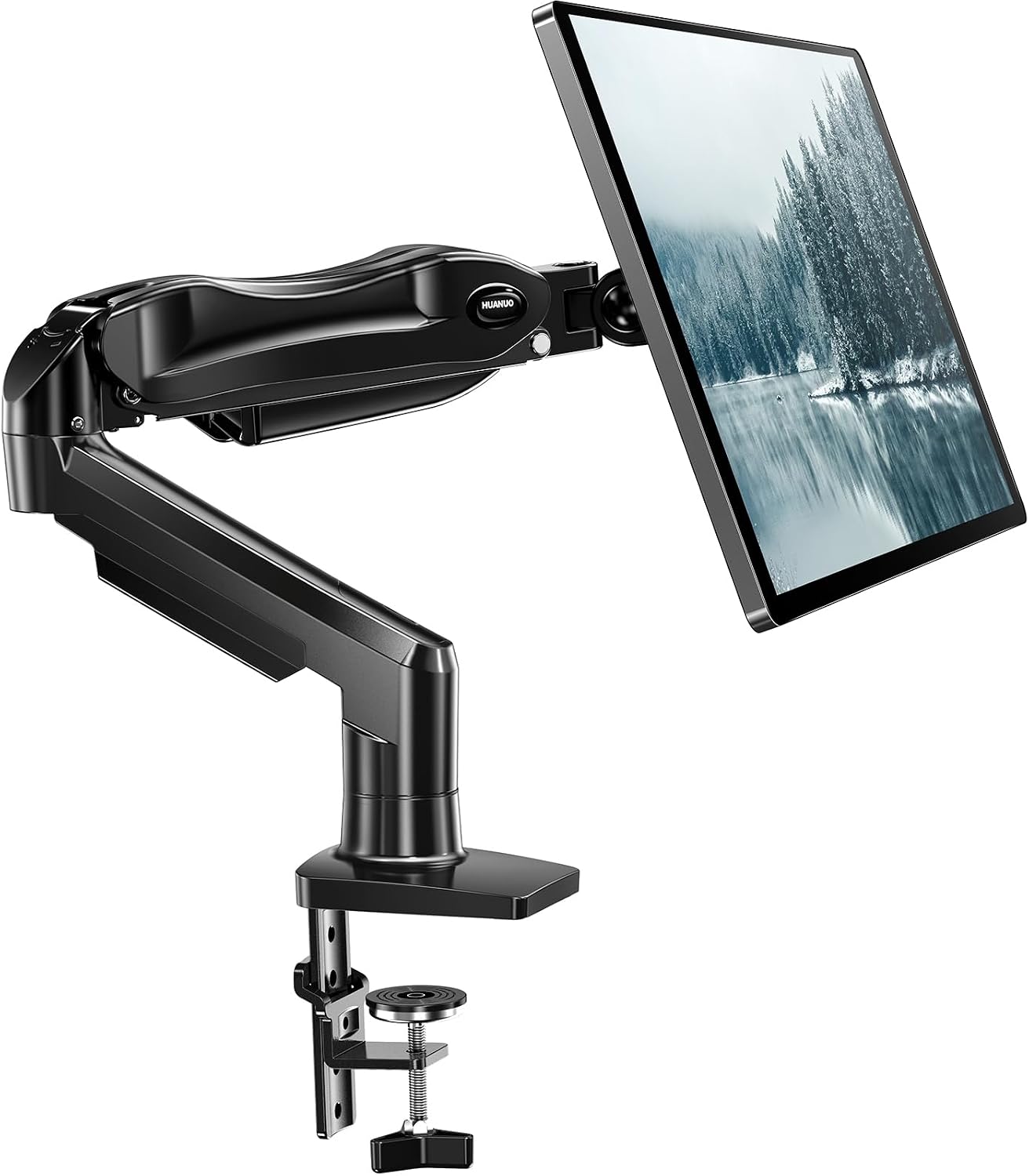
1. HUANUO Adjustable Desk Monitor Arm
Best for: Desks where a compatible clamp can attach securely without interfering with the desktop structure.
HUANUO offers several desk-mounted monitor arms with adjustable clamps and different weight capacities. The brand is worth comparing if you want a conventional monitor arm without immediately moving to a wall-mounted solution.
For a thin desk, the deciding factor is the exact model’s clamp range. Check the permitted desktop thickness, the space required underneath, and whether the desk material is suitable for the clamp pressure.
What to check before buying:
- Minimum and maximum supported desktop thickness.
- Maximum monitor weight and compatible screen dimensions.
- Clamp contact area and clearance around rear desk panels.
- Whether the arm can be installed without putting pressure on a weak or hollow section.
2. VIVO Single Monitor Desk Mount
Best for: Buyers who want to compare different clamp and grommet mounting configurations.
VIVO sells a range of single-monitor desk mounts, including models with different mounting methods and adjustment mechanisms. This makes it useful to compare when your desk has unusual dimensions or a suitable mounting hole.
Do not assume all VIVO mounts have the same clamp range. Check the exact model’s specifications, including the maximum monitor weight, supported VESA pattern, desktop thickness, and any grommet requirements.
If your tabletop is thin and made from a relatively weak material, a different clamp or a wider mounting plate may help distribute pressure, but only if the desk construction can safely support the installation.
3. Ergotron LX Desk Monitor Arm
Best for: Buyers looking for a premium adjustable arm for a compatible monitor and desk.
The Ergotron LX is a well-known adjustable monitor arm designed for everyday workstation use. Its range of positioning options can be useful if you regularly change your screen height, viewing distance, or monitor angle.
However, a premium arm does not automatically make a thin desktop suitable for mounting. You must still confirm that the clamp’s mounting range and the desk material are compatible with the intended installation.
For heavier monitors, also verify that the monitor’s weight falls within the exact model’s supported range. Do not confuse the suitability of the arm mechanism with the strength of the desk supporting it.
View the official Ergotron LX specifications
4. Monitor Arm Reinforcement Plate
Best for: A compatible desk that needs a larger contact area around the clamp.
A monitor arm reinforcement plate sits between the mounting hardware and the desktop to spread the clamp’s pressure over a larger area. It may help reduce localized pressure on a suitable tabletop.
This can be useful for some thin wood or engineered-wood desks, but it is not a universal fix. A reinforcement plate cannot turn a fragile, damaged, or unsupported tabletop into a structurally sound mounting surface.
Before buying one, check that the plate is compatible with the clamp, provides adequate contact on both sides of the desktop, and does not interfere with the desk frame or cable tray.
Look for:
- A plate designed for monitor arm clamps rather than an unrelated mounting application.
- A suitable contact area for the desktop material and mounting hardware.
- Compatibility with the desk thickness and the clamp’s shape.
- Clear installation guidance and suitable materials.
Compare Reinforcement Plates →
5. Freestanding Monitor Stand
Best for: Desks that should not be clamped or drilled.
If your desktop is too fragile for a clamp and you cannot verify a safe mounting method, a freestanding monitor stand may be the simplest alternative. It supports the monitor on a base placed on the desktop instead of applying clamping pressure to the rear edge.
The trade-off is that the base takes up desk space. Check the base dimensions, the monitor’s weight, the permitted screen size, and the stability of the stand.
A freestanding stand still places the monitor’s weight on the tabletop, so it is not automatically suitable for a fragile or damaged desk. Confirm that the desktop can support the concentrated load beneath the base.
Compare Freestanding Monitor Stands →
How to Choose a Monitor Arm Clamp for a Thin Desk
Before comparing prices, measure your desk and record the information that affects installation. This makes it easier to eliminate incompatible mounts before ordering.
Step 1: Measure the Desktop Thickness
Measure the vertical thickness of the desktop at the exact rear edge where you intend to attach the clamp. Do not assume the entire desk has the same thickness; some desks have a thick front edge, a thinner rear panel, or a separate frame.
Step 2: Identify the Desktop Material
Determine whether the desk is solid wood, plywood, MDF, particleboard, hollow-core construction, or glass. If you cannot identify the material or the desk’s load limits, check the product manual or contact the manufacturer.
Step 3: Check the Clamp’s Full Mounting Range
Read the specifications for the exact monitor arm. Confirm both the supported desktop thickness and the required clearance underneath. A clamp that fits around the edge may still conflict with a frame, drawer, or cable tray.
Step 4: Check Monitor Weight and Arm Reach
The monitor’s weight affects the forces applied to the mounting point. An arm extended far away from the desk edge creates more leverage than one kept close to the support. Verify the load rating and follow the manufacturer’s mounting and positioning instructions.
Step 5: Decide Whether Reinforcement Is Appropriate
If the desk is suitable for clamping but the contact area needs to be increased, investigate a compatible reinforcement plate. If the desktop is hollow, fragile, cracked, or otherwise unsuitable, choose a different mounting method instead of relying on a plate to compensate for weak construction.
Are Monitor Arm Reinforcement Plates Worth It?
A reinforcement plate can be useful when the desktop material is appropriate for mounting but the clamp would otherwise concentrate pressure over a small area. It spreads that pressure over a larger contact surface and may help reduce localized deformation.
However, the result depends on the desk’s construction, the plate’s size, the clamp design, and the monitor’s weight.
A reinforcement plate may be worth considering when:
- The desktop is structurally sound and approved for the mounting method.
- The clamp and plate are compatible with the desk thickness.
- The desk manufacturer permits the intended load and installation.
- The plate can sit flat and make appropriate contact with the tabletop.
Do not use a reinforcement plate as a substitute for structural support on a hollow-core desk, a damaged desktop, or a glass surface that is not approved for clamping.
C-Clamp vs. Grommet Mount vs. Freestanding Stand
| Mounting method | Main advantage | Main limitation |
|---|---|---|
| C-clamp | Usually straightforward to install and reposition. | Requires a suitable desktop edge and compatible thickness. |
| Grommet mount | Uses a suitable existing hole or an approved mounting opening. | Requires compatible hole dimensions and a structurally suitable desktop. |
| Freestanding stand | Avoids clamp pressure and drilling. | Uses desktop space and still places weight on the surface. |
| Wall mount | Keeps the mounting hardware off the desk. | Requires a suitable wall structure and secure installation. |
For a thin but structurally sound desk, a compatible C-clamp may be all you need. If the desk cannot safely accept clamping pressure, a freestanding stand or an appropriately installed wall mount may be a better choice.
Common Mistakes to Avoid
- Buying before measuring: Check the actual mounting location instead of estimating desktop thickness.
- Ignoring the desktop material: A clamp’s dimensions do not establish whether the desk can support the load.
- Overtightening the clamp: Follow the manufacturer’s instructions rather than applying extra force to compensate for an unstable fit.
- Assuming a reinforcement plate solves every problem: It cannot make every weak or hollow tabletop suitable for mounting.
- Forgetting the underside clearance: Frames, drawers, and cable trays may prevent proper clamp installation.
- Ignoring the monitor’s weight: The arm, mounting hardware, and desk must all be suitable for the actual load.
- Mounting directly to unsuitable glass: Do not clamp a monitor arm to glass unless the desk manufacturer explicitly approves that installation.
Frequently Asked Questions
What is the best monitor arm for a thin desk?
The best option is a monitor arm whose clamp range includes your desktop thickness and whose installation is suitable for the desk material and monitor weight. HUANUO, VIVO, and Ergotron are brands worth comparing, but you must check the specifications for the exact model.
Can I use a monitor arm on a 0.5-inch desk?
Possibly, but it depends on the arm’s mounting range and the desktop’s construction. A 0.5-inch tabletop may be too thin for some clamps or may not provide sufficient structural support. Confirm compatibility with both the monitor arm manufacturer and, when necessary, the desk manufacturer.
Will a monitor arm clamp damage my desk?
It can damage a desk if the clamp is incompatible, overtightened, or attached to a surface that cannot withstand the load. Pressure can cause indentation, cracking, or deformation, especially in weak engineered-wood or hollow-core desktops. Follow the installation instructions and use only approved reinforcement methods.
Do I need a reinforcement plate for a thin desk?
Not always. A structurally suitable desk may work with a compatible clamp without an additional plate. A reinforcement plate may help distribute pressure in some installations, but it cannot compensate for an unsuitable desktop structure.
Can I install a monitor arm on an IKEA desk?
It depends on the specific desk model and its construction. IKEA desks vary in materials, thickness, and internal support. Check the product’s construction and mounting guidance before using a clamp or drilling a hole.
Is a grommet mount better for a thin desktop?
Not automatically. A grommet mount can provide an alternative to an edge clamp when the desk has a suitable opening and enough structural support around it. Check the mounting hardware, hole dimensions, and desktop construction before installation.
What is the safest option for a glass desk?
Follow the desk manufacturer’s mounting instructions. Do not attach a conventional monitor arm directly to glass unless the manufacturer explicitly approves that mounting method. A separate freestanding stand may be an alternative if the desk can safely support its base and monitor load.
Final Verdict: Choosing a Monitor Arm for a Thin Desk
A thin desk does not automatically rule out a monitor arm, but it makes compatibility more important. Before buying, check the desktop thickness, material, clamp range, monitor weight, and available clearance.
Start by comparing compatible HUANUO, VIVO, and Ergotron models. If the desk is structurally suitable but needs a larger contact area, investigate an approved reinforcement plate. If the desktop cannot safely support a clamp, consider a suitable freestanding stand or wall-mounted alternative.
The key is to choose a mounting solution that works with the desk’s actual construction. A secure installation matters more than buying an arm with the most adjustment features or the highest advertised weight rating.
1 thought on “Best Monitor Arms for Thin Desks: What to Buy”