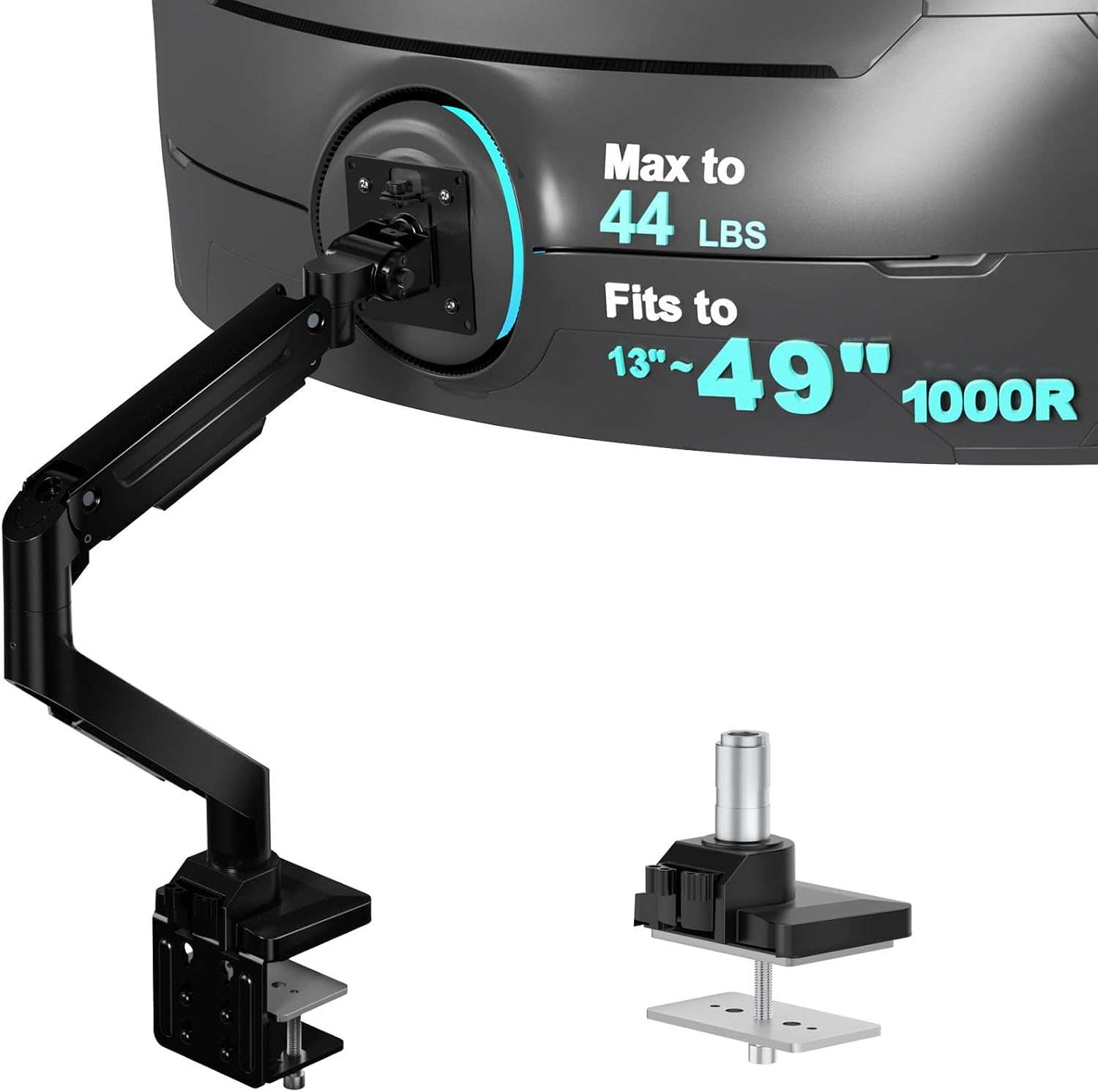
Monitor Arm Buying Guide
A heavy monitor can be difficult to position with a standard monitor arm. If the display slowly tilts downward, drifts out of position, or puts too much pressure on your desk, the problem may be an unsuitable mount rather than the monitor itself. The best monitor arm for a heavy monitor should match the screen’s actual weight, mounting pattern, depth, and the strength of your desk.
Quick Picks: Which Heavy-Duty Monitor Arm Should You Consider?
- Best premium option: Ergotron HX Desk Monitor Arm for compatible displays weighing 20–42 lb.
- Best alternative to compare: VIVO heavy-duty single-monitor arms for large displays, after checking the exact model’s load range.
- Best for very large, deep curved displays: A purpose-built heavy-duty arm with a tilt pivot rated for the monitor’s weight and depth.
- Best first step for any setup: Measure the monitor without its original stand and confirm the arm’s minimum and maximum supported weight.
Compatibility varies by model and configuration. Always verify the current manufacturer’s specifications before purchasing.
1. Best Monitor Arms for Heavy Monitors
Not every large monitor is heavy, and not every heavy monitor is especially wide. A 32-inch professional display may weigh more than a larger, lightweight screen. That is why choosing a monitor arm by screen size alone can lead to poor results.
For this guide, the most important factors are supported monitor weight, tilt performance, mounting compatibility, desk stability, and the amount of adjustment you need during the workday.
Ergotron HX Desk Monitor Arm — Best Premium Choice
The Ergotron HX Desk Monitor Arm is a strong candidate for heavy displays that exceed the practical range of many standard monitor arms. The manufacturer lists a supported monitor weight of 20–42 lb (9.1–19.1 kg), making it suitable for compatible large displays when all other requirements are met.
- Designed for compatible displays weighing 20–42 lb.
- Provides adjustable positioning and integrated cable management.
- Includes desk-clamp and grommet-mount installation options.
- Has a stated 10-year manufacturer warranty.
One important detail: the standard HX configuration is not automatically the right choice for every deep or curved monitor. Display depth can affect tilt performance. Certain heavier, deeper screens require the compatible heavy-duty tilt pivot or a bundled configuration designed for that load.
Best for: Users who want a premium adjustable arm for a heavy display and have verified the monitor’s weight, depth, and VESA pattern.
Check the manufacturer’s specifications before ordering.
VIVO Heavy-Duty Monitor Arm — Best Alternative to Compare
VIVO offers several heavy-duty monitor mounts, including models designed for ultrawide displays. Depending on the model, supported screen sizes and weight limits can differ substantially, so the exact model number matters more than the brand name.
When comparing a VIVO arm with a premium mount, check these details:
- The exact minimum and maximum supported monitor weight.
- Whether the capacity applies to flat screens, curved screens, or both.
- The supported screen depth and the arm’s tilt-adjustment range.
- The desk thickness range accepted by the clamp.
- Whether the monitor’s VESA mounting pattern is supported.
A budget-friendly arm may be a sensible choice when the monitor falls comfortably within its specified range. However, a high maximum weight rating alone does not guarantee smooth movement or stable tilt adjustment.
Best for: Buyers comparing lower-cost heavy-duty options who are willing to verify the exact model’s technical limits before purchasing.
Heavy-Duty Arms with a Specialized Tilt Pivot — Best for Deep Displays
Some heavy monitors are difficult to balance because their weight sits far away from the tilt joint. This is particularly relevant to deep curved screens, where the display’s center of gravity can put additional leverage on the mount.
In these situations, look for an arm or manufacturer-approved configuration specifically rated for the monitor’s weight and depth. A specialized heavy-duty pivot may be necessary even when the monitor’s weight appears to fit the arm’s headline capacity.
Do not assume that a mount advertised for a particular screen size can support every display of that size. The manufacturer’s stated weight range, screen-depth guidance, and mounting requirements should take priority.
Best for: Large, deep, or curved monitors that are prone to tilting forward when attached to a standard arm.
Explore Heavy-Duty Tilt Options
2. How Much Weight Can a Monitor Arm Support?
Monitor-arm weight capacity is one of the most important specifications to check before buying. A mount must support the display’s actual weight, and the weight must fall within the arm’s specified operating range.
Use the following table as a starting point for comparing products, not as a substitute for checking the manufacturer’s specifications.
| Monitor Weight Without Stand | What to Look For |
|---|---|
| Under 10 lb | A compatible standard arm with a minimum weight rating below the monitor’s weight. |
| 10–20 lb | A standard or mid-duty arm whose weight range includes the display. |
| 20–30 lb | A heavy-duty model with verified tilt and desk-mount compatibility. |
| 30–42 lb | A high-capacity arm specifically rated for the monitor’s weight and depth. |
| Over 42 lb | A mount with a documented capacity above the display’s weight, plus a suitable mounting surface. |
These bands are shopping guidelines rather than formal product classes. Some arms have different minimum and maximum loads, and a model with a high maximum capacity may not balance a lighter monitor correctly.
3. How to Choose a Monitor Arm for a Heavy Monitor
Check the Monitor’s Actual Weight
Look up the monitor’s technical specifications and find its weight without the original stand. The stand can add several pounds, so using the complete shipping weight or assembled weight can lead to the wrong decision.
If you cannot find a reliable specification, weigh the display safely before choosing a mount. Do not estimate the weight based only on screen size.
Confirm the VESA Mounting Pattern
Most monitor arms attach through a VESA mounting interface on the back of the display. Common patterns include 75 × 75 mm and 100 × 100 mm, but some larger displays use different patterns or require an adapter.
Before buying, confirm that the arm supports the monitor’s mounting pattern and that the necessary mounting hardware is included or available. A weight-compatible arm is not necessarily VESA-compatible.
Consider Screen Depth, Not Just Screen Size
A deep display can create more leverage on the tilt joint than a shallow display of similar weight. This can be especially important with curved monitors, where the screen’s depth and center of gravity affect how the mount behaves.
Check any screen-depth limits and special pivot requirements listed by the manufacturer. If your monitor is both heavy and deep, choose a configuration explicitly rated for that combination.
Inspect the Desk Before Installing the Clamp
The monitor arm is only one part of the setup. A heavy display transfers its load through the arm and clamp into the desktop. A weak, hollow, damaged, or very thin tabletop may flex or become damaged under concentrated pressure.
Before installation, check:
- Whether the tabletop material is suitable for a concentrated clamp load.
- Whether the desk thickness falls within the clamp’s specified range.
- Whether the clamp can sit flat and securely at the chosen location.
- Whether the desk edge has enough clearance for the clamp hardware.
- Whether a manufacturer-approved reinforcement plate is appropriate for your desk.
A reinforcement plate can help distribute clamp pressure on some desks, but it cannot make every weak tabletop safe. If the desk is not structurally suitable, consider a compatible wall-mounted solution attached to an appropriate structural surface, or use a stable monitor stand instead.
4. Why Does a Heavy Monitor Arm Keep Tilting Down?
If a monitor gradually tilts forward or will not stay at the desired angle, several issues may be responsible.
- The monitor exceeds the arm’s supported weight: The mount may not be designed for the display’s load.
- The monitor is below the minimum weight: Some counterbalanced arms cannot maintain position when the display is too light.
- The screen is too deep: The tilt joint may not be rated for the monitor’s leverage, even if its weight is within range.
- The tension needs adjustment: Some arms include a tension mechanism that must be set for the installed monitor.
- The hardware is installed incorrectly: Loose fasteners or incorrect assembly can affect stability.
Follow the product manual when adjusting tension or tightening hardware. Do not exceed the manufacturer’s adjustment instructions, and stop using the arm if the mount, clamp, or desktop appears damaged or unstable.
5. Gas Spring vs. Mechanical Monitor Arms
Heavy-duty monitor arms commonly use gas-spring or mechanical spring mechanisms, while some designs use other counterbalance systems. Neither mechanism is automatically better for every heavy display.
| Feature | Gas-Spring Arm | Mechanical-Spring Arm |
|---|---|---|
| Adjustment | Often designed for smooth repositioning. | Can provide controlled movement when properly balanced. |
| Weight range | Depends on the model’s spring and rated load. | Depends on the model’s spring and rated load. |
| Best buying criterion | Verified load range, depth limits, and adjustment range. | Verified load range, stability, and adjustment range. |
For a heavy monitor, the mechanism matters less than whether the specific arm is designed for the screen’s weight and dimensions. Read the specifications before choosing based on the mechanism alone.
6. When Is a Monitor Stand Better Than an Arm?
A monitor arm is useful when you want more desk space, adjustable positioning, or a flexible multi-screen layout. However, it is not always the best solution for a very heavy display.
Consider a freestanding monitor stand if:
- Your desk cannot safely support a clamp-mounted arm.
- The monitor exceeds the capacity of the available compatible arms.
- You rarely move the screen and do not need a wide adjustment range.
- You want to avoid concentrated clamp pressure on the desktop.
A stand still needs to be stable, correctly sized, and rated for the monitor. If you choose a wall mount instead, make sure the mounting hardware is appropriate for the wall structure and the display’s weight.
7. Frequently Asked Questions
Can a regular monitor arm hold a heavy monitor?
It can if the monitor’s actual weight falls within the arm’s supported range and the display’s dimensions, VESA pattern, and mounting surface are compatible. If the screen exceeds the specified limits, choose a properly rated heavy-duty model instead.
Is a monitor arm’s maximum weight capacity enough to determine compatibility?
No. You should also check the minimum supported weight, VESA pattern, screen depth, tilt-pivot requirements, desk-clamp range, and mounting-surface suitability.
Why does my monitor arm sag even though the weight is within its rating?
The display may be too deep for the tilt mechanism, the tension may need adjustment, or the arm may have been installed incorrectly. Consult the manual and verify the exact load and depth specifications for your model.
Do I need a special monitor arm for a curved monitor?
Not always. The deciding factors are the display’s weight, depth, VESA pattern, and the arm’s compatibility requirements. Some heavy or deep curved displays need a specialized tilt pivot or a mount specifically designed for them.
Can I install a heavy-duty monitor arm on any desk?
No. The desk must have a suitable structure, thickness, and mounting location. Thin, hollow, glass, damaged, or unsupported surfaces may be unsuitable for clamp mounting. Follow the desk and arm manufacturers’ installation guidance.
Final Verdict: Choose by Weight, Depth, and Desk Compatibility
The best monitor arm for a heavy monitor is not necessarily the one with the largest advertised screen-size limit. It is the one that safely supports your display’s actual weight, accommodates its depth and VESA pattern, and attaches securely to your desk.
The Ergotron HX is worth considering for compatible displays in its specified 20–42 lb range. VIVO and other heavy-duty manufacturers offer alternatives, but compare the exact model specifications rather than relying on brand names or broad marketing claims.
Before ordering, confirm four things: the monitor’s weight without its stand, the arm’s minimum and maximum load, the VESA and depth requirements, and the desk’s suitability for the mounting hardware.
Compare Heavy-Duty Monitor Arms on Amazon
Related Monitor Arm Guides
Disclosure: SitBetterLab may earn a commission from qualifying purchases made through affiliate links. Product specifications and availability may change; verify compatibility with the manufacturer before purchasing.