SITBETTERLAB MONITOR ARM GUIDE
Best Monitor Arms for 49-Inch Ultrawide Monitors
A 49-inch ultrawide needs more than a regular monitor arm. Compare heavy-duty mounts, weight limits, tilt stability, VESA compatibility, and desk installation options before mounting your large curved display.
A 49-inch ultrawide monitor can replace a dual-monitor setup, create an immersive gaming experience, or provide extra workspace for video editing and multitasking. However, its size and weight make choosing a suitable mount more complicated than choosing an arm for a standard 24- or 27-inch display.
The right 49-inch monitor arm must support the monitor’s actual weight, accommodate its mounting pattern, and keep the screen stable when tilted or extended. Curved super-ultrawide monitors introduce another consideration: the depth of the housing can place additional demands on the tilt mechanism.
This guide focuses on heavy-duty single-monitor arms for large ultrawide displays, including the Samsung Odyssey G9 family and compatible 49-inch productivity monitors. Rather than relying on screen-size claims alone, use the manufacturer’s specifications to determine whether a particular arm suits your display.
Quick Picks
- Best overall for heavy 49-inch curved displays: Ergotron HX Desk Monitor Arm with Heavy-Duty Tilt Pivot, when the monitor meets the specified weight and depth requirements.
- Best alternative to compare: VIVO heavy-duty single monitor arms, provided the exact model supports your monitor’s weight, width, depth, and VESA pattern.
- Best budget-oriented option to investigate: WALI heavy-duty single monitor arms, after checking the precise model’s compatibility limits.
- Best for a permanent workstation: A compatible heavy-duty wall mount, if the wall structure and mounting hardware are suitable for the display.
These are options to evaluate, not a claim that every model from each brand supports every 49-inch monitor. Check the exact model specifications before purchasing.
Affiliate disclosure: SitBetterLab may earn a commission from qualifying purchases made through links on this page, at no additional cost to you.
What Makes a 49-Inch Monitor Arm Different?
A 49-inch ultrawide is much wider than a conventional desktop monitor. Many models also have a substantial curved housing, which can change how the monitor’s weight acts on the arm’s joints.
Three specifications deserve particular attention:
- Weight capacity: The arm must support the display’s weight without its original stand, within the manufacturer’s stated load range.
- Tilt capacity: The tilt joint must hold the monitor at your chosen angle without the screen gradually tipping forward or downward.
- Supported monitor depth: The arm must be suitable for the depth and curvature of your display, not just its diagonal measurement.
These requirements are especially important for large curved gaming monitors. A mount may advertise a high maximum load but still be unsuitable if its tilt mechanism is not designed for the monitor’s depth or center of gravity.
Best Monitor Arms for 49-Inch Ultrawide Monitors
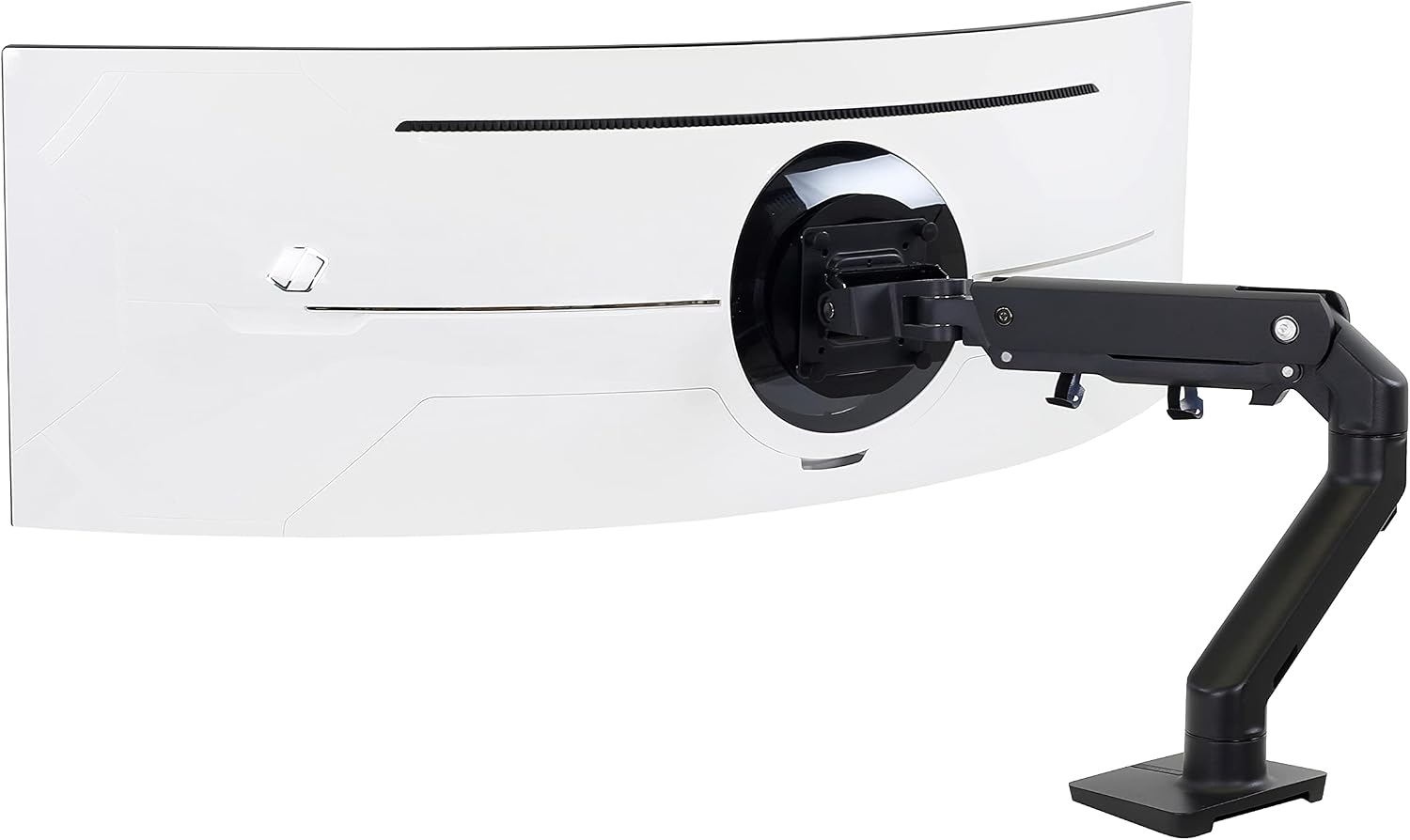
1. Ergotron HX Desk Monitor Arm with Heavy-Duty Tilt Pivot
Best for: Premium 49-inch curved monitors that fall within the HX system’s specified weight and depth limits.
The Ergotron HX is a strong starting point when shopping for a heavy-duty monitor arm for a 49-inch display. Its manufacturer lists support for screens up to 49 inches and a weight range of 20–42 pounds for the standard HX arm configuration. The compatible Heavy-Duty Tilt Pivot is particularly important for certain deep, curved displays.
Ergotron specifically identifies its HX arm with the Heavy-Duty Tilt Pivot as a solution for curved 49-inch monitors such as the Samsung Odyssey G9. The accessory is designed to address the additional demands placed on the tilt joint by large, deep displays.
Why consider it:
- Designed for heavy monitors rather than lightweight office displays.
- Adjustable positioning helps reclaim desktop space.
- The compatible heavy-duty pivot accommodates certain large, curved screens.
- The manufacturer publishes detailed compatibility and load specifications.
What to check: Do not assume the standard tilt joint is suitable for every 49-inch curved monitor. Confirm whether the Heavy-Duty Tilt Pivot is required for your monitor’s depth and weight. Also check the monitor’s VESA pattern and the arm’s minimum supported load.
View the official Ergotron HX specifications
2. VIVO Heavy-Duty Single Monitor Arm
Best for: Buyers comparing heavy-duty alternatives at different price points.
VIVO offers a range of single-monitor mounting products, including heavy-duty arms intended for larger displays. It is worth comparing the brand when the Ergotron HX exceeds your budget, but you should select by exact model number rather than by brand name alone.
For a 49-inch ultrawide, look for a model that explicitly supports your screen size, weight, depth, and VESA mounting pattern. Some large displays require a mounting adapter, and some arms designed for ordinary ultrawide monitors may not support the demands of a heavy 49-inch curved panel.
Why consider it:
- Multiple mounting configurations may suit different desk layouts.
- A useful brand to include when comparing heavy-duty desk mounts.
- Potentially more affordable alternatives may be available depending on the model.
What to check: Verify the exact model’s maximum and minimum load, supported screen dimensions, tilt mechanism, clamp requirements, and included VESA hardware. Do not buy a VIVO arm solely because its listing uses the words “heavy duty.”
Compare VIVO Monitor Arms on Amazon →
3. WALI Heavy-Duty Single Monitor Arm
Best for: Budget-conscious buyers who want to investigate lower-cost mounting options.
WALI is another brand to consider when comparing heavy-duty monitor mounts. Its product range includes different arm designs and load ratings, so compatibility must be established using the specifications for the exact model you intend to purchase.
For a 49-inch ultrawide, the key question is whether the mount can support the actual monitor weight while maintaining stable tilt adjustment. The width of the screen also makes the arm’s reach, joint design, and desk-clamp stability important.
Why consider it:
- Worth comparing if you are trying to keep the mounting budget down.
- Different designs may suit different desk and positioning requirements.
- Provides another option to investigate alongside premium heavy-duty arms.
What to check: Do not assume a WALI model designed for a 35-inch display is suitable for a 49-inch screen. Confirm the stated screen-size limit, supported weight, monitor depth, tilt capability, and VESA compatibility before ordering.
Compare WALI Monitor Arms on Amazon →
4. Heavy-Duty Wall-Mounted Monitor Arm
Best for: Permanent workstations where desk mounting is impractical.
A wall-mounted monitor arm can be a useful alternative if your desk has a thick rear apron, insufficient clamp clearance, or a surface that is unsuitable for conventional desk mounting.
For a large curved monitor, however, wall mounting is not automatically more stable. The arm, tilt joint, wall bracket, anchors, and supporting wall structure must all be suitable for the complete installation.
Before purchasing, confirm that the exact mount supports the monitor’s weight and depth, that the VESA interface matches, and that the mounting hardware is appropriate for the wall construction. For a heavy display, secure attachment to suitable structural support is essential.
Compare Heavy-Duty Wall Mounts →
How Much Weight Capacity Do You Need?
The weight of your particular monitor matters more than its advertised screen size. Two 49-inch displays can have different weights because of their panel design, housing, and built-in components.
Use the following table as a starting point when filtering products. These are shopping guidelines, not a substitute for the manufacturer’s approved load range.
| Monitor weight | What to prioritize |
|---|---|
| Under 20 lb | A compatible arm whose minimum and maximum load ratings include your monitor’s weight. |
| 20–28 lb | A heavy-duty arm with adequate load capacity and a tilt mechanism suited to the screen’s depth. |
| 28–35 lb | A high-capacity arm with verified compatibility for large curved monitors. |
| 35–42 lb | A model specifically rated for the monitor’s weight and dimensions, with suitable tilt hardware. |
These ranges do not mean that every monitor in a given weight category requires the same arm. Check the exact model’s permitted load range, including the minimum weight. A monitor that falls below a gas-spring arm’s minimum rating may rise unexpectedly or fail to remain in position.
Why the Tilt Mechanism Matters for Curved Ultrawide Monitors
A large curved monitor extends farther forward and backward than many conventional flat displays. Depending on its design and mounting position, this depth can put additional leverage on the tilt joint.
That is why maximum weight capacity alone does not tell you everything about compatibility. An arm may support the monitor’s static weight but still be unsuitable for the depth or curvature of the display.
When shopping, look for:
- A tilt mechanism explicitly rated for the monitor’s weight and depth.
- Manufacturer guidance for deep or aggressively curved displays.
- A secure VESA connection and the correct mounting hardware.
- Adjustment instructions that explain how to set the joint tension correctly.
For compatible Samsung Odyssey G9 models, the Ergotron HX with the Heavy-Duty Tilt Pivot is a particularly relevant option because Ergotron specifically identifies the configuration for large curved displays.
VESA Compatibility: What to Check Before Buying
VESA compatibility is another essential part of choosing a 49-inch monitor arm. Many monitor arms support 75 × 75 mm or 100 × 100 mm mounting patterns, but you should never assume that every ultrawide uses the same interface.
Some large monitors use a recessed mounting area or require a model-specific adapter. The correct adapter must fit the display and be approved for use with the intended mounting system.
Before ordering, confirm the following:
- The VESA pattern listed in your monitor’s official specifications.
- Whether the monitor requires an adapter or special mounting plate.
- Whether the arm includes the required hardware.
- Whether the complete mounting assembly supports the display’s weight.
If you own a Samsung Odyssey G9, Neo G9, or OLED G9, check the exact model number rather than relying on the family name. Mounting requirements can differ between generations and variants.
Desk Clamp, Grommet Mount, or Wall Mount?
| Mounting type | Advantages | Limitations |
|---|---|---|
| Desk clamp | Usually straightforward to install and relocate. | Requires a compatible desk edge, thickness, and underside clearance. |
| Grommet mount | Can provide a direct mounting point through a suitable desk opening. | Requires a compatible opening and suitable desktop construction. |
| Wall mount | Avoids attaching the mount to the desk itself. | Requires suitable wall support, correct anchors, and careful installation. |
For most home-office setups, a compatible desk clamp is the simplest starting point. A grommet mount may work better when the desk already has a suitable mounting hole. A wall mount is worth considering for a permanent workstation when the wall structure and installation requirements are appropriate.
Regardless of the mounting method, inspect the desk or wall before installation. A heavy monitor on an extended arm creates leverage, so the mounting surface must be able to handle the load safely.
How to Install a 49-Inch Monitor Arm Safely
A large ultrawide is awkward to handle during installation. Following the mount manufacturer’s instructions helps reduce the risk of damaging the display or the mounting hardware.
- Confirm compatibility first. Check the monitor weight without its original stand, VESA pattern, dimensions, and the arm’s load range.
- Inspect the desk. Make sure the mounting area is structurally suitable and that the clamp or grommet hardware fits correctly.
- Install the base securely. Follow the manufacturer’s instructions for tightening the clamp or fastening the wall bracket.
- Attach the VESA plate. Use the correct screws and spacers. Do not force screws that are too long or otherwise unsuitable.
- Lift the monitor carefully. A second person can help manage the size and weight of a large curved display.
- Adjust the tension gradually. Follow the manufacturer’s instructions for the tilt joint and gas spring. Do not exceed the specified adjustment range.
- Check movement and cables. Move the monitor slowly through its intended range and confirm that cables do not snag, pull, or become pinched.
If the screen gradually tilts forward, the mount feels unstable, or the desk flexes under load, stop using the setup until you have checked the compatibility, mounting hardware, and installation.
Common Mistakes When Buying a 49-Inch Monitor Arm
Choosing by Screen Size Alone
A product advertised for 49-inch monitors may not support every monitor of that size. Verify the weight, depth, mounting interface, and any model-specific restrictions.
Ignoring the Minimum Weight Rating
Some heavy-duty gas-spring arms are designed for a relatively heavy minimum load. A lighter monitor may not stay in place even though it is below the maximum capacity.
Forgetting the Curved Screen’s Depth
The tilt joint needs to accommodate the monitor’s shape as well as its weight. This is especially important for deeply curved screens.
Assuming Every VESA Adapter Is Universal
Adapters vary by monitor and mount. Confirm the required pattern, screw specifications, and compatibility with the arm before installing the display.
Mounting on an Unsuitable Desk
A heavy-duty arm cannot compensate for a weak desktop or an incorrectly installed clamp. Check the surface construction, clamp clearance, and permitted mounting thickness.
Frequently Asked Questions
What is the best monitor arm for a 49-inch ultrawide?
The Ergotron HX Desk Monitor Arm with the compatible Heavy-Duty Tilt Pivot is a leading option to evaluate for heavy 49-inch curved displays. Confirm the exact monitor’s weight and depth against the manufacturer’s specifications before purchasing.
Can the Ergotron HX hold a Samsung Odyssey G9?
Ergotron specifically identifies the HX with the Heavy-Duty Tilt Pivot as suitable for compatible 49-inch curved displays such as the Samsung Odyssey G9. Check your exact G9 model’s weight and depth, and confirm the correct pivot configuration.
How much weight capacity should a 49-inch monitor arm have?
The arm’s permitted load range must include your monitor’s actual weight without its original stand. Also check the minimum supported weight and the suitability of the tilt mechanism for the display’s depth. A higher maximum rating alone does not guarantee compatibility.
Do all 49-inch ultrawide monitors use VESA 100 × 100 mm?
No. VESA patterns and mounting arrangements vary by monitor model. Check the manufacturer’s specifications and determine whether a special adapter is required.
Can I use a regular monitor arm for a 49-inch curved monitor?
Only if the particular arm is explicitly compatible with the monitor’s weight, dimensions, depth, and mounting pattern. Many standard arms are intended for lighter displays and may not provide the necessary tilt stability for a large curved ultrawide.
Is a desk-mounted or wall-mounted monitor arm better?
A desk-mounted arm is usually easier to install and relocate if your desk supports the required mounting method. A wall-mounted arm can keep the desk clear, but it requires a suitable structural attachment and careful installation.
Will a monitor arm stop my ultrawide from wobbling?
A suitable arm can help position the monitor securely, but wobble may also come from the desk, clamp, wall attachment, or arm joints. A heavy monitor mounted on a flexible desk may still move during typing. Check the complete installation rather than blaming the arm alone.
Final Verdict: Which 49-Inch Monitor Arm Should You Choose?
For a large, curved 49-inch ultrawide, prioritize compatibility and tilt stability over the lowest price. The Ergotron HX with the appropriate Heavy-Duty Tilt Pivot is a strong premium choice for supported displays, particularly when the monitor’s depth and weight make ordinary arms unsuitable.
If your budget is tighter, compare compatible VIVO and WALI heavy-duty models using their exact specifications. Do not purchase based on brand, screen size, or maximum load alone.
Before you order, verify four things: monitor weight, VESA compatibility, tilt-joint suitability, and desk or wall mounting requirements. Getting these details right will help you choose a mount that fits your ultrawide display and your workspace.
Explore More Monitor Setup Guides
Continue building a more comfortable workstation with these related guides:
1 thought on “Best Monitor Arms for 49-Inch Ultrawide Monitor”