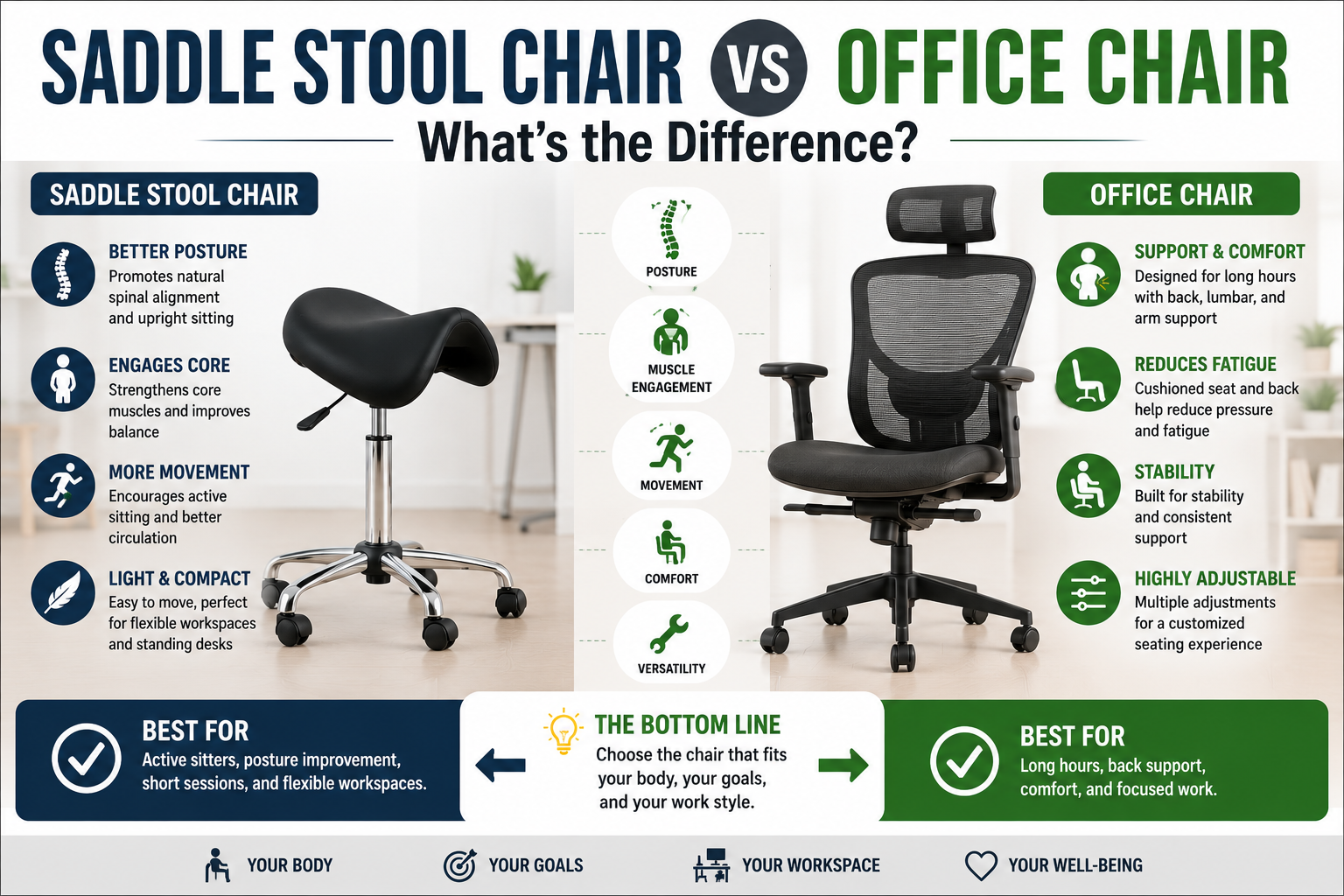
Choosing between a saddle chair vs office chair comes down to how you work, how you move, and how much support you need throughout the day. A saddle chair has a raised, contoured seat that encourages a more open hip position and can make it easier to sit close to a work surface. A conventional ergonomic office chair usually offers a backrest, a larger seat, and more options for supported desk work.
Both designs can be useful. Saddle chairs are worth considering for close-up tasks at grooming tables, examination stations, and elevated work surfaces. Ergonomic office chairs are often more versatile for computer work, meetings, reading, and administrative tasks. This guide compares their advantages, limitations, comfort, mobility, and key buying considerations so you can choose the right seating for your workspace.
Saddle Chair vs Office Chair: Quick Answer
You work close to a task surface
- You frequently lean toward a grooming or examination table.
- You need to pivot or reposition around a workstation.
- You prefer a raised, contoured seat.
- Your work surface requires a higher seating position.
You spend hours at a desk
- You do extended computer or administrative work.
- You prefer a conventional backrest and larger seat.
- You want adjustable lumbar support and armrests.
- You regularly recline or change your sitting position.
Neither chair type is automatically more ergonomic. Proper seat height, a comfortable working position, adequate support, and the ability to change positions matter more than the label on the chair.
In This Guide
Saddle Chair vs Office Chair: Key Differences
The most important differences are seat shape, back support, height range, movement, and how easily each chair fits your daily tasks. Use this comparison as a starting point rather than a guarantee of comfort.
Saddle Chair
Raised, contoured seat
Seat design: Saddle-shaped, often with a narrower profile.
Hip position: Encourages a more open hip angle for many users.
Back support: May have no backrest or an optional one.
Movement: Can make pivoting and close access easier.
Typical fit: Clinical tasks, grooming, laboratories, and elevated work surfaces.
Ergonomic Office Chair
Conventional seat and backrest
Seat design: Wider seat, usually flat or gently contoured.
Hip position: Depends on seat height, depth, and how you sit.
Back support: Usually includes a backrest, with lumbar support on many models.
Movement: May offer recline, tilt, and armrest adjustments.
Typical fit: Computer work, writing, meetings, and administrative tasks.
| Feature | Saddle Chair | Office Chair |
|---|---|---|
| Seat shape | Raised and contoured | Wider and generally flatter |
| Backrest | Optional on some models | Usually included |
| Seat height | Often designed for higher work surfaces | Typically suited to desk-height work |
| Armrests | Less common | Available on many models |
| Recline | Limited on many models | Available on many models |
| Close-up tasks | Often convenient | Depends on chair size and workstation |
| Extended desk work | May suit some users | Often the more versatile option |
What Is a Saddle Chair?
A saddle chair is a seat with a raised, contoured shape inspired by a riding saddle. Depending on the design, the seat may have one continuous cushion or a split shape that allows more room between the thighs. Many models use a height-adjustable central column and a five-star base with casters.
Compared with a conventional chair, a saddle seat often positions the thighs farther apart and encourages a more open angle between the torso and thighs. Some users find this position helpful when working close to a counter, treatment table, or other elevated surface. However, the seat shape does not guarantee better posture, and an unsuitable height or seat width can create discomfort.
Common Saddle Chair Features
- Contoured seat: Creates a different sitting position from a flat office chair.
- Height adjustment: Helps match the seat to the user and work surface.
- Optional backrest: Available on some models for users who want additional support.
- Rolling base: Makes repositioning around a workstation easier when the floor and casters are compatible.
- Different seat widths: Can affect thigh spacing, pressure, and comfort.
- Cleanable upholstery: Useful in workplaces where frequent cleaning is required.
If you want to compare saddle-seat designs, visit our Saddle Stools guide. It is a useful starting point for comparing seat shapes, backrest options, and adjustable-height models.
What Is an Ergonomic Office Chair?
An ergonomic office chair is designed to support desk-based work while allowing the user to adjust the seating position. Common features include a backrest, seat-height adjustment, a swivel base, and casters. Depending on the model, you may also find adjustable lumbar support, seat depth, armrests, recline tension, and tilt controls.
These features can be useful when your day involves typing, reading, video calls, writing, or switching between different computer tasks. A suitable backrest can support the torso, while adjustable armrests may help you position your arms comfortably during keyboard and mouse use.
Not every chair marketed as ergonomic offers the same adjustments. A basic office chair may have little more than seat-height adjustment, while a higher-end model may provide several ways to customize the fit. The best choice depends on your body dimensions, desk height, tasks, and preferences.
If you are primarily furnishing a computer workstation, explore our Best Chairs guides for more office and ergonomic seating options.
Saddle Chair: Advantages and Disadvantages
Potential Advantages
- Can make it easier to sit close to a work surface.
- Encourages a more open hip position for many users.
- A compact design can fit into smaller work areas.
- Can be convenient for frequent pivoting and repositioning.
- Height-adjustable models can suit some elevated workstations.
Potential Disadvantages
- The seat may feel unfamiliar at first.
- Some users experience uncomfortable pressure on the thighs or seat area.
- Many models offer limited back support or no backrest.
- The higher seat may require a footrest or a compatible workstation setup.
- The shape may not suit every body type or long sitting session.
A saddle chair is not automatically a better choice for posture or back comfort. If the seat is too high, too wide, too narrow, or poorly matched to the task, it can be less comfortable than a conventional chair. A return policy is valuable because seat fit is difficult to judge from photographs alone.
Office Chair: Advantages and Disadvantages
Potential Advantages
- A backrest supports a more conventional seated position.
- Many models offer adjustable lumbar support and seat depth.
- Armrests can help support the arms during desk work.
- Recline and tilt features allow changes in sitting position.
- Often versatile for computer and administrative work.
Potential Disadvantages
- A large seat or backrest can make close access to a work surface less convenient.
- Basic models may lack useful ergonomic adjustments.
- Armrests can interfere with some counters or treatment tables.
- A poorly fitted seat can create pressure behind the knees or leave the feet unsupported.
- A supportive chair still does not eliminate the need to change positions.
Which Chair Is Best for Your Work?
For Pet Grooming and Veterinary Tasks
A saddle chair can be worth considering if you regularly work close to a grooming table or examination surface. Its seat profile may make it easier to move nearer to the task and pivot toward nearby equipment. Check the height range, caster compatibility, seat comfort, and cleaning requirements before choosing a model.
For Computer and Administrative Work
A conventional ergonomic office chair is often the more versatile option for extended typing, charting, billing, meetings, and other desk tasks. A suitable backrest, adjustable seat depth, and properly positioned armrests can make it easier to configure the workstation around your needs.
For a Standing Desk
A height-adjustable saddle stool or saddle-style chair may work well with a raised desk, provided its height range matches the desk and your body. A conventional drafting chair is another option. Check whether your feet can be supported and whether the keyboard and monitor remain at comfortable heights.
For Mixed Workdays
If you alternate between hands-on work and computer tasks, one chair may not be ideal for every station. A saddle chair at a treatment or grooming area and a conventional ergonomic chair at a desk can offer more flexibility when the budget and available space allow.
Saddle Chair vs Office Chair: Models to Compare
These examples represent different seating designs rather than a definitive ranking. Check the exact model, dimensions, available adjustments, seller details, and current warranty before buying.
Bambach Saddle Seat
Worth comparing if you want a purpose-designed saddle seat for close-up professional tasks.
Check: exact configuration, seat height, base, and seller availability.
Salli Saddle Chair
A split-seat design to investigate if you prefer a saddle chair with a different thigh-contact layout.
Check: seat width, split-seat design, height range, and accessories.
HÅG Capisco
A distinctive saddle-style chair to consider for adjustable workstations and varied sitting positions.
Check: model number, lift height, seat configuration, and accessories.
Steelcase Leap
An ergonomic office chair option to compare if back support and desk-work adjustments are priorities.
Check: version, seat depth, lumbar adjustment, armrests, and seller condition.
Product names and search links are provided to help you compare listings. They do not imply that every model is suitable for every user or available directly from the manufacturer through Amazon.
How to Choose the Right Chair
1. Measure Your Work Surface
Start with the height of your desk, counter, grooming table, or examination surface. Compare it with the chair’s published seat-height range. A chair that is too low may encourage reaching downward; one that is too high may leave your feet unsupported or force your shoulders upward.
2. Check Seat Fit and Pressure
Saddle seats vary in width, contour, firmness, and split-seat design. Look for a shape that supports you without uncomfortable pressure. Office chairs also require a suitable seat depth and width so the seat does not press excessively behind the knees.
3. Decide How Much Back Support You Need
If you often recline, lean back between tasks, or spend hours at a computer, a conventional office chair with a suitable backrest may be a better fit. If you prefer an open working position, a saddle chair may be worth testing. Some saddle chairs include backrests, but their support and adjustability differ by model.
4. Consider Armrests and Desk Clearance
Armrests can support your arms during keyboard use, but they can also prevent a chair from moving close to some desks or work surfaces. For close-up tasks, check the clearance around the workstation. For desk work, make sure the armrests can be adjusted to suit the desk height.
5. Match the Casters to Your Floor
Caster design affects how a chair moves on carpet, hard floors, and floor mats. If you work in a grooming salon or clinic, consider cleaning requirements and whether the chair can roll safely on the flooring you use. Do not assume all casters are suitable for every surface.
6. Check Cleaning and Maintenance Needs
For professional environments, look for upholstery that can be cleaned according to the manufacturer’s instructions. Confirm which cleaning products are compatible with the material. Also check whether the manufacturer or seller offers replacement parts such as casters, cylinders, or seat components.
7. Review the Return Policy
A saddle chair can feel very different from a standard office chair. If you are shopping online, review the return window, return shipping costs, warranty, and any restrictions before ordering. A chair that looks suitable in a product photo may not fit your body or workflow in practice.
Ergonomic Setup Tips for Either Chair
The chair is only one part of your workstation. Small adjustments to your seat, desk, monitor, and tools can make the working position more comfortable.
- Set the seat height first. Aim for a stable position that lets you work without repeatedly raising your shoulders or reaching down.
- Support your feet. If your feet do not rest securely on the floor when using a higher seat, consider a suitable footrest or a different chair configuration.
- Keep frequent-use items nearby. Arrange tools, keyboard, mouse, and supplies to reduce unnecessary reaching and twisting.
- Change position regularly. Alternate between sitting, standing, and walking when your work permits rather than trying to hold one ideal posture all day.
- Adjust for each task. A position that works for close-up hands-on work may not be the best position for typing or reading.
- Pay attention to discomfort. Persistent numbness, sharp pain, or worsening symptoms are reasons to stop and reassess the chair and workstation setup.
If you are exploring other seating styles for an adjustable workstation, our guide to active sitting office chairs explains another approach to changing how you sit during desk work.
Saddle Chair vs Office Chair: FAQ
Is a saddle chair better than an office chair?
Not for everyone. A saddle chair can suit close-up tasks and elevated work surfaces, while an ergonomic office chair often provides more back support and adjustment options for desk work. The better choice depends on your body, workstation, and daily tasks.
Are saddle chairs good for long hours?
Some people use saddle chairs comfortably for extended work, while others prefer a conventional chair with a backrest and a larger seat. Seat fit, height, task requirements, and opportunities to change position all matter. Try a saddle chair gradually rather than assuming it will be comfortable all day.
Do saddle chairs improve posture?
A saddle seat encourages a different hip and sitting position, which some users find helpful. However, it does not guarantee better posture or prevent discomfort. Correct height, a suitable fit, workstation layout, and regular movement remain important.
Can you use a saddle chair at a regular desk?
Yes, if the chair’s height range and seat design suit your desk and body. Some saddle chairs work well at adjustable or standing desks, but a seat that is too high may leave your feet unsupported or put your keyboard and monitor at uncomfortable heights.
Can a saddle chair help with back pain?
Changing seat shape or working position may make sitting more comfortable for some people, but a saddle chair is not a treatment for a back condition. If pain is persistent, severe, or worsening, seek advice from an appropriately qualified healthcare professional rather than relying on a chair alone.
Are saddle chairs available with backrests?
Yes. Some saddle chairs have an integrated or optional backrest. Check the exact model because backrest shape, adjustability, and support vary. A backrest may be useful for some tasks, although it can change how freely you move around the workstation.
Are saddle chairs suitable for pet groomers and veterinarians?
They can be a useful option when work involves sitting close to grooming tables or examination surfaces. Before buying, confirm that the seat height matches the workstation, the casters suit the floor, and the upholstery can be cleaned appropriately. A conventional office chair may still be more comfortable for extended computer work.
Should I buy both a saddle chair and an office chair?
If your workday involves distinct hands-on and computer-based tasks, using different chairs at different stations may be practical. If space or budget is limited, prioritize the chair that best suits your most frequent task and look for a model that fits your other work requirements reasonably well.
Final Verdict: Saddle Chair or Office Chair?
The saddle chair vs office chair decision should be based on your working position rather than a claim that one design is universally better.
Choose a saddle chair if you frequently work close to an elevated surface, need to pivot around a workstation, and find a contoured seat comfortable.
Choose an ergonomic office chair if you spend much of the day at a computer and value a backrest, armrests, recline, and adjustable seat depth.
For mixed workdays, consider separate seating for hands-on tasks and desk work when practical. Whichever design you choose, prioritize proper fit, workstation height, comfort, and regular changes in position.
Explore More Seating Guides
Disclaimer: This article provides general ergonomic and product-selection information, not medical advice. Chair comfort and fit vary by individual. Neither a saddle chair nor an office chair can be assumed to prevent or treat a medical condition. Seek appropriate professional guidance for persistent or worsening pain, numbness, weakness, or other concerning symptoms.