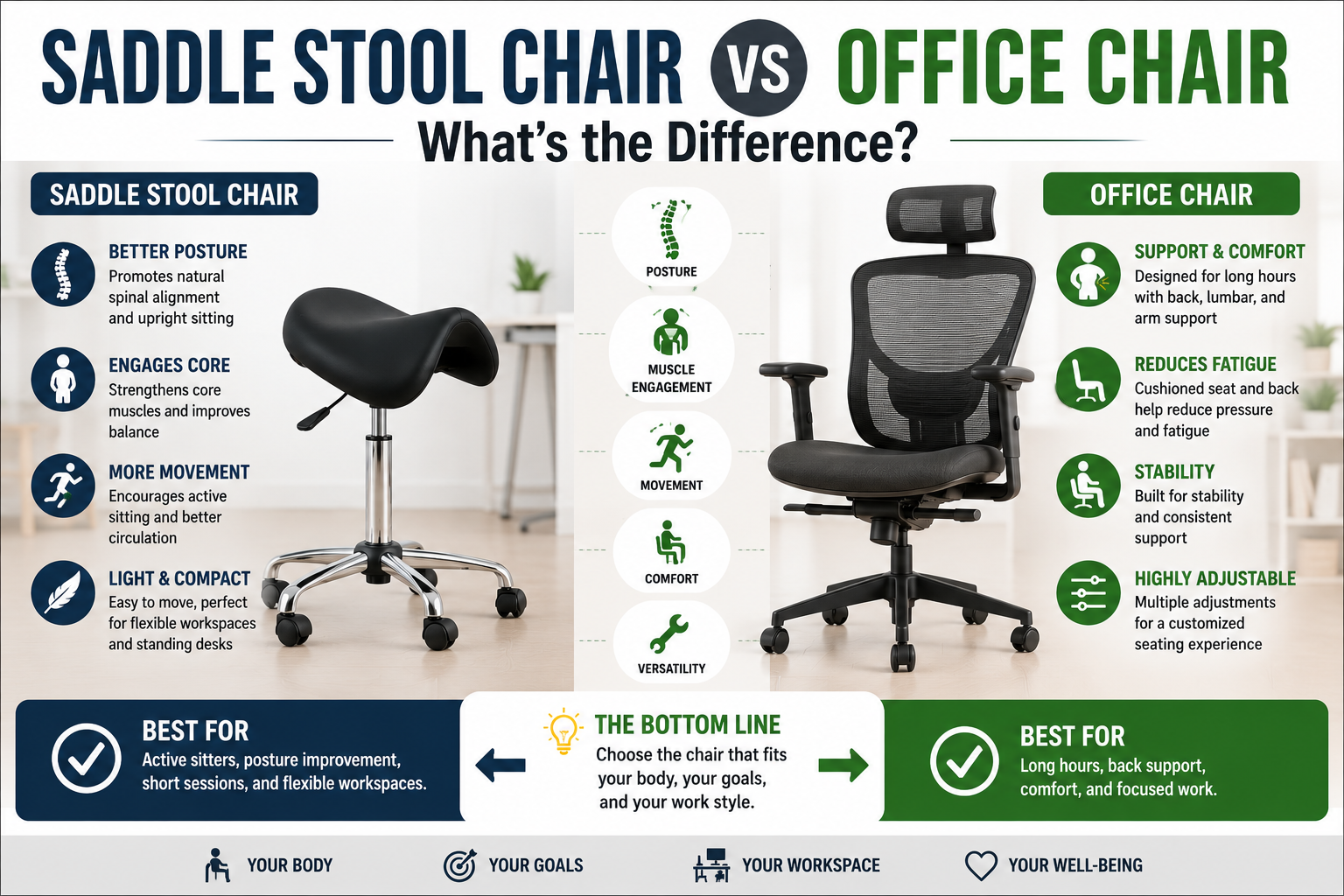
You have seen them in dental offices, hair salons, and increasingly in home workspaces: the unusual saddle‑shaped stool that looks nothing like a traditional office chair. Perhaps you have wondered if it is a gimmick or a genuine upgrade for your back. The difference between a saddle stool and a standard office chair is not just about appearance — it is a fundamental shift in how your pelvis, spine, and muscles work together while you sit.
After researching the biomechanics, testing dozens of models, and analyzing user experiences from people who have made the switch, this guide breaks down everything you need to know. You will learn how each chair affects your posture, which one is better for your specific type of work, and whether you should consider adding a saddle stool to your workspace in 2026.
Quick Answer: What Is the Main Difference?
The core difference is hip angle and pelvic tilt. A standard office chair forces your hips into a 90‑degree angle, which rolls your pelvis backward (posterior pelvic tilt), flattens your lumbar curve, and increases pressure on your spinal discs. A saddle stool opens your hip angle to 120‑135°, tilts your pelvis forward (anterior pelvic tilt), and preserves your spine’s natural S‑curve — the same neutral posture you have when standing.
This difference affects everything: where your body weight rests, how your core muscles engage, and how long you can sit before fatigue or pain sets in. Neither is universally “better” — each excels in different work scenarios.
Biomechanics: How Each Chair Affects Your Spine
The 90‑Degree Problem of Standard Office Chairs
When you sit on a traditional office chair with your thighs parallel to the floor, your hips are forced into a 90‑degree angle. This mechanically rolls your pelvis backward into a posterior pelvic tilt, which flattens your lower back into a damaging C‑curve. This C‑slump dramatically increases anterior disc compression, stretches spinal ligaments, and leads to chronic back pain. Research shows that sitting in a poorly designed chair can put up to 90% more pressure on your spine than standing.
Standard office chairs attempt to compensate for this problem with added lumbar support cushions. But these cushions are passive — they push into your back only when you are sitting perfectly upright. As soon as you lean forward to type or recline to think, the lumbar support loses contact, creating a painful gap. Your pelvis remains in posterior tilt, and your spine stays flattened.
The Open Hip Angle of a Saddle Stool
A saddle stool positions your thighs at a downward slope (roughly 45°), with your knees lower than your hips. This geometry opens your hip angle to the natural 120–135° range, which tilts your pelvis forward (anterior pelvic tilt) and restores your lumbar curve. The result is a seated posture that mirrors your standing posture — often called “supported standing.”
To maintain proper lumbar lordosis, an angle of 135° between the hip and trunk is required — a position that a saddle chair naturally achieves. The wider hip abduction (knees spread apart) provides greater spinal stability and postural support. Try it yourself: sit with your knees together and see how far you can slump. Now sit with your knees apart and try to slump again. The difference is noticeable.
Comparison Table: Saddle Stool vs Office Chair
| Feature | Saddle Stool | Office Chair |
|---|---|---|
| Hip Angle | Open (120–135°); thighs slope downward | 90°; thighs parallel to floor |
| Pelvic Tilt | Anterior (forward) — maintains natural lumbar curve | Posterior (backward) — flattens lumbar curve |
| Spinal Curve | Preserves natural S‑curve (lordosis) | Flattens into C‑curve without lumbar support |
| Core Engagement | High — you must actively stabilize your torso | Low — chair does the work (passive sitting) |
| Back Support | Most models are backless; optional backrests available | High backrest with adjustable lumbar support |
| Armrests | Rarely included | 4D adjustable armrests common on premium models |
| Freedom of Movement | High — swivel, reach sideways, “walk around” while seated | Moderate — backrest and armrests can restrict movement |
| Seat Material | PU leather or memory foam; minimal to moderate padding | Mesh, fabric, or leather; thick foam cushion |
| Adjustability | Height, sometimes seat tilt; limited backrest options | Height, seat depth, backrest angle, lumbar depth, armrests |
| Price Range (Quality) | $100–500 | $300–2,000+ |
| Best For | Active tasks, forward‑leaning work, standing desks, healthcare, creative work | Passive, long‑duration desk work, meetings, typing, programming |
Advantages and Disadvantages of Each
Office Chair: Pros and Cons
✅ Pros:
- Passive support for long hours: The high backrest and lumbar support unload the weight of your torso, reducing muscle fatigue during static tasks like spreadsheet work or customer support calls.
- Extensive adjustability: Premium office chairs offer seat depth adjustment, 4D armrests, headrest angle, and lumbar firmness — allowing you to dial in a custom fit for your body.
- Armrests for shoulder relief: Properly positioned armrests keep your shoulders relaxed and wrists straight, reducing upper body strain during typing.
- Recline for breaks: The ability to lean back and lock at different angles allows you to change positions throughout the day, reducing static disc pressure.
- Wide variety of materials: Choose between breathable mesh, plush fabric, or premium leather to match your comfort and aesthetic preferences.
- Familiar design: No learning curve; most people already know how to adjust and use a standard office chair.
❌ Cons:
- Flattens lumbar curve: The 90° hip angle rolls your pelvis backward, flattening your lower back — even with lumbar support, you must actively avoid slouching.
- Lumbar gap when leaning forward: As soon as you lean forward to type, your back loses contact with the backrest, and the lumbar support becomes useless. Your spine then assumes a damaging C‑curve.
- Encourages passive slouching: Without active core engagement, users tend to slump into the backrest over time, reinforcing poor posture habits.
- Restricted movement: Armrests and a high backrest can limit your ability to reach sideways or swivel freely.
- Higher cost for quality: A truly ergonomic office chair with proper adjustments costs $800–2,000. Budget models under $300 often lack essential features like adjustable seat depth or 4D armrests.
Saddle Stool: Pros and Cons
✅ Pros:
- Preserves natural spinal curve: The open 120–135° hip angle maintains your lumbar lordosis, reducing disc pressure and lower back strain.
- Engages core muscles: Without a backrest to lean on, your deep trunk stabilizing muscles must remain active, strengthening them over time and helping prevent low back pain.
- Encourages active sitting: The design naturally promotes micro‑movements and posture shifts, keeping your intervertebral discs hydrated and preventing stiffness.
- Superior for forward‑leaning tasks: When you lean forward to type, draw, or perform clinical work, your spine stays aligned because the saddle stool maintains the open hip angle regardless of torso position.
- Excellent mobility: The narrow front profile and lack of armrests allow you to swivel 360°, reach sideways, and even “walk around” while seated.
- Improves circulation: The open hip angle reduces pressure on blood vessels behind your knees and thighs, promoting better leg circulation and reducing numbness.
- Lower cost for quality: A well‑constructed saddle stool with high‑density foam and a steel base typically costs $100–250 — significantly less than a premium office chair.
- Smaller footprint: Saddle stools take up less floor space and easily tuck under desks, making them ideal for compact home offices.
❌ Cons:
- No backrest (most models): If you have existing lower back pain or prefer to lean back during passive tasks, a backless saddle stool may not provide enough support. Some models offer optional backrests.
- Initial adjustment period: Most users need 1–2 weeks to adapt to the new seated posture. You may experience mild soreness in your sit bones and hips as your body adjusts to bearing weight differently.
- Requires proper desk height adjustment: Because a saddle stool raises your seated eye level by 4–8 inches, you must raise your desk and monitor to match. Failing to do this will trade lower back pain for neck strain.
- Not ideal for passive tasks: For tasks where you want to recline and relax (watching videos, phone calls), a backless saddle stool can feel unsupportive.
- Perineal pressure (solid seat models): On one‑piece saddle stools, some users experience pressure in the genital area. Split‑seat designs solve this problem but are more expensive.
- No armrests: Without arm support, some users find their shoulders becoming fatigued during long typing sessions. You may need to adjust your desk height or use a separate armrest attachment.
Which One Is Right for Your Work Style?
Use this simple decision guide to choose based on your primary tasks and work environment.
👉 Choose an OFFICE CHAIR if:
- You perform mostly passive tasks: spreadsheet analysis, programming, customer support calls, video meetings, or reading.
- You prefer to recline and have the chair support your weight while you work.
- You value armrests and a headrest for upper body support.
- You share your workspace with others who may not want to learn a new sitting posture.
- You have existing knee or hip conditions that make the wide abduction position of a saddle stool uncomfortable.
👉 Choose a SADDLE STOOL if:
- Your work involves active, forward‑leaning tasks: typing, writing, drawing, designing, dental or clinical work, laboratory work, or fine motor tasks.
- You want to strengthen your core and improve your posture actively, not passively.
- You need to move around your workspace — swiveling between workstations, reaching sideways, or working in tight quarters.
- You have chronic lower back pain from sitting and have tried traditional office chairs without relief.
- You use a standing desk and want a perch to alternate between sitting, standing, and perching throughout the day.
- You are willing to adjust your desk height and monitor position to match the new seated eye level.
👉 Use BOTH if: Your budget and space allow. The healthiest sitting strategy is variety. Alternate between a saddle stool for active, upright work and a traditional office chair for passive, relaxed tasks. Standing desks add even more movement variety. Research shows that healthy individuals change their sitting posture up to 13 times per hour — no single chair can replace the benefits of changing positions.
Who Should Avoid Saddle Stools?
Saddle stools are not for everyone. Consult your physician before switching if you have:
- Severe hip arthritis or labral tears — the externally rotated (abducted) position may exacerbate joint pain.
- Knee replacements or chronic knee pain — the position may put strain on the knee joint.
- Recent pelvic surgery or perineal conditions — split‑seat designs reduce pressure, but consult your doctor first.
- Poor balance or neurological conditions that make active sitting unsafe.
How to Choose the Right Saddle Stool (If You Decide to Switch)
If you decide to try a saddle stool, here are the features that matter for long‑term comfort.
1. Seat Width — Fit Your Pelvis
A saddle that is too narrow will pinch; one that is too wide will splay your legs uncomfortably. Measure your pelvic width or try different sizes if possible. Most standard saddles fit average frames well. For a personalized fit, look for split‑seat models with splay adjustment.
2. Split‑Seat vs. Solid Saddle
Split‑seat designs (like the Kanewell Twin or Salli Sway) have a gap in the middle, which eliminates perineal pressure, improves circulation, and activates muscle function. These are the gold standard for all‑day sitting, especially for men.
3. Height Range
For standard desks (29–30 inches), look for a stool with a minimum height of 20–24 inches. For standing desks, look for stools that adjust to 28–32 inches. The SONGMICS wobble stool adjusts to 33.1 inches, making it a perfect perch for standing desk workflows.
4. Padding Thickness
Look for high‑density memory foam (4+ PCF) with at least 5mm extra thickness. The YEEZEE saddle stool features 5mm extra‑thick memory foam for unmatched plushness. Cheap stools with thin, low‑density foam flatten within weeks.
5. Base and Casters
A 5‑star steel or aluminum base prevents wobbling. Dual‑wheel nylon casters roll smoothly on carpet and hard floors; polyurethane casters are quieter and floor‑friendly. For precision work, look for dual‑brake casters that lock the stool in place.
6. Backrest (Optional)
If you have existing lower back pain or prefer to lean back during passive tasks, choose a model with a tiltable backrest (80–110°). The Antlu Saddle Stool and the Saddle Stool Chair with Backrest and Footrest both offer adjustable backrests.
How to Transition to a Saddle Stool (Without Injury)
Switching from a traditional office chair to a saddle stool requires a deliberate transition period.
Week 1: Use the saddle stool for 20–30 minutes at a time, then switch back to your regular chair. Your body needs time to adapt to the new pelvic position and active core engagement.
Week 2: Increase to 1–2 hour sessions. You may experience mild soreness in your sit bones — this is normal. If sharp pain occurs, reduce duration.
Week 3: Use the saddle stool for half of your workday, alternating with your regular chair or standing.
Week 4 and beyond: Use the saddle stool as your primary chair, but continue to stand up and move every 30–45 minutes. No single chair should be used for an entire 8‑hour day without breaks.
Critical step: Raise your desk and monitor height. The top of your monitor should be at or slightly below your eye level while sitting on the saddle stool. If you skip this, you will develop forward head posture and neck pain.
Frequently Asked Questions (FAQ)
Can I use a saddle stool as my only office chair?
Yes — many people use saddle stools as their primary desk chair. However, because the active sitting posture engages your core muscles, you may feel more fatigue at the end of the day compared to a passive office chair. It is recommended to alternate between a saddle stool, standing, and a conventional chair for the best spinal health.
Are saddle stools good for programming and coding?
Yes — saddle stools are excellent for coding. Programmers often lean forward toward their screens, and saddle stools maintain spinal alignment in this forward posture better than office chairs, which lose lumbar support when you lean forward. Additionally, the 360° swivel allows you to easily pivot between multiple monitors.
Do saddle stools hurt your tailbone?
No — the forward pelvic tilt actually shifts weight away from your tailbone (coccyx) onto your sit bones. Many users with coccydynia report relief from saddle stools because the cutout or split‑seat design eliminates direct pressure on the tailbone.
Can I use a saddle stool with a standing desk?
Absolutely. Saddle stools pair perfectly with standing desks. Look for a stool with a height range that reaches at least 28–32 inches. This allows you to perch at a semi‑standing height, alternating between sitting, perching, and standing throughout the day.
How long does it take to get used to a saddle stool?
Most users need 1–2 weeks to adapt. Initial soreness in the sit bones (ischial tuberosities) is normal and typically resolves within two weeks. If pain persists beyond that, re‑evaluate your seat width and height adjustments.
Do I need a backrest on a saddle stool?
If you have existing lower back pain or prefer to lean back during passive work, a backrest is recommended. The best backrests tilt (80–110°) to provide dynamic lumbar support. For active tasks where you lean forward, a backless saddle stool may be sufficient and encourages core engagement.
What is the best saddle stool for lower back pain?
For most users, a saddle stool with a tiltable backrest (like the Antlu or the Saddle Stool with Backrest and Footrest) offers the best balance of spinal support and active sitting. For backless models, the ANWBROAD and VEVOR provide thick, supportive cushioning for all‑day comfort.
Final Verdict: Which One Should You Choose?
After comparing biomechanics, features, and real‑world use cases, here is the simple answer:
Choose a SADDLE STOOL if: You suffer from lower back pain, you lean forward for most of your work, you want to strengthen your core, you need to move around your workspace, or you are willing to adjust your desk height and give yourself a 1‑2 week adaptation period.
Choose an OFFICE CHAIR if: You prefer passive, reclined sitting, you value armrests and a headrest, you share your workspace with others who are not willing to adapt, or you have hip or knee conditions that make the saddle position uncomfortable.
Choose BOTH if: You can afford it. The healthiest sitting strategy is movement and variety — using a saddle stool for active tasks and an office chair for passive tasks, plus a standing desk, is the ultimate setup for spinal health.
Most important advice: No chair, no matter how well‑designed, can replace movement. Stand up, stretch, and walk every 30–45 minutes. Your intervertebral discs rely on compression and decompression cycles to pump nutrients in and waste products out. Static posture — even perfect static posture — starves your discs. Use your chair as one tool in a movement‑rich system that includes standing, walking, and switching positions. That is what actually keeps your back healthy.
👉 See today’s best‑rated saddle stools on Amazon →