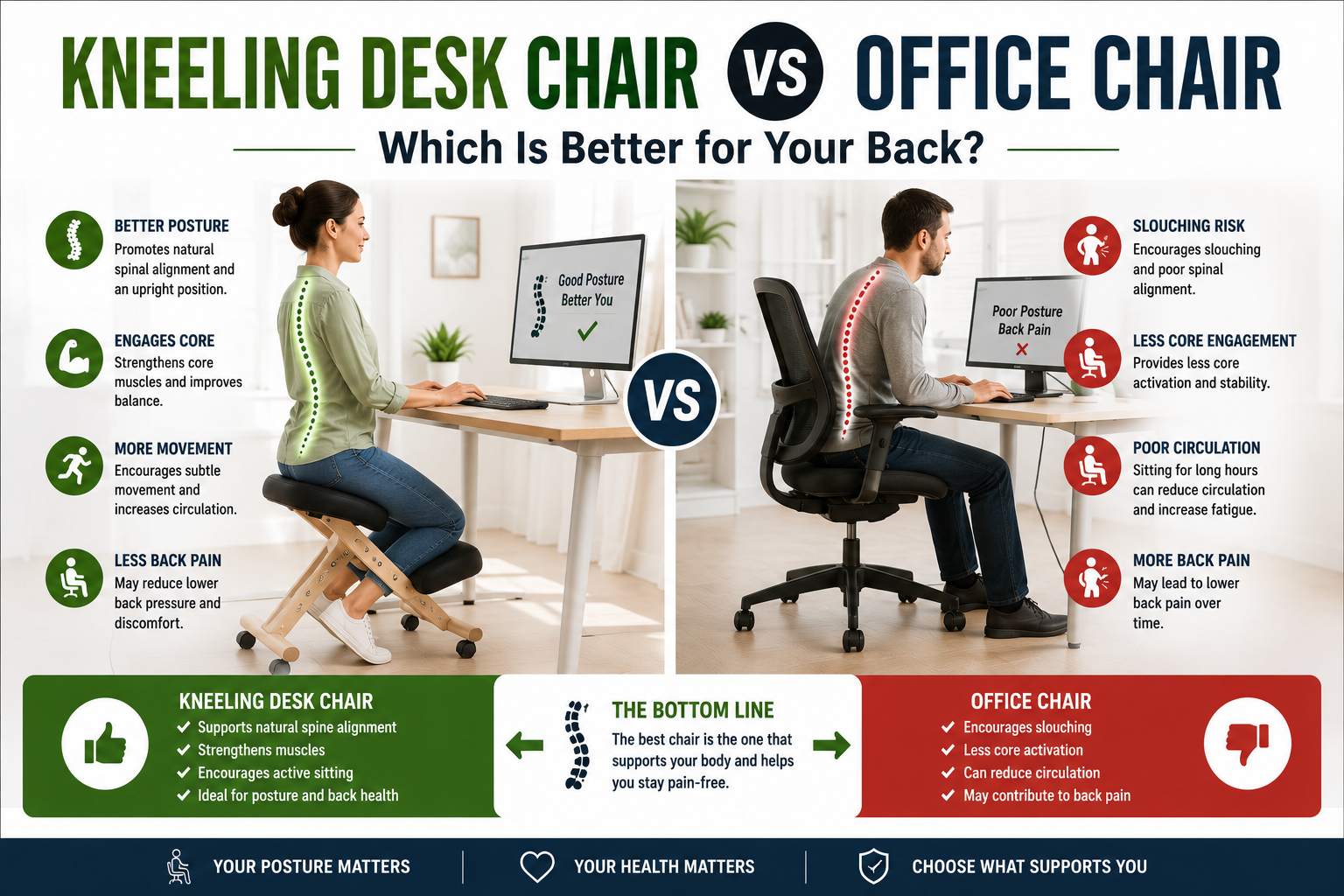
You sit at a desk for hours. Your lower back aches. Your shoulders round forward. You have tried adjusting your chair, adding a lumbar pillow, even switching to a standing desk. But the pain persists. Then you hear about kneeling chairs — strange-looking contraptions that swap a backrest for knee pads. Could they be the solution your spine has been waiting for?
The short answer is that kneeling chairs and traditional office chairs serve different purposes, and neither is universally “better.” One excels at active, forward‑leaning tasks and posture correction; the other provides passive, reclined comfort for long, stationary work. This guide breaks down the biomechanics, pros and cons, and real‑world trade‑offs so you can decide which one truly helps your back.
Quick Comparison: Kneeling Chair vs Office Chair
| Feature | Kneeling Chair | Traditional Office Chair |
|---|---|---|
| Hip Angle | Open (120‑135°); thighs slope downward | 90°; thighs parallel to floor |
| Pelvic Tilt | Anterior (forward) — maintains lumbar curve | Posterior (backward) — flattens lumbar curve |
| Weight Distribution | Buttocks + thighs + shins | Buttocks + thighs |
| Back Support | No backrest; relies on pelvic tilt | Adjustable lumbar support + high backrest |
| Armrests | Rare | Common (2D, 3D, or 4D adjustable) |
| Core Engagement | High — you must actively stabilize your torso | Low — chair does the work (passive sitting) |
| Freedom of Movement | Moderate — can swivel, but reaching sideways is limited | Moderate to high — full 360° swivel, armrests may restrict |
| Best For | Active, forward‑leaning tasks; posture correction; short to mid sessions | Passive, long‑duration desk work; reclining; meetings |
| Initial Adjustment Period | 1‑2 weeks (shin soreness, core fatigue) | None (familiar design) |
| Price Range (Quality) | $80–400 | $300–2,000+ |
How Each Chair Affects Your Spine (Biomechanics 101)
To understand which chair is better for your back, you need to look at your pelvis. When you stand, your pelvis is in a neutral position, maintaining the natural S‑curve (lordosis) of your spine. When you sit on a standard office chair with your thighs parallel to the floor, your hips are forced into a 90‑degree angle. This rolls your pelvis backward — a posterior pelvic tilt — which flattens your lower back into a damaging C‑curve. This C‑slump dramatically increases anterior disc compression, stretches spinal ligaments, and leads to chronic back pain.
A kneeling chair changes this entirely. The seat slopes forward (typically 15‑30°), and your shins rest on padded supports. Your thighs angle downward, opening your hip angle to 120‑135°, which tilts your pelvis forward (anterior pelvic tilt). This preserves your lumbar lordosis and redistributes your body weight across your buttocks, thighs, and shins. The result is a seated posture that closely mimics standing — often called “supported standing.”
The open hip angle also reduces pressure on your intervertebral discs and relaxes your hip flexors, which are often tight in people who sit all day. However, because there is no backrest, your core and back muscles must remain active to keep you upright. This is both a benefit (strengthening muscles) and a drawback (potential fatigue).
Kneeling Chair: Pros and Cons for Back Pain
✅ Pros
- Preserves natural spinal curve: The anterior pelvic tilt maintains lumbar lordosis, reducing disc pressure and lower back strain.
- Reduces lower back compression: By sharing your weight between your buttocks and shins, kneeling chairs take load off the lumbar spine.
- Engages core muscles: Without a backrest, your deep trunk stabilizers must work continuously, strengthening them over time.
- Encourages active sitting: The design naturally promotes micro‑movements and posture shifts, keeping your discs hydrated and preventing stiffness.
- Improves breathing and circulation: The open hip angle reduces compression on your diaphragm and improves blood flow.
- Lower cost for quality: A well‑built kneeling chair typically costs $100‑250 — significantly less than a premium office chair.
❌ Cons
- Shin and knee pressure: Users often report discomfort on the shins or knees, especially during the first 1‑2 weeks. Adding extra padding can help, but some people never fully adapt.
- No backrest for passive work: If you like to recline during calls or reading, a kneeling chair offers no support.
- Limited sideways movement: Reaching to the side or behind you can be awkward compared to a swivel office chair.
- Not ideal for very long sessions: The lack of back support and constant core engagement can lead to fatigue after 4‑6 hours.
- Desk height adjustment required: A kneeling chair raises your seated eye level; your desk and monitor must be raised accordingly to avoid neck strain.
- Learning curve: It takes time to find the right angle and to get used to the feeling of weight on your shins.
Traditional Office Chair: Pros and Cons for Back Pain
✅ Pros
- Passive support for long hours: The high backrest and adjustable lumbar support unload your torso weight, reducing muscle fatigue during static tasks.
- Extensive adjustability: Premium office chairs offer seat depth, 4D armrests, headrest angle, and lumbar firmness — allowing a custom fit.
- Armrests reduce shoulder strain: Properly positioned armrests keep your shoulders relaxed and wrists straight, reducing upper body tension.
- Recline for breaks: The ability to lean back and lock at different angles allows you to change positions and reduce static disc pressure.
- Familiar and easy to use: No learning curve; most people know how to adjust a standard office chair.
- Wide variety of materials: Choose from breathable mesh, plush fabric, or premium leather to match your comfort and aesthetic preferences.
❌ Cons
- Flattens lumbar curve: The 90° hip angle rolls your pelvis backward, flattening your lower back — even with lumbar support, you must actively avoid slouching.
- Lumbar gap when leaning forward: As soon as you lean forward to type, your back loses contact with the backrest, and the lumbar support becomes useless.
- Encourages passive slouching: Without active core engagement, users tend to slump into the backrest over time, reinforcing poor posture.
- High cost for quality: A truly ergonomic office chair with proper adjustments costs $800–2,000. Budget models under $300 often lack essential features.
- Restricted movement: Armrests and a high backrest can limit your ability to reach sideways or swivel freely.
- Can aggravate tight hip flexors: The 90° hip angle shortens the psoas and iliacus muscles, contributing to lower back pain.
Which One Is Better for Your Specific Back Condition?
If you have chronic lower back pain (disc issues, muscle strain):
The kneeling chair may be better for you because it offloads your lumbar spine. The open hip angle reduces disc pressure and encourages a neutral, pain‑free posture. However, if your back pain is caused by instability or weak muscles, the lack of a backrest may allow you to fatigue faster, leading to poor form. Try a kneeling chair for short sessions and listen to your body.
If you have sciatica (leg pain from nerve compression):
A kneeling chair can help. The anterior pelvic tilt and open hip angle reduce pressure on the sciatic nerve pathway. Many users with sciatica report relief when switching to kneeling chairs. However, if your sciatica is aggravated by bending forward, the forward tilt of the seat may need to be less aggressive.
If you have a herniated disc:
Consult your doctor first. Some patients find kneeling chairs helpful because they reduce intradiscal pressure. Others find that the forward tilt exacerbates symptoms. A high‑quality office chair with adjustable lumbar support may be a safer starting point.
If you have knee or shin problems:
A kneeling chair is generally not recommended. The weight placed on your shins and knees can aggravate patellofemoral pain, arthritis, or shin splints. Stick with an office chair that has good seat depth adjustment and lumbar support.
If you have chronic neck or shoulder tension:
A kneeling chair can help indirectly by improving your overall spinal alignment. However, you must raise your desk and monitor to eye level; otherwise, you will trade lower back pain for neck strain. An office chair with 4D armrests is also beneficial for supporting your upper body.
How to Choose the Right Chair for Your Work Style
Use this simple decision guide based on your daily tasks.
👉 Choose a KNEELING CHAIR if:
- You spend most of your time leaning forward — typing, writing, drawing, designing, or performing clinical work.
- You want to strengthen your core and actively correct your posture, not just passively support it.
- You have lower back pain that worsens when sitting in traditional office chairs.
- You are willing to go through a 1‑2 week adaptation period and adjust your desk height.
- You have no existing knee or shin problems.
- You prefer a compact, space‑saving seat.
👉 Choose an OFFICE CHAIR if:
- You perform mostly passive tasks: spreadsheet analysis, programming, customer support calls, video meetings, or reading.
- You like to recline and have the chair support your weight while you work.
- You value armrests, a headrest, and the ability to lock the backrest at different angles.
- You share your workspace with others who may not want to learn a new sitting posture.
- You have existing knee or shin conditions that make a kneeling chair uncomfortable.
- You are not willing to adjust your desk height or take time to adapt to a new seating style.
👉 Use BOTH if: Your budget and space allow. The healthiest sitting strategy is variety. Alternate between a kneeling chair for active, focused work and a traditional office chair for passive, relaxed tasks. Standing desks add even more movement variety. No single chair should be used for an entire 8‑hour day without breaks.
How to Transition to a Kneeling Chair Without Injury
If you decide to try a kneeling chair, follow this gradual transition schedule to avoid shin pain and back strain:
Week 1: Use the kneeling chair for 20–30 minutes at a time, then switch back to your regular chair. Your body needs time to adapt to the new pelvic position and weight distribution on your shins.
Week 2: Increase to 1‑2 hour sessions. You may experience mild shin soreness — this is normal. If sharp pain occurs, add extra cushioning (a folded towel or gel pad) or reduce duration.
Week 3: Use the kneeling chair for half of your workday, alternating with standing or your regular chair.
Week 4 and beyond: Use the kneeling chair as your primary desk chair, but continue to stand up and move every 30‑45 minutes.
Critical step: Raise your desk and monitor height. The top of your monitor should be at or slightly below your eye level while sitting on the kneeling chair. If you skip this, you will develop forward head posture and neck pain.
Frequently Asked Questions (FAQ)
Is a kneeling chair good for lower back pain?
Yes — for many people. The open hip angle and anterior pelvic tilt preserve lumbar lordosis, reducing disc pressure. A 2015 study found that kneeling chairs help reduce the inward curve of the lower back that contributes to pain. However, results vary; some users find the forward tilt uncomfortable. Try one with a 30‑day return policy.
Can I use a kneeling chair all day?
Yes, but it is not recommended for 8+ hours without breaks. The constant core engagement can lead to fatigue, and shin pressure may become uncomfortable. Many users alternate between a kneeling chair and a standing desk or conventional office chair.
Do kneeling chairs hurt your knees?
If the chair is properly adjusted and you use adequate padding, they should not hurt your knees. Most discomfort is on the shins, not the knees. Users with existing knee problems should consult a doctor before using a kneeling chair.
What is the best kneeling chair for back pain?
For most users, the NYPOT Adjustable Ergonomic Kneeling Chair offers the best balance of adjustability, rocking motion, and value. For a premium, time‑tested option, the Varier Variable Balans 350 is excellent. For heavy users, the Costway Rocking Kneeling Chair supports 330 lbs with extra‑thick cushions.
Can a kneeling chair replace my office chair?
It can, but it depends on your work style. If you spend most of your time leaning forward (typing, writing, drafting), a kneeling chair can be your primary chair. If you frequently recline or perform passive tasks, you may prefer a conventional office chair. Many people use both and switch throughout the day.
How long does it take to get used to a kneeling chair?
Most users need 1‑2 weeks to adapt. The first few days may feel strange, and you may experience mild shin soreness. By the end of the second week, most users report feeling comfortable and notice improved posture.
Do I need a special desk for a kneeling chair?
Not necessarily, but you will likely need to raise your desk or monitor. A kneeling chair raises your seated eye level by 4‑8 inches compared to a standard office chair. If your desk is fixed at standard height, use a monitor riser or consider a height‑adjustable desk.
Final Verdict: Which One Should You Choose for Your Back?
After comparing biomechanics, user experiences, and clinical research, here is the simple answer:
👉 Choose a KNEELING CHAIR if: You suffer from lower back pain (especially from disc compression), you lean forward for most of your work, you want to strengthen your core and improve posture actively, you have no knee or shin issues, and you are willing to adjust your desk height and give yourself a 1‑2 week adaptation period.
👉 Choose an OFFICE CHAIR if: You prefer passive, reclined sitting, you value armrests and a headrest, you have existing knee or shin problems, you share your workspace with others, or you are not willing to adapt to a new sitting style.
👉 Use BOTH if: Your budget and space allow. Alternating between a kneeling chair for active tasks and an office chair for passive tasks, plus a standing desk, is the ultimate setup for spinal health.
Most important advice: No chair, no matter how well‑designed, can replace movement. Stand up, stretch, and walk every 30‑45 minutes. Your intervertebral discs rely on compression and decompression cycles to stay healthy. Use your chair as one tool in a movement‑rich system that includes standing, walking, and switching positions. That is what actually helps your back.
👉 See today’s price for a top‑rated kneeling chair on Amazon →