Monitor Stand Buying Guide
Best Wooden Monitor Stands for Home Offices
A wooden monitor stand can raise your screen, create useful storage space, and bring a warmer look to your home office. The right choice depends on your monitor size, desk dimensions, preferred material, and how much space you want underneath.
Desk Organization
Single & Dual Monitors
Choosing a wooden monitor stand is about more than matching your desk furniture. A well-sized riser can make room for a keyboard underneath, help organize everyday accessories, and bring your screen closer to a comfortable viewing position. However, not every wood monitor stand is made from solid wood, and not every design is wide or strong enough for a large display.
This guide compares several wooden and wood-style monitor stand options, explains what to check before buying, and helps you choose a stand that fits your home office rather than simply looking good in product photos.
Disclosure: As an Amazon Associate, SitBetterLab earns from qualifying purchases. If you buy through links on this page, we may earn a commission at no additional cost to you. Product availability, specifications, and prices can change, so confirm the current Amazon listing before ordering.
Quick Picks: Wooden Monitor Stands
Start with the design that best matches your workspace. These are product candidates to compare, not claims of hands-on testing. Check the current listing for exact dimensions, construction, and load limits.
| Option | Best For | What to Check |
|---|---|---|
| WESTREE Dual Monitor Stand Riser | Two-monitor setups | Overall width, support structure, and monitor placement |
| BONTEC Wooden Monitor Stand Riser | Desk organization | Available width, storage layout, and assembly |
| TEAMIX Wood Monitor Stand Riser | Simple desktop setups | Platform dimensions, height, and finish |
| Zimilar Wooden Monitor Riser | Multi-tier storage | Tier spacing, footprint, and stability |
| Homerays Bamboo Monitor Stand with Drawer | Small accessories and storage | Drawer clearance, actual material, and usable space |
1. WESTREE Dual Monitor Stand Riser
Best for Dual-Monitor Desks
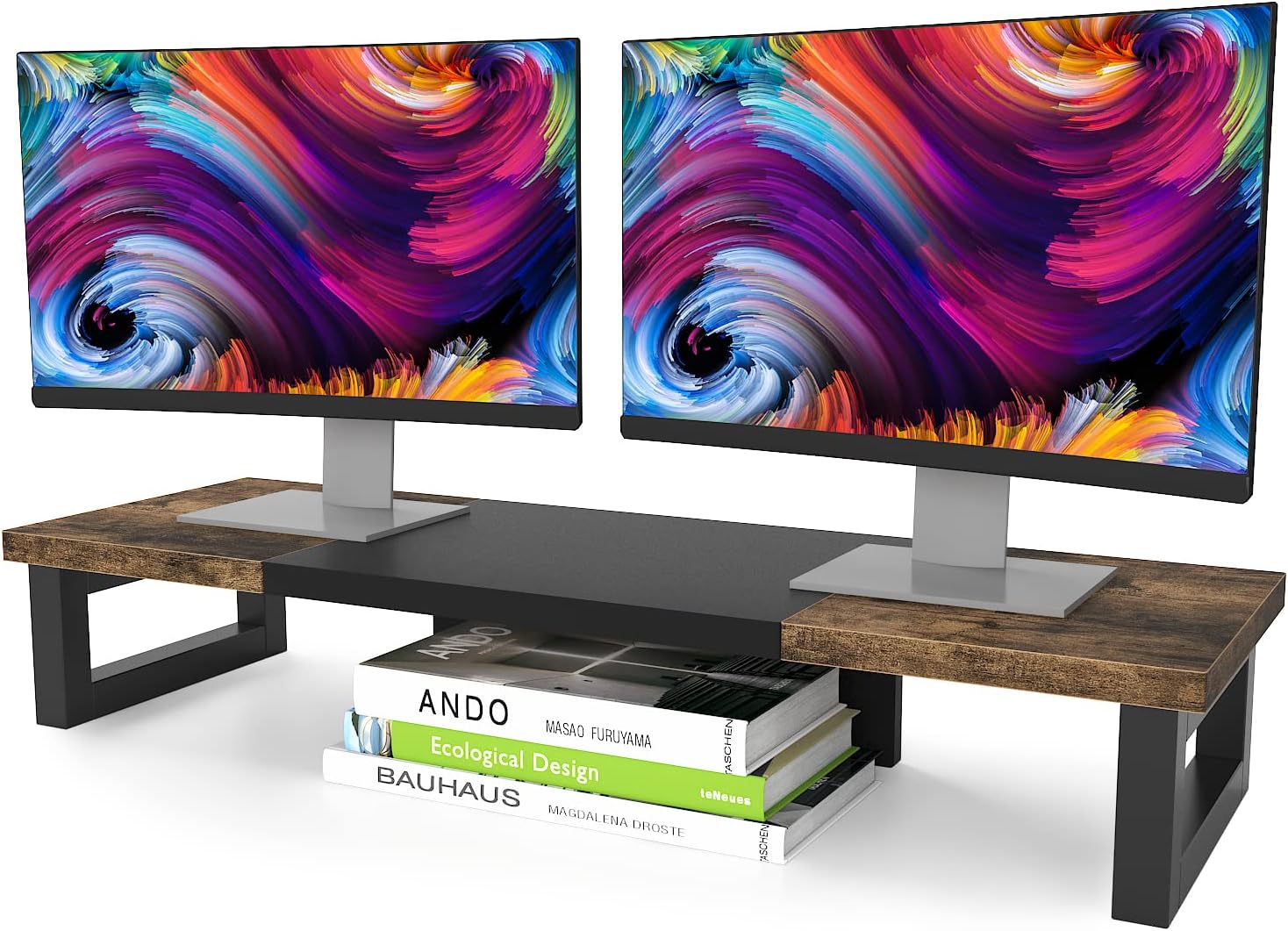
A dual-monitor desk needs more horizontal space than a typical single-screen workstation. The WESTREE dual monitor stand riser is a candidate worth considering if you want a wood-and-steel style platform that can accommodate a pair of displays while leaving usable space underneath.
The main advantage of this style is its combination of a desktop shelf and a support structure. It can help separate the monitor area from the keyboard and accessories below. The trade-off is that a wide stand occupies permanent desk space, so measuring first is especially important.
What to check before buying
- Measure the combined width of both monitor bases and leave enough room to position them safely.
- Check the current listing’s maximum supported load and compare it with the combined weight of your equipment.
- Confirm that the platform depth accommodates your monitor bases without placing them too close to the front or rear edge.
- Look closely at the product photos and description to confirm the top material and support construction.
Best fit: A home office with two monitors that needs a raised shelf and a more organized desktop.
2. BONTEC Wooden Monitor Stand Riser
Best for Desk Organization
BONTEC offers wooden-style monitor risers in desktop organizer designs. Depending on the version, the layout may include a raised platform, space for accessories, or features intended to keep everyday work items together.
This type of monitor stand wood design is worth comparing if your desk holds a monitor, laptop, phone, notebooks, and other small items. Instead of choosing by appearance alone, check whether the platform dimensions and compartments suit the things you actually use.
Why consider it?
- A raised platform can create a dedicated area for the monitor.
- Organizer features may help keep frequently used accessories within reach.
- Different sizes or finishes may make it easier to coordinate with an existing desk.
Before ordering: Confirm whether the specific version is adjustable, whether it requires assembly, and whether the top is solid wood, engineered wood, or another material with a wood finish.
3. TEAMIX Wood Monitor Stand Riser
Best for a Simple Setup
A straightforward wooden monitor riser can be a practical choice when you do not need drawers, multiple tiers, or a large dual-monitor shelf. TEAMIX has wood-style monitor riser options in different sizes, making it a useful brand to check when comparing compact desktop platforms.
A simple stand is often easier to fit into a small workspace because there are fewer built-in features to work around. It can also leave a clear area underneath for a keyboard, provided the platform’s height and support layout offer enough clearance.
Who should consider it?
- People who want a basic raised platform rather than a full desktop organizer.
- Home office users who need to compare different shelf widths.
- Anyone who wants to keep the desk visually simple.
Check the listing carefully for the exact model and dimensions. A compact riser may work well for one monitor but may not provide enough width for two displays or a large monitor base.
4. Zimilar Wooden Monitor Stand Riser
Best for Multi-Tier Storage
If you want more than a single shelf, consider a multi-tier monitor riser. Zimilar has been associated with two-tier wooden-style monitor risers designed to create separate levels for a screen and other desktop items.
A two-tier layout can make small accessories easier to organize, but the extra structure may reduce the open space available for a keyboard or other equipment. Measure the entire footprint and compare the shelf layout with your actual desk arrangement before deciding.
Check these details
- The height and width of each tier.
- The available space for a keyboard, notebook, or laptop.
- The maximum supported load for the monitor platform.
- Whether the assembly instructions and required hardware are included.
Best fit: A desk where organization matters as much as raising the screen.
5. Homerays Bamboo Monitor Stand with Drawer
Best for Small Accessories
A bamboo monitor stand with a drawer may suit a home office where small items tend to spread across the desktop. Homerays is one option to investigate if you want a natural-looking riser with built-in storage.
Bamboo is technically a grass rather than a traditional hardwood, but bamboo products are commonly grouped with wooden desk accessories because of their natural appearance. The actual construction can vary, so review the materials listed for the specific product.
What makes a drawer useful?
- It can store small stationery items and other lightweight accessories.
- It provides a designated place for items that would otherwise sit on the desk.
- It can help create a tidier-looking workspace without adding a separate organizer.
Measure the space needed to open the drawer fully. If the stand sits close to a wall, monitor base, or other desk accessories, drawer access may be more limited than the product photos suggest.
How to Choose the Right Wooden Monitor Stand
The best wood stand monitor option is the one that fits your equipment and viewing position. Use the following checklist before buying.
1. Measure the Width and Depth
Measure the monitor’s base rather than relying only on the screen size listed in inches. Two monitors with the same diagonal measurement can have different stand footprints. The shelf should provide enough room for the base, with a little space to position it safely.
Depth matters too. A platform that is too shallow may leave the monitor base close to an edge, while an unnecessarily deep stand can consume valuable desk space.
2. Check the Height Before You Buy
Wooden monitor risers usually provide a fixed height. Think about your current sitting position, chair height, monitor dimensions, and whether the display already has an adjustable stand.
As a starting point, position the screen so that you can look straight ahead without repeatedly bending your neck down or tilting your head up. The top of the display is often around eye level or slightly below, although the ideal position varies with screen size, glasses, posture, and personal comfort.
If you need frequent adjustments for different tasks, a fixed wooden riser may not be the best solution. Consider a monitor arm or an adjustable monitor stand instead.
3. Understand the Material
Product titles often use the word “wood” broadly. Check the manufacturer’s description to find out what the stand is actually made from.
- Solid wood: Offers natural grain and a distinctive appearance, but finish, construction, and price vary.
- Bamboo: A natural material that often suits light, minimalist desk setups.
- Engineered wood: May provide a consistent finish and lower cost, but edge quality and resistance to moisture depend on the construction.
- Wood-and-metal construction: Combines a wood-style platform with a metal support structure. Inspect the joints and support layout rather than assuming all models have the same stability.
Do not assume that a wood-look finish means a product is made from solid timber. If material authenticity is important to you, look for explicit material information in the listing.
4. Verify the Weight Capacity
Check the maximum supported load for the exact model and compare it with the weight of your monitor and any other equipment placed on the shelf. A larger screen is not automatically heavier than a smaller one, so use the manufacturer’s stated monitor weight rather than the diagonal measurement alone.
For dual monitors, account for the combined load. Do not place heavy equipment on a platform unless the manufacturer indicates that it is suitable for that use.
5. Decide Whether You Need Storage
A simple shelf usually offers more open space underneath than a design with drawers or several tiers. A drawer can be useful for small accessories, while a wide open platform may work better for storing a keyboard or notebook.
Choose storage features based on the items you use daily. Extra compartments are not necessarily useful if they make the stand too tall, too deep, or difficult to clean.
6. Match the Finish to Your Desk
Walnut-style finishes often work well with darker desks, while lighter bamboo or oak-style finishes can complement brighter workspaces. If the desk and stand are made from different materials, matching the overall tone may look more intentional than trying to match the grain exactly.
Also check the underside of the stand for protective feet or pads. These can help reduce slipping and protect the desktop from scratches.
Wooden Monitor Stand vs. Monitor Arm
A wooden monitor stand and a monitor arm solve different workspace problems. Neither is automatically better for everyone.
| Feature | Wooden Monitor Stand | Monitor Arm |
|---|---|---|
| Installation | Usually rests on the desktop | Usually attaches to the desk or a mounting point |
| Adjustability | Typically fixed height | Often offers height, tilt, and position adjustments |
| Storage | May provide shelf or drawer space | Frees desk surface under the monitor |
| Desk compatibility | Needs a stable, flat surface | Requires compatible mounting and adequate desk support |
| Best use | Simple elevation and organization | Flexible positioning and more open desktop space |
If you prefer a natural desktop shelf and do not need to move your screen often, a wooden riser is a straightforward choice. If you regularly change your screen position or need more precise adjustment, browse our monitor arms guide before deciding.
Are Wooden Monitor Stands Good for Ergonomics?
A wooden monitor stand can help when your screen is too low, but the material itself does not make a setup ergonomic. The important factors are screen height, viewing distance, posture, and whether your chair and desk allow you to work comfortably.
Before choosing a stand, sit in your normal working position and check where your eyes meet the screen. A riser that is too tall can be just as inconvenient as one that is too short. If you use multiple monitors, consider how their top edges and viewing angles line up.
Also make sure your keyboard and mouse remain at a comfortable height. Raising the monitor alone will not fix a workstation where your shoulders are lifted or your wrists are bent awkwardly.
Frequently Asked Questions
Is a wooden monitor stand better than a plastic one?
Not necessarily. Wood and bamboo can offer a natural finish that suits many home offices, while plastic stands may be lighter or easier to clean. Compare dimensions, stability, material quality, load capacity, and price rather than choosing by material alone.
Can a wooden monitor stand hold two monitors?
Some wider models are designed for dual-monitor setups, but not all wooden risers are suitable. Check the usable platform width, depth, and stated weight capacity, and make sure both monitor bases fit securely without overhanging the edges.
Is bamboo considered a wooden monitor stand material?
Bamboo is technically a grass, not wood, but it is commonly used for natural-looking desk accessories. Check the listing’s materials section to distinguish solid bamboo from bamboo veneer, laminated panels, and other wood-style finishes.
How high should a monitor stand be?
There is no single height that works for every person and monitor. Aim for a viewing position that lets you look forward comfortably without repeatedly tilting your head up or down. Consider your seated eye level, screen size, and existing monitor base before choosing a fixed-height riser.
Do wooden monitor stands need assembly?
It depends on the model. Some risers arrive ready to use, while others require attaching legs, shelves, or support pieces. Check the listing for assembly instructions and included hardware, and tighten all connections before placing a monitor on the stand.
What should I check before buying a wooden monitor stand on Amazon?
Confirm the exact model, dimensions, material, weight capacity, assembly requirements, and return policy. Read recent customer feedback for comments about stability, finish quality, and whether the actual size matches the product photos. Prices and availability can change.
Final Verdict: Which Wooden Monitor Stand Should You Choose?
The best wooden monitor stand depends on how you use your desk. A simple riser may be enough for one monitor, while a wider platform can make more sense for two displays. If small accessories are the main source of clutter, a design with storage may be more useful than a plain shelf.
- For two monitors: Start by comparing the WESTREE dual-monitor riser and other wide platforms.
- For desk organization: Look at BONTEC’s wooden-style organizer options.
- For a simple setup: Compare TEAMIX risers in sizes that fit your monitor base.
- For multiple storage levels: Check the dimensions of a Zimilar two-tier design.
- For small accessories: Consider a bamboo riser with a drawer, such as the Homerays style.
Before ordering, measure your desk, verify the monitor’s weight, and confirm the exact product specifications. A good stand should fit the space you have, provide a stable platform, and place your screen at a comfortable height.
Explore More Workspace Guides
Compare more ways to create a comfortable and organized home office.