
Best Vertical Laptop Stands for Desk Organization
Free up desk space with a vertical laptop holder designed for closed-laptop setups, external monitors, and cleaner cable management.
Quick Answer
The best vertical laptop stand depends on your laptop’s thickness, how much desk space you have, and whether you need to store one or multiple devices. For most external-monitor workstations, start with an adjustable single-slot holder. Choose a dual-slot model for two laptops, or a fixed-width holder if you have one compatible laptop and prefer a simple, permanent setup.
A laptop can take up a surprising amount of desk space even when you rarely use its built-in display. If your main screen is an external monitor, leaving the laptop open beside it may occupy valuable room that could otherwise hold a keyboard, mouse, notebook, or other accessories.
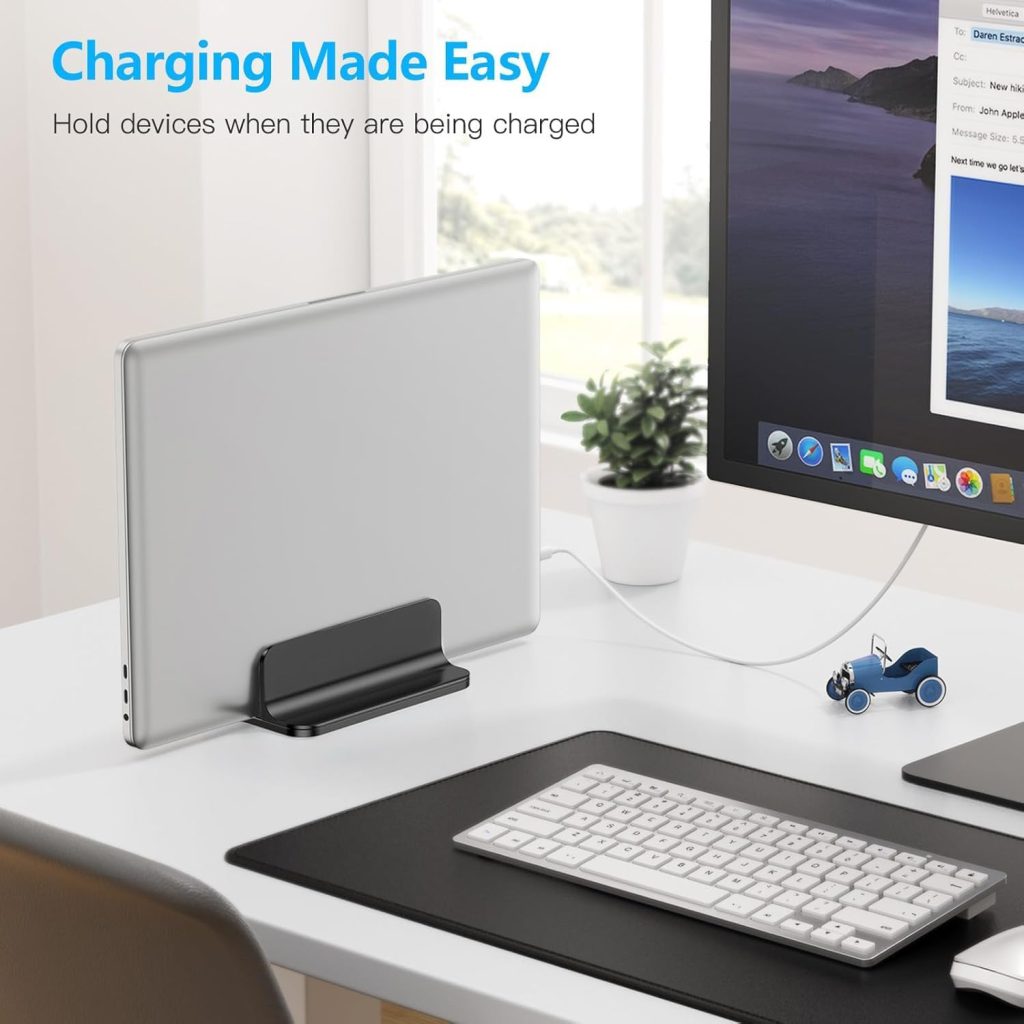
A vertical laptop stand solves a different problem from a traditional laptop riser. Instead of elevating an open screen, it holds a closed laptop upright on its edge. The result is a smaller desktop footprint and a more organized workstation.
In this guide, we compare vertical laptop holders by slot adjustment, base stability, device compatibility, and single- versus multi-device storage. The goal is to help you find a holder that fits your actual laptop and desk, rather than choosing based on appearance alone.
In This Guide
Best Vertical Laptop Stands: Quick Comparison
These recommendations represent different desk setups rather than a claim that one model is best for everyone. Product availability and specifications can change, so confirm the exact version before ordering.
| Product / Type | Best For | Key Feature to Check | Potential Trade-Off |
|---|---|---|---|
| OMOTON Adjustable Vertical Laptop Stand | Most single-laptop desk setups | Adjustable slot width | Stores one device |
| OMOTON Dual Vertical Laptop Stand | Work and personal laptops | Two independently adjustable slots | Wider base than a single-slot holder |
| UGREEN Vertical Laptop Stand | A compact, straightforward desk setup | Slot adjustment and cable clearance | Verify the exact model’s adjustment range |
| HumanCentric Wooden Vertical Laptop Stand | A coordinated home office | Slot fit, lining, and base stability | Finish and fixed-slot compatibility vary by version |
| Fixed-Width Vertical Holder | One laptop with a known thickness | Exact slot width and protective lining | Less flexible if you change laptops |
Important: These are product and design recommendations based on their intended use, not results from our own hands-on testing. Check the current listing for slot dimensions, laptop compatibility, included accessories, and the exact model being sold.
Our Top Vertical Laptop Stand Picks
1. OMOTON Adjustable Vertical Laptop Stand
An adjustable aluminum vertical holder is a practical starting point if you use one laptop with an external monitor. The slot can be widened or narrowed to match a compatible laptop, making this type more flexible than a holder with a permanently fixed opening.
Why consider it
- Adjustable slot to accommodate different compatible laptop thicknesses.
- Metal construction suits a permanent desk setup.
- A single slot keeps the layout relatively simple.
Check before buying: Verify the advertised minimum and maximum slot widths against your laptop’s thickness, including any case or protective shell.
2. OMOTON Dual Vertical Laptop Stand
If you keep a work laptop and a personal laptop on the same desk, a dual-slot holder can store both devices upright in one organizer. It can be more convenient than placing two separate holders side by side.
Why consider it
- Two slots for compatible laptops or other supported devices.
- Independent slot adjustment on versions designed with separate adjustment mechanisms.
- A consolidated storage solution for a multi-device desk.
Check before buying: Confirm the width range of each slot individually. Do not assume that the two openings accept the same maximum laptop thickness without checking the specifications.
3. UGREEN Vertical Laptop Stand
UGREEN offers vertical laptop holders intended for desk organization. This is a useful option to investigate if you want a straightforward metal holder rather than a larger desktop platform.
Why consider it
- A compact upright storage format for a closed laptop.
- A metal design that fits a minimalist workstation.
- Some versions include features for routing cables near the base.
Check before buying: UGREEN sells different stand designs. Confirm whether the specific listing has an adjustable slot, a cable cutout, or a fixed opening before placing an order.
4. HumanCentric Wooden Vertical Laptop Stand
A wooden vertical holder can complement a desk with wood furniture, neutral colors, or a minimalist home-office design. HumanCentric offers wooden and other vertical laptop stand options, so compare the exact finish and slot configuration in the listing.
Why consider it
- A warmer visual alternative to an all-metal holder.
- A lined slot on compatible designs to protect contact surfaces.
- A weighted base on applicable models for desktop stability.
Check before buying: Confirm the internal slot width, finish, and base construction. A holder designed for a thin laptop may not fit a thick gaming laptop.
5. Fixed-Width Vertical Laptop Holder
If you have one laptop and do not expect to change devices, a fixed-width holder may offer a simple, uncluttered solution. It can work well as a permanent docking spot, provided the slot matches your laptop’s thickness closely enough to hold it securely.
Why consider it
- Simple construction without an adjustment mechanism.
- Potentially compact design for a dedicated workstation.
- Suitable for users who already know their laptop’s exact dimensions.
Check before buying: Measure the closed laptop at the point where it contacts the slot. A tapered chassis, protective case, or rubber feet can affect how it sits in the holder.
How to Choose the Right Slot Width
Slot width is one of the most important specifications for a vertical laptop stand. The holder must accommodate the thickness of your closed laptop while keeping it upright and secure.
A slot that is too narrow may not accept the laptop at all. A slot that is too wide can leave the device loose, tilted, or more likely to shift when you connect or disconnect a cable.
Measure your laptop before ordering
- Close the laptop completely and check the manufacturer’s published thickness.
- If you use a protective case or shell, measure the actual thickness with it installed.
- Compare your measurement with the stand’s stated minimum and maximum slot widths.
- Check whether the slot is adjustable by hand, by a screw, or through a spring-loaded mechanism.
- Look for protective lining at the contact points and a stable base that keeps the laptop upright.
Why adjustable slots are useful
An adjustable holder can accommodate different compatible laptop thicknesses and may remain useful if you replace your laptop later. However, adjustability does not guarantee universal compatibility. The chassis dimensions, slot range, laptop weight, and support geometry still matter.
Base Size: How Much Desk Space Will You Save?
A vertical laptop stand reduces the amount of desk depth taken up by a laptop lying flat. The laptop still occupies some space through its height, thickness, and the holder’s base, but its broad footprint no longer lies across the desk surface.
For small desks, the most useful measurement is not just the holder’s overall width. Consider its complete footprint, including how far it extends toward your keyboard and mouse.
Compact Single Slot
Best when you dock one laptop and want to preserve as much usable desk area as possible.
Dual-Slot Organizer
Best when two devices need a dedicated place, even though the holder may have a wider base.
Weighted Base
Worth considering if you frequently connect cables or handle the laptop while it is docked.
Before buying, measure the area next to your monitor or at the back of your desk. A holder with a small footprint is useful only if you can still access the laptop’s ports and remove the device comfortably.
Using a Vertical Laptop Stand with the Lid Closed
Vertical laptop holders are especially useful for people who use an external monitor as their primary display. The laptop can remain closed and upright while the external monitor, keyboard, and mouse handle everyday work.
This setup is often called clamshell mode on compatible laptops. However, placing a laptop in a vertical holder does not automatically enable clamshell mode. The operating system, power settings, external display connections, and power supply all affect how the setup behaves.
What you may need
- External monitor: Confirm that your laptop supports the monitor’s connection and resolution requirements.
- External keyboard and mouse: These let you work without opening the laptop for routine input.
- Power connection: Check whether your laptop can charge through its available port or requires a separate charger.
- Display and sleep settings: Configure the laptop to operate with the lid closed according to the operating system’s supported settings.
- Port access: Ensure the stand leaves enough clearance for the charging cable, display cable, and other necessary connections.
A practical setup tip
Connect your monitor and peripherals and confirm that the laptop remains active with its lid closed before permanently arranging the cables. Some systems require a power adapter or specific power settings for this configuration.
Laptop Compatibility: What to Check Before Buying
Vertical holders are not automatically compatible with every laptop just because the product listing says “universal.” Different machines have different thicknesses, weights, edge shapes, and port locations.
| Laptop Type | What to Check | Recommended Approach |
|---|---|---|
| Thin ultrabook | Minimum slot width and secure contact | Adjustable holder with a suitable narrow setting |
| MacBook Air or Pro | Exact model thickness, protective shell, and contact points | Check the slot range and lining against the specific model |
| Business laptop | Chassis thickness, ports, and docking arrangement | Adjustable single slot for a dedicated monitor setup |
| Gaming laptop | Greater thickness, weight, and stability | Verify maximum slot width and the stand’s support capacity |
| Two laptops | Each device’s thickness and each slot’s range | Dual-slot holder with suitable individual adjustment |
Vertical Laptop Stand vs Traditional Laptop Stand
These accessories serve different purposes, so choosing between them is straightforward once you know how you use your laptop.
Vertical Laptop Stand
Holds a closed laptop upright to reduce its footprint on the desk.
Best for: External-monitor setups, closed-laptop workflows, and desktop organization.
Traditional Laptop Stand
Supports an open laptop and raises its display for direct viewing.
Best for: People who use the built-in screen and need a higher viewing position.
If you want to keep typing directly on your laptop while looking at its built-in display, choose a traditional stand instead. If you primarily work on an external monitor, a vertical holder is usually the more relevant accessory.
For more options, explore our Workspace Guides or read our comparison of laptop stands vs. laptop risers.
Frequently Asked Questions
Are vertical laptop stands safe for laptops?
A properly sized, stable holder with suitable protective contact surfaces can be used to store a compatible laptop upright. Make sure the device is securely supported, the holder does not press against vulnerable areas, and cables do not pull the laptop off balance.
Can I use a vertical laptop holder with any laptop?
Not necessarily. Check the laptop’s thickness, weight, chassis shape, and any protective case against the holder’s specifications. Adjustable models accommodate a wider range of thicknesses, but their maximum dimensions still matter.
Can a vertical laptop stand hold a laptop while charging?
Usually, provided the laptop’s charging port remains accessible and the cable reaches without putting tension on the device. Check the stand’s shape and cable clearance before buying, especially if the charging port is close to the desk surface.
Does a vertical laptop stand improve cooling?
It can leave more space around the laptop than laying it flat on a desk, but cooling results depend on the laptop’s ventilation design and the holder’s contact points. Do not assume every vertical holder improves temperatures or that every laptop is designed for identical airflow in every orientation.
Should I choose a single-slot or dual-slot vertical laptop stand?
Choose a single-slot holder if you dock one laptop. A dual-slot holder is more useful if you regularly store both a work and a personal laptop. Compare the width and stability of the base, as well as the adjustment range of each slot.
Is an adjustable vertical laptop stand worth the extra cost?
It can be worthwhile if your laptop is unusually thin or thick, you use a protective case, or you expect to change devices. If you own one laptop with a known thickness and find a secure fixed-width holder that fits, adjustment may not be necessary.
Final Verdict: Choose the Right Fit for Your Desk
For most single-laptop external-monitor setups, an adjustable vertical laptop stand is a practical place to start. A dual-slot organizer makes more sense for two devices, while a wooden holder can complement a carefully coordinated workspace.
Before buying, prioritize slot width, base stability, laptop compatibility, and cable access. The right vertical laptop holder should make your desk easier to use without compromising the security of your device.
Disclosure: As an Amazon Associate, SitBetterLab may earn from qualifying purchases. Product specifications, compatibility, availability, and prices can change. Verify the current product listing before purchasing.