
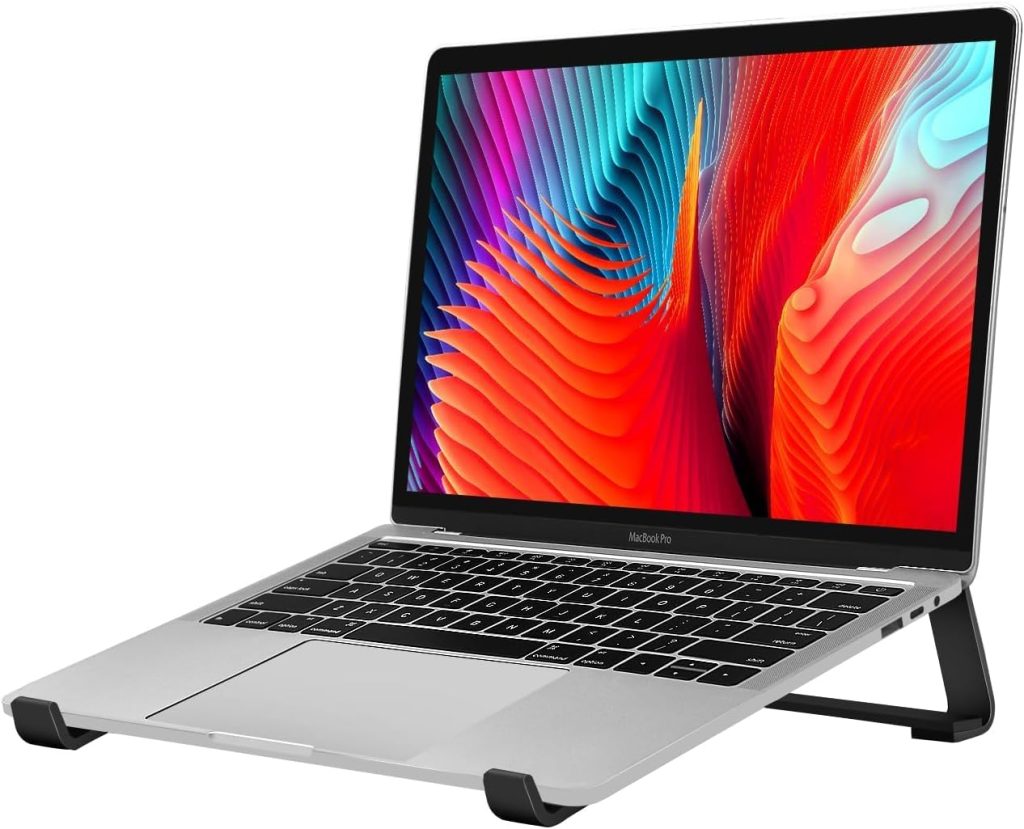
Laptop Stand vs Laptop Riser: What’s the Difference?
Compare height adjustment, portability, desk space, and ventilation to find the right laptop support for your home office, daily commute, or travel setup.
The Short Answer
A laptop stand and a laptop riser often describe the same type of accessory. When sellers distinguish between them, a stand may emphasize adjustable height and viewing angles, while a riser may refer to a simpler platform that lifts the laptop. The actual design matters more than the product name.
If your laptop sits flat on your desk, its screen may be too low for comfortable viewing. Raising it can help you maintain a more comfortable head and neck position, but choosing the right support depends on how you work.
Some people need a lightweight accessory that fits in a backpack. Others want a stable, elevated laptop position for a permanent workstation. Still others need to free up desk space or improve airflow around a laptop that runs hot.
This guide compares laptop stands and laptop risers by their actual features, so you can choose the right design without paying for adjustments or extras you do not need.
Quick Navigation
Laptop Stand vs Laptop Riser: Key Differences
There is no universally enforced naming standard that separates a laptop stand from a laptop riser. Both products elevate and support a laptop, and either name can describe fixed, adjustable, foldable, or relatively bulky designs.
The following comparison describes common design tendencies rather than strict product categories.
| Feature | Laptop Stand | Laptop Riser |
|---|---|---|
| Height adjustment | May offer adjustable height and tilt | May provide fixed or adjustable elevation |
| Portability | Ranges from compact folding models to heavy desk stands | Ranges from lightweight lifts to large desktop platforms |
| Desk footprint | Depends on the base and support structure | Depends on platform size and design |
| Airflow | Open frames can improve clearance underneath | Open or solid surfaces are both available |
| Best use | Flexible setups or adjustable positioning when the design supports it | Simple elevation or a dedicated desk setup, depending on the model |
Important: Do not assume that every laptop stand is adjustable or that every riser is fixed. Check the listed height range, folded dimensions, platform size, and adjustment mechanism before buying.
1. Height Adjustment: Fixed vs Adjustable Support
Height adjustment is one of the most useful features to compare, especially if you spend several hours a day working at a laptop.
When a fixed-height riser makes sense
A fixed riser elevates your laptop to a predetermined height. It is often a straightforward option for a dedicated desk where the same person uses the same chair and workstation every day.
- Choose it when the fixed elevation already suits your seated viewing position.
- Look for a stable base and secure laptop contact points.
- Consider it if you prefer a simple design without adjustment hinges.
The trade-off is flexibility. If you change desks, chairs, or working positions frequently, the fixed height may not suit every setup.
When an adjustable stand is worth considering
An adjustable stand lets you change the laptop’s height, tilt, or both, depending on the mechanism. This can make it easier to position the screen for different chairs, desks, and viewing preferences.
- Look for a height range that matches your actual desk and seated eye level.
- Check that the hinges remain stable at the highest setting.
- Make sure the adjustment process is convenient enough for everyday use.
For long work sessions, the goal is to bring the screen closer to eye level without creating a new problem for your arms and wrists. Since raising a laptop also raises its built-in keyboard, an external keyboard and mouse are often useful companions for a higher setup.
Our recommendation
If you work at a desk most days and have not yet found your ideal screen height, prioritize an adjustable model. If you already know the height you need, a fixed riser may be all you need.
2. Portability and Desk Space
A support that works well on a permanent desk may be inconvenient if you carry your laptop between home, the office, a library, and coffee shops.
For travel and hybrid work
Look for a compact folding stand or riser that fits comfortably in your laptop bag. Weight, folded thickness, setup time, and stability are more useful buying criteria than the name on the packaging.
- Compare packed dimensions, not just the product’s open dimensions.
- Check whether the stand needs a separate case or protective pouch.
- Confirm that it supports your laptop’s size and weight.
- Check whether it stays secure on the desks where you normally work.
A compact folding design is generally the practical choice for commuters and remote workers who change locations frequently.
Best for travel: A lightweight folding stand
Choose a model that folds flat, sets up quickly, and offers enough stability for your laptop. A simpler design can be preferable to a bulky mechanism you rarely use.
For a small home office
A laptop support can free up some of the space directly beneath the computer, depending on its construction. An open-frame design may leave room for a compact keyboard or other small accessories, while a raised platform can provide a useful shelf-like area underneath.
However, a large riser with a wide base may occupy more desk space than a compact folding stand. Measure your available surface before choosing a design.
For a permanent workstation
If your laptop rarely moves, you can prioritize stability, screen position, and cable management over packed size. A heavier stand or a desktop riser may work well if its dimensions fit your desk and its height suits your setup.
If your laptop is connected to an external monitor, a vertical laptop holder is another option for saving space. It holds the laptop upright, usually while closed, rather than raising its screen for direct viewing. It is not a substitute for a conventional elevated laptop stand when you need to look at the laptop display itself.
3. Cooling and Ventilation: Does the Design Matter?
Some laptop stands and risers allow more air to circulate beneath the laptop than a flat desk surface does. The practical benefit depends on your laptop’s ventilation layout and the support’s design.
An open-frame stand can provide clearance around the underside, while a solid platform may offer less airflow in some configurations. Neither product name guarantees better cooling.
What to check before buying
- Vent placement: Make sure the support does not cover the laptop’s intake or exhaust vents.
- Open space: Look for a design that allows air to circulate where your laptop needs it.
- Stability: Ventilation is not useful if the laptop shifts or wobbles during normal use.
- Fan compatibility: If you want active cooling, verify the fan arrangement, power connection, and physical fit.
A built-in cooling fan is not automatically necessary. Start by checking whether your laptop’s vents are unobstructed and whether its temperature or performance actually presents a problem. A stand that improves airflow may help in some circumstances, but it cannot guarantee a specific temperature reduction.
Best for airflow: An open-frame design
For a laptop that gets warm during extended workloads, compare open-frame models and check your device’s vent locations. Choose a cooling-fan model only if active cooling fits your needs.
4. Which Should You Buy? Five Common Scenarios
The best choice depends on what you need the accessory to do. Use these scenarios to narrow your options before comparing individual products.
Travel and commuting
Choose a lightweight folding design with a small packed footprint and quick setup.
Daily desk work
Choose a stable adjustable stand if you need to fine-tune your screen position.
Small desk or dorm
Look for a compact support with a small footprint or useful clearance underneath.
Laptop runs hot
Prioritize unobstructed vents and an open support structure compatible with your device.
External keyboard setup
Choose a stable stand that places the display at a suitable height while leaving room for a separate keyboard and mouse.
5. Laptop Stand and Riser Buying Checklist
Before ordering, compare the actual specifications rather than relying on the listing title or product photos.
- Screen height: Does the support raise your display enough for your seated position?
- Adjustment range: Can you change the height or tilt to match your needs?
- Stability: Is the base secure, and does the stand remain steady at its highest setting?
- Laptop compatibility: Does it support your laptop’s dimensions and weight?
- Ventilation: Does the design leave the relevant cooling vents unobstructed?
- Portability: If you travel, what are the folded dimensions and actual weight?
- Desk footprint: Will the base fit alongside your keyboard, mouse, and other accessories?
- Typing ergonomics: Will you need an external keyboard and mouse after elevating the screen?
6. A More Comfortable Laptop Setup
Buying a stand is only one part of setting up a comfortable workspace. Because a laptop combines its screen and keyboard in one unit, raising the display also raises the typing surface.
For longer desk sessions, consider these practical adjustments:
- Raise the screen so you can view it without constantly bending your neck down.
- Use a separate keyboard and mouse when the elevated built-in keyboard is too high for comfortable typing.
- Keep your shoulders relaxed and your elbows near your sides while typing.
- Adjust your chair and desk position so your feet are supported and your arms can rest comfortably.
- Change position and take regular movement breaks rather than remaining in one posture all day.
If you are building a more complete workstation, explore our Workspace Guides for related desk accessories and setup ideas.
Frequently Asked Questions
Is a laptop stand the same as a laptop riser?
Often, yes. Retailers use the terms interchangeably for many products. Some listings use “stand” for an adjustable support and “riser” for a simpler platform, but this is not a universal distinction. Compare the actual design and specifications.
Is an adjustable laptop stand better than a fixed riser?
An adjustable model offers more flexibility when you need to fine-tune screen height or viewing angle. A fixed riser can be sufficient if its elevation already suits your desk and seating position. Neither is automatically better for every user.
Does a laptop riser improve cooling?
It may help if the design improves airflow around the laptop’s ventilation openings. The result depends on the device and its cooling system. Check vent placement and avoid supports that obstruct air intake or exhaust.
Can I use a laptop stand without an external keyboard?
Yes, especially for short sessions or when using a lower-angle stand. However, raising the laptop also raises its keyboard. For extended typing, a separate keyboard and mouse can make it easier to position the screen and hands independently.
Which is better for travel: a laptop stand or a riser?
Choose whichever model is lighter, folds smaller, and remains stable with your laptop. A compact folding stand or riser is usually more convenient than a heavy desktop platform. Check the packed dimensions before buying.
Should I buy a laptop stand with a cooling fan?
Not necessarily. A passive stand with suitable clearance may be sufficient for many users. Consider a fan-equipped model if you have a specific cooling need, and verify that the fan placement and power connection are compatible with your laptop.
The Bottom Line: Focus on Features, Not Labels
The difference between a laptop stand and a laptop riser is often more about naming than function. For travel, prioritize a compact folding design. For daily desk work, look for a stable support with the adjustment range you need. For a fixed workstation, a simple riser may be enough if its height suits you.
Whichever you choose, check laptop compatibility, ventilation, stability, and typing ergonomics before buying.
Disclosure: As an Amazon Associate, SitBetterLab may earn from qualifying purchases. Product availability, specifications, and prices may change. Always verify current details with the seller before purchasing.