
Gaming Comfort Guide
Best Seat Cushions for Gaming Chairs
A gaming chair can look comfortable and still leave your tailbone sore after a few hours. A seat cushion may help, but choosing one for a racing-style bucket seat takes more care than choosing a cushion for a flat office chair.
This guide compares three cushion styles and explains what to look for in a seat cushion for a gaming chair, including tailbone cutouts, breathable materials, cushion thickness, and fit between raised side bolsters.
Quick Picks: Gaming Chair Seat Cushions
Tailbone Cutout
ComfiLife Gel Enhanced Seat Cushion
A coccyx-style cushion to consider if direct pressure near the tailbone is your main concern.
Contoured Support
Cushion Lab Pressure Relief Seat Cushion
A shaped foam option for users who prefer contoured support rather than a flat pad.
Airflow
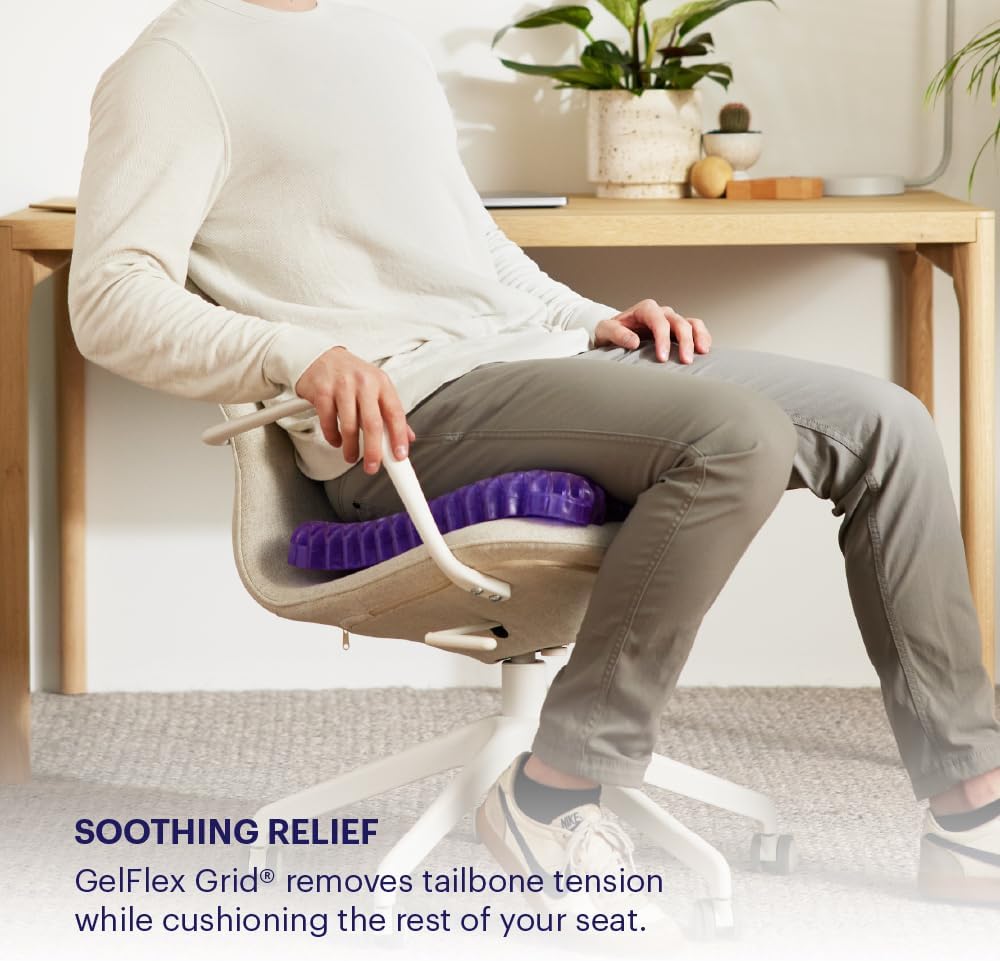
Purple Seat Cushion
A flexible grid-style design to consider if heat buildup is a bigger concern than a dedicated tailbone cutout.
These are product candidates, not results from hands-on gaming-chair testing. Confirm the current model, dimensions, cover details, and return policy before buying.
Why Does Your Gaming Chair Hurt Your Tailbone?
If your gaming chair hurts your tailbone after a long session, the cause may be related to the seat’s shape, padding, fit, or how long you remain in one position. A chair that feels comfortable for the first hour may feel different after several hours of sitting.
Several factors can contribute to discomfort:
- Firm or compressed seat foam: A seat that provides too little cushioning may concentrate pressure around the sitting bones and tailbone.
- Bucket-seat side bolsters: Raised edges can restrict how a cushion sits on the seat. A cushion that is too wide may bunch, tilt, or press against the sides.
- Deep seat contours: The original seat shape may not match your body, causing you to shift around to find a comfortable position.
- Heat and moisture: Dense foam, synthetic upholstery, and long periods of sitting can make the seat feel warm and uncomfortable.
- Staying seated too long: Even a well-fitted cushion cannot replace regular movement and changes in posture.
A cushion can change the contact surface between your body and the chair, but it cannot fix every seating problem. If discomfort is persistent, severe, follows an injury, or comes with numbness or weakness, seek medical advice rather than relying on a cushion alone.
3 Seat Cushions to Consider for Gaming Chairs
The best choice depends on the shape of your chair and the type of discomfort you want to address. Before ordering, measure the usable flat area between the side bolsters and compare it with the product’s current dimensions.
Pick 1 · Tailbone Cutout
1. ComfiLife Gel Enhanced Seat Cushion
If tailbone pressure is your main concern, a cushion with a rear coccyx cutout is a sensible design to investigate. The ComfiLife Gel Enhanced Seat Cushion combines a memory-foam base with a gel layer and a contoured shape intended for seated use.
The rear opening is designed to reduce direct contact around the tailbone. For a gaming chair, however, the cutout must line up with your body, and the cushion must fit securely within the seat’s side bolsters. A cutout that sits too far forward or backward may not provide the intended space.
What to check
- Whether the rear coccyx opening aligns with your tailbone when seated.
- Whether the cushion’s width fits between your chair’s bolsters.
- Whether the foam height raises you too far above the seat.
- Whether the current model has a removable, washable cover and a base that grips your chair.
Potential drawbacks: Memory foam can feel warm to some users, and adding a cushion may change your sitting height. A U-shaped cutout also will not suit everyone or guarantee pain relief.
Pick 2 · Contoured Foam
2. Cushion Lab Pressure Relief Seat Cushion
The Cushion Lab Pressure Relief Seat Cushion is worth considering if you prefer a shaped cushion instead of a flat pad. Its contoured form is designed to support the sitting area and includes a rear relief area for the tailbone.
For gaming, the key question is whether its contours work with the chair you already own. Racing-style seats can have deep side bolsters and a sloped center. If the cushion sits on top of those contours rather than fitting inside them, it may shift or create new pressure points.
What to check
- The usable width and depth of the cushion compared with your chair.
- Whether the contoured edges interfere with the seat’s side supports.
- How much additional height the cushion adds.
- Whether the cover can be removed and cleaned according to the current product instructions.
Potential drawbacks: A contoured cushion may not match every body shape or seat design. Check the current price and return terms, particularly if you are unsure how it will fit a bucket seat.
Pick 3 · Grid-Style Airflow
3. Purple Seat Cushion
If your biggest complaint is heat buildup rather than a specific tailbone pressure point, a grid-style cushion offers a different approach. Purple seat cushions use a flexible polymer grid rather than relying only on a solid block of foam. The open structure is designed to allow air to move through the material.
This style may appeal to players who spend long sessions in a warm room or find conventional foam cushions uncomfortable. But it is important to choose the correct Purple model: the shape, thickness, and coverage differ between versions, and a standard grid cushion is not the same as a dedicated U-shaped coccyx cushion.
What to check
- Whether the specific model includes a tailbone cutout or has a continuous seat surface.
- Whether the grid cushion is wide enough for you but narrow enough for the chair.
- Whether its flexible feel suits your preference.
- Whether the cover is removable and washable on the model you select.
Potential drawbacks: The grid-style feel is different from memory foam, and a model without a dedicated cutout may not be the best match if your main goal is to reduce direct pressure on the tailbone.
How to Choose a Seat Cushion for a Gaming Chair
1. Measure the Bucket Seat Before Buying
This is the most important step for racing-style gaming chairs. Do not measure only the full width of the seat. Measure the usable area between the raised side bolsters, then compare that space with the cushion’s actual width and depth.
A cushion that is too wide may ride up the side bolsters, fold at the edges, or move during gameplay. One that is too small may not support enough of your sitting area. Check the manufacturer’s current dimensions rather than relying on a generic label such as “universal fit.”
2. Choose a Tailbone Cutout if That Is Your Main Concern
A coccyx cushion typically has a U-shaped or similar opening at the rear. The opening is intended to leave space around the tailbone instead of placing the full sitting surface directly underneath it.
Correct positioning matters. Place the cutout toward the back of the chair and check that it lines up with your tailbone when you sit naturally. If the opening is poorly positioned, too small for your needs, or compressed by the chair’s shape, it may not help as expected.
Not everyone needs a cutout. If you mainly want general cushioning or better airflow, a flat or grid-style design may be worth considering instead.
3. Look for Breathable Materials
Long gaming sessions can make a seat feel warm, especially when the chair has synthetic leather upholstery. Consider the full combination of materials rather than assuming that any cushion advertised as “cooling” will stay cool.
- Mesh covers: Often a practical option when you want a fabric surface that allows airflow.
- Gel-infused memory foam: Combines foam cushioning with a gel layer, but it should not be assumed to eliminate heat buildup.
- Open-grid cushions: Have spaces within the cushion structure that can allow airflow through the seating surface.
- Solid memory foam: Can provide a familiar, conforming feel but may feel warmer depending on the cover and environment.
Look for a removable cover if regular cleaning is important. Check the care instructions for the exact model before washing any component.
4. Check Thickness and Sitting Height
A thick cushion can add softness, but it also raises your body relative to the desk, monitor, armrests, and floor. If the added height leaves your feet unsupported or your shoulders elevated, the overall setup may become less comfortable.
After placing a cushion on the chair, check that:
- Your feet can rest securely on the floor or a suitable footrest.
- Your knees and hips remain in a comfortable position.
- Your elbows can reach the desk without raising your shoulders.
- The cushion does not push you forward or make the seat feel unstable.
5. Prioritize Stability During Gameplay
Frequent shifting, leaning, and reaching can cause a poorly fitted cushion to slide. A nonslip base or a secure attachment may help, but neither guarantees compatibility with every upholstery material.
Once the cushion is in place, test it with ordinary seated movements before starting a long session. Stop using it if it bunches, tilts, or repeatedly moves out of position.
6. Do Not Ignore the Chair Itself
If the original seat is badly worn, uneven, or too narrow for your body, an extra cushion may only partly address the problem. Check the chair’s seat depth, width, height adjustment, and overall condition. A flatter seat or a different chair design may be a better solution than adding more padding.
Gaming Chair Cushion vs. Replacing the Chair
| Situation | Option to Consider |
|---|---|
| The seat is generally comfortable but feels too firm | Try a compatible seat cushion |
| Direct tailbone pressure is the main issue | Consider a correctly positioned coccyx-cutout cushion |
| The seat feels hot during long sessions | Consider a breathable cover or open-grid design |
| The cushion cannot fit between the side bolsters | Look for a narrower design or a chair with a flatter seat |
| The seat is damaged, badly compressed, or fundamentally too small | Assess whether replacing the chair is the better long-term option |
Tips for More Comfortable Long Gaming Sessions
A cushion is only one part of a comfortable gaming setup. Try these adjustments alongside any new seat cushion:
- Take movement breaks: Stand up, walk briefly, and change position regularly instead of sitting continuously for hours.
- Adjust the chair height: Aim for a position where your feet are supported and your shoulders can stay relaxed.
- Check the desk and monitor: Position your screen and controls so you do not need to lean forward for extended periods.
- Keep the cushion centered: Reposition it if it shifts or becomes uneven.
- Evaluate comfort gradually: Try the setup for a shorter session first and pay attention to new pressure points or posture changes.
If your setup also needs better back support, see our guide to lumbar support options. A lumbar pillow and a seat cushion serve different purposes, so adding both is not automatically better.
Frequently Asked Questions
What is the best seat cushion for a gaming chair?
The best choice depends on your chair’s dimensions and your main concern. A coccyx-cutout cushion is worth considering for direct tailbone pressure, while a grid-style cushion may appeal to people who prioritize airflow. Measure the usable seat area before choosing either style.
Can I use an office chair cushion on a gaming chair?
Often, yes, provided the cushion fits securely and does not interfere with the chair’s side bolsters. Office cushions are not all designed for bucket seats, so compare the cushion’s width, depth, thickness, and base before buying.
Will a coccyx cushion fix gaming chair tailbone pain?
A coccyx cutout is designed to reduce direct contact around the tailbone, but results vary with fit, posture, the chair itself, and the cause of the discomfort. It cannot guarantee pain relief or replace medical assessment when symptoms persist.
Are gel cushions cooler than memory foam?
Not necessarily. A gel layer may change how a cushion feels, but cooling depends on the entire construction, including the cover, foam, and surrounding upholstery. Open-grid structures and breathable covers are other options to consider if heat is a concern.
How thick should a gaming chair cushion be?
There is no single ideal thickness for every gaming chair. Choose a cushion that provides the feel you want without raising you so high that your feet lose support or your desk and armrests become awkward to use.
Should I use a seat cushion for every gaming session?
Use one if it makes your setup more comfortable and stable, but do not treat it as a substitute for movement breaks or a suitable chair. If the cushion increases discomfort, slides around, or changes your posture in an unhelpful way, stop using it and reassess the fit.
Explore More Seat Cushion Guides
Choosing the right cushion starts with understanding your seating needs. Explore these related SitBetterLab guides for more options.
Affiliate Disclosure: As an Amazon Associate, SitBetterLab may earn from qualifying purchases. This does not affect the price you pay.
Important Note: Product designs, dimensions, availability, and care instructions may change. Verify details on the current product listing before purchasing. This article is for general informational purposes and is not medical advice.