Best Portable Laptop Stands for Travel and Remote Work
Build a more comfortable mobile workstation with compact laptop stands designed for hotel desks, coworking spaces, coffee shops, and working on the go.
Working remotely often means using whatever desk happens to be available. A hotel desk, shared workspace, or coffee shop table may be convenient, but your laptop screen can sit too low for comfortable viewing. A portable laptop stand helps raise the display without forcing you to carry a full-size desktop accessory.
The best option depends on how you travel. Frequent flyers may prefer a lightweight stand that folds into a small package, while remote workers who spend weeks at a time in one location may appreciate a sturdier adjustable model. If you work in cafés or shared offices, quick setup and a stable base can matter just as much as weight.
This guide focuses on portability, packability, adjustability, and practical remote-work use. Product availability and specifications can change, so confirm the current model details before ordering.
Quick Buying Advice
- Frequent travel: Choose a lightweight folding stand that fits easily into your laptop bag.
- Minimal carry weight: Consider an ultra-thin, laptop-mounted stand if a modest screen lift is enough.
- Long remote-work sessions: Prioritize height adjustment and use an external keyboard and mouse.
- Shared desks: Look for a stand that opens quickly and stays stable during normal typing.
Best Portable Laptop Stands at a Glance
| Stand | Best For | Main Advantage | Potential Trade-Off |
|---|---|---|---|
| Roost Laptop Stand | Frequent travelers | Compact folding design with screen-height adjustment | Premium pricing; check the exact version |
| NEXSTAND K2 | Value-focused mobile offices | Folding support with adjustable elevation | Requires setup and careful placement |
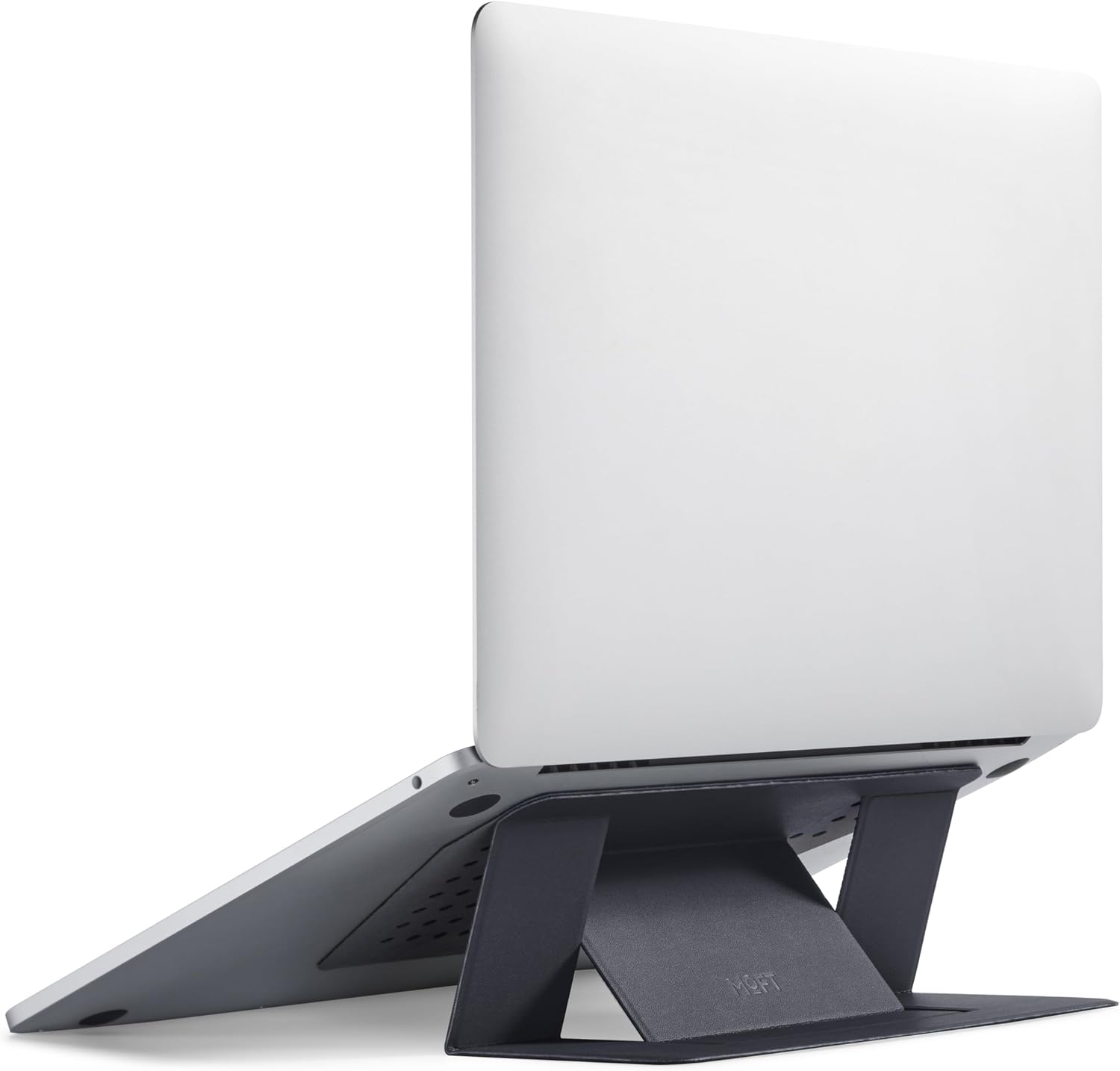
| MOFT Invisible Laptop Stand | Minimalist carry kits | Slim design that stays attached to a compatible laptop | Limited lift compared with taller stands |
| Twelve South Curve Flex | Premium remote-work setups | Adjustable viewing position and a polished design | Bulkier than ultra-light travel stands |
| SODI Ultra Compact Laptop Stand | Compact bags and temporary desks | Small folding format for mobile use | Verify laptop fit and stability before buying |
These are use-case recommendations, not laboratory test rankings. Check the current listing for the exact model, dimensions, supported laptop size, and included accessories.
1. Roost Laptop Stand — Best for Frequent Travelers
The Roost Laptop Stand is worth considering if you regularly move between hotel rooms, temporary offices, and coworking spaces. Its folding support design is built around portability rather than a permanent desktop footprint.
Unlike a simple low-angle riser, an adjustable stand can help you position the laptop display higher on different desks. That flexibility is useful when desk heights and available space change from one location to another.
What Works Well
- Designed for a compact travel setup.
- Adjustable support can accommodate different viewing positions.
- Pairs well with a separate compact keyboard and mouse.
What to Consider
- Check which Roost version is currently listed and confirm its dimensions.
- Confirm that your laptop’s base fits securely on the support points.
- Budget for a separate keyboard and mouse if you plan to raise the screen for extended typing.
Best for: Remote workers who travel regularly and want a dedicated stand that packs away between work sessions.
2. NEXSTAND K2 — Best for a Budget-Friendly Mobile Office
The NEXSTAND K2 is another option for travelers who prefer a folding support system rather than a broad metal platform. It is designed for portable workstation setups where the stand needs to be packed away after use.
Its appeal is straightforward: elevate the laptop screen at a temporary desk without carrying a conventional desktop riser. This format can work well for people who work from several locations during the week.
What Works Well
- Folding design is suited to mobile work.
- Adjustable elevation offers more flexibility than a fixed-angle wedge.
- Can help create a more consistent viewing position at temporary desks.
What to Consider
- It may take longer to set up than a stand that remains attached to the laptop.
- Check the supported laptop dimensions and the instructions for securing your device.
- Use it on a firm, level surface rather than a soft bed or unstable tray.
Best for: Travelers who want an adjustable folding stand but do not need a premium aluminum platform.
3. MOFT Invisible Laptop Stand — Best for Minimalist Carry Kits
If you want to carry as little as possible, the MOFT Invisible Laptop Stand takes a different approach. Rather than carrying a separate stand, this slim accessory attaches to a compatible laptop and folds into a low-profile support when needed.
This can be especially convenient for people who work from cafés, libraries, or shared offices and want a simple way to add some elevation without adding another large item to their bag.
What Works Well
- Low-profile design reduces the need to carry a separate stand.
- Quick to access when moving between locations.
- A good match for minimalist laptop bags and lightweight travel kits.
What to Consider
- It does not provide the same height range as a tall folding stand.
- Confirm compatibility with your laptop model, size, and case.
- Check the current attachment instructions before applying it to your device.
Best for: People who prioritize low carrying bulk and need a modest lift rather than a full eye-level setup.
4. Twelve South Curve Flex — Best for Premium Remote Work
The Twelve South Curve Flex is worth a look if your remote-work setup needs more than a basic screen lift. Its adjustable design lets you change the laptop’s viewing position, which can be useful for video calls, presentations, and work sessions at different desks.
It is better suited to someone who wants a refined, adjustable workstation and is willing to carry a little more than an ultra-compact stand. Before buying, check the current version’s folded dimensions, laptop compatibility, and whether a travel sleeve is included.
What Works Well
- Adjustable positioning can help accommodate different desk heights.
- Useful for remote workers who regularly join video meetings.
- Can serve as a travel accessory and a more permanent home-office stand.
What to Consider
- It is not the first choice if every ounce and inch in your bag matters.
- Compare the packed size with your laptop sleeve or carry-on.
- For long typing sessions, use a separate keyboard and mouse when the laptop is elevated.
Best for: Remote professionals who want a versatile, polished stand for both temporary and home-office desks.
5. SODI Ultra Compact Laptop Stand — Best for Small Bags
A compact folding stand can be a sensible choice if you regularly work from libraries, cafés, or shared desks and want to avoid carrying a larger riser. The SODI Ultra Compact Laptop Stand is a model to investigate for this type of mobile setup.
Before choosing it, verify the exact listing and model name. Compact accessories can look similar while differing in support design, adjustment positions, laptop compatibility, and stability.
What to Look For
- A folded shape that fits your existing laptop bag or accessory pouch.
- Non-slip contact points and a secure resting area for your laptop.
- Adjustment positions that suit the desks where you usually work.
What to Consider
- Do not assume every compact stand supports larger or heavier laptops.
- Check that the stand remains stable when the laptop is opened and used.
- Review the current seller’s specifications before comparing it with established models.
Best for: Buyers looking for a compact travel accessory who are prepared to verify the exact model and fit before ordering.
How to Choose a Portable Laptop Stand
1. Compare Packed Size, Not Just Product Size
A stand can look compact in product photos but still take up valuable space once folded. Check the listed folded dimensions and compare them with the laptop compartment or accessory pocket in your bag. If you travel with only a small backpack, a low-profile or laptop-mounted design may be more practical than a rigid platform.
2. Consider Weight Alongside Stability
Weight matters when you carry your setup every day, but the lightest option is not automatically the best. A stand must support your laptop securely and remain stable on the surfaces where you work. Check compatibility, support points, and the manufacturer’s guidance for your device.
3. Choose Enough Height Adjustment
A low-profile stand may make typing or viewing slightly more comfortable, but it may not raise the screen enough for your preferred viewing position. If you want the laptop display closer to eye level, compare the actual lift range rather than relying on product photos or the word “ergonomic.”
4. Check Setup Time
If you change work locations several times a day, a stand that opens and folds quickly can be more useful than a model with many adjustment points. If you stay in one place for weeks, additional adjustment and a more substantial support structure may be worth the extra setup.
5. Plan for a Separate Keyboard and Mouse
Raising a laptop screen also raises its keyboard. Typing for long periods with your hands held high can be uncomfortable. For a more flexible workstation, place the elevated screen in front of you and use a separate keyboard and mouse at a comfortable hand height.
Portable Laptop Stand Checklist
- ☐ Fits the laptop’s size and weight
- ☐ Packs into the bag without damaging other gear
- ☐ Provides a suitable screen height for your usual desks
- ☐ Has secure, non-slip support points
- ☐ Opens and folds easily
- ☐ Works with your keyboard, mouse, and other accessories
Portable Laptop Stand vs. Regular Desk Stand
| Feature | Portable Stand | Regular Desk Stand |
|---|---|---|
| Main purpose | Travel and changing workspaces | A more permanent workstation |
| Storage | Usually folds or packs away | May remain on the desk |
| Stability | Depends on the folding design and surface | Often prioritizes a stable desktop base |
| Best buyer | Digital nomads and hybrid workers | People with a dedicated home office |
How to Set Up a More Comfortable Travel Workstation
A stand is only one part of a mobile workstation. Use these simple steps to make a temporary desk more practical:
- Raise the display: Position the screen so you can view it without repeatedly bending your neck downward.
- Keep your keyboard low: Use an external keyboard when the laptop is raised, with your shoulders relaxed and elbows close to your body.
- Place the mouse nearby: Keep it at a comfortable height and within easy reach.
- Check the surface: Make sure the stand rests on a firm, level desk and does not wobble during normal use.
- Change positions regularly: Take breaks and move throughout the day rather than relying on a single setup to solve every discomfort.
For more ideas, see our guide to ergonomic desk setup tips and explore our recommendations for monitor stands.
Frequently Asked Questions
Are portable laptop stands worth it for travel?
They can be worthwhile if you regularly work away from your main desk. A compact stand makes it easier to raise your screen at temporary workspaces. The benefit depends on how often you travel, how much you value screen adjustment, and whether you are willing to carry a separate keyboard and mouse.
What type of laptop stand is easiest to carry?
Laptop-mounted designs are often convenient because they stay with the device, while compact folding stands can provide more elevation. Compare the packed dimensions and total carry weight of the specific models rather than assuming that every folding stand is equally portable.
Can I use a laptop stand without an external keyboard?
Yes, but raising the laptop can make its built-in keyboard less comfortable to use. For longer sessions, a separate keyboard and mouse usually provide more flexibility because you can position the display independently from your hands.
Do portable laptop stands fit every laptop?
No. Compatibility varies by stand design, laptop dimensions, base shape, and weight. Check the manufacturer’s supported size range and instructions before purchasing, especially if you use a large laptop or a device with an unusual bottom shape.
Are lightweight laptop stands stable enough for typing?
Stability depends on the stand’s design, laptop fit, and work surface. Use the stand on a firm, level desk and follow its setup instructions. If you type forcefully or use a heavier laptop, prioritize a secure support structure over minimum weight.
Should I buy a portable stand or a desktop riser?
Choose a portable stand if you regularly move between workspaces or need to pack your desk accessories away. A larger desktop riser may be a better fit if the stand will remain in one place and portability is not important.
Final Verdict: Which Portable Laptop Stand Should You Choose?
The right portable laptop stand is the one that fits your travel routine, laptop, and preferred work setup. A compact folding design makes sense for frequent travelers, while an attached low-profile stand is appealing if you want to minimize the number of accessories in your bag. A more adjustable model can be worth carrying if you spend long periods working at temporary desks.
Roost Laptop Stand
Consider it if compact packing and adjustable elevation are your main priorities.
NEXSTAND K2
A folding option to compare when building a mobile workstation on a budget.
MOFT Invisible Laptop Stand
Consider it if a slim, attached accessory matters more than maximum lift.
Before buying, verify current model specifications, laptop compatibility, packed dimensions, and price. For longer work sessions, combine your stand with an external keyboard and mouse to build a more adaptable setup wherever you work.
Affiliate Disclosure: SitBetterLab may earn a commission from qualifying purchases made through links on this page, at no additional cost to you. Product availability, specifications, and prices may change. Confirm details on the retailer’s current listing before purchasing.