
Best Gaming Chairs Under $300
Find a gaming chair that balances comfort, support, adjustability, and build quality without pushing your budget beyond $300.
The best gaming chairs under $300 are not necessarily the ones with the most features. For most buyers, prioritize a chair that fits your body, provides useful lumbar support, has adjustable armrests, offers a comfortable recline range, and uses a seat cushion that remains supportive during longer sessions. Your ideal choice will depend on your size, room, gaming habits, and whether you also use the chair for work.
If you are searching for the best gaming chairs under $300, you have enough budget to move beyond the cheapest racing-style chairs and look for better support, adjustability, materials, and overall fit.
However, a $300 budget still requires some compromises. Some chairs focus on reclining and footrests, while others put more emphasis on lumbar support, breathable upholstery, or a wider seat. The right choice depends more on your priorities than on the number of features listed on the product page.
If you are comparing gaming chairs more broadly, start with our Gaming Chairs Hub for guides organized by body size, room size, budget, and support needs.
Best Gaming Chairs Under $300: Quick Comparison
| Gaming Chair | Best For | What to Look For | Amazon |
|---|---|---|---|
| Razer Iskur V2 X | Support-focused gaming setups | Built-in lumbar support and reclining design | Check Amazon |
| Corsair TC100 Relaxed | Comfort-focused gaming and work | Relaxed seat design, adjustability, and recline | Check Amazon |
| RESPAWN 110 Pro | Reclining and footrest users | Recline, footrest, lumbar support, and padded seat | Check Amazon |
| GTPLAYER Gaming Chairs | Feature-rich budget setups | Footrest, lumbar support, armrest adjustment, and fit | Check Amazon |
| Dowinx Gaming Chairs | Recline and relaxation | Reclining backrest, lumbar support, and seat width | Check Amazon |
Prices, availability, colors, and configurations can change. Check the current Amazon listing before purchasing.
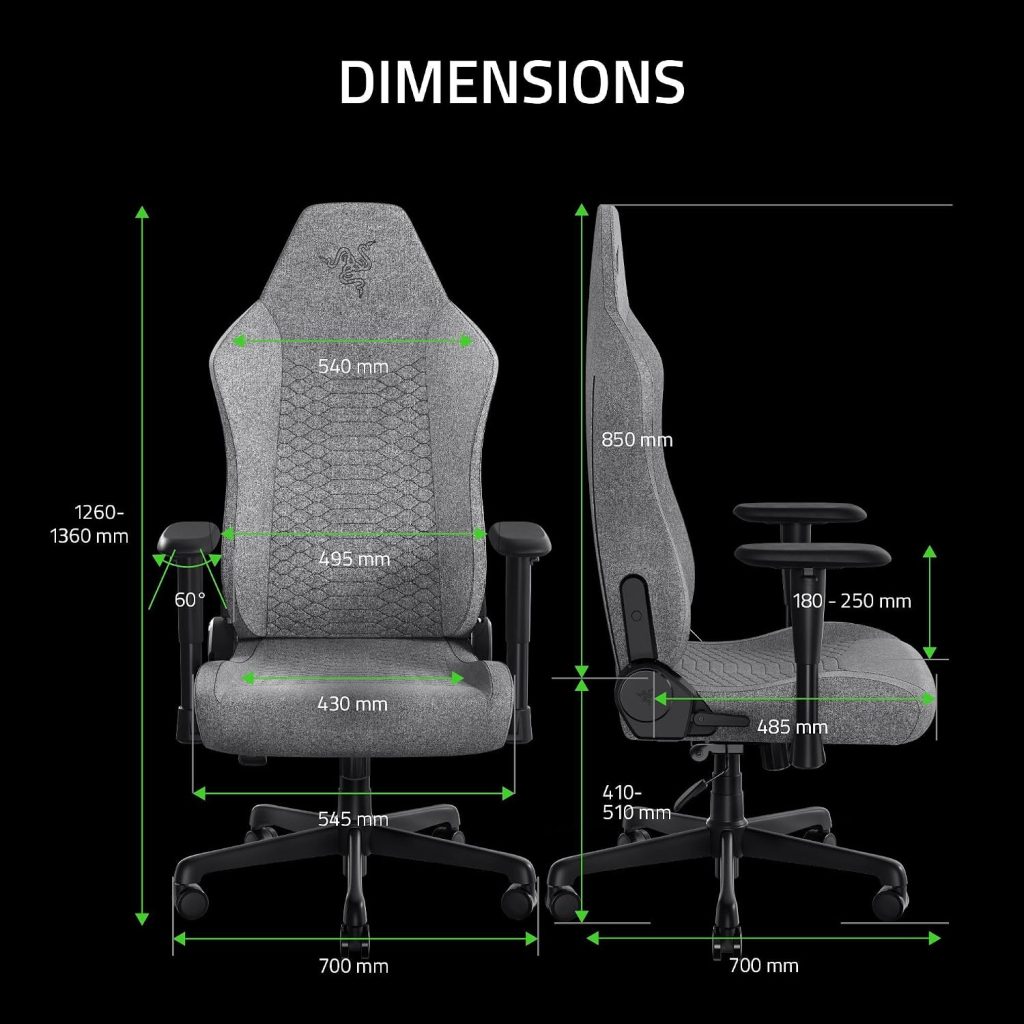
1. Razer Iskur V2 X: A Strong Support-Focused Option
The Razer Iskur V2 X is worth considering if your priority is support rather than simply adding as many gaming features as possible. Its design puts more emphasis on the relationship between the backrest and lumbar area than many basic gaming chairs.
That makes it particularly interesting for buyers who want a gaming chair that can also work for desk-based activities such as studying, streaming, or working from home.
- Built-in lumbar support design
- Gaming-oriented reclining backrest
- More understated than some heavily styled racing chairs
- Suitable for gaming and general desk use
Check Razer Iskur V2 X on Amazon →
2. Corsair TC100 Relaxed: A Comfortable Alternative
The Corsair TC100 Relaxed is a good option for shoppers who prefer a less aggressive racing-seat shape. The relaxed approach can make a difference if you use your chair for both gaming and everyday desk work.
Instead of choosing a chair solely because it looks like a racing seat, consider whether the seat width, backrest shape, armrests, and recline position allow you to change positions comfortably.
Gamers who also use their chair for PC work, browsing, streaming, or study and want a more relaxed seating feel.
Check Corsair TC100 Relaxed on Amazon →
3. RESPAWN 110 Pro: Best for Reclining and Footrest Features
The RESPAWN 110 Pro is a different type of budget gaming chair. It focuses heavily on reclining and relaxation, making it attractive to people who want to lean back between games or use their chair for watching videos.
A retractable footrest can also be useful when you want to take pressure off your legs while reclining. Just remember that a footrest is a comfort feature rather than a substitute for correct desk and monitor positioning.
- Reclining design
- Retractable footrest on supported configurations
- Lumbar and head support
- Useful for gaming and relaxed viewing
Check RESPAWN 110 Pro on Amazon →
4. GTPLAYER Gaming Chairs: Feature-Rich Budget Choices
GTPLAYER has several gaming chair configurations aimed at shoppers who want more features without moving into premium pricing. Depending on the model, you may find combinations of reclining backrests, footrests, lumbar cushions, headrests, and adjustable armrests.
The important point is to compare the exact model rather than treating every GTPLAYER chair as identical. Seat dimensions, weight capacity, upholstery, armrest design, and support features can vary between models.
Do not choose a budget gaming chair only because it includes a footrest or massage cushion. Fit, seat depth, lumbar position, armrest height, and weight capacity usually matter more for everyday use.
Check GTPLAYER Gaming Chairs on Amazon →
5. Dowinx Gaming Chairs: Recline and Relaxation
Dowinx is another brand worth checking when reclining comfort is high on your list. Different models can emphasize features such as reclining backrests, lumbar support, footrests, wider seating, or massage-style lumbar cushions.
Because the lineup includes multiple configurations, check the exact model’s dimensions and weight rating before ordering. This is especially important if you need a wider seat or have a larger frame.
Check Dowinx Gaming Chairs on Amazon →
What Should You Look for in a Gaming Chair Under $300?
The best gaming chair under $300 should be judged by how well it fits your body and daily routine, not by how long its feature list is.
1. Seat Width and Depth
Seat dimensions determine how much freedom you have to change positions. A seat that is too narrow can feel restrictive, while excessive seat depth can make it difficult for shorter users to keep their feet comfortably on the floor.
Before buying, compare the manufacturer’s seat measurements with a chair you already find comfortable.
2. Lumbar Support
Lumbar support is one of the most important features to evaluate. Budget gaming chairs commonly use a separate lumbar cushion, while some designs use more integrated support.
A removable pillow is not automatically bad. The key question is whether you can position it where your lower back actually needs support.
3. Armrest Adjustability
Adjustable armrests can make a meaningful difference when gaming at a desk. Ideally, your elbows should be supported without forcing your shoulders upward.
Check the actual adjustment range instead of choosing a chair simply because the product listing says “adjustable armrests.”
4. Recline Range
A reclining backrest is useful for changing positions, resting between games, and watching content. However, maximum recline angle should not be the only consideration.
Look for a mechanism that feels stable at the positions you actually use.
5. Weight Capacity
Always compare the chair’s stated weight capacity with your own body weight and allow some margin rather than buying right at the limit.
If you specifically need a higher-capacity gaming chair, see our dedicated guide to Big and Tall Gaming Chairs.
6. Upholstery
PU leather can be easy to clean and gives a classic gaming-chair appearance. Fabric can be preferable if breathability is a priority. Neither material is automatically better for everyone.
Think about your room temperature, cleaning habits, pets, and how many hours you spend in the chair.
Gaming Chair Features That Matter Most Under $300
| Feature | Why It Matters | Priority |
|---|---|---|
| Correct seat size | Determines whether the chair actually fits your body | Very High |
| Lumbar support | Supports a more comfortable seated position | Very High |
| Adjustable armrests | Helps position your arms relative to the desk | High |
| Recline | Makes it easier to change position and relax | Medium-High |
| Footrest | Useful for relaxation but not essential for everyone | Medium |
| Extra features | Massage, RGB, cushions, and similar extras add convenience but do not guarantee better ergonomics | Low-Medium |
How to Choose the Best Gaming Chair Under $300 for You
Prioritize lumbar design, backrest shape, and adjustability before cosmetic features.
Focus on fit, seat comfort, breathable materials, armrest position, and the ability to change posture.
Look for stable recline, comfortable head support, and a footrest if you actually plan to use one.
Check seat width, seat depth, backrest width, and weight capacity before considering extra features.
Are Gaming Chairs Under $300 Good Enough for Long Hours?
They can be, but the price alone does not determine whether a chair will work well for long sessions.
A budget gaming chair can be comfortable for several hours if the seat dimensions match your body, the lumbar support is positioned correctly, and the armrests allow a comfortable relationship with your desk.
At the same time, a chair with an attractive racing design and many extra features can still feel uncomfortable if the seat is too deep, the lumbar pillow sits in the wrong location, or the armrests are too low.
If long gaming sessions are your main concern, also read our dedicated guide to Gaming Chairs for Long Hours.
Gaming Chairs Under $300 vs. Ergonomic Office Chairs
A gaming chair is not automatically more ergonomic than an office chair. In many cases, an ergonomic office chair offers more adjustment options, while a gaming chair may offer a more recognizable gaming design and deeper recline.
| Priority | Gaming Chair | Ergonomic Office Chair |
|---|---|---|
| Gaming appearance | Usually stronger | Usually more understated |
| Deep recline | Often a major feature | Varies by model |
| Lumbar adjustment | Varies widely | Often a stronger focus |
| Footrest | Common on budget models | Less common |
For a detailed comparison, see Gaming Chair vs. Ergonomic Chair if that article is part of your current Gaming Chairs cluster.
Gaming Chair Size Matters More Than Most Buyers Expect
Before buying, compare your body measurements with the manufacturer’s specifications. Pay particular attention to seat width, seat depth, seat height, backrest height, and weight capacity.
Simple Fit Checklist
- Your feet should be able to rest comfortably on the floor when the chair is at the appropriate height.
- Your knees should have enough room without the seat forcing you too far forward.
- Your lower back should contact the lumbar support rather than sitting above or below it.
- Your shoulders should remain relaxed when your arms are supported.
- The chair’s stated weight capacity should comfortably exceed your body weight.
If you are shorter than average, see our guide to Gaming Chairs for Short People. For taller users, see Gaming Chairs for Tall People.
When Should You Spend More Than $300?
A $300 budget can cover many useful gaming-chair features, but you may want to increase your budget if you specifically want more advanced adjustability, premium materials, more refined lumbar mechanisms, or a higher-end warranty and build system.
Do not spend more simply because a chair is marketed as premium. First identify the adjustment or fit problem you are trying to solve.
If your current chair is uncomfortable because it does not fit your body, spending more on another poorly fitting chair will not solve the problem. Get the size and adjustment basics right first.
FAQs About Gaming Chairs Under $300
What is the best gaming chair under $300?
There is no single best model for every buyer. Razer, Corsair, RESPAWN, GTPLAYER, and Dowinx all offer options worth comparing in this price range. The best choice depends on your body size, preferred support, recline needs, and whether you use the chair for work as well as gaming.
Can you get a good gaming chair for under $300?
Yes. A $300 budget can provide access to gaming chairs with useful lumbar support, adjustable armrests, reclining backrests, and other comfort features. The key is choosing the right combination of features rather than paying for features you will rarely use.
Are cheap gaming chairs good for your back?
A low price does not automatically make a chair bad for your back, and a higher price does not guarantee better support. Fit, lumbar position, seat dimensions, desk setup, and how often you change position all matter.
Is a gaming chair under $300 good for work?
It can be. Look for adjustable armrests, appropriate seat dimensions, useful lumbar support, and a backrest that allows comfortable position changes. If work is your primary use, compare gaming chairs with ergonomic office chairs before buying.
Should I choose a gaming chair with a footrest?
Choose a footrest if you expect to recline and relax in the chair. It is less important if you mainly sit upright at a desk. Do not sacrifice seat fit or lumbar support just to get a footrest.
How much should I spend on a gaming chair?
There is no universal amount. Under $300 is a useful range for shoppers who want a noticeable step up from the cheapest gaming chairs while still keeping the purchase relatively affordable. If you need advanced adjustability or premium construction, a higher budget may be justified.
Related Gaming Chair Guides
Gaming Chairs Hub
Explore gaming chairs by size, space, budget, and support needs.
Short People
Find gaming chairs with a better fit for shorter users.
Tall People
Compare gaming chair fit considerations for taller users.
Big & Tall
Explore higher-capacity gaming chair options.
Small Spaces
Find compact gaming chairs for smaller rooms and setups.
Lower Back Pain
Focus on lumbar support and fit when choosing a gaming chair.
Long Hours
See what to prioritize for extended gaming sessions.
Final Takeaway
The best gaming chair under $300 is the one that fits your body and supports the way you actually use your desk. Instead of choosing the chair with the longest feature list, compare seat dimensions, lumbar support, armrests, recline, upholstery, and weight capacity first.
For more gaming chair recommendations by need, return to the SitBetterLab Gaming Chairs Hub.
Affiliate Disclosure: SitBetterLab may earn a commission from qualifying purchases made through affiliate links. This does not increase the price you pay.