
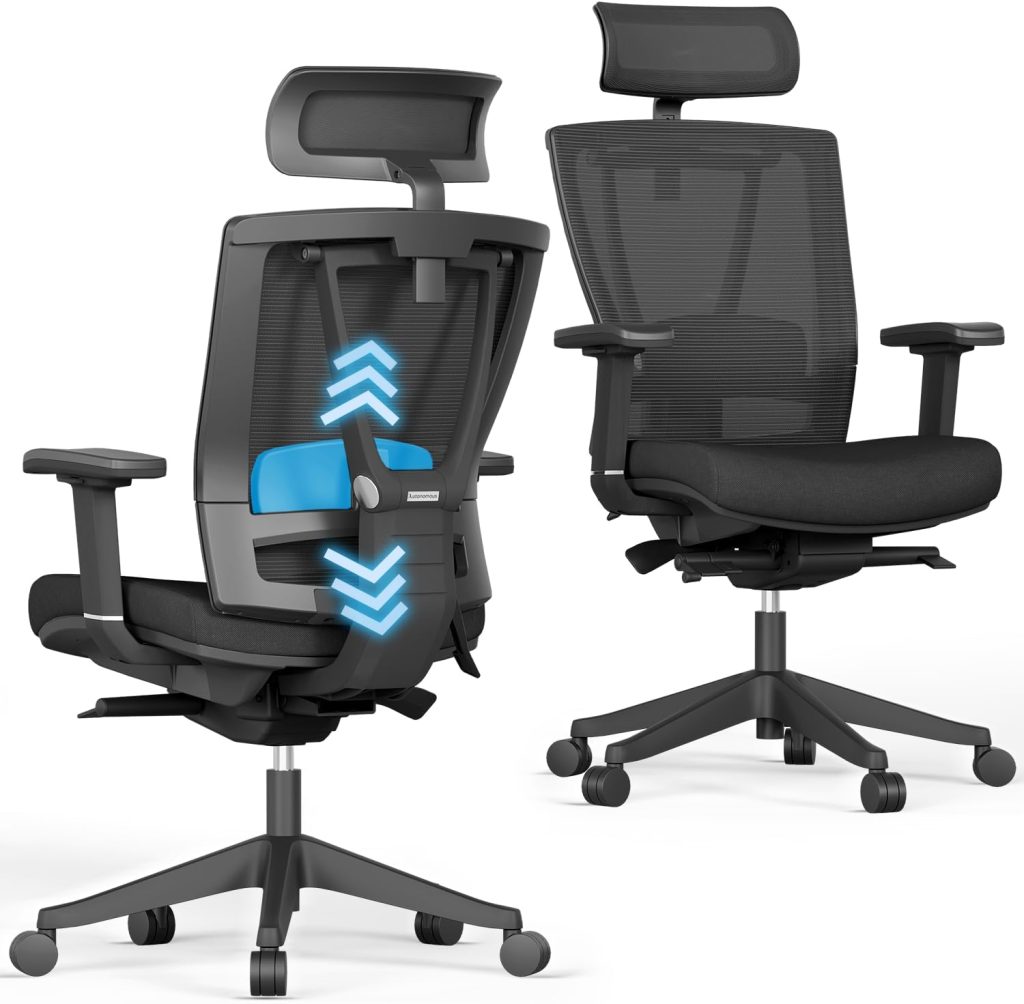
The Autonomous ErgoChair Pro has become one of the most talked‑about office chairs in the sub‑$600 category. With its 4D armrests, adjustable seat depth, built‑in headrest, and sporty design, it has attracted a loyal following among remote workers and gamers alike.
But is it actually comfortable? How does it compare to the Branch Ergonomic Chair Pro? And is the short 2‑year warranty a dealbreaker?
In this review, I will break down everything you need to know about the Autonomous ErgoChair Pro: design, adjustability, comfort, durability, pricing, and how it stacks up against its closest competitors.
Quick Verdict: Is the Autonomous ErgoChair Pro Worth It?
Yes — with important caveats. The ErgoChair Pro offers impressive adjustability for the price: 4D armrests, adjustable seat depth (19–21.5″), built‑in headrest, and a 22° synchro‑tilt recline with forward tilt. The seat is wide (20″) and the back is tall, accommodating a range of body types.
However, the chair has significant drawbacks: the 2‑year warranty is short compared to Branch’s 7 years, the seat padding is thinner than competitors, and quality control issues (wobbly armrests, loose lumbar) are reported by some users. The assembly is also more time‑consuming than average.
The ErgoChair Pro is best suited for users who prioritize an included headrest, want a wider seat, and are willing to accept a shorter warranty for a lower upfront cost. For most people, the Branch Ergonomic Chair Pro offers better value overall.
👉 Check today’s price for Autonomous ErgoChair Pro on Amazon →
Autonomous ErgoChair Pro: Overview

Autonomous is a well‑known direct‑to‑consumer brand offering a range of office products, from standing desks to ergonomic chairs. The ErgoChair Pro sits in the middle of their chair lineup — above the ErgoChair Core (under $300) and below the ErgoChair Plus (their premium model).
The ErgoChair Pro has been on the market for several years and has accumulated thousands of reviews. It has evolved through multiple iterations, with the current version addressing some early concerns about build quality.
The chair is designed to compete directly with the Branch Ergonomic Chair Pro, offering similar features at a similar price point with a few key differences: an included headrest, a wider seat, and forward tilt capability.
Specifications at a Glance:
- Price: $499 ($379–449 on sale)
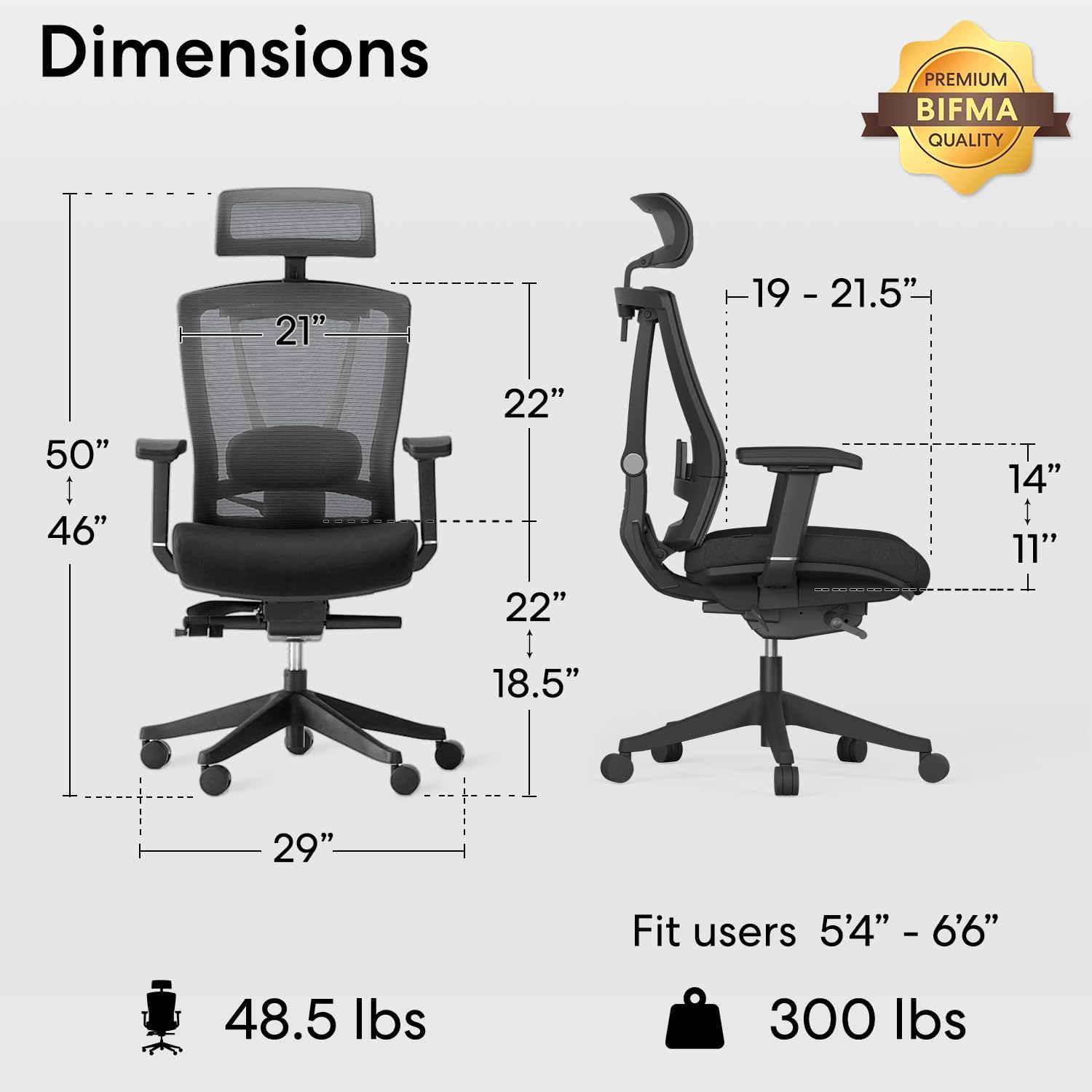
- Weight capacity: 300 lbs
- Chair weight: 48.5 lbs
- Adjustments: 9 points
- Armrests: 4D (height, width, depth, pivot)
- Lumbar support: Height‑adjustable (depth fixed), removable
- Seat depth: Adjustable (19″ – 21.5″)
- Seat width: 20″ (wider than average)
- Recline: 22° synchro‑tilt with 5 lock positions + forward tilt
- Headrest: Included, height‑adjustable
- Material options: Molded foam (fabric‑covered) or German‑engineered mesh
- Base: Reinforced polymer (plastic)
- Warranty: 2 years
- Assembly time: 30–45 minutes
Design and Build Quality
The Autonomous ErgoChair Pro has a distinct, sporty aesthetic. Unlike the minimalist, professional look of the Branch chair, the ErgoChair Pro looks more like a high‑end gaming chair — but without the aggressive racing stripes. It is available in multiple colors, including black, gray, blue, pink, green, and white.
The chair is large. With a 20″ wide seat and tall backrest, it has a substantial presence in any room. It is also heavy — nearly 50 lbs — making it difficult to move between rooms.
Build quality is acceptable for the price, but the materials feel less premium than the Branch chair. The base is reinforced polymer (plastic) rather than aluminum. The armrests have some wobble — a common complaint in reviews — and the plastic components can feel slightly less refined than higher‑end chairs.
One positive: the German‑engineered mesh option is highly breathable and durable, comparable to what you would find on chairs costing significantly more.
Adjustability: Solid but Not Class‑Leading

The ErgoChair Pro offers 9 adjustment points — fewer than the Branch chair’s 14, but still more than many competitors at this price.
4D Armrests
The armrests adjust in height, width, depth, and pivot. This is standard 4D adjustability — good, but not as advanced as the Branch’s 5D (which adds lateral movement). Reviewers note that the armrests can feel “wobbly” or “loose” compared to premium chairs.
One Amazon reviewer wrote: “The armrests are nice but have a bit too much play. They don’t feel as solid as the Leap’s armrests, but for the price, they work.”
Some users also report that the armrest padding is thin, leading to sore elbows during long sessions.
Adjustable Lumbar Support
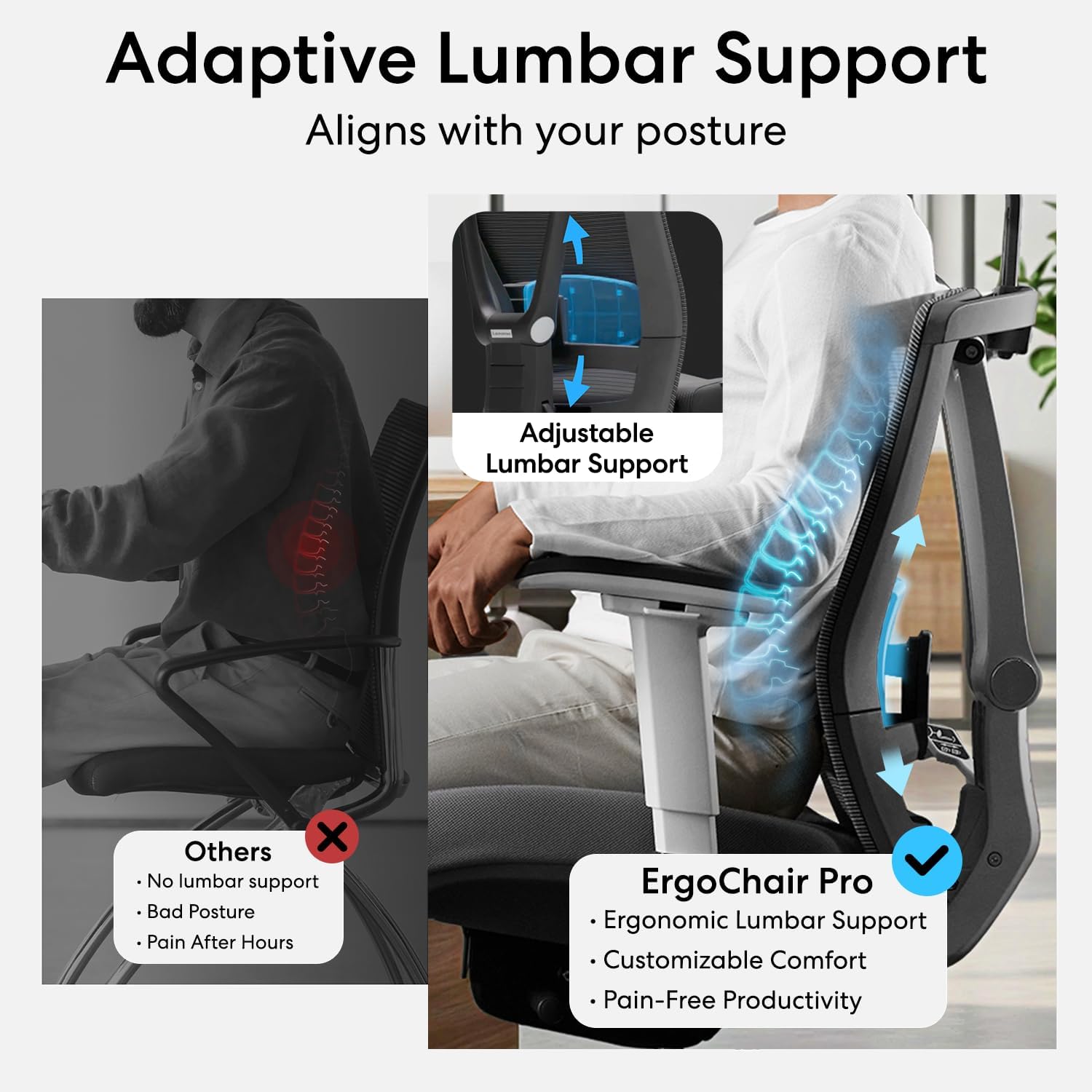
The lumbar support is height‑adjustable (up/down) but not depth‑adjustable. You can move it to hit your lower back, but you cannot control how much pressure it applies. The lumbar cushion is removable if you prefer no lumbar support at all.
One reviewer noted: “The lumbar is better than nothing, but it doesn’t push in as much as I’d like. If you need aggressive lumbar support, look at the Steelcase Leap instead.”
Seat Depth Adjustment (19″ – 21.5″)
The ErgoChair Pro features adjustable seat depth — a valuable feature for tall users or those with long legs. The range (19″ – 21.5″) is among the widest in its class. This allows you to properly support your thighs without pressing into the back of your knees.
This is one area where the ErgoChair Pro outperforms many competitors, including the Branch chair (which has a smaller depth range).
Recline: Synchro‑Tilt + Forward Tilt
The ErgoChair Pro features a 2:1 synchro‑tilt mechanism — as you recline, the seat moves at a 2:1 ratio to the backrest, keeping your feet on the floor and your eyes level with your screen. This is a more sophisticated mechanism than most chairs at this price.
The recline offers 22° of tilt with 5 lock positions. Additionally, the chair has a forward tilt option — a feature Branch does not offer. Forward tilt is useful for drafting, drawing, or leaning into focused work.
One reviewer praised this feature: “The forward tilt is great for those times when I need to really focus on a task. It feels like I’m leaning into my work.”
Headrest (Included)
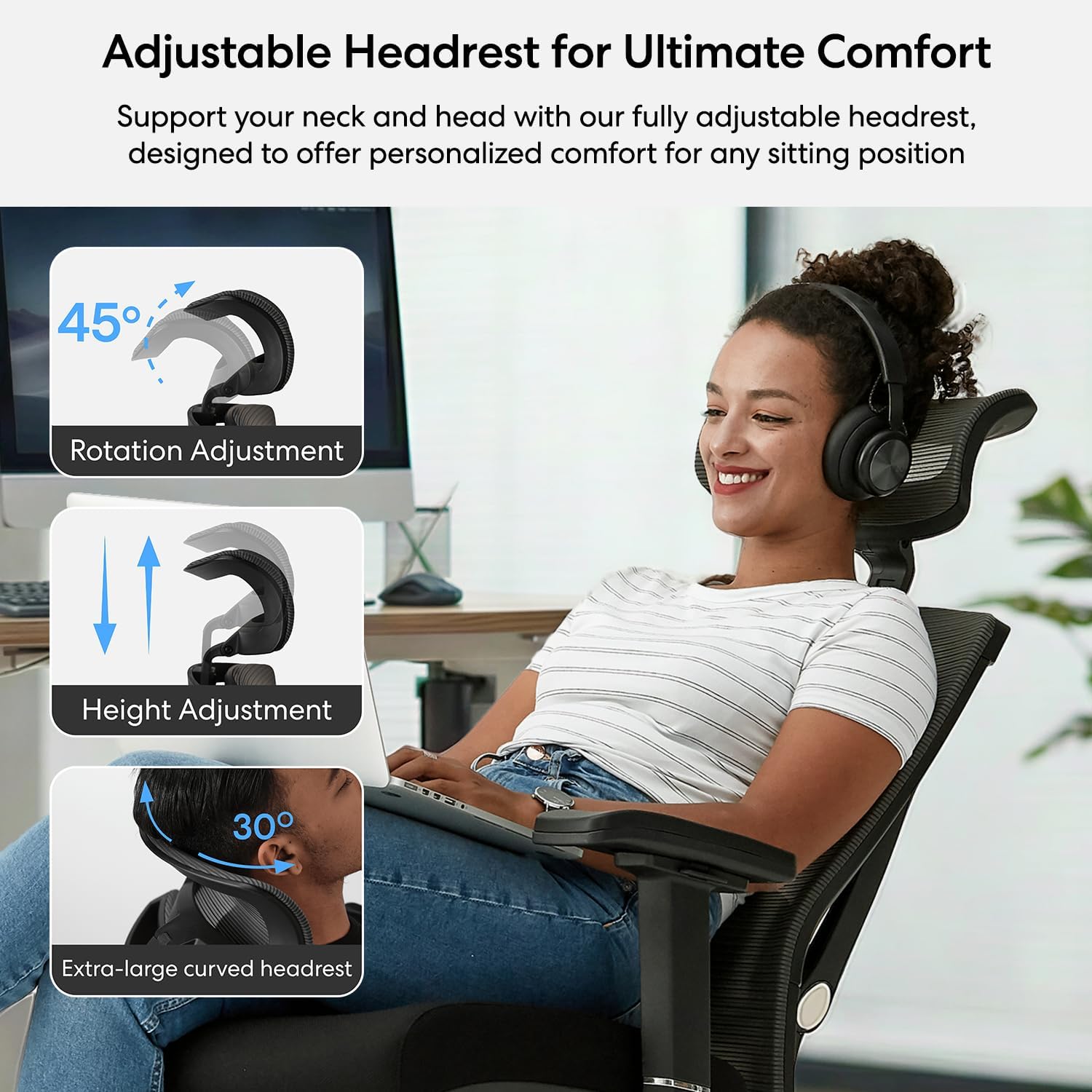
Unlike the Branch chair (where the headrest is an optional add‑on), the ErgoChair Pro comes with a headrest included. It is adjustable for height and angle, though reviewers note that its range is limited — taller users may find it sits too low.
The headrest is one of the ErgoChair Pro’s main selling points. For users who want neck support without spending extra, this is a significant advantage.
Comfort: The Good and the Not‑So‑Good

Comfort is where the ErgoChair Pro receives mixed reviews. Some users find it very comfortable; others experience issues with seat padding and armrest firmness.
Seat Comfort: Thinner Padding Than Competitors
The seat cushion uses molded foam — dense and supportive, but thinner than the Branch chair. Several reviewers note that the seat can feel hard after 4–6 hours, especially for heavier users.
One Amazon reviewer wrote: “The seat is too firm for me. I added a cushion after a week of use.” Another noted: “I’m 5’11” and 180 lbs. After about 5 hours, my sit bones start to ache.”
This is the most common comfort complaint about the ErgoChair Pro. If you have a bony tailbone or prefer a plush seat, you may find the ErgoChair Pro lacking.
For lighter users or those who prefer firm seats, the ErgoChair Pro may be perfectly fine. One 140‑lb reviewer said: “The seat is firm but supportive. I don’t have any issues after full workdays.”
Back Support: Breathable Mesh, Decent Curve
The mesh back (on the mesh version) is breathable and provides good support. The natural curve of the backrest works well for most users, and the adjustable lumbar adds targeted lower back support.
One reviewer noted: “The back is my favorite part of this chair. The mesh keeps me cool, and the curve fits my spine well.”
For users who prefer fabric, the molded foam option provides a different feel — softer but less breathable.
Comfort for Different Body Types
The ErgoChair Pro is known for accommodating a wider range of body types than many competitors. The 20″ seat width is generous, and the adjustable seat depth (up to 21.5″) works well for tall users.
- Tall users (up to 6’4″): The tall backrest and deep seat depth work well.
- Heavy users (up to 300 lbs): The 300 lb weight capacity is solid, though some heavier users report seat comfort issues.
- Short users (under 5’4″): The seat may be too deep even at minimum — consider the Branch or Aeron Size A instead.
Assembly: Time‑Consuming but Manageable
Assembly takes 30–45 minutes. The chair arrives in a large box, and the instructions are adequate but not excellent.
One reviewer noted: “Assembly took about 40 minutes. The hardest part was attaching the back to the seat — the alignment is tricky.” Another said: “I put it together alone, but I wish I had a second person for a few steps.”
Compared to the Branch chair (15–20 minutes with two people), the ErgoChair Pro takes longer and is more fiddly.
Durability and Warranty: The Biggest Concern
The ErgoChair Pro comes with a 2‑year warranty — significantly shorter than the Branch chair’s 7 years (10 years frame) and much shorter than premium chairs’ 12 years.
This is the ErgoChair Pro’s most significant weakness. A 2‑year warranty suggests that Autonomous does not expect the chair to last as long as its competitors. For a $500 purchase you plan to use daily for years, this is a serious consideration.
Common durability complaints from long‑term owners include:
- Seat foam compression after 2–3 years
- Armrest wobble that worsens over time
- Gas lift failure (though replacement parts are available)
- Mesh sagging on the mesh version
One reviewer who owned the chair for three years wrote: “The chair was great for the first two years. Then the seat started to flatten, and the armrests got really wobbly. For the price, it was decent, but I wish it lasted longer.”
If you plan to keep the chair for 5+ years, the short warranty should give you pause. Consider the Branch chair (7‑year warranty) or a refurbished Steelcase Leap (similar price, better longevity).
Autonomous ErgoChair Pro vs Competitors
ErgoChair Pro vs Branch Ergonomic Chair Pro
Both are $499. The Branch Pro has more adjustments (14 vs 9), better armrests (5D vs 4D), a longer warranty (7 years vs 2 years), and premium material options (vegan leather, leather). The Autonomous includes a headrest (Branch’s is optional) and has a higher weight capacity (300 lbs vs 275 lbs) and a wider seat (20″ vs 19.25″). Branch wins for most users.
ErgoChair Pro vs Herman Miller Aeron
The Aeron costs $1,500+ — three times the price. The Aeron has superior breathability (Pellicle mesh), build quality, durability (12‑year warranty), and resale value. The ErgoChair Pro has a headrest (Aeron does not) and costs much less. For most budgets, the ErgoChair Pro is a reasonable alternative.
ErgoChair Pro vs Steelcase Leap v2
The Leap v2 costs $1,200+ new (or $500–700 refurbished). The Leap has superior lumbar adjustability (height + depth + firmness), better seat padding, and a 12‑year warranty. A refurbished Leap is a comparable price to the ErgoChair Pro and offers much better longevity. If you can find a refurbished Leap, choose it.
ErgoChair Pro vs Ticova (Under $300)
The Ticova costs $259 — half the price. The Ticova has adjustable lumbar, mesh back, foam seat, and tilt lock. It lacks 4D armrests, adjustable seat depth, and a headrest. If your budget is under $300, the Ticova is excellent. If you can spend $500 and want more features, the ErgoChair Pro is an upgrade.
Comparison Table
FeatureAutonomous ErgoChair ProBranch Ergonomic Chair ProHerman Miller Aeron (Size B)
| Price | $499 ($379–449 on sale) | $499 ($399–449 on sale) | $1,500+ |
| Adjustments | 9 points | 14 points | ~9 points |
| Armrests | 4D | 5D | 4D |
| Lumbar Adjustability | Height only | Height + depth | Height + depth (PostureFit) |
| Headrest | Included | Optional ($) | Aftermarket only |
| Seat Depth Range | 19″ – 21.5″ | ~17″ – 19″ | Fixed (size‑dependent) |
| Seat Width | 20″ | 19.25″ | 19.5″ |
| Forward Tilt | Yes | No | Yes (optional) |
| Warranty | 2 years | 7 years | 12 years |
| Weight Capacity | 300 lbs | 275 lbs | 350 lbs |
Who Is the Autonomous ErgoChair Pro For?
✅ Buy the Autonomous ErgoChair Pro if:
- You want an included headrest without paying extra
- You need a wider seat (20″) for comfort
- You have long legs and need adjustable seat depth up to 21.5″
- You want forward tilt for focused work (Branch lacks this)
- You prefer a sporty, gaming‑adjacent aesthetic
- Your budget is $400–500 and you want maximum features per dollar
- You weigh up to 300 lbs (higher than Branch’s 275 lb limit)
❌ Avoid the Autonomous ErgoChair Pro if:
- You want a chair that will last 5+ years (short 2‑year warranty is a red flag)
- You prefer a plush, thick seat cushion (the padding is thin)
- You have a bony tailbone or sit 8+ hours daily — you may need more padding
- You want premium build quality (plastic base, armrest wobble)
- You are under 5’4″ — the seat may be too deep even at minimum
- You can afford the Branch chair (better warranty, better build) or a refurbished Leap
Pros and Cons Summary
✅ Pros:
- 4D armrests — good adjustability for the price
- Adjustable seat depth (19″ – 21.5″) — excellent range, best in class
- Wide seat (20″) — accommodates larger body types
- Included headrest — saves $50+ compared to Branch
- Synchro‑tilt recline with forward tilt — more sophisticated mechanism
- 300 lb weight capacity — higher than Branch
- Breathable mesh option — keeps you cool
- Sporty, modern design with multiple color options
- Often on sale for $379–449 — good value at sale price
❌ Cons:
- 2‑year warranty — significantly shorter than competitors (Branch 7 years, Aeron 12 years)
- Seat padding is thin — comfort concerns for long sessions and heavier users
- Armrests can feel wobbly — quality control issues reported
- Build quality feels less premium — plastic base vs aluminum on Branch
- Assembly takes 30–45 minutes — longer than average
- Short users (under 5’4″) may find seat too deep
- Lumbar support is height‑only (no depth adjustment)
- Less durable than premium chairs — foam compression after 2–3 years
Frequently Asked Questions (FAQ)
Is the Autonomous ErgoChair Pro worth the money?
At the full price of $499 — maybe. At sale price ($379–449) — yes, for the right user. You get 4D armrests, adjustable seat depth, an included headrest, and a 300 lb weight capacity. However, the short 2‑year warranty and thin seat padding are real drawbacks. If you can afford the Branch chair (same price, better warranty and build), it is a better value.
How does the Autonomous ErgoChair Pro compare to the Branch Ergonomic Chair Pro?
Branch wins for most users. Branch has more adjustments (14 vs 9), better armrests (5D vs 4D), a longer warranty (7 years vs 2 years), and a thicker seat cushion. Autonomous wins on included headrest, wider seat (20″), higher weight capacity (300 lbs), and forward tilt. Branch is better for long‑term ownership; Autonomous is better for immediate feature count.
Is the Autonomous ErgoChair Pro good for tall people?
Yes — the ErgoChair Pro is well‑suited for tall users. The seat depth adjusts to 21.5″, the backrest is tall, and the headrest can be raised. Users up to 6’4″ report good fit. For users over 6’4″, consider the Aeron Size C or Steelcase Gesture.
Is the Autonomous ErgoChair Pro good for short people?
Mixed. The seat depth adjusts down to 19″, which may still be too deep for users under 5’4″. The seat height also has a higher minimum than some chairs. If you are under 5’4″, test it if possible, or consider the Aeron Size A or Branch with short cylinder.
Does the Autonomous ErgoChair Pro come with a headrest?
Yes — the headrest is included and adjustable for height and angle. This is one of its main selling points compared to the Branch chair (headrest optional). Taller users may find the headrest sits too low.
How long does the Autonomous ErgoChair Pro last?
Based on user reviews, the chair typically lasts 2–4 years before significant wear (foam compression, armrest wobble, gas lift issues). The short 2‑year warranty reflects this expected lifespan. If you want a chair that lasts 7–10+ years, look at Branch, Steelcase, or Herman Miller.
What is the weight capacity of the Autonomous ErgoChair Pro?
The weight capacity is 300 lbs. This is higher than the Branch chair (275 lbs) and sufficient for most users. Very heavy users (over 300 lbs) should consider the Aeron Size C (350 lbs) or Steelcase Leap Plus (500 lbs).
Is the Autonomous ErgoChair Pro good for back pain?
It can be, but it is not the best option. The lumbar support is height‑adjustable but not depth‑adjustable, so you cannot control how much pressure it applies. For chronic back pain, the Steelcase Leap v2 (refurbished) or Branch chair (better lumbar adjustability) are better choices.
Is the ErgoChair Pro good for gaming?
Yes — the sporty design, included headrest, and synchro‑tilt recline make it a solid gaming chair. Many users prefer it to racing‑style “gaming chairs” because of the breathable mesh and better lumbar support.
Where can I buy the Autonomous ErgoChair Pro?
You can buy it directly from Autonomous’s website or through Amazon. Amazon often offers faster shipping and easier returns. Prices fluctuate, with sales dropping to $379–449 during major promotions.
👉 Check price for Autonomous ErgoChair Pro on Amazon →
Final Verdict: Should You Buy the Autonomous ErgoChair Pro?
After researching hundreds of reviews, analyzing technical specifications, and compiling feedback from long‑term owners, here is my honest conclusion:
The Autonomous ErgoChair Pro offers solid adjustability at a competitive price. The included headrest, wide seat (20″), and 300 lb weight capacity are genuine advantages. For users who want these specific features and are willing to accept a shorter warranty and thinner seat padding, the ErgoChair Pro is a reasonable choice — especially when on sale for $379–449.
However, for most people, the Branch Ergonomic Chair Pro is a better value. Branch offers more adjustments (14 vs 9), better armrests (5D vs 4D), a thicker seat cushion, and a significantly longer warranty (7 years vs 2 years) — all at the same $499 price point. The only things Branch lacks are an included headrest and forward tilt.
If your budget is under $400 and you find the ErgoChair Pro on sale, it is a solid buy. If you can spend $500, get the Branch chair. If you plan to keep the chair for 5+ years, consider a refurbished Steelcase Leap v2 ($500–700) — it will outlast both.
My recommendation: Buy the Autonomous ErgoChair Pro if you prioritize an included headrest, want a wider seat, and find it on sale for under $400. Otherwise, spend the same money on the Branch Ergonomic Chair Pro or save up for a refurbished Steelcase Leap.
👉 See today’s price for Autonomous ErgoChair Pro on Amazon →
Related Articles
- Branch Ergonomic Chair Pro Review – The main competitor at the same price
- Branch vs Autonomous – Head‑to‑head comparison
- Best Ergonomic Chairs Under $500 – Top picks at this price point
- Steelcase Leap Review – Premium alternative (refurbished options available)
- Do 4D Armrests Matter? – Understanding armrest adjustability
Disclosure: This post contains affiliate links. If you purchase through our links, we may earn a commission at no extra cost to you. We only recommend products we have researched thoroughly.