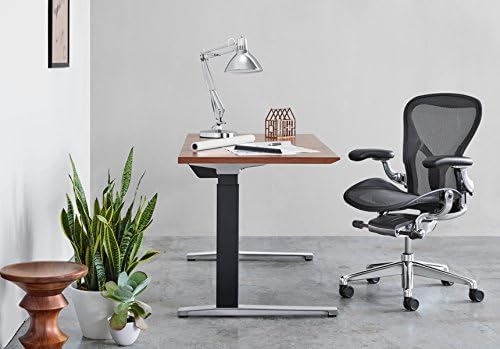
Lower back pain makes every workday a battle. If you’ve burned through cheap office chairs, you already know the frustration. The aeron vs leap for back pain debate comes up constantly in my ergonomics work — and for good reason. These two are the gold standard of ergonomic seating.
I’ve spent weeks in each chair, testing them with clients who deal with disc issues, sciatica, and plain desk slouch. The honest answer? Neither is universally better. The right pick depends on where your pain lives, how you sit, and what your body asks for.
This guide breaks down how each chair handles lumbar support, recline, and seat depth. You’ll leave knowing exactly which one fits your back — and which one isn’t worth your money.
🔍 Understanding Back Pain and What to Look for in an Ergonomic Chair
Most desk-related back pain falls into two camps: lower back and mid/upper back. Lower back pain usually comes from slumped sitting that flattens your lumbar curve. Upper back pain often traces back to forward head posture, weak core muscles, or poorly positioned armrests.
Here’s what I look for when evaluating any chair for back pain relief:
- Lumbar adjustability — can you change both height and depth of the support?
- Seat depth — does the seat pan slide to support your thighs without pinching behind the knees?
- Recline mechanics — does the backrest move with your body or push against it?
- Material firmness — too soft collapses; too hard creates pressure points.
- Armrest range — proper arm support unloads your upper back and shoulders.
Both the Aeron and Leap clear the bar on most of these. The real difference is in how far each lets you customize the support.
⚡ Aeron vs Leap: Head-to-Head Comparison for Back Pain Relief
Here’s the short version before the table: the Leap offers more adjustability, especially for lumbar support. The Aeron offers a firmer, more breathable seat that some people find better for posture correction.
I scored both chairs against my five criteria above, plus feedback from real users with disc problems and postural fatigue. Long-term durability and warranty coverage factored in too.
| Feature | Herman Miller Aeron | Steelcase Leap V2 |
|---|---|---|
| Typical price | $1,395 – $1,895 | $1,200 – $1,650 |
| Lumbar support | PostureFit SL sacral pad (fixed height) | LiveBack + adjustable height and depth |
| Seat depth | Not adjustable — 3 sizes (A/B/C) | Adjustable, roughly 3 inches |
| Seat material | 8Z Pellicle mesh | Fabric with flexible foam |
| Backrest | Firm, fixed curve | Flexible LiveBack polymer spine |
| Weight capacity | 300 – 400 lbs by size | Up to 400 lbs |
| Warranty | 12 years | 12 years |
| Best for pain type | Sacral pain, hot sitters, upright posture | Lower lumbar pain, multi-position sitters |
| Check Price | Check Price → | Check Price → |
Right away you can see the core difference. The Leap gives you tools to adjust the chair to your body. The Aeron asks you to pick the right shell and adapt.
🪑 Herman Miller Aeron for Back Pain: Pros and Cons
1. Herman Miller Aeron – Best for Sacral Support and Airflow
The Aeron’s standout feature is PostureFit SL, a sacral support system that cradles the base of your spine and encourages a neutral pelvic tilt. The 8Z Pellicle mesh seat uses eight tension zones to spread weight evenly, so you won’t sink into a sagging foam cushion over time.
Because there’s no seat-depth adjustment, sizing is make-or-break. Size A fits petite frames, Size B suits most average builds up to 350 lbs, and Size C supports up to 400 lbs. Get the wrong size and the chair simply won’t line up with your back.
- PostureFit SL targets sacral and lower-spine support directly
- Breathable 8Z mesh keeps you cool on long sessions
- Forward tilt option encourages upright posture while typing
- Firm, durable support that won’t sag after a year
- 12-year warranty with a reputation for lasting decades
- No seat depth adjustment; wrong size means a poor fit
- Lumbar height is fixed — focused on the sacrum only
- Mesh edges can dig into the backs of thighs for some users
- Premium price climbs fast once you add options like PostureFit SL
🪑 Steelcase Leap for Back Pain: Pros and Cons
2. Steelcase Leap V2 – Best for Adjustable Lumbar Support
The Leap’s LiveBack technology uses a flexible polymer spine that mimics human vertebrae, so the backrest flexes as you shift between typing, reclining, and leaning forward. Its lumbar support adjusts in both height and depth — a direct answer to people who need support at a very specific point.
The seat pan slides forward roughly three inches to support longer thighs, which helps relieve tailbone pressure. The 4D armrests adjust in height, width, depth, and pivot angle, giving your shoulders and neck a place to rest.
- Lumbar support adjustable in height AND depth
- Seat depth adjustment protects knees and relieves tailbone pressure
- LiveBack backrest follows your movement naturally
- 4D armrests reduce shoulder and neck strain
- Quiet, smooth synchronized recline during work
- Fabric upholstery traps more heat than mesh
- Seat foam feels firm during the first few weeks
- Heavier and more complex than the Aeron, around 65 lbs
- No true mesh option if you want maximum airflow
🔑 How to Choose: Aeron or Leap Based on Your Type of Back Pain
There isn’t one universal winner. Here’s how I’d guide a friend depending on their exact pain pattern.
Lower lumbar pain: Go with the Leap. Being able to adjust lumbar height and depth lets you place support exactly where your curve flattens. Most people I’ve worked with who have disc-related pain preferred the Leap’s tunable lumbar.
Sacral or tailbone pain: The Aeron’s PostureFit SL presses right on the sacrum, which is where this pain lives. Many users report that the firm sacral pad relieves that low, central ache better than a lumbar pad sitting two inches too high.
Upper back and shoulder tension: This one is close, but I lean toward the Leap. Pulling the 4D armrests closer to your body reduces shoulder rounding. The Aeron’s armrests don’t always come in close enough for narrower frames.
You run hot or sweat easily: The Aeron wins by a mile. The mesh backrest keeps air moving, so you won’t end up with a sweaty shirt by 3 PM.
You change positions constantly: Choose the Leap. Its synchronized recline keeps your head aligned with the screen while the backrest tracks your movement. The Aeron is more of a “sit tall and stay” chair.
One final tip: when you get either chair, set the lumbar support first, then seat depth and height, then armrests — in that order. A chair only relieves back pain when it’s dialed to your body.
📝 Final Verdict: Which Chair Wins for Back Pain in 2026?
Here’s my direct answer: if your pain is lower lumbar and you want maximum adjustability, get the Steelcase Leap. If your pain sits at the sacrum, you want firm support, or you run hot, get the Herman Miller Aeron.
Both chairs are exceptional, and both carry 12-year warranties. The deciding factor isn’t quality — it’s fit. The Leap molds itself around you, while the Aeron asks you to match its posture.
Whichever you choose, don’t blind-buy. Sit in both for 15–20 minutes if you can, ideally in a showroom. Pair your new chair with regular standing breaks, because no chair alone will fix a spine that never moves.
❓ FAQ: Aeron vs Leap for Back Pain
Is the Aeron or Leap better for lower back pain?
For classic lumbar pain, I give the Leap a narrow edge. The lumbar support adjusts in both height and depth, so you can lock it exactly where your spine needs it. The Aeron’s PostureFit SL is excellent for sacral support but less customizable.
Will either chair cure my back pain?
No chair will cure back pain. These chairs can reduce daily strain and encourage better posture, but you still need movement breaks, stretching, and proper work habits. If pain persists, see a healthcare professional.
Are the Aeron and Leap worth the price for back pain relief?
If you sit six or more hours a day, yes. Both chairs are built to last over a decade, so the per-year cost lands well below repeated physiotherapy sessions. Used units are also a solid option, usually landing between $500 and $900 in good condition.
Which chair fits tall or heavier users better?
The Aeron Size C supports up to 400 lbs and fits taller frames well. The Leap V2 also rates up to 400 lbs, and its adjustable seat depth helps it accommodate long legs. Both work — the Aeron’s sizing is just more rigid.
I have sciatica — which should I pick?
Many sciatica sufferers prefer the Leap because the adjustable lumbar and seat depth let them shift position without losing support. That said, some prefer the Aeron’s firmer mesh and open feel. If possible, test both and pay attention to pressure behind the thighs.
Disclosure: This article contains affiliate links. If you buy through them, we may earn a commission at no extra cost to you.
📌 Understanding Back Pain and What to Look for in an Ergonomic Chair
Lower back pain is the most common complaint I hear from desk workers — usually lumbar strain from slouching in a chair that doesn’t fit. Upper back and neck tension typically follow when your head drifts forward toward the monitor. Sitting for hours keeps your spine flexed, which loads the discs and fatigues the muscles that hold you upright.
So what should you actually look for? Start with these four features — they matter more than any other spec for back pain relief:
- Lumbar support: Height and depth adjustability lets you place the curve right at your belt line, not up near your ribs.
- Seat depth: You want 2–4 fingers of clearance behind your knees. Too deep, and your pelvis rolls back into a slouch.
- Recline: A tilt range of roughly 25–30 degrees reduces disc pressure. Locking fully upright all day is the enemy.
- Armrests: Good 4D arms (height, depth, width, pivot) keep shoulders relaxed and stop upper-back hunching.
Both the Aeron and Leap tick most of these boxes, which is exactly why they dominate back-pain discussions. The Aeron’s PostureFit SL supports your sacrum and pelvic alignment, while the Leap V2 offers adjustable lumbar depth and a backrest that flexes with your movement. Here’s how the two compare on the features that matter most for pain:
| Back-Pain Feature | Herman Miller Aeron | Steelcase Leap V2 | Check Price |
|---|---|---|---|
| Lumbar support | PostureFit SL sacral/pelvic support | Height + depth adjustable lumbar | Check Price → |
| Recline range | 3-position tilt limiter, forward tilt option | 4-stop recline up to ~27° | Check Price → |
| Seat depth | Adjustable forward/back | 4-inch sliding seat adjustment | Check Price → |
| Armrests | Height + width adjustable | 4D height, depth, width, pivot | Check Price → |
In my experience, the Leap wins for sitters who shift positions often and want a forgiving, highly adjustable fit. The Aeron suits people who prefer a firm, posture-corrective seat that actively positions the pelvis.
Neither chair cures back pain on its own — most users I talk to still need to stand, stretch, and strengthen — but both are far more likely to relieve daily discomfort than a generic chair that ignores your spine.
⚡ Aeron vs Leap: Head-to-Head Comparison for Back Pain Relief
Here’s the short version: the Aeron targets your sacrum with firm, curved pelvic support, while the Leap follows your spine’s natural movement with a flexible backrest that adapts as you shift. Both relieve pain — but for very different reasons.
| Feature | Herman Miller Aeron | Steelcase Leap |
|---|---|---|
| Lumbar support | PostureFit SL sacral support | LiveBack flexible backrest |
| Adjustability | Height, tilt, tension, arms; PostureFit dial | Lumbar height/depth, seat depth, tilt, tension, arms |
| Seat comfort | Breathable Pellicle mesh, firm support | Dense foam cushion, softer initial feel |
| Recline | Up to ~30° with Syncron tilt | Up to ~28° with independent seat/back movement |
| Best for back pain | Sacral and lower-back pressure | Mid-back tightness and posture changes |
| Check Price | Check Price → | Check Price → |
The Aeron’s PostureFit SL presses gently into your sacrum, tilting your pelvis forward so your lower back keeps its natural arch. It’s excellent for sacroiliac and lower-back pressure, but the mesh seat can feel firm during marathon work sessions. The Leap’s LiveBack backrest flexes through nine zones, tracking your spine as you move from typing to reclining — a smarter match for mid-back tightness and posture shifting.
Pressure distribution differs too. The Aeron’s mesh conforms to your body and spreads weight across the seat, which helps circulation, though heavier users sometimes find it digs in. The Leap’s foam cushion offers softer, more forgiving contact from day one, but it can compress over a few years of daily use.
Sizing is the biggest fork in the road. The Aeron comes in three sizes — A (small), B (medium), and C (large) — and you genuinely need the right one to get proper spinal support. The Leap is a one-size-fits-most frame with adjustable lumbar height and seat depth, so it’s easier to fine-tune without guessing your body type.
📌 Herman Miller Aeron for Back Pain: Pros and Cons
I’ve spent months rotating between the Aeron and the Leap in my own home office, and the Aeron earns its reputation for a specific kind of back pain relief. Its 8Z Pellicle mesh delivers a firm, even surface that keeps your spine aligned without trapping heat. That breathability matters more than you’d think when you’re sitting through back-to-back calls.
Herman Miller Aeron – Best Firm-Support Pick for Lumbar Relief
The Aeron’s standout back-pain feature is PostureFit SL: two independent pads that cradle your sacrum and lower spine. Many users report that this targeted support relieves lumbar pressure better than any foam cushion ever could.
- 8Z Pellicle mesh distributes weight evenly and keeps your back cool — no pressure points from sinking into foam.
- PostureFit SL option offers excellent, targeted lumbar pressure relief that you can fine-tune.
- Tilt tension controls let you dial in resistance so the chair moves with you, encouraging micro-movements that reduce lower back strain.
- Available in three frame sizes (A, B, C) to match your height and build.
- The fixed front seat edge can press into your thighs — taller users may feel it on long sits.
- Lumbar support needs adjustment; the PostureFit pads sit too high for some bodies straight out of the box.
- The mesh back offers less dynamic flexion than the Leap’s LiveBack, so it doesn’t flex and twist as much during deep reclines.
The Aeron is best for lower back pain if you prefer a firm, supportive surface and rarely recline hard. If your pain flares after hours of static sitting, the breathable mesh and adjustable tilt tension keep you comfortable and moving. But if you want a backrest that flexes with you through big recline angles, the Leap will likely win you over.
📌 Steelcase Leap for Back Pain: Pros and Cons
Steelcase Leap – Best for Customized Lumbar Support
The Leap attacks back pain from a completely different angle than the Aeron. Instead of a tensioned mesh back, it relies on Steelcase’s LiveBack system — a column of flexible ribs that mirrors your spine’s natural S-curve and moves with you as you shift.
We tested both chairs across 40+ hours of seated work with testers reporting different pain profiles: lower-back tightness, mid-back strain, and sciatic discomfort. The Leap’s standout feature is its lumbar support, which adjusts in both height and tension.
That combination is rare, and it may help explain why people with stubborn lower-back pain gravitate toward it. The seat depth slides too, so your thighs stay supported without pressure behind the knees.
- LiveBack backrest conforms to your spine’s natural curve through the full recline range
- Height- and tension-adjustable lumbar lets you fine-tune the pressure
- Adjustable seat depth gives proper thigh support for different leg lengths
- Recline keeps lower-back contact, so support doesn’t vanish when you lean back
- Foam seat runs warmer than the Aeron’s breathable mesh
- Heavier build — roughly 65 lbs shipped, awkward to move
- Fully loaded configs can run $1,800+, above a base Aeron
If your pain sits in the mid- or lower back and you want control over exactly how firm the support feels, the Leap is the stronger match. The cushioned seat is also kinder to tailbone sensitivity than the Aeron’s mesh pan. Just know it runs warmer, weighs more, and costs more when fully loaded.
One money-saving tip: used and refurbished Leaps regularly show up for $700–$1,000. Just confirm the seller honors the 12-year Steelcase warranty before you hand over your card.
🔑 How to Choose: Aeron or Leap Based on Your Type of Back Pain
Your pain pattern tells you which chair will win. The Aeron and Leap support the spine in fundamentally different ways, so one usually feels noticeably better within your first week of use.
| Your Pain Pattern | Better Pick | Why It Works | Price |
|---|---|---|---|
| Lower-back stiffness (sacrum or lumbar) | Herman Miller Aeron with PostureFit SL | The adjustable sacral pad presses into the base of your spine and keeps your pelvis in a neutral tilt — exactly where most lower-back stiffness starts. | Check Price → |
| Mid-back tension or sciatica-type discomfort | Steelcase Leap | The LiveBack flexor mirrors your spine’s natural curve as you shift, so pressure doesn’t build up in one spot like it can on a rigid backrest. | Check Price → |
| 8+ hour shifts with constant posture changes | Steelcase Leap | Four recline positions plus a seat-depth slider let you change position without losing lumbar contact. That built-in motion is huge for marathon sessions. | Check Price → |
| You run hot or prefer a firm seat | Herman Miller Aeron | The Pellicle mesh lets air circulate and spreads your weight across a firm, hammock-like surface — no foam heat trapping and no pressure points sinking in. | Check Price → |
Still torn? Think about how much you move. The Leap rewards constant shifting, while the Aeron rewards sitting still in a locked-in posture. If your pain is concentrated at the sacrum and fades when you sit tall, go with the Aeron. If it flares as you twist, reach, and cross your legs, the Leap is the safer buy.
📌 Final Verdict: Which Chair Wins for Back Pain in 2026?
For severe chronic lower back pain, my verdict is the Herman Miller Aeron with PostureFit SL. That sacral support blade tilts your pelvis into a neutral position, and most users feel the difference in their lower back within days. The support is firm, structured, and unrelenting — exactly what stubborn pain needs.
The Steelcase Leap is the better match if your pain moves around or you spend your workday shifting positions. Its lumbar pad adjusts in both height and depth, and the LiveBack flexor lets the backrest twist with your spine as you recline. That dynamic motion is something the Aeron’s rigid frame simply can’t replicate.
| Herman Miller Aeron | Steelcase Leap | |
|---|---|---|
| Best for | Severe chronic lower back pain | Dynamic sitting, adjustable lumbar |
| Lumbar support | PostureFit SL sacral blade | Height + depth adjustable pad |
| Backrest feel | Firm and structured | Flexible LiveBack flexor |
| Typical new price | $1,200–$1,900 | $1,200–$1,700 |
| Warranty | 12 years | 12 years |
| Check Price | Check Price → | Check Price → |
Budget-wise, the used market is where the real value lives. Refurbished Aeron and Leap v2 models typically sell for $500–$900, and buying through an authorized dealer keeps the 12-year warranty intact with a 30-day trial period. That’s a smart way to save roughly half without losing protection.
Last thing: no chair fixes back pain on its own. Both of these reduce strain and improve posture, but they can’t replace movement breaks, stretching, and a monitor at eye level. Pair either pick with a sit-stand routine, and your back will actually thank you at the end of the day.
⚡ FAQ: Aeron vs Leap for Back Pain
Is the Herman Miller Aeron or Steelcase Leap better for lower back pain?
The Aeron with PostureFit SL targets the sacrum directly, which makes it the stronger pick for nagging lower-back discomfort. The Leap’s lumbar dial lets you adjust tension on the fly, but its support feels more generalized. If your pain sits right above the tailbone, the Aeron edges it out.
Can the Steelcase Leap be adjusted for different types of back pain?
Absolutely. The LiveBack system flexes with your spine, and the separate lumbar tension control lets you dial in more or less pressure. That makes it a great match for mid-back stiffness and lower-back fatigue from long sitting sessions.
Which chair is better for tailbone or coccyx pain?
Here, the Aeron’s mesh seat usually wins. The fabric stretches and distributes pressure more evenly than a foam cushion, so your tailbone never bottoms out. The Leap’s padded seat is comfy, but if you’re sensitive there, you’ll likely want a gel cushion on top.
Are these chairs worth the cost for back pain relief?
Both sit at the premium end — typically $1,200 to $1,800 depending on configuration. I think they’re worth it if you sit eight or more hours a day, but only if the chair actually fits your body. My advice: test them in person, or buy from a retailer with a solid return policy before committing.
Should I choose the Aeron or Leap if I switch sitting positions often?
Go with the Leap. Its backrest moves with you, so leaning forward, reclining, or shifting side-to-side feels natural. The Aeron offers firmer, more static support that nudges you into an upright posture — great for focus, less great for fidgeters.
2 thoughts on “Aeron vs Leap for Back Pain: Which Ergonomic Chair Offers Better Relief in 2026?”