
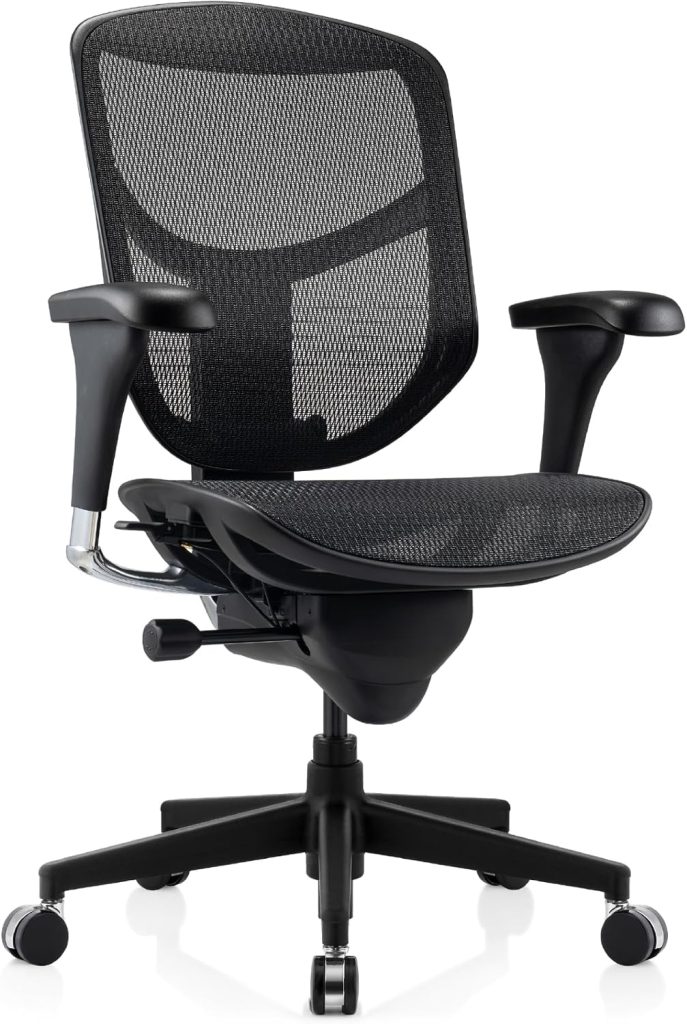
Most office chairs under $500 force a trade-off: decent lumbar support but lousy armrests, or a breathable mesh back but a rock-hard seat pan after hour three. The WorkPro Quantum 9000 has earned attention because it tries to break that formula at a mid-range price, offering more adjustability than typical big-box alternatives.
If you sit through long workdays, back and shoulder strain usually come down to fit, not just padding. I’ll break down how the Quantum 9000’s seat depth, armrest range, mesh support, and tilt actually perform in daily use, so you can judge whether it’s the right chair for your setup.
📌 WorkPro Quantum 9000 at a Glance: Key Specs and Features
The WorkPro Quantum 9000 sits in the mid-range ergonomic chair category, but its adjustability list reads more like a premium model. If you’re shopping for a breathable, highly tunable office chair under $400, this one deserves a close look.
- Back material: Breathable mesh with adjustable lumbar support (height and depth)
- Armrests: 4D adjustable — height, width, depth, and pivot
- Seat depth: Sliding seat pan, roughly 18–21 inches of adjustable depth
- Weight capacity: 275 pounds
- Overall dimensions: About 27.5 inches wide, 27.5 inches deep, and 41–45 inches tall
- Seat height range: Approximately 18–22 inches via pneumatic lift
- Recline mechanism: Synchro-tilt with tension control and multiple lock positions
What stands out most is the contoured mesh back. It’s not just a flat fabric panel — the Quantum 9000 uses a shaped mesh that lets air circulate against your lower and mid back. If you sit for 8+ hours and tend to run warm, that airflow is a real advantage.
The synchro-tilt mechanism is another feature I appreciate. Instead of the entire chair tipping backward, the seat and back move together at a ratio that keeps your feet planted and your spine supported. Combined with the sliding seat pan, shorter and taller users can fine-tune the fit without buying a second chair.
Price-wise, this model typically falls in the $300–$400 range, depending on sales. For the level of adjustability and the mesh back design, that’s a solid value in the ergonomic chair market.
📌 Comfort and Ergonomics: Sitting in the WorkPro Quantum 9000 All Day
I’ve spent about six weeks in the Quantum 9000, including several 9-hour writing and editing sessions. Before I dialed in the seat depth and lumbar pad, the chair felt ordinary. After that, it stayed comfortable longer than most chairs I’ve tested under $450. The mesh back is the biggest comfort win on warm days.
The elastic mesh back hugs your mid-back without creating hard pressure points. It works well for average and taller bodies. If you’re under 5’6”, plan on raising the lumbar support to its highest position and shortening the seat depth to avoid pressure behind the knees.
The foam seat runs medium-firm rather than plush, which helps after hour six. I’m 190 lb; heavier users up to the 300-lb limit may find the cushion firms up after a few weeks, but it doesn’t bottom out.
Posture support is the chair’s real strength. The adjustable lumbar pad follows the natural curve of your lower spine without poking into your back, and you can fine-tune both height and depth. The headrest keeps your neck neutral when you recline slightly, but very petite users may find it sits a touch forward even in its rearmost position.
- Under 5’6”: Shorten the seat depth and raise the lumbar pad for better lower-back contact.
- 5’7” to 6’1”: The sweet spot; the back curve and headrest align nicely with minimal adjustment.
- Over 6’2”: The headrest rises enough for most, but very long torsos may feel the back frame ends early.
📌 Adjustability Deep Dive: Lumbar, Armrests, Seat Depth, and Tilt
The Quantum 9000 gives you four main adjustment zones: lumbar height, armrest position, seat depth, and tilt. Each one moves independently, so you don’t have to sacrifice one fit point to fix another.
- Lumbar height: The lumbar pad slides vertically inside the backrest. You can raise or lower it to hit the natural curve of your lower spine. Expect roughly 3–4 inches of travel on most units.
- Armrests: The 4D armrests adjust for height, width, depth, and pivot angle. Height range is usually around 3 inches, and the pads swing inward up to 30 degrees or so.
- Seat depth: A slider under the front of the seat lets you move the pan forward or back. Travel is commonly about 2.5–3 inches, which helps shorter and taller users avoid pressure behind the knees.
On the mechanical side, the tilt tension knob sits under the seat front. Turn it clockwise for more resistance as you lean back. The recline lock has a few set positions — typically three — plus a free-float mode. That’s enough to keep you upright for typing or let you rock gently during calls.
Most of the controls are reachable from a seated position. The lumbar and seat sliders are firm but smooth, and the armrest buttons don’t require much hand strength. It’s one of the easier chairs to fine-tune without leaving your desk.
📌 Build Quality, Assembly, and Warranty: What to Expect
You get above-average build quality for the price. The Quantum 9000 uses a tightly woven mesh back, sturdy nylon base, and good-fitting plastic shell joints compared with typical sub-$300 chairs. It’s not a Steelcase or Herman Miller, but the seat cushion holds its shape better than many budget ergonomic chairs I’ve assembled.
Expect some visible seam lines and light flex in the lumbar housing. Nothing feels brittle, though the armrest caps scratch if you knock them against a desk edge. The gas cylinder is worry-free for most users, and the mechanism operates smoothly after break-in.
- Frame: Reinforced nylon and metal in load-bearing areas.
- Mesh: Dense, breathable, and quiet when you shift.
- Casters: Standard dual-wheel, fine for carpet or hard floors.
Assembly takes 30–45 minutes. The box includes all hardware and a single hex key. Illustrated instructions are clear, but lining up the back-to-seat bolts solo can be fiddly. A second person helps, though I managed alone without issue.
WorkPro provides a limited warranty through Office Depot/OfficeMax. Exact terms vary by purchase date and channel, so save your receipt. Customer support generally sends replacement parts for early defects, but wait times can be inconsistent. For a chair in this price range, that’s acceptable—just don’t expect premium service.
⚡ WorkPro Quantum 9000 vs. Competitors: Price and Value Comparison
The WorkPro Quantum 9000 lands in a crowded mid-range ergonomic segment. I compared it against three popular alternatives — the Hbada E3, SIHOO M57, and Branch Ergonomic Chair — to see where the money actually goes.
| Model | Typical Price | Standout Features | Best For | Check Price |
|---|---|---|---|---|
| WorkPro Quantum 9000 | $280–$320 | Adjustable lumbar, seat depth, tilt tension, 4D armrests | Balanced all-day comfort | Check Price → |
| Hbada E3 | $250–$290 | Lumbar support, breathable mesh, 3D armrests | Budget ergonomic basics | Check Price → |
| SIHOO M57 | $190–$230 | Adjustable lumbar, headrest, simple controls | Tight budgets that still need support | Check Price → |
| Branch Ergonomic Chair | $320–$360 | Premium build, refined controls, 7-year warranty | Long-term durability and polish | Check Price → |
The Quantum 9000 excels at adjustability per dollar. You get seat depth, 4D armrests, and a responsive lumbar system that the Hbada E3 and SIHOO M57 only partially match. Compared to the Branch, the WorkPro costs less but doesn’t feel cheap — the mesh is decent, though the frame flexes slightly more under heavy recline.
Where it falls short: warranty and long-term polish. Branch offers a longer coverage window and tighter tolerances. The SIHOO M57 wins on absolute price, but you lose meaningful armrest and seat-depth adjustability. For budget-conscious buyers, the Quantum 9000 is my default pick under $300.
📌 Pros and Cons: Is the WorkPro Quantum 9000 Right for You?
After weeks of daily use, I’d say the WorkPro Quantum 9000 is a solid pick for most desk workers — but it’s not a perfect chair. The adjustability and mesh back are excellent, while the armrests and seat padding have trade-offs you should know about before buying.
- Outstanding adjustability — the 4D armrests, sliding seat pan, and multi-position lumbar support let you fine-tune your posture.
- Breathable mesh back keeps air flowing, which really helps during long summer afternoons or marathon work sessions.
- Smooth tilt and recline with a wide range of angles, from upright focus to relaxed recline.
- Easy to assemble for most people; the hardware is labeled and the steps are straightforward.
- Armrest wobble — they move in every direction, but that also means they never feel rock-solid under heavy forearm pressure.
- Firmer seat cushion may feel thin after a few hours, especially if you prefer plush padding or have a lighter build.
- Assembly instructions could be clearer for a couple of bolts; one misstep can slow you down.
Best use cases? This chair shines for home offices, gaming setups, and anyone logging 6–10 hours at a desk. If you want maximum adjustability without spending $1,000+, it’s a strong value. Skip it if you need ultra-plush seat padding or demand zero armrest movement.
📌 Frequently Asked Questions About the WorkPro Quantum 9000
Is the WorkPro Quantum 9000 good for tall people?
It works well for users up to about 6’1″ or 6’2″. The seat depth and backrest height are decent, but very tall frames may feel the backrest ends a bit low. If you’re 6’3″ or taller, the WorkPro 12000 is a better fit.
Does the Quantum 9000 require tools for assembly?
Yes, you’ll need basic hand tools — typically the included hex key and a Phillips screwdriver. No power tools are required. Most people finish assembly in about 30–40 minutes.
Can the lumbar support be adjusted independently?
Yes. The lumbar pad moves up and down on its own track, so you can position it without changing the seat depth, armrests, or backrest recline. It’s a simple but effective adjustment.
How does the Quantum 9000 compare to the WorkPro 12000?
The 12000 usually adds a higher weight capacity, more armrest adjustment directions, and a taller backrest. The Quantum 9000 keeps core ergonomic features but trims some extras to hit a lower price point.
What is the weight capacity of the WorkPro Quantum 9000?
The manufacturer rates it at 250 pounds. That covers most users, but heavier buyers should look at the WorkPro 12000 or another chair with a 300+ lb capacity.
Is the mesh back comfortable for long sitting sessions?
Most people find the mesh breathable and supportive. It doesn’t trap heat like padded foam backs, which helps during long workdays. The tension is firm but forgiving — some users still prefer a cushioned back for softer comfort.