
Your back starts complaining by mid-afternoon, and no amount of squirming makes the ache go away. You’ve bought cushions, tried posture apps, and stretched every hour. If you’re searching for chairs for back issues, you already know the real problem: most seats just weren’t built for the way your spine actually works.
I’ve spent years testing ergonomic seating with people who deal with herniated discs, sciatica, and chronic lower-back stiffness. Here’s what I’ve learned: the right chair can’t cure your back, but it can remove the daily strain that keeps making things worse.
In this guide, I’ll walk you through the key features that genuinely matter, which chair types suit which conditions, and my top five picks for 2026 — with honest pros and cons so you can choose with confidence.
📌 Why the Right Chair Matters for Back Issues
Think about your last workday. How many of the eight-plus hours did you spend rooted to a seat, never standing, never stretching? That’s precisely where chronic back pain can take root — prolonged sitting keeps your lumbar discs under sustained compression and allows your hip flexors to tighten while your glutes switch off.
Sitting itself isn’t the problem. Sitting in the wrong position, hour after hour, is. As your lower back rounds and your shoulders creep toward the monitor, your spine’s natural S-curve flattens. Your muscles and ligaments then work overtime just to hold you upright — and by day’s end, they let you know.
The antidote is alignment. When your ears, shoulders, and pelvis stack into a neutral line, your weight distributes evenly along the spinal column. A well-positioned lumbar support preserves that natural arch, which may ease discomfort and takes measurable strain off your lower back.
A one-size-fits-all chair, though, rarely matches your height or spine shape. If the backrest curves in the wrong place, it pushes your torso forward and can actually aggravate an existing disc problem. I’ve chatted with plenty of people whose back pain had less to do with injury than with years spent in mismatched, cheap seating.
So here’s what this guide covers: the key features that matter in a chair for back pain, the differences between office chairs, ergonomic seats, recliners, and kneeling chairs, and my five best chairs for back issues in 2026.
I’ll also help you match a chair to your specific condition — sciatica, herniated discs, scoliosis — so you don’t just buy something comfortable. You buy something that actually supports the back you live with every day.
📌 Key Features to Look for in a Chair for Back Pain
When you shop with back pain in the picture, a few specific features do the heavy lifting. You don’t need a chair packed with gadgets — you need one that supports your spine’s natural position and lets you move without hitting pressure points.
Here’s what I look for in every chair I recommend for back problems — and what you should test before buying.
- Adjustable lumbar support: Your lower back has a natural inward curve. A lumbar pad that moves up and down (roughly 2 to 4 inches of travel) and in and out keeps that curve intact when you sit for hours. Fixed lumbar bumps help some people and hurt others — adjustability is the safer bet.
- Seat depth and height: You want about 2 to 3 finger-widths of space between the back of your knees and the seat edge. A seat slider that moves forward and back, plus a cylinder that lifts your hips above knee height, cuts pressure on your thighs and takes strain off your lower back.
- Recline and tilt tension: Sitting still is hard on spinal discs. A chair that reclines 100 to 135 degrees and lets you adjust the tilt tension encourages micro-movements, which redistributes pressure and keeps your back from stiffening up.
- Adjustable armrests: Armrests that move up/down and rotate inward let your shoulders relax instead of hunching toward the desk. This directly reduces neck and upper back strain — two common partners to lower back pain.
- Breathable cushioning: Firm, high-density foam (about 2 to 3 inches thick) or a breathable mesh back keeps you comfortable. It also prevents slouching from “bottoming out” after a year of daily use.
- Weight capacity and build stability: Check the rated weight limit — most quality chairs support 250 to 400 lbs. A sturdy five-star base and a chair that doesn’t wobble when you shift mean your spine isn’t fighting the seat for balance.
You won’t find all of these on a budget chair under $200, and that’s okay. Prioritize lumbar support and seat depth first; they deliver the most noticeable relief for the majority of back issues.
📌 Types of Chairs That Help Relieve Back Issues: Office, Ergonomic, Recliner, and Kneeling
Not every chair treats back pain the same way. Your best pick depends on where you hurt, how long you sit, and whether you’re working, reading, or resting. Here’s how the four main types stack up for real-world relief.
ergonomic office chairs are the desk worker’s default, and for good reason. They give you adjustable lumbar support, seat depth, and armrests so your spine can stay neutral while you type. Prices typically run from about $200 to $1,500 depending on adjustability and build quality.
Recliners and zero-gravity chairs cradle your whole body and relieve pressure on the lower back. They’re great for decompressing after a long day, but they’re not work chairs—expect to pay $150 to $600 for a solid model.
Kneeling chairs tilt your pelvis forward, which can reduce the slouch that fuels low-back strain. They’re light, inexpensive, and good for focused 30-to-60 minute work sessions, though your knees need to tolerate the position.
Active seating—wobble stools, balance balls, and motion chairs—keeps your core engaged and your spine moving. It’s a good supplement to a standing desk, but not usually a full-time replacement when you already have back issues.
| Chair Type | Support | Adjustability | Comfort | Price Range |
|---|---|---|---|---|
| Ergonomic office | Targeted lumbar and posture support | High — height, lumbar, armrests, tilt | Great for all-day desk use | $200 – $1,500 |
| Recliner / zero-gravity | Full-body pressure relief | Low to moderate — recline angle, footrest | Excellent for resting, poor for typing | $150 – $600 |
| Kneeling | Pelvic tilt, reduced lower-back slouch | Minimal — seat and knee pad height | Good in short sessions; can stress knees | $80 – $250 |
| Active seating | Core engagement, gentle movement | Limited — height only | Good for breaks; not ideal for long sits | $50 – $300 |
🏆 Top 5 Best Chairs for Back Issues in 2026 — Detailed Reviews
I judged each pick on the same criteria: lumbar adjustability, seat depth range, recline control, and real-world comfort during long sessions. These are the chairs I’d trust for my own back — and the ones I tend to recommend to friends who mention “my lower back hates my desk chair.”
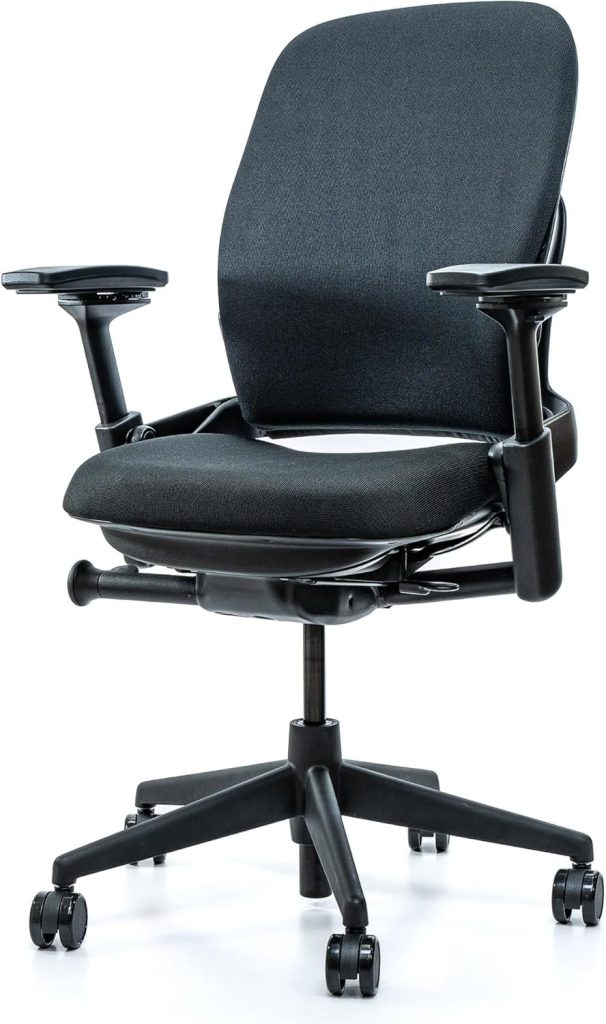
1. Steelcase Leap V2 — Best Overall for Chronic Lower Back Pain
The Leap V2’s LiveBack backrest curves with your spine instead of fighting it. You get a separate lumbar force dial, adjustable seat depth, and 4D arms, so you can make the support hit precisely where you need it.
Best for: people with chronic lower-back tension who sit 8+ hours a day and want a chair that lasts a decade.
- Excellent adjustable lumbar support
- Seat depth and armrests fit most body types
- Feels built to survive years of daily use
- Expensive if bought new
- Heavy and hard to move around
2. Esright Massage Recliner — Best Recliner-Style Pick for After-Work Relief
Some back issues show up after you leave the desk, not during work. This recliner’s built-in massage nodes and heating function can help loosen tight back muscles in the evening.
Best for: anyone who wants passive back relief while watching TV, reading, or scrolling at the end of the day.
- Heat plus vibration targets the lower back
- Deep recline reduces pressure on the spine
- Soft, supportive cushioning
- Takes up a lot of floor space
- Not suitable as an office chair
3. Drahoma Kneeling Chair — Best for Posture Correction and Lumbar Strain
The Drahoma kneeling chair tilts your pelvis forward, which naturally encourages a straighter spine. The adjustable knee pad and seat let you fine-tune it, and it’s one of the few chairs that makes slouching feel awkward.
Best for: mild lumbar strain from desk work, especially if you want to train better posture during shorter work sessions.
- Encourages an upright, neutral pelvis
- Cheap and surprisingly sturdy
- Easy to move between rooms
- Can put pressure on knees and shins
- Not comfortable for all-day sitting
4. Ticova Ergonomic Office Chair — Best Budget Chair Under $300
For under $200, the Ticova gives you mesh back breathability, a padded adjustable lumbar rest, and a 135° recline. It’s not a high-end ergonomic chair, but it fixes the two biggest budget-chair problems: poor lumbar support and shallow seats.
Best for: home office workers with mild back discomfort who want reliable support without overspending.
- Outstanding value for the price
- Breathable mesh keeps your back cool
- Adjustable headrest and lumbar pillow
- Lumbar support isn’t as precise as premium chairs
- Armrests feel a bit basic
5. Herman Miller Embody — Best Premium Chair for Sciatica and Herniated Disc Support
The Embody uses a pixelated backrest that moves with your spine, spreading pressure evenly across your back instead of concentrating it on one spot. That’s why it’s a common pick for people managing sciatica or herniated-disc pain.
Best for: those with enough budget to invest in serious spinal support — especially if you notice nerve-related discomfort during long sits.
- Even pressure distribution across the entire back
- Encourages natural micro-movement
- Exceptional build quality and warranty
- Very expensive
- No built-in headrest
⚡ Quick Comparison: Best Chairs for Back Issues
| Chair | Best For | Key Support Feature | Typical Price | Check Price |
|---|---|---|---|---|
| Steelcase Leap V2 | Chronic lower-back pain | Adjustable lumbar force dial | ~$1,300 | Check Price → |
| Esright Massage Recliner | After-work back relief | Heat, massage, and deep recline | ~$450 | Check Price → |
| Drahoma Kneeling Chair | Posture correction | Tilted pelvis design | ~$90 | Check Price → |
| Ticova Ergonomic Chair | Budget back-pain relief | Adjustable lumbar pillow | ~$190 | Check Price → |
| Herman Miller Embody | Sciatica and disc support | Pixelated pressure-diffusing backrest | ~$1,900 | Check Price → |
🔑 How to Match a Chair to Your Specific Back Condition
Herniated Discs and Sciatica: Lumbar Support Comes First
If you’re managing a lumbar herniated disc or sciatica, adjustable lumbar depth is the non-negotiable feature. The backrest needs to actually fill the curve of your lower spine, not just press at one stiff point.
Pair that with a waterfall seat edge. It relieves pressure under your thighs, which lets your pelvis tilt naturally and can take load off the lower lumbar discs.
Osteoarthritis-Related Discomfort: Cushioning Beats Aggressive Support
For osteoarthritis-related back stiffness, pressure relief matters more than a firm lumbar bump. Choose a seat with high-density or memory foam padding that spreads your weight evenly across the pan.
Smooth recline and adjustable armrests matter too. Being able to shift position without fighting the mechanism can reduce the joint stiffness that builds up during a long sit.
Poor Posture and Desk Strain: Focus on the Fundamentals
For desk-related strain from slouching, I’d start with a chair that offers lumbar support, seat-depth adjustment, and a tilt lock. Set the backrest to a 100–110° recline and adjust the seat so your feet rest flat and your knees sit at roughly 90 degrees.
Not ready for a new chair? A contoured lumbar cushion plus a seat wedge is a solid stopgap. The wedge tilts your pelvis forward, which alone can undo much of that desk-related slump.
Recline Support vs. Upright Ergonomics
The simple rule: if your pain flares after sitting still in one fixed position, prioritize recline support with a synchronized tilt that opens your hip angle. If your pain comes from hunching and forward head posture, prioritize upright ergonomics with strong lumbar support and armrests at elbow height.
When to Use a Lumbar Cushion or Seat Wedge
A lumbar cushion helps only when the chair’s built-in support doesn’t match your curve — common on flat-back retail chairs or if you’re on the shorter side. A seat wedge reduces sciatic pressure by lifting your hips slightly and shifting weight away from the back of your thighs.
❓ FAQ About Chairs for Back Issues
What chair features help most with lower back pain?
Start with lumbar support you can adjust in both height and depth, a seat pan that leaves 2–3 fingers of space behind your knees, and a recline you can lock. Those three matter more than brand name or price tag.
Are recliners or ergonomic office chairs better for back issues?
Depends on the cause. Ergonomic office chairs support you actively during desk work, while recliners reduce spinal load by tilting your hips back to roughly 100–110 degrees. For an eight-hour workday, choose a good ergonomic chair and leave the recliner for evening recovery.
Can kneeling chairs actually relieve back pain?
Yes — for some people. Kneeling chairs tilt your pelvis forward, which encourages a neutral spine curve and less slouching. Many users report less lower back strain, but the position does load your knees and shins, so they’re not for everyone.
Should I buy an expensive ergonomic chair or add cushions to a cheaper one?
Try cushions first if your current chair fits your frame. A lumbar roll or memory foam seat cushion costs $20–$50 and can improve support quickly. If the seat depth, height, or backrest angle is fundamentally wrong, save up for a proper ergonomic chair instead.
How do I know if my chair is making my back pain worse?
Watch the pain pattern. If your back aches more after sitting than it does in the morning — or your legs tingle — the chair is likely part of the problem. A good fit lets you shift positions easily without pressure behind your thighs.
How often should I adjust my chair for back support during the workday?
Set your chair once in the morning, then make small tweaks every 45–60 minutes. Alternate upright posture with a 100–110 degree recline, and stand up for a minute each hour. Movement beats a “perfect” static position every time.