
Ergonomic Workspace Guide
Best Height Adjustable Monitor Stands for Your Desk
Compare adjustable-height monitor stands, including the Allsop Hi-Lo, and learn how to choose the right height, platform size, and support for your screen.
Quick recommendation
If you simply need to raise your monitor a few inches, a two-position riser such as the Allsop Hi-Lo is a straightforward option. If you need frequent height changes, a freestanding adjustable monitor stand or a monitor arm may be more suitable. Choose based on your monitor’s weight, mounting compatibility, and the height you actually need.
A monitor that sits too low can encourage you to bend your neck forward while working. A height adjustable monitor stand gives you a way to raise the display and make your desk setup more comfortable without necessarily replacing your monitor or desk.
However, not every product described as adjustable works the same way. Some monitor risers offer two fixed heights, while other stands let you adjust the screen position along a vertical column or with an articulated arm. Understanding this difference helps you avoid buying a stand that cannot reach your preferred viewing height.
In this guide, we compare the Allsop Hi-Lo with other styles of adjustable monitor stands, explain what to check before buying, and help you decide which type fits your workstation.
Monitor compatibility
Desk space
Ergonomic positioning
Best Height Adjustable Monitor Stands to Consider
The right choice depends on whether you want a simple raised platform or more control over the screen’s position. The following options represent different approaches rather than a hands-on performance ranking. Check the latest product specifications before ordering.
1. Allsop Hi-Lo Adjustable Monitor Stand
Best for: a simple desk riser with two preset height options.
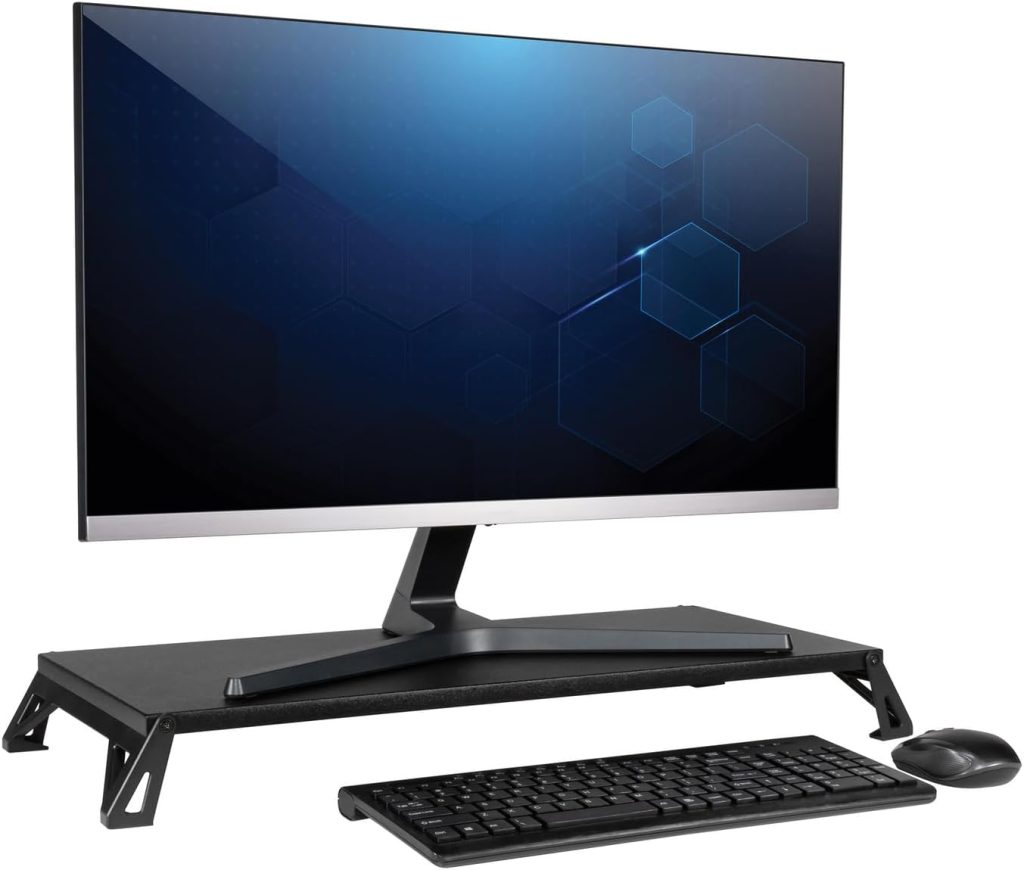
The Allsop Hi-Lo Adjustable Monitor Stand is designed for people who want to raise a monitor without installing a desk-mounted arm. Its platform has a finished MDF surface, removable height-adjustment components, and nonslip rubber feet.
Key specifications
- Two height settings: 2.8 inches or 4 inches
- Platform dimensions: 15.8 inches wide × 9.5 inches deep
- Manufacturer-listed capacity: up to 30 lb
- Manufacturer-listed monitor size: up to 32 inches
What to know: the Hi-Lo is adjustable, but it does not provide continuous height adjustment. You choose between its two preset heights. Its relatively compact platform also means you should measure the footprint of your monitor’s original base before purchasing.
Potential drawback: the two height settings may not place every monitor at the ideal viewing level. If you need a more precise adjustment, consider a stand with a taller column or an adjustable arm.
2. Allsop Lo Riser Monitor Stand
Best for: users who need a wider platform for a widescreen monitor.
The Allsop Lo Riser is another two-height option, but its platform is substantially wider than the Hi-Lo. The manufacturer lists a platform width of 24 inches in the lower position and 26.1 inches in the higher position, with a depth of 11.3 inches.
Key specifications
- Two height settings: 2 inches or 3 inches
- Wide platform for compatible widescreen monitor bases
- Manufacturer-listed capacity: up to 30 lb
- Manufacturer-listed monitor size: up to 32 inches
What to know: the wider surface may suit a desk where the Hi-Lo platform feels too narrow. However, it raises the monitor less than the Hi-Lo in its highest position. A wider platform does not automatically make it the better option; your required height and desk dimensions still matter.
3. Kanto DTS1000 Height Adjustable Desktop Monitor Stand
Best for: people who want a desktop stand with more positioning options.
The Kanto DTS1000 is a desktop monitor stand designed for adjustable positioning rather than simply adding a fixed-height shelf under the monitor. It is worth comparing if a basic riser cannot place your display at the height or angle you need.
Before buying, check the exact supported screen size and weight, the stand’s height-adjustment range, its tilt and swivel capabilities, and the mounting method required by your monitor. Confirm that the model you select is compatible with your display rather than relying on the phrase “universal monitor stand.”
Potential drawback: an adjustable stand with more moving parts may cost more than a simple platform riser. If you only need to raise your monitor by a few inches and rarely change the setup, the extra adjustment features may not be necessary.
4. StarTech Adjustable Monitor Stand
Best for: users looking for a monitor stand with adjustable support height.
StarTech offers monitor stand designs with removable or stackable height sections, allowing users to configure the screen elevation for their desk. This style can be useful if you want a stable desktop support without attaching a clamp to the desk.
Check the exact product model carefully. Different StarTech stands have different size limits, adjustment methods, and load capacities. Confirm whether the particular stand you choose supports your monitor’s size and weight and whether its available height settings meet your needs.
Potential drawback: a stand with a few preset configurations is not the same as a continuously adjustable monitor arm. Make sure the available height options are suitable before ordering.
Adjustable Height Monitor Stand Comparison
| Option | Adjustment Type | Main Advantage | Best For |
|---|---|---|---|
| Allsop Hi-Lo | Two preset heights | Simple, compact design | Small to medium desk setups |
| Allsop Lo Riser | Two preset heights | Wider platform | Compatible widescreen monitors |
| Kanto DTS1000 | Adjustable desktop stand | More positioning options | Users needing extra adjustment |
| StarTech adjustable stand | Varies by model | Configurable monitor elevation | Users comparing preset height options |
This comparison focuses on adjustment style and use case rather than lab-tested performance. Product specifications and availability can change, so verify the exact model details before purchasing.
What to Look for in an Adjustable Monitor Stand
1. The height range
Measure how far your monitor needs to move upward to reach a comfortable viewing position. A stand that raises the display by 2 or 3 inches may be sufficient for one desk, while another setup may require a much taller column. Check the actual adjustment range rather than relying on the word “adjustable.”
2. Monitor size and weight
Check both the manufacturer’s supported screen size and maximum weight. Screen size alone does not determine compatibility because monitors of the same diagonal size can have different weights and base designs. Never exceed the stated load limit.
3. Platform width and depth
If the monitor uses its original stand, measure the base and compare it with the usable surface of the riser. The entire support footprint should sit securely on the platform. A narrow riser may be unsuitable even if its advertised monitor size seems adequate.
4. Stability and desk protection
Look for a stable base or support structure, appropriate load specifications, and feet or pads that help protect the desk surface. Follow the assembly instructions and place the stand on a level surface. If you use a monitor arm, verify the desk’s compatibility with its clamp or grommet mount.
5. Storage and keyboard clearance
A riser may leave space underneath for a keyboard or small accessories, but the clearance depends on the platform height and support design. If you plan to slide your keyboard underneath when not in use, measure its height and width before choosing a stand.
Fixed-Height Riser vs. Adjustable Monitor Arm
One of the most important buying decisions is whether you need a riser or a stand that changes the monitor’s position more freely.
Choose a riser if…
- You need a modest height increase.
- You prefer a simple desktop platform.
- You want to keep using the monitor’s original base.
- You rarely change screen position.
Choose an adjustable arm if…
- You need a broader range of movement.
- You want to reposition the screen during the day.
- You want to free up more desk surface.
- You have a compatible monitor and desk.
A monitor arm is not automatically the better ergonomic choice. The right option is the one that lets you place the display at a comfortable height while staying within the product’s compatibility and load limits.
See our monitor arms guide if you want more positioning flexibility, or browse our monitor stands guide for other desktop riser options.
How High Should Your Monitor Be?
There is no single height that works for every person or workstation. Your chair height, desk height, screen dimensions, and viewing distance all affect the best position.
A useful starting point is to position the screen so you can look at it comfortably without repeatedly tilting your head upward or bending your neck down. Many desk setups start with the top of the display at or slightly below eye level, then adjust according to comfort and the screen’s size.
Before buying a riser, sit in your usual working position and measure the height difference between your current monitor position and the position you want. This helps you decide whether a two-height product like the Allsop Hi-Lo is sufficient or whether you need a stand with a greater adjustment range.
Remember that raising the screen is only one part of a comfortable workstation. Keep your keyboard and mouse positioned so your shoulders can remain relaxed, and adjust your chair and desk as needed.
Common Buying Mistakes
Assuming all adjustable stands offer continuous adjustment
Some models only provide two or three preset heights. Confirm the adjustment method and available positions before ordering.
Buying by monitor size alone
Check the monitor’s weight and the dimensions of its original base. A display can meet the size limit but still have a base that does not fit the platform.
Choosing more height than you need
A taller stand can position the screen too high. Measure your preferred viewing position before selecting the adjustment range.
Ignoring desk and accessory clearance
Make sure the stand fits your desk and leaves enough room for your keyboard, mouse, and other frequently used items.
Frequently Asked Questions
What is the best height adjustable monitor stand?
The best stand depends on the height you need, your monitor’s weight and base dimensions, and how often you adjust the screen. The Allsop Hi-Lo is worth considering for a simple two-position riser. If you need more flexible positioning, compare adjustable desktop stands and monitor arms.
Is the Allsop Hi-Lo fully height adjustable?
No. The Allsop Hi-Lo has two preset height settings: 2.8 inches and 4 inches. It does not provide continuous height adjustment like some adjustable monitor arms.
What is the difference between the Allsop Hi-Lo and Lo Riser?
The Hi-Lo offers 2.8-inch and 4-inch height settings on a compact 15.8-by-9.5-inch platform. The Lo Riser offers 2-inch and 3-inch settings on a wider platform. Choose based on your required height and the footprint of your monitor base.
Can I use an adjustable monitor stand with a 32-inch monitor?
Only if the specific stand supports the monitor’s size, weight, and base or mounting arrangement. Some desktop risers are listed for monitors up to 32 inches, but you should also check the load rating and usable platform dimensions.
Will a monitor stand help improve posture?
A stand can help you position the display more comfortably, which may reduce the need to look down at a low screen. However, a stand alone does not guarantee good posture. Chair height, keyboard placement, viewing distance, and regular movement also matter.
Final Verdict: Which Adjustable Monitor Stand Should You Choose?
For a straightforward height increase, the Allsop Hi-Lo Adjustable Monitor Stand is a practical option to investigate if its two height settings and compact platform match your setup. The Allsop Lo Riser is worth comparing if you need a wider platform and a lower elevation.
If neither option gives you the positioning flexibility you need, consider an adjustable desktop stand or monitor arm. Before buying, confirm the exact model, height range, supported monitor weight, base dimensions, and installation requirements.
Affiliate disclosure: SitBetterLab may earn a commission from qualifying purchases made through affiliate links, at no additional cost to you. Product availability and specifications may change. Confirm current details with the seller before purchasing.