
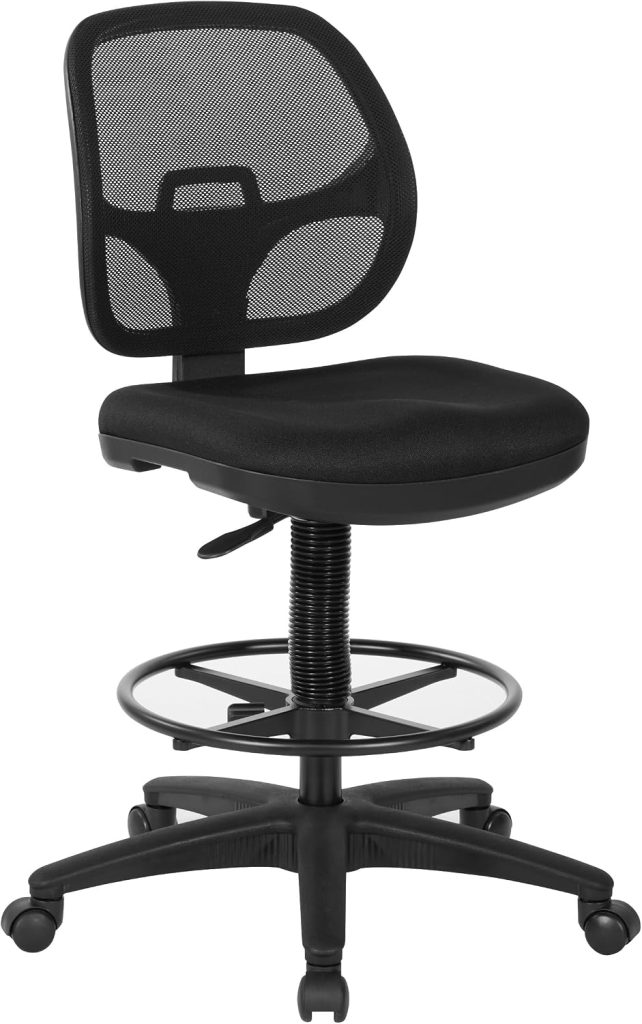
The best standing desk chair for back pain should let you change positions without forcing your lower back into an awkward posture. Height adjustment, lumbar support, seat depth, foot support, and overall fit all matter when choosing a chair for a sit-stand workstation.
What Is a Standing Desk Chair?
A standing desk chair is a type of elevated seating designed for use with a standing or height-adjustable desk. Compared with a conventional office chair, it generally provides a higher seating position so you can work comfortably when the desk is raised.
Many models resemble drafting chairs and may include a foot ring or another form of lower-leg support. Some designs also provide ergonomic features such as adjustable seat height, a contoured backrest, lumbar support, or adjustable armrests.
If you are dealing with back discomfort, however, the highest possible seat is not automatically the best choice. The important question is whether the chair allows you to maintain a comfortable working posture while keeping your feet and legs properly supported.
If you are comparing different types of elevated seating, see our
Standing Desk Chairs guide
for the broader category overview.
Can a Standing Desk Chair Help With Back Discomfort?
A chair cannot diagnose or treat the underlying cause of back pain. However, a better-fitting workstation chair can make it easier to maintain a comfortable sitting position and change positions during the workday.
This is especially relevant when using a sit-stand desk. Switching between sitting and standing can reduce the need to remain in one position for an extended period, while a properly adjusted chair can provide support when you choose to sit.
The goal should not be to find a chair that completely eliminates back discomfort. Instead, look for a setup that allows you to adjust your working position, maintain comfortable support, and avoid unnecessary pressure caused by poor fit.
Key Features to Look For
Adjustable Seat Height
The chair should reach a useful height for your standing desk while still allowing a stable and comfortable sitting position.
Lumbar Support
A supportive backrest can help you maintain a more comfortable seated posture, particularly during longer seated periods.
Seat Depth
A seat that is too deep can make it harder for shorter users to sit comfortably against the backrest.
Foot Support
A foot ring can be particularly useful when the chair is elevated and your feet cannot comfortably rest on the floor.
Supportive Backrest
A backrest should provide enough support without restricting your ability to change positions naturally.
Stable Base
A stable five-star base and smooth movement can make position changes easier at an elevated workstation.
Best Standing Desk Chairs for Back Pain
The following types of chairs are worth considering when your priority is comfortable support at a standing desk. Always verify the current specifications, dimensions, weight capacity, and adjustment range before purchasing.
1. Office Star DC Series Deluxe Mesh Back Drafting Chair
The Office Star DC Series is a drafting-style chair worth considering for elevated workstations. Its mesh back design can provide airflow, while the drafting-chair format makes it suitable for higher desk surfaces.
For users concerned about back comfort, pay particular attention to the seat height range and the relationship between the chair, foot ring, and desk height.
2. Flash Furniture Mid-Back Mesh Drafting Chair
A mid-back drafting chair can be a practical option when you need elevated seating without moving to a large executive-style chair. Mesh construction can also help with airflow during longer work sessions.
If lower-back support is your main concern, compare the shape of the backrest and the amount of lumbar contouring rather than choosing solely by appearance.
3. HUANUO Ergonomic Drafting Chair
HUANUO offers several elevated ergonomic chair designs that can be useful for standing-desk setups. Look for versions with an appropriate height range, supportive backrest, and foot ring.
The key consideration for back comfort is whether the chair can be adjusted to match your desk and body dimensions without leaving your legs unsupported.
4. KERDOM High-Back Drafting Chair
A high-back drafting chair can be appealing if you prefer more upper-back coverage than a compact stool-style standing desk chair. A taller backrest may also provide a more familiar office-chair feel.
Before buying, check whether the seat height is appropriate for your standing desk and whether the foot support allows you to keep your lower legs comfortable.
5. Tempur-Pedic Drafting Chair
A cushioned drafting chair can be worth considering if seat comfort is particularly important to you. When comparing padded models, consider the seat shape, height range, backrest support, and whether the chair allows easy posture changes.
For back-sensitive users, cushioning alone should not be the deciding factor. A well-matched chair height and supportive backrest are generally more important than simply choosing the softest seat.
Standing Desk Chair Features Compared
| Feature | Why It Matters for Back Comfort | What to Check |
|---|---|---|
| Seat height | Helps match the chair to an elevated work surface | Full adjustment range |
| Lumbar support | Provides support around the lower-back area | Shape and position of the backrest |
| Seat depth | Affects how easily you can sit against the backrest | Seat dimensions relative to your legs |
| Foot support | Helps support the legs when the chair is elevated | Foot ring position and stability |
| Backrest | Can provide support while seated | Height, contour, and recline |
How to Set Up a Standing Desk Chair for Better Back Comfort
1. Match the Chair to the Desk
Adjust the chair so your working surface is at a comfortable height rather than choosing the chair based only on its maximum height.
2. Support Your Feet
If your feet cannot comfortably reach the floor, use the chair’s foot ring or another appropriate support.
3. Keep the Backrest Supportive
Sit far enough back to use the backrest instead of perching on the front edge of the seat.
4. Change Positions
Use the standing desk as intended by alternating between sitting, standing, and brief movement rather than remaining in one position all day.
Standing Desk Chair vs. Regular Office Chair for Back Pain
| Feature | Standing Desk Chair | Regular Office Chair |
|---|---|---|
| Height range | Generally higher | Generally designed for conventional desks |
| Elevated desk use | Designed for higher work surfaces | May not provide enough height |
| Foot support | Often includes a foot ring | Usually uses the floor |
| Best for | Sit-stand workstations | Traditional seated workstations |
Who Should Consider a Standing Desk Chair?
- People who use a height-adjustable standing desk.
- Users who want to alternate between sitting and standing.
- People who need a higher chair position than a conventional office chair provides.
- Users who prefer a drafting-chair style with foot support.
- People who want more flexibility in their workstation setup.
Who May Prefer a Regular Ergonomic Office Chair?
A standing desk chair is not automatically better for everyone with back discomfort. If you spend most of your working day seated, a conventional ergonomic office chair may provide a better combination of seat depth, lumbar support, recline, armrest adjustment, and overall back support.
The right choice depends on your workstation and how you actually work. If you regularly alternate between sitting and standing, an elevated chair can make more sense. If you rarely raise your desk, a conventional ergonomic office chair may be the simpler solution.
Related SitBetterLab Guides
- Standing Desk Chairs — explore the complete standing desk chair category.
- Best Standing Desk Chair for Long Hours — focus on comfort and support during extended work sessions.
- Best Office Chair for Lower Back Pain — compare conventional office-chair options.
- Best Ergonomic Chair for Lower Back Pain — another option if you primarily work seated.
Final Buying Checklist
- Check the height range to make sure the chair works with your standing desk.
- Check lumbar and backrest support rather than choosing based only on cushioning.
- Check seat dimensions so the chair fits your body.
- Look for foot support when the chair is used at an elevated height.
- Consider your sitting time because a chair used for several hours may need more adjustability.
- Compare current specifications before purchasing because product designs and configurations can change.
Frequently Asked Questions
What is the best standing desk chair for back pain?
The best standing desk chair for back pain is one that fits your body and workstation correctly. Prioritize appropriate seat height, supportive backrest design, comfortable seat dimensions, and reliable foot support rather than choosing a chair solely because it is marketed as ergonomic.
Are standing desk chairs good for your back?
A well-adjusted standing desk chair can provide comfortable support when sitting at an elevated workstation. It can also make it easier to alternate between sitting and standing. However, a chair is only one part of a comfortable workstation setup.
Should a standing desk chair have lumbar support?
Lumbar support can be useful if you prefer seated support around the lower back. The ideal amount and shape vary by person, so adjustability and overall fit are more important than simply having a lumbar-support label.
Is a drafting chair the same as a standing desk chair?
The terms are often used for similar products, but they are not necessarily identical. Drafting chairs are generally designed for elevated work surfaces, while standing desk chairs are commonly marketed specifically for use with sit-stand workstations.
Can I use a standing desk chair all day?
You can use an appropriate standing desk chair for extended periods, but the goal of a sit-stand workstation is to provide opportunities to change positions. Regular movement and position changes are generally preferable to staying seated or standing in exactly the same position for the entire workday.
Bottom Line
If back comfort is your priority, do not choose a standing desk chair simply because it reaches a high position. The better approach is to match the chair’s height, seat dimensions, back support, and foot support to your body and standing desk. For more options and related buying guides, visit our Standing Desk Chairs hub.
Note: This article provides general information about ergonomic seating and workstation setup. It is not medical advice. If you have persistent, severe, or worsening back pain, consult an appropriate healthcare professional.