
By 3 p.m., that dull ache creeps into your lower back. You shift, stretch, maybe wedge a cushion behind you — but nothing fully stops the discomfort building over an eight-hour workday.
If that sounds familiar, you’re probably looking for the best office chair for lower back problems, and honestly, that’s a smart place to start. A well-designed chair won’t cure back pain, but the right support can dramatically reduce the strain your spine carries daily.
Most lower back discomfort at work comes from sitting in a desk chair that ignores your lumbar curve. When your pelvis tilts backward, your spine loses its natural S-shape, and your muscles work overtime just to keep you upright.
This 2026 buying guide covers the features that truly matter for lower back relief, reviews the top five chairs on the market, and shows you how to set up any seat for better support.
📌 Introduction: Why Your Chair Matters for Lower Back Health
lower back pain rarely arrives at 9 a.m. It creeps in around hour three — a tightness across your lumbar spine that makes you shift, lean and eventually lose focus.
That’s no accident: sitting raises pressure on the discs between your vertebrae, and most of us do it for seven or more hours each workday. Understanding how that pressure builds is the first step toward choosing the best office chair for lower back problems.
When you stand tall, your spine carries a load your body manages effortlessly. Sit down and the pressure inside those lumbar discs climbs — one widely cited biomechanics study puts it roughly 40% higher than standing, with slouching pushing it higher still.
Over a full day, that compression can irritate discs and leave surrounding muscles tired, which is why many people notice more stiffness in the evening than in the morning.
An ergonomic office chair won’t remove that pressure entirely, but it can redistribute it and keep your spine closer to its natural S-curve. As you evaluate any desk chair, check whether you can adjust these contact points:
- Lumbar support that fits snugly against the inward curve of your lower back
- Seat depth and tilt that let your hips rest slightly above your knees
- Backrest recline with tension control, so you can open your hip angle and ease disc load
- Seat height and armrest adjustments that keep shoulders and wrists neutral
Keep that checklist ready — the right supportive chair won’t erase lower back problems by itself, since movement breaks still matter, but it removes the daily resistance that turns neutral posture into a fight. In the reviews below, I compare the best desk chairs for lumbar relief across budget, mesh and mid-back options so you can match one to your body and workspace.
📌 Key Features to Look for in an Office Chair for Lower Back Support
When you’re shopping for the best office chair for lower back problems, don’t get distracted by flashy extras. Focus on adjustability — that’s what separates a real ergonomic desk chair from a pretty but useless seat.
Here are the five features I test before recommending any computer chair to someone dealing with lower back pain:
- Adjustable lumbar support — Height, depth, and pressure should all move independently. Your spine’s curve isn’t one-size-fits-all, so static pads rarely help.
- Seat height and depth adjustability — You need to keep your feet flat and knees near 90 degrees. A seat that’s too long hits the back of your knees and tilts your pelvis backward.
- Backrest tilt and recline tension — Your spine wasn’t meant to stay frozen in one position. A chair that reclines smoothly lets you shift posture and may help reduce pressure on your spinal discs throughout the day.
- Waterfall seat edge — A front edge that curves downward takes pressure off your thighs, which encourages better circulation and reduces strain that radiates into your lower back.
- Firm, shape-retaining cushioning — Soft foam might feel great for five minutes, but it collapses. A firm cushion that supports your pelvis keeps your hips level so your lumbar spine stays aligned.
If a chair lets you dial in all five of these, you’re on the right track. If it skips lumbar pressure adjustment or forces one fixed recline angle, keep looking — your back deserves better.
🔍 Top 5 Best Office Chairs for Lower Back Problems in 2026
I’ve broken down the market to find the best office chair for lower back problems across five price and body-type categories. Each pick below earned its spot through genuine lumbar engineering, durable build quality, and real-world feedback from desk workers who live with lower back pain.
1. Herman Miller Aeron – Best Premium Pick for Sacral Support
The Aeron’s PostureFit SL spinal support cradles the sacrum instead of just pressing the lumbar spine, which many lower back pain sufferers prefer. The breathable mesh keeps you cool, and the 12-year warranty makes the $1,400+ price easier to stomach. Best for medium-to-large frames that need a firm, supportive seat.
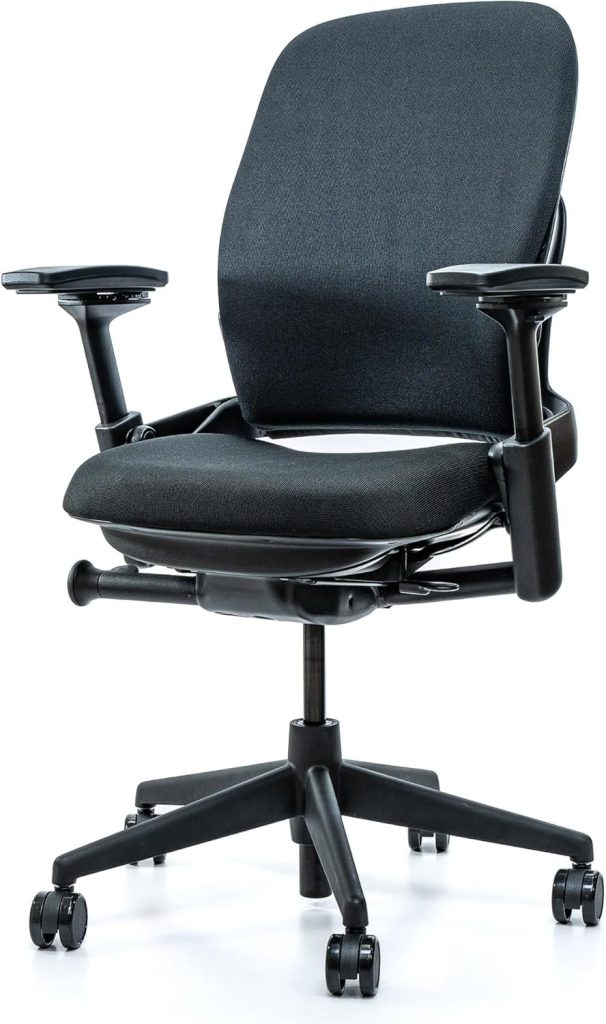
2. Steelcase Leap V2 – Best for Precision Lumbar Adjustment
The Leap V2 offers independent lumbar depth and tension controls, so you can dial support exactly where your lower back needs it. Its LiveBack technology flexes with your spine through the day, which reduces pressure buildup. Around $1,100 with a 12-year warranty, it’s a favorite among long-hour desk workers.
3. Sihoo Doro C300 – Best Self-Adapting Lumbar Under $400
The Doro C300 uses a dynamic floating lumbar piece that adjusts automatically as you recline or shift position. It’s a smart middle ground for people who don’t want to fiddle with settings all day. The mesh back promotes airflow, and the headrest supports your neck without pushing your head forward.
4. Branch Ergonomic Chair – Best Overall Under $500
Branch packs height-adjustable lumbar support, a 4D armrest and a deep seat-slider into a clean, compact design. Shorter and smaller-framed users consistently report finding a better fit here than on bulkier ergonomic chairs. Ordering is simple and assembly takes about ten minutes.
5. Ticova Ergonomic High-Back Chair – Best Budget Pick
For around $180, the Ticova gives you fixed-height lumbar support, a weight-activated tilt lock and breathable mesh. It won’t match premium chairs, but reviewers say it relieves lower back strain far better than typical $100 office chairs. A practical choice for a home office on a budget.
Here’s how the top picks compare at a glance:
| Model | Lumbar Support Type | Best For | Price Tier | Check Price |
|---|---|---|---|---|
| Herman Miller Aeron | PostureFit SL sacral support | Medium–large frames | ~$1,395 | Check Price → |
| Steelcase Leap V2 | Independent depth + tension | Precise adjustments | ~$1,100 | Check Price → |
| Sihoo Doro C300 | Self-adapting floating lumbar | No-fuss lumbar support | ~$350 | Check Price → |
| Branch Ergonomic | Height-adjustable lumbar pad | Shorter / smaller users | ~$475 | Check Price → |
| Ticova High-Back | Weight-activated tilt lock | Tight budgets | ~$180 | Check Price → |
Whichever tier fits your budget, test the lumbar height and depth controls first — those two adjustments matter most for lower back problems. In the next section, I’ll walk through exactly how to set up whichever of these chairs you choose so your spine stays supported all day.
⚡ Comparison Table: Ergonomics, Support, and Price
Here’s the head‑to‑head on the chairs above, zeroing in on what actually helps a cranky lower back during an eight‑hour shift.
| Model | Lumbar Support | Adjustability | Tilt Mechanism | Seat Depth | Material | Best For | Price & Value | Check Price |
|---|---|---|---|---|---|---|---|---|
| Herman Miller Aeron | PostureFit SL sacral pad (add‑on) | Full pneumatic, 4D arms | Recline + tension, forward tilt | Sizes A–C, ~16–21 in | Pellicle mesh | Small to tall; size C fits heavier users | $1,400–$1,700 · Premium overall | Check Price → |
| Steelcase Leap V2 | Height‑adjustable lower‑back support | Seat depth, 4D arms, lumbar height | 4‑position lock, adjustable recline force | Adjustable, ~18–20 in | Stretch fabric | Medium to large frames up to 400 lb | $1,000–$1,400 · Strong heavy‑duty pick | Check Price → |
| Branch Ergonomic Chair | Curved back with adjustable lumbar tension | Height, armrest, seat slider, recline | 4‑position tilt with tension knob | Adjustable forward glide | Breathable mesh back, foam seat | Average frames, 5’4”–6’2” | $399–$550 · Excellent under $600 | Check Price → |
| Sihoo Doro C300 | Self‑adjusting flexible spine pads | Seat height, backrest angle, tension knob | 90°–130° recline with lock | Adjustable sliding seat | Breathable full mesh | 5’5”–6’2”, light to average build | $350–$450 · Feature‑rich budget | Check Price → |
| Ticova Ergonomic High‑Back | Supportive integrated lumbar pillow | Height, armrest tilt, recline lock | Rocking with tension adjustment | Fixed, ~17 in | Mesh back and cushion seat | Petite to average, up to 250 lb | $150–$250 · Best on a strict budget | Check Price → |
If you want the best office chair for lower back problems without compromise, the Aeron is still my benchmark for overall support. For taller, heavier users, the Steelcase Leap V2 is the heavy‑duty answer, while the Ticova gives you the best low‑cost route to lumbar relief.
🔑 How to Adjust Your Office Chair for Maximum Lower Back Relief
Even the best office chair for lower back problems won’t do its job if it’s set up wrong. Take five minutes to run through these adjustments — you’ll feel the difference by mid-afternoon.
- Chair height: Set it so your feet rest flat on the floor and your thighs are roughly parallel to the ground, knees near a 90-degree angle. If your heels lift, lower the seat or add a footrest.
- Lumbar depth: Position the lumbar pad into the inward curve of your lower back — right around belt level — not too high and not too low.
- Backrest recline: Unlock the tilt and adjust tension so the backrest supports you when you lean back to about 100–110 degrees. Don’t lock it bolt upright.
- Armrests: Set them so your elbows rest at roughly 90 degrees with your shoulders relaxed. Your forearms should float parallel to the desk.
Sit with your hips all the way back in the seat. Your spine should keep its natural S-curve: ears over shoulders, shoulders over hips. That’s your neutral sitting posture.
Switch between upright work and slightly reclined positions throughout the day. Leaning back takes pressure off the discs in your lower back. And if your feet don’t reach the floor after adjusting seat height, a footrest keeps your hips and knees properly aligned.
Common mistakes to avoid:
- Lumbar support set too low, pressing into your tailbone instead of the curve above it.
- A backrest locked too vertically, which nudges you into a rounded, forward slump.
- Knees sitting higher than your hips, which tips your pelvis back and flattens the lumbar curve.
Movement matters just as much as adjustment. Stand, stretch, or walk for a minute or two every 30–60 minutes so your lower back doesn’t stiffen up.
📌 Frequently Asked Questions about Office Chairs and Lower Back Pain
What is the best type of lumbar support for lower back problems?
Look for independently adjustable lumbar support — a pad that moves up and down as well as in and out. A fixed bump hitting the wrong spot is worse than none at all. Many users with lower back problems prefer a curved, forward-tilting lumbar pad that fills the natural lordotic curve around your belt line.
How much should I spend on an office chair for lower back issues?
Plan on $300 to $1,500 for a chair with genuinely adjustable lumbar support, seat depth control, and durable materials. Budget chairs under $150 often skimp on these mechanisms, which means you’ll likely replace them within a year or two. A quality chair is a long-term investment in comfort.
Are gaming chairs or kneeling chairs better for lower back pain?
Gaming chairs usually feature aggressive bolsters and fixed lumbar pillows that push the pelvis forward awkwardly — generally not ideal for long workdays. Kneeling chairs tilt your hips open, which can reduce lower back strain for some users, but they lack backrest support for extended sitting. For most desk workers, an ergonomic office chair offers more sustainable support.
How long should I sit at a time even with a good chair?
Aim to stand up every 45 to 60 minutes, even if your back feels fine. No chair can replace movement. Set a timer and do a quick stretch, walk to the water cooler — just give your spine a chance to unload.
Can a chair alone fix chronic lower back pain?
Honestly, no chair is a cure-all. A supportive chair reduces strain, but pairing it with ergonomic accessories often helps — a footrest adjusts hip angle, a monitor stand keeps your neck neutral, and a sit-stand desk lets you alternate postures. If pain persists, consult a healthcare professional rather than relying solely on seating.