
Desk Organization Guide
Best Monitor Stands with Drawers for a Tidy Desk
Compare monitor risers with built-in drawers, from compact organizers to wider desktop stands, and learn how to choose the right storage, height, and platform size.
Quick recommendation
If you want a monitor riser with an integrated drawer and side compartments, the Allsop Metal Art Organizer 5 is worth comparing. For adjustable height, look at the Allsop Metal Art Tri-Level model. If you want two drawers or built-in connectivity features, explore Vaydeer’s dual-drawer risers and verify the exact version before ordering.
A monitor stand with drawers combines two useful desk accessories: a raised platform for your screen and storage for small items that otherwise clutter your workspace. Pens, USB drives, sticky notes, charging cables, and other frequently used supplies can be easier to organize when they have a dedicated place.
However, not every drawer-equipped monitor stand is equally practical. Some have a single shallow drawer, while others combine drawers with side compartments or extra-long platforms. The best option depends on what you want to store, how much desk space you have, and whether the stand raises your monitor to a comfortable viewing height.
This guide focuses specifically on desktop monitor stands with drawers, rather than general monitor risers with open shelves or storage baskets. The products below are options to compare, not a claim that every model has been independently tested by SitBetterLab. Check the current listing for exact specifications, availability, and included features.
Desk organization
Monitor height
Space-saving design
Best Monitor Stands with Drawers to Consider
1. Allsop Metal Art Organizer 5 Monitor Stand with Drawer
Best for: users who want a drawer plus additional compartments for desk supplies.
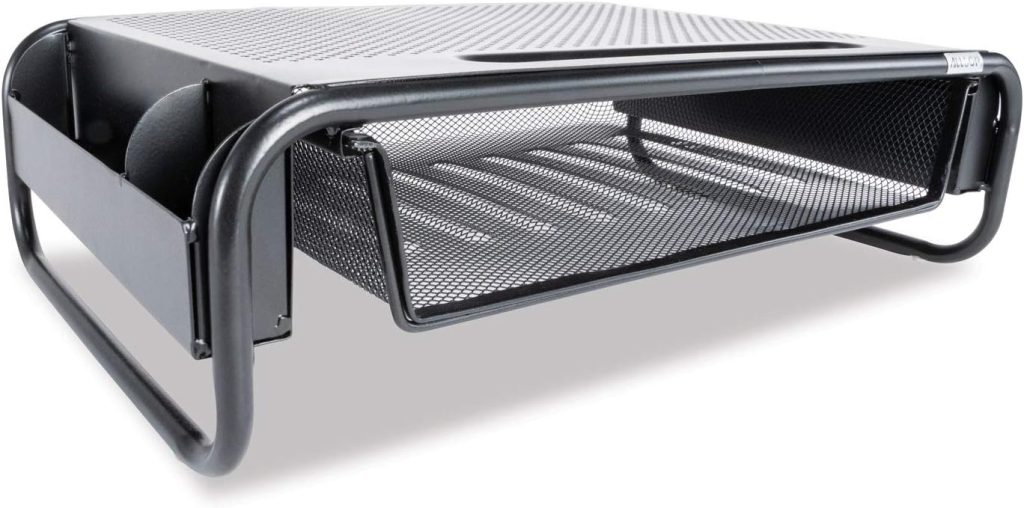
The Allsop Metal Art Organizer 5 is a multifunctional monitor stand designed to raise the display while organizing small office essentials. Its layout combines a sliding drawer with side storage compartments, making it a useful option if you want more than a single hidden storage space.
Published product details
- Overall dimensions: 18 inches wide × 11.8 inches deep × 5.3 inches high
- Manufacturer-listed monitor capacity: up to 30 lb
- Manufacturer-listed monitor size: up to 32 inches
- Steel platform with a sliding drawer and side compartments
Why consider it: the extra compartments give small accessories a place to go, while the space beneath the stand can be used for a compatible keyboard when it is not in use.
What to check: the actual monitor base footprint, the amount of desk space available, and whether a 5.3-inch lift is appropriate for your viewing position. The overall stand dimensions and the usable platform dimensions are not identical, so check both if your monitor has a wide base.
2. Allsop Metal Art Tri-Level Adjustable Monitor Stand with Drawer
Best for: users who want storage and multiple height settings.
The Allsop Metal Art Tri-Level stand combines an integrated drawer with adjustable legs. It is worth considering if you want to raise your monitor while keeping frequently used office items close at hand.
Published product details
- Three height settings: 4.13, 5, or 5.75 inches
- Platform dimensions: 14.5 × 9.25 inches
- Manufacturer-listed monitor capacity: up to 35 lb
- Manufacturer-listed monitor size: up to 27 inches
- Integrated drawer with a phone slot
Why consider it: the three height options offer more flexibility than a fixed-height riser, and the drawer can help keep small accessories out of sight.
What to check: this is a compact stand. Measure the footprint of your monitor’s original base and check the supported monitor size carefully. Its relatively small platform may not suit every large or ultrawide display, even if the weight is within the stated limit.
3. Vaydeer Monitor Riser Stand with Dual Drawers
Best for: users who want two small drawers and a wider platform.
Vaydeer offers monitor risers with two pull-out drawers. Depending on the version, the product line may also include a USB hub or wireless charging features. This makes it worth comparing if you want a monitor stand that combines storage with additional desktop connectivity.
Details to verify
- Some versions are advertised with two drawers measuring approximately 5.9 × 6.1 × 1.3 inches each.
- Some versions are listed with a maximum load of 66 lb.
- USB connectivity and wireless charging depend on the selected version.
- Confirm the exact product dimensions and supported monitor arrangement on the listing.
Why consider it: two separate drawers can help you organize small items by type, such as cables in one drawer and pens or adapters in the other. A longer platform may also be useful for a wider desk setup, provided it fits your available space.
What to check: the drawers are intended for small accessories rather than bulky stationery or large documents. Listings for different Vaydeer versions may show different features and dimensions, so do not assume every version has the same ports, charging functions, or load rating.
4. Wooden Monitor Stand with a Drawer
Best for: home offices that prioritize a warm, furniture-like appearance.
A wooden monitor stand with a drawer can blend into a home-office desk more naturally than a metal organizer. It may be a good fit if you want a place to store pens, sticky notes, charging cables, and other small items without adding a separate desk organizer.
Wooden models vary significantly in their construction. Some use solid wood, while others use engineered wood or a laminate finish. Check the material description rather than assuming a wood-look surface is solid timber.
What to check: platform width and depth, drawer dimensions, maximum supported load, finish, and the stability of the legs or support panels. Make sure the monitor’s feet sit fully on the platform and that the drawer can open without hitting a keyboard or other desk items.
5. Wide Desktop Monitor Stand with Drawers
Best for: users who want a wider organizer for a larger desk setup.
If you have a wide monitor base, a second screen, or several desk accessories, a wider desktop monitor stand with drawers may be more practical than a compact riser. Some designs combine multiple drawers with a broad top surface, while others leave additional space beneath the platform.
Do not assume a wide stand automatically supports two monitors. Check the load limit, usable platform area, and any stated monitor-size restrictions. If you plan to place two screens on the same platform, verify that both bases fit securely and that their combined weight is within the rated capacity.
What to check: total width, platform depth, drawer opening clearance, maximum load, and the height of the space underneath for your keyboard.
Monitor Stand with Drawers Comparison
| Option | Storage | Height | Best Use |
|---|---|---|---|
| Allsop Organizer 5 | One drawer plus side compartments | Fixed, 5.3 inches | Everyday office supplies |
| Allsop Tri-Level | One integrated drawer | Three settings | Compact desk with adjustable height |
| Vaydeer dual-drawer riser | Two drawers; features vary by version | Check exact listing | Small accessories and connectivity features |
| Wooden drawer riser | Usually one or more drawers, depending on model | Varies by model | Home-office styling |
| Wide drawer riser | Varies by model | Varies by model | Wider desktops and larger bases |
The Allsop models have published specifications that make them easier to compare directly. For other options, confirm the current product listing before relying on a specific dimension, capacity, or feature.
How to Choose a Desktop Monitor Stand with Drawers
1. Decide what you want to store
Small drawers are ideal for USB drives, pens, memory cards, sticky notes, and compact cables. They are less useful for notebooks, bulky chargers, or large office supplies. Measure your frequently used items and compare their dimensions with the drawer’s usable interior space.
2. Check the platform size
Measure the full footprint of your monitor’s original base, including any feet that extend forward or backward. The platform should support the base securely. If you use a large or ultrawide monitor, check the product’s usable surface and load rating instead of relying on the overall dimensions alone.
3. Choose the right height
A monitor riser should help position the screen comfortably, not force you to look upward. Check the height of the stand and consider the height of your current chair and desk. If you need precise positioning, a model with several height settings may be more useful than a fixed platform.
4. Measure keyboard clearance
Some monitor stands leave room underneath for a keyboard, but the actual clearance varies. Measure the keyboard’s height, including any raised feet, and check whether the stand’s legs or drawer mechanism obstruct the opening. Also make sure the drawer can slide out when the keyboard is in its normal position.
5. Check construction and stability
Look at the materials, support structure, stated load limit, and foot design. A metal platform may suit a practical office setup, while a wood or wood-look finish may complement home furniture. Regardless of material, follow the manufacturer’s load limits and assembly instructions.
What About an IKEA Monitor Stand with Drawers?
If you search for an IKEA monitor stand with drawers, you may be looking for a single product with an integrated drawer, or a desk arrangement that combines a monitor shelf with IKEA storage furniture. These are different solutions, and the right choice depends on how much storage you need.
A dedicated monitor stand with drawers keeps small accessories close to the screen and raises the display from the desktop. A separate drawer unit or desk organizer can provide more storage, but it may not raise the monitor to the right height. A monitor shelf placed on top of a separate storage unit also needs a stable, level surface and a suitable load rating.
Before buying an IKEA-based or DIY arrangement, verify the dimensions and intended use of each component. Do not assume a drawer unit is designed to support a monitor or that a decorative shelf can safely bear the combined load.
If you prefer to compare ready-made drawer risers, you can also browse monitor stands with drawers on Amazon and compare them with your desk’s available space.
Are Monitor Stands with Drawers Worth It?
A drawer-equipped monitor stand is most useful when you regularly use small desk supplies and want to reduce visible clutter. It can combine monitor elevation and storage in one footprint, leaving less need for a separate organizer.
However, integrated storage is not always the best option. Small drawers can be shallow, and a stand with a built-in drawer may offer less usable space underneath than a simple riser. If you mostly need to store a keyboard, notebook, or larger accessories, compare the available clearance and drawer dimensions before choosing.
Good fit if you…
- Use pens, cables, and small accessories daily.
- Want a cleaner desktop.
- Need to raise your screen slightly.
- Prefer an all-in-one organizer.
Think twice if you…
- Need to store large items.
- Need a very wide monitor platform.
- Require frequent screen repositioning.
- Have very limited desk depth.
Common Mistakes to Avoid
Choosing by the number of drawers alone
Two small drawers are not necessarily more useful than one larger drawer. Compare the internal dimensions and the items you plan to store.
Ignoring the monitor’s base footprint
A platform can be wide enough for the monitor’s screen but too narrow or shallow for its actual base. Measure the base before buying.
Assuming all versions have the same features
Some products have multiple versions with different USB ports, charging features, dimensions, or materials. Confirm the exact version shown in the listing.
Forgetting drawer clearance
A drawer that opens into a keyboard, desk divider, or another accessory can become inconvenient. Check the drawer’s opening path and the space around the stand.
Frequently Asked Questions
What is the best monitor stand with drawers?
The best choice depends on your monitor size, required height, and storage needs. The Allsop Metal Art Organizer 5 is worth considering for a drawer plus side compartments, while the Allsop Tri-Level offers three height settings. Compare the platform dimensions and load limits with your monitor before buying.
Can a monitor stand with drawers hold a large monitor?
Some can, but capacity varies by model. Check the supported screen size, maximum load, and usable platform dimensions. The monitor’s base must fit securely on the platform, and the total load must remain within the manufacturer’s limit.
Are drawers on a monitor stand large enough for a keyboard?
Usually, the drawers on compact monitor stands are intended for small accessories rather than a full-size keyboard. Some stands provide open space underneath for a keyboard instead. Check the drawer’s internal dimensions and the clearance beneath the platform.
Is a wooden monitor stand with drawers better than a metal one?
Neither material is automatically better. Compare the construction, stability, finish, load rating, drawer design, and platform dimensions. Wood or wood-look finishes may suit home-office furniture, while metal designs may offer a more utilitarian appearance.
Does a monitor stand with drawers improve ergonomics?
It can help raise the screen to a more comfortable position, but the effect depends on the stand’s height and your workstation setup. Also consider chair height, keyboard placement, and viewing distance. A storage drawer by itself does not guarantee better posture.
Final Verdict: Which Monitor Stand with Drawers Should You Choose?
For a built-in drawer plus side compartments, start by comparing the Allsop Metal Art Organizer 5. If you need several preset height options, the Allsop Metal Art Tri-Level is another option to investigate. For two drawers and possible extra connectivity features, compare the available Vaydeer dual-drawer versions carefully.
Before ordering, measure your monitor’s base, check the stand’s rated load, and confirm that the height suits your viewing position. Then compare drawer dimensions and keyboard clearance to make sure the storage will be genuinely useful rather than just another feature on the product page.
Affiliate disclosure: SitBetterLab may earn a commission from qualifying purchases made through affiliate links, at no additional cost to you. Product availability, prices, and specifications can change. Confirm current details with the seller before purchasing.