
Ultrawide Monitor Setup Guide
Best Monitor Stands for Ultrawide Monitors
Find a stable monitor stand for a wide screen, with practical advice on weight capacity, platform dimensions, desk space, and when a monitor arm is the better choice.
Quick answer
The best monitor stand for an ultrawide monitor is one that supports the monitor’s actual weight, provides a platform wide and deep enough for its feet, and keeps the screen stable on your desk. For many 34-inch ultrawide setups, a sturdy wide riser or a properly rated monitor arm is worth considering. Always check your monitor’s dimensions and stand design before buying.
If you use an ultrawide monitor, a standard compact monitor riser may not be wide or deep enough for your setup. Ultrawide screens can have long feet, wide V-shaped bases, or heavy stands that need more support than a typical monitor. Choosing the right monitor stand for ultrawide displays means checking the full setup—not just the screen size listed on the product page.
This guide compares the main types of stands to consider, explains what matters for 34-inch ultrawide monitors, and shows you how to check compatibility before ordering. The products below are Amazon search links for researching available options; verify the current specifications and fit of any model before purchasing.
Weight capacity
Desk stability
Risers vs. arms
Best Ultrawide Monitor Stand Options
There is no single stand that works for every ultrawide monitor. Use the following options as a shortlist based on your desk layout and how you want to position the screen.
1. Wide Desktop Monitor Riser
Best for: users who want a simple raised platform without installing a mount.
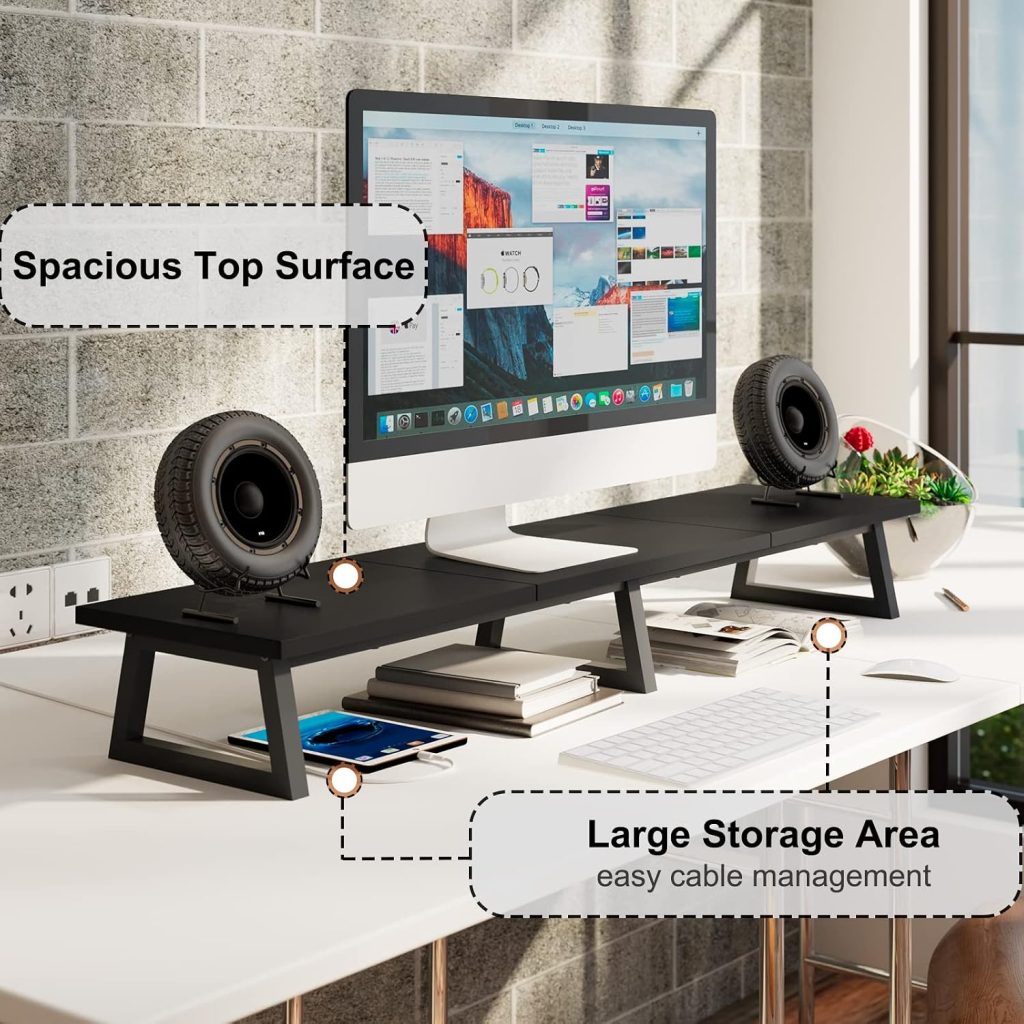
A wide desktop riser places your monitor on a solid shelf while leaving some space underneath for a keyboard, notebook, or small accessories. It is often the simplest option if you are happy with the monitor’s existing stand and only need additional height.
What to check: the platform’s usable width and depth, maximum supported load, construction, and whether the monitor’s original feet sit completely on the surface.
2. Heavy-Duty Monitor Riser
Best for: setups where the monitor and its original base create a higher load.
A heavy-duty riser may be a better fit when your ultrawide monitor has a substantial stand or when you want a more solid platform. However, a product labeled “heavy-duty” is not automatically suitable for every large display. Its stated load rating and platform dimensions still need to match your equipment.
What to check: the rated load, whether the rating applies to evenly distributed weight, the stability of the legs or supports, and the surface material.
3. Adjustable Ultrawide Monitor Arm
Best for: users who need more desk space or flexible screen positioning.
A monitor arm can free up the desk surface that would otherwise be occupied by the original monitor base. It can also make it easier to adjust screen height, viewing distance, and angle. The key is choosing an arm that explicitly supports your monitor’s weight, screen size range, and mounting pattern.
Some ultrawide displays are heavier or wider than the monitors supported by basic arms. Check the manufacturer’s specifications for the exact arm model, and make sure your desk can safely support the clamp or grommet mount.
What to check: supported weight range, compatibility with your monitor’s VESA pattern, desk thickness limits, clamp clearance, and any restrictions for curved or extra-wide screens.
4. Extra-Wide Wooden Monitor Stand
Best for: home offices where appearance and a broad shelf are priorities.
A wooden monitor stand can complement a home-office desk and provide a convenient raised surface. For an ultrawide monitor, do not choose by appearance alone: some decorative risers are designed for smaller screens and may not provide enough usable support.
Look for clear load specifications, sturdy joints or supports, a sufficiently deep top, and dimensions that fit your monitor base. Avoid placing the monitor so that any part of its feet extends beyond the supported platform.
How to Choose a Monitor Stand for a 34-Inch Ultrawide
A 34-inch ultrawide monitor is a common size to search for when upgrading a desk setup. But screen size alone does not tell you whether a stand will fit. Two monitors with the same diagonal measurement can have different widths, base shapes, weights, and mounting requirements.
Compatibility checklist
- Measure the base: measure the full width and depth of the monitor’s original feet, including any protruding sections.
- Check the monitor’s weight: use the manufacturer’s specifications for the monitor and the configuration you plan to mount.
- Confirm usable platform dimensions: the top surface must support the monitor base securely, not merely be wider than the screen’s stand column.
- Consider screen depth and curvature: a curved ultrawide may extend forward or backward differently from a flat display.
- Measure available desk space: account for the stand, keyboard, speakers, and any accessories behind or beside the monitor.
- Check adjustment needs: if the screen needs to move frequently, an appropriately rated monitor arm may be more practical than a fixed riser.
Can You Use a Dual Monitor Stand for a 34-Inch Ultrawide?
Possibly, but the label “dual monitor stand” does not guarantee compatibility with a single 34-inch ultrawide display—or with an ultrawide plus a second monitor.
For a single ultrawide monitor, check whether the mount supports its weight and dimensions. For a dual-screen setup, confirm the maximum supported weight per arm and the total load, as well as the mounting pattern and range of motion for both displays. Some mounts support two conventional monitors but are not designed for the combined width or weight of an ultrawide setup.
If your goal is to place a 34-inch ultrawide beside a second monitor, also measure the available desk width and make sure the arms can position both screens without colliding with the wall, desk shelves, or each other.
Search Dual Monitor Mounts for Ultrawide Setups
Monitor Riser vs. Monitor Arm for an Ultrawide Screen
| Feature | Desktop Riser | Monitor Arm |
|---|---|---|
| Installation | Usually simple placement on the desk | Requires compatible mounting and desk clearance |
| Desk surface | Uses space for the platform and supports | Can free up space beneath the monitor |
| Height adjustment | Usually fixed | Depends on arm design and adjustment range |
| Main compatibility check | Platform size and load rating | Weight, VESA pattern, screen size, and desk mounting |
| Best fit | A stable, straightforward raised screen | Flexible positioning and a less cluttered desktop |
Choose a riser if you want a straightforward platform and your monitor base fits securely. Choose a monitor arm if adjustable positioning and freeing desk space matter more. Neither option is automatically safer: correct specifications and installation are essential for both.
Common Mistakes to Avoid
Choosing by screen size alone
A stand marketed for a 34-inch monitor may still have a top surface that is too small for your particular base.
Ignoring the load rating
A wide platform is not necessarily a strong one. Check the stated load limit and the manufacturer’s usage instructions.
Forgetting desk clearance
Monitor arms and deep risers can interfere with desk edges, shelves, wall clearance, or keyboard placement.
Overlooking stability
Keep the monitor’s base within the supported area and follow the product’s installation and safety instructions.
How High Should an Ultrawide Monitor Sit?
The ideal height depends on your chair, desk, posture, and viewing distance—not just the monitor’s size. As a practical starting point, position the screen so you can look at it comfortably without repeatedly tilting your head upward or bending your neck down.
Many users start with the top of the display at or slightly below eye level, then adjust based on comfort and the screen’s size. Because ultrawide monitors are often tall as well as wide, check the height of the actual display panel and make sure raising it does not force you to look upward for most of your work.
If a fixed riser places the screen too high, consider a lower platform or an adjustable arm with a suitable range. For more workspace accessories, browse our monitor stands guide and monitor arms guide.
Frequently Asked Questions
What is the best monitor stand for an ultrawide monitor?
The best choice is the one that matches your monitor’s weight, base dimensions, and positioning needs. A wide desktop riser works for a fixed setup, while a compatible heavy-duty monitor arm is worth considering when you want more adjustability or desk space.
Can a regular monitor stand hold a 34-inch ultrawide?
Some can, but you should not assume compatibility. Compare the monitor’s actual weight and base measurements with the stand’s stated load limit and usable platform dimensions before buying.
Is a monitor arm better than a riser for ultrawide monitors?
An arm can provide more positioning flexibility and free desk surface, but only if it is rated for the monitor and compatible with its mounting pattern and your desk. A riser is simpler when you want to keep using the original monitor base.
Can I use a dual monitor stand with a 34-inch ultrawide?
It depends on the mount’s specifications and your screen arrangement. Check supported screen sizes, weight per arm, total load, VESA compatibility, and whether the arm can position the ultrawide without hitting the desk or another display.
Does an ultrawide monitor need a special stand?
Not necessarily. It needs a stand or mount that is compatible with its weight, dimensions, base or mounting pattern, and intended position. Some standard wide risers and monitor arms may work, provided the manufacturer confirms compatibility.
Final Recommendation
When choosing a monitor stand for ultrawide displays, prioritize fit and stability over appearance or marketing claims. Measure your monitor base, verify its weight, and compare those details with the stand’s specifications. For a simple setup, start with a wide desktop riser. If you need flexible positioning or more desk space, investigate a monitor arm rated for your exact screen.
Before ordering, review the current product dimensions, load limits, mounting requirements, and return policy. These checks are especially important for 34-inch ultrawide monitors and dual-screen configurations.
Disclosure: SitBetterLab may earn a commission from qualifying purchases made through affiliate links, at no additional cost to you. Product availability and specifications can change; confirm details with the seller before purchasing.