
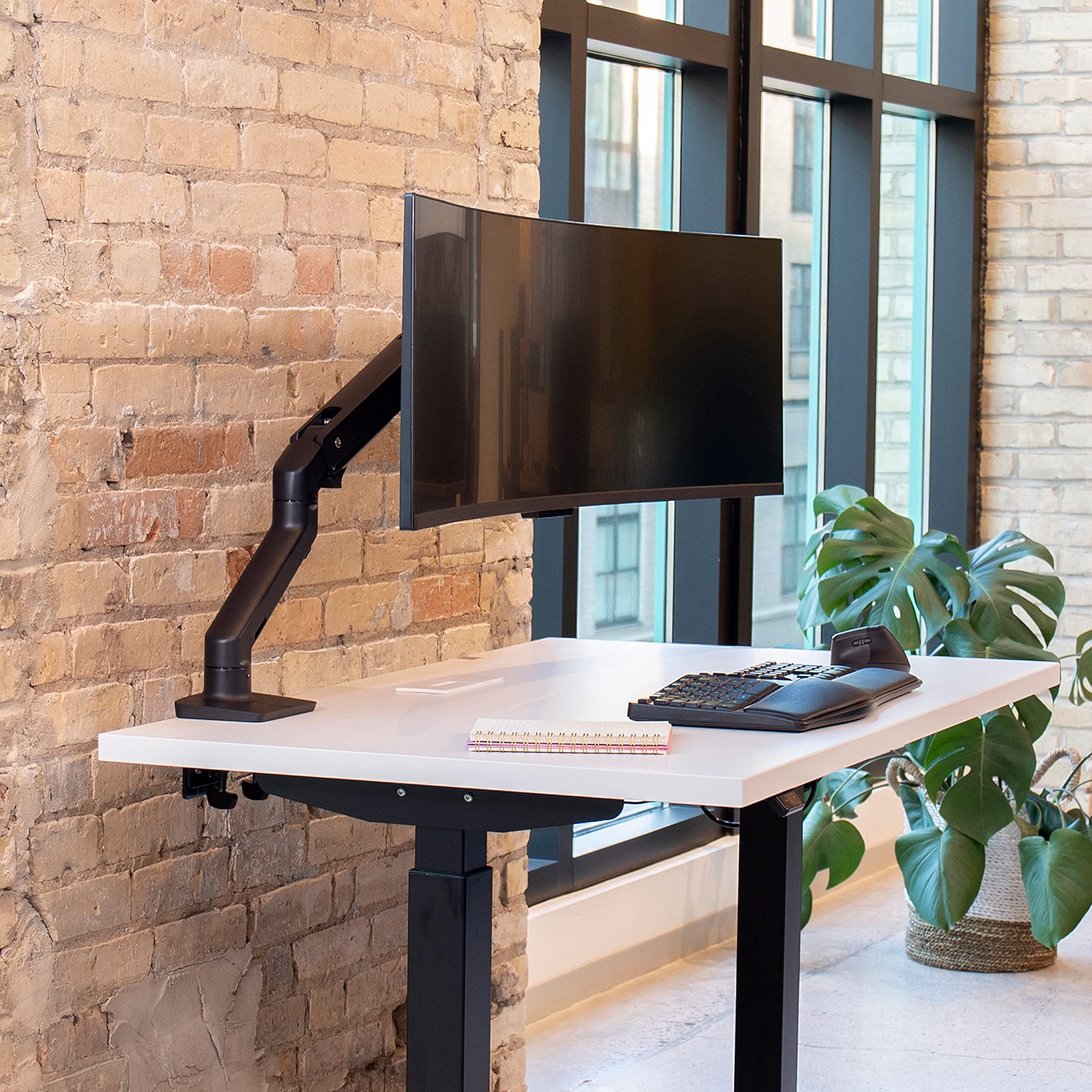
If your neck starts feeling tight or tired by the middle of the workday, your monitor height may be part of the problem. A screen that sits too low can encourage you to look downward for long periods, while the best monitor stand for neck pain can help place your display in a more comfortable viewing position.
This matters even more in a busy home office. If you’re also a pet owner, your desk may need to handle everything from a curious cat jumping onto the workspace to a dog nudging your chair during a video call. A stable monitor arm or riser can improve screen positioning while freeing up valuable desk space.
In this 2026 guide, we’ll compare five popular monitor-mount options, explain what to look for when shopping, and show you how to set up your display for a more comfortable ergonomic workstation.
📌 Best Monitor Stand for Neck Pain: Quick Take
The right monitor stand is less about finding a particular brand and more about getting your screen into a comfortable position. For most desk setups, look for easy height adjustment, stable mounting, appropriate weight capacity, and enough range to position the display at or slightly below eye level.
- Best overall: Ergotron LX
- Budget option: VIVO STAND-V001
- Best for sit-stand setups: HUANUO Gas Spring Monitor Arm
- Best for dual monitors: VIVO STAND-V002
- Best for heavy ultrawide displays: Ergotron HX
The best choice depends on your monitor size, desk type, preferred sitting or standing position, and how much adjustment you need throughout the day. Always check the current product listing for the exact specifications and compatibility of the model you are considering.
🔍 How We Evaluated Monitor Stands for Neck Pain
A monitor stand cannot treat an underlying medical condition, but changing screen position can be a useful part of an ergonomic workstation. For this guide, we focus on the features that matter most when trying to create a comfortable viewing position.
1. Height Adjustment
Enough vertical range to position the display comfortably for your seated or standing height.
2. Stability
A secure base or clamp helps prevent unwanted movement when you adjust the screen or bump the desk.
3. Adjustability
Tilt, swivel, rotation, and depth adjustment can make fine-tuning easier.
4. Desk & Pet Practicality
Cable management, desk clearance, and secure mounting matter in busy home offices.
📌 Why Monitor Height Matters for Neck Comfort
One of the simplest ergonomic changes you can make at a desk is adjusting the position of your screen. When a monitor is substantially below your preferred viewing height, you may spend more time looking downward or bending your neck forward.
That does not mean monitor height is the only cause of neck pain. Chair height, keyboard position, viewing distance, lighting, work habits, and how often you change position can all affect how comfortable your workstation feels.
For many desktop setups, a useful starting point is to place the top of the monitor at or slightly below eye level. You should be able to look toward the screen without repeatedly lifting your chin or bending your neck sharply downward.
If you are also adjusting your chair, take a look at our guide to fixing office chair lumbar support for another part of the workstation setup.
📌 What to Look For in a Monitor Stand for Neck Pain
Monitor stands come in several designs. The right type depends on whether you want a simple riser, a fully adjustable arm, or a solution for multiple displays.
| Type | Best For | Main Advantage | Potential Drawback |
|---|---|---|---|
| Fixed Riser | Simple desk setups | Simple and stable | Limited height adjustment |
| Gas-Spring Arm | Frequent adjustments | Wide positioning range | More installation and adjustment |
| Clamp-On Arm | Small desks and multi-monitor setups | Frees desk surface | Requires compatible desk edge |
For people who regularly change their workstation position, an adjustable monitor arm can be especially useful. If your screen only needs to be raised a few inches and you rarely move it, a fixed riser may be all you need.
🔍 Top 5 Monitor Stands for Neck Pain in 2026
The five options below cover different workstation needs, from a relatively affordable single-monitor setup to premium arms designed for larger displays. Prices, configurations, supported monitor sizes, and availability can change, so check the current Amazon listing before purchasing.
| Model | Best For | Key Advantage | Price Position | Check Price |
|---|---|---|---|---|
| Ergotron LX | Single-monitor ergonomic setups | Strong adjustability and established monitor-arm design | Premium | Check Price → |
| VIVO STAND-V001 | Budget single-monitor setups | Lower-cost entry into adjustable mounting | Budget | Check Price → |
| HUANUO Gas Spring | Sit-stand workstations | Flexible positioning for changing desk heights | Budget to Mid-Range | Check Price → |
| VIVO STAND-V002 | Dual-monitor workstations | Independent positioning for two screens | Budget to Mid-Range | Check Price → |
| Ergotron HX | Large and heavy monitors | Designed for heavier display configurations | Premium | Check Price → |
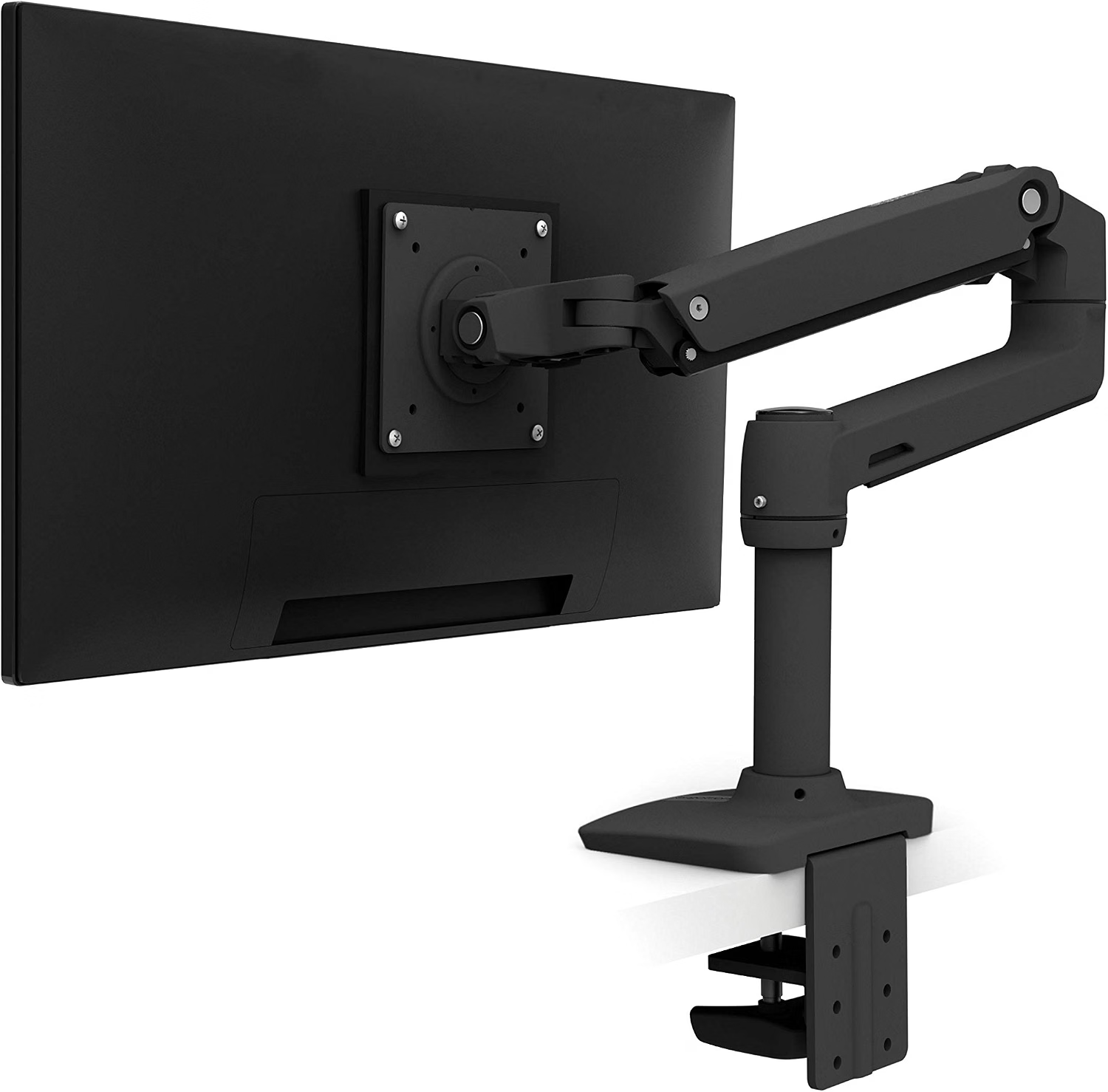
1. Ergotron LX – Best Overall for Adjustable Single-Monitor Setups

Premium
The Ergotron LX is a strong choice if your priority is precise monitor positioning rather than simply raising the screen a few inches. Its articulated arm design allows you to adjust the display’s height, depth, tilt, and orientation, depending on the specific configuration.
That flexibility is particularly useful if you regularly switch between reading, writing, video calls, and other desk tasks. It can also help keep your desk surface more open than a large freestanding monitor base.
- Wide range of screen-position adjustments
- Good option for a clean, flexible workstation
- Useful for users who reposition their monitor frequently
- Costs more than basic monitor mounts
- Desk-clamp installation requires a compatible, sturdy desk
- Exact monitor compatibility depends on the model configuration
2. VIVO STAND-V001 – Best Budget Monitor Arm
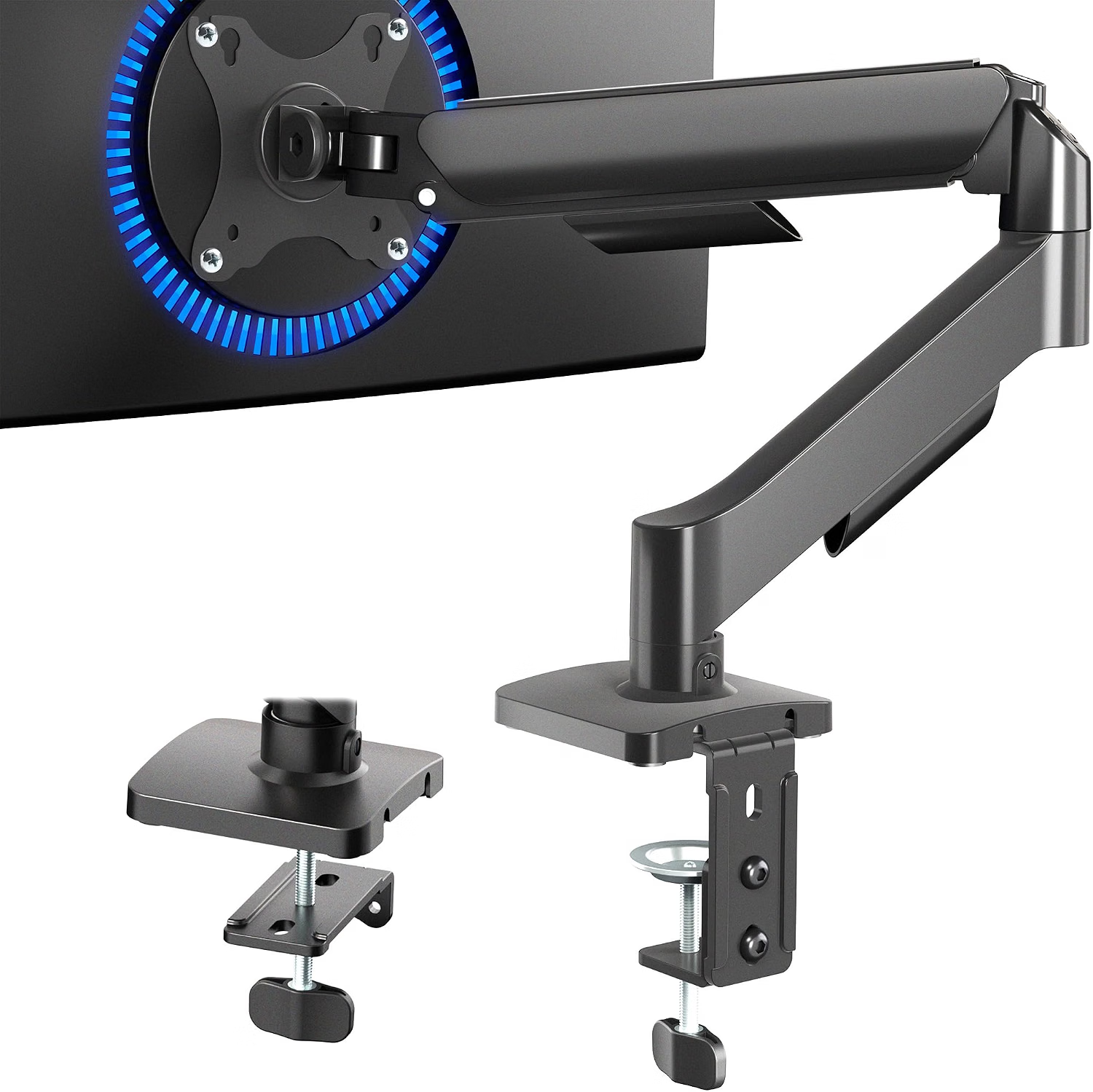

The VIVO STAND-V001 is worth considering if you want an adjustable monitor mount without moving into premium pricing. Its clamp-style design can also help free up space underneath the display.
For smaller home offices, that extra desk space can be useful. It also makes it easier to keep keyboards, notebooks, and other items away from areas where pets tend to climb or knock things over.
- Lower-cost way to add monitor adjustment
- Frees some desk surface compared with a large monitor base
- Useful for compact workspaces
- Less premium than higher-end monitor arms
- Desk thickness and edge design need to be compatible
- Check the current listing for exact supported monitor specifications
3. HUANUO Gas Spring Monitor Arm – Best for Sit-Stand Workstations

If you alternate between sitting and standing, the HUANUO gas-spring monitor arm is designed around frequent position changes. The adjustable arm can make it easier to move your display when your desk height changes.
This can be especially helpful when the same monitor needs to work for both seated and standing positions. Instead of compromising on one height, you can reposition the screen as your workstation changes.
- Convenient for changing monitor height frequently
- Useful for sit-stand desk users
- Adjustable arm design saves desk space
- Requires careful installation and tension adjustment
- Performance depends on monitor weight and arm configuration
- Check the current model’s specifications before buying
4. VIVO STAND-V002 – Best for Dual Monitors
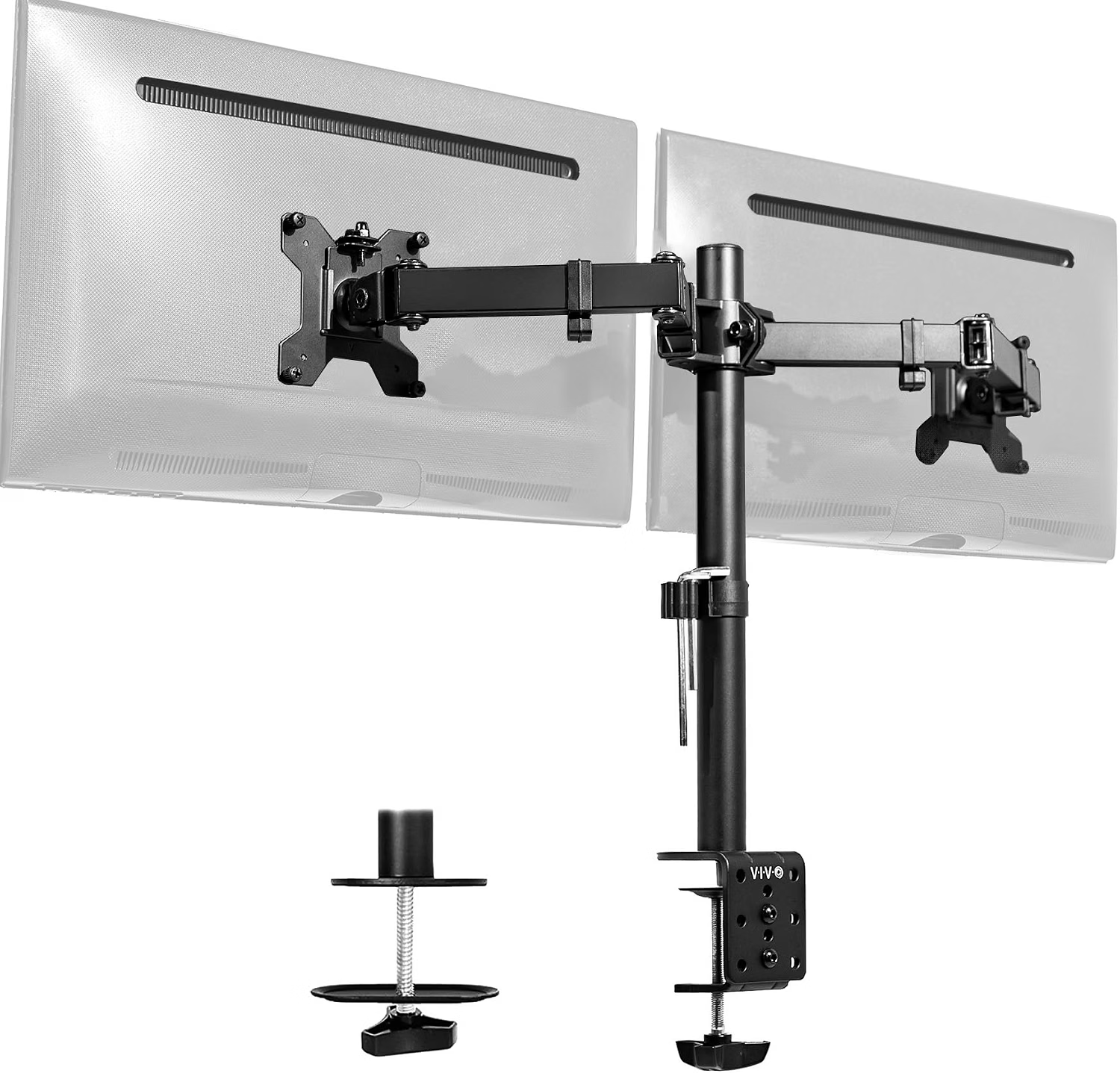

For a two-monitor workspace, the VIVO STAND-V002 provides independent positioning for two displays. That can be useful when your secondary monitor sits at a different height or angle from your primary screen.
A dual-monitor setup can create awkward head and neck movements if the screens are positioned too far apart or at noticeably different heights. Adjustable arms make it easier to keep the primary viewing area centered and the secondary display within a comfortable range.
- Designed for two-monitor setups
- Independent positioning helps with screen alignment
- Can free substantial desk surface
- Requires enough desk depth and clearance
- Installation takes more time than a simple riser
- Monitor compatibility should be checked before purchase
5. Ergotron HX – Best for Large and Heavy Displays


The Ergotron HX is aimed at larger and heavier display configurations. If you’re using a large ultrawide or another monitor that exceeds the practical range of entry-level arms, a heavy-duty mount may provide the additional support and adjustment you need.
This is not the most practical choice for everyone. For a standard lightweight office monitor, a less expensive arm may provide everything you need. The HX makes more sense when monitor size and weight are the primary constraints.
- Designed for heavier monitor configurations
- Useful for large and ultrawide displays
- Premium adjustment and construction
- More expensive than basic monitor arms
- Unnecessary for many standard office monitors
- Exact weight and screen-size compatibility varies by configuration
⚡ Monitor Stand vs. Adjustable Desk: Which Helps More With Neck Comfort?
A monitor stand and a sit-stand desk solve different ergonomic problems. A monitor stand primarily changes the position of your display, while an adjustable desk changes the height of the entire work surface.
| Factor | Monitor Stand | Adjustable Desk |
|---|---|---|
| Primary purpose | Changes monitor position | Changes entire desk height |
| Screen positioning | Directly adjustable | Depends on desk and monitor setup |
| Space required | Usually compact | Requires more floor space |
| Position changes | Monitor-focused | Whole workstation |
| Pet considerations | Secure cables and clamp points | Keep moving parts and cables away from pets |
If your main problem is simply that your monitor is too low, a monitor arm or riser may be a straightforward place to start. If you also want to alternate between sitting and standing, an adjustable desk can complement the monitor mount rather than replace it.
For more guidance on changing positions during the workday, see our sit-to-stand workstation guide.
🔑 How to Set Up a Monitor Stand for Better Ergonomics
Buying an adjustable monitor stand is only part of the solution. The screen still needs to be positioned correctly for your body, desk, and typical working posture.
1. Set the Screen Height
Start with the top of the display at or slightly below eye level while you are sitting naturally. Avoid positioning the monitor so high that you need to lift your chin to see the upper portion of the screen.
2. Adjust Viewing Distance
Place the monitor far enough away that you can read text without leaning forward. The ideal distance varies with screen size, resolution, eyesight, and personal preference, so use a comfortable viewing distance rather than treating one measurement as universal.
3. Position Your Keyboard and Mouse
Keep the keyboard and mouse close enough that your shoulders can remain relaxed. Your elbows should generally stay near your sides rather than forcing your arms far forward.
4. Check the Monitor Angle
Tilt the display to reduce glare and avoid repeatedly bending your neck to see the screen. If you use multiple monitors, keep the display you use most directly in front of you.
🐾 How to Make Your Monitor Setup Pet-Friendly
A monitor stand can free desk space, but it doesn’t automatically make a workspace safe for pets. Cables, power strips, clamps, and unstable objects still need attention.
- Route monitor cables along the back or underside of the desk whenever possible.
- Avoid leaving loose charging cables hanging where pets can chew or pull them.
- Use cable sleeves or raceways to reduce exposed wiring.
- Keep water bowls away from power strips and electrical connections.
- Check the monitor arm clamp periodically if your pet frequently jumps onto the desk.
- Create a comfortable pet bed or mat beside the workstation if your dog or cat likes to stay near you.
Avoid relying on taste deterrent sprays around electrical equipment unless the product is specifically intended for that use and applied according to its instructions. Physical cable management and keeping cords inaccessible are simpler safety measures.
🪑 Don’t Ignore the Rest of Your Workstation
A monitor stand can improve screen positioning, but your workstation works as a system. If your neck or shoulders still feel uncomfortable after adjusting the monitor, look at your chair, desk height, keyboard position, and work habits as well.
If your chair is causing pressure around your hips or thighs, our guide to office-chair-related hip discomfort covers some additional workstation adjustments.
Most importantly, avoid staying in one position simply because your workstation is technically ergonomic. Regularly changing position, standing briefly, walking, and looking away from the screen can all make a long workday more manageable.
❓ FAQ: Monitor Stands and Neck Pain
How high should a monitor stand be for neck pain?
A useful starting point is to position the top of the monitor at or slightly below eye level when you’re sitting in your normal working posture. Your exact height will depend on your chair, desk, monitor size, eyesight, and preferred viewing angle.
Can a monitor stand fix neck pain?
A monitor stand may improve comfort when screen height or viewing angle is contributing to an awkward posture, but it cannot be expected to fix every cause of neck pain. Persistent, severe, or worsening symptoms should be evaluated by an appropriate healthcare professional.
Are gas-spring monitor arms better than fixed stands?
Neither type is automatically better for everyone. Gas-spring arms are useful when you need frequent height or position changes, while fixed stands can be simpler and less expensive. The important factor is whether the finished setup places the monitor in a comfortable position for you.
Does a monitor stand work with a laptop?
A laptop riser can raise the screen, but using a laptop on a stand usually works best with an external keyboard and mouse. Otherwise, raising the screen can force the keyboard too high or too far away.
How much weight should a monitor arm support?
Choose an arm whose rated capacity comfortably covers the actual weight of your monitor, excluding the stand you removed. Also check VESA compatibility, screen-size guidance, and the desk-clamp requirements. Heavy ultrawide monitors may require a dedicated heavy-duty arm.
Should I use a monitor stand with a standing desk?
Yes. A monitor arm can make a sit-stand workstation easier to configure because you can reposition the display as the desk moves. If you frequently alternate between sitting and standing, make sure the arm has enough vertical and horizontal range for both positions.
🛒 Monitor Stand Buying Checklist
- Monitor weight: Make sure the arm’s rated capacity covers your display.
- VESA compatibility: Check whether your monitor uses a compatible mounting pattern.
- Height range: Make sure the arm can reach your preferred seated and standing positions.
- Desk compatibility: Check desk thickness and available clamp space.
- Monitor size: Large or ultrawide displays may require a heavier-duty mount.
- Cable management: Choose a design that helps keep cables organized and away from pets.
- Adjustment needs: If you rarely move the display, a simpler stand may be sufficient.
🏁 The Bottom Line
The best monitor stand for neck pain is the one that lets you position your screen comfortably without forcing you to repeatedly bend your neck forward or lift your chin.
For a flexible single-monitor setup, the Ergotron LX is a premium option to consider. Budget shoppers can look at the VIVO STAND-V001, while sit-stand users may benefit from a gas-spring arm. Dual-monitor users have different mounting requirements, and large ultrawide displays may justify a heavy-duty option such as the Ergotron HX.
Whatever you choose, spend a few minutes adjusting the monitor after installation. A well-positioned display, comfortable chair, correctly placed keyboard, and regular movement are more important than any single piece of ergonomic equipment.
Health Disclaimer: This article provides general ergonomic and workstation information and is not medical advice. A monitor stand does not diagnose, treat, or cure neck pain or any other medical condition. If you have persistent, severe, worsening, or otherwise concerning symptoms, consider speaking with a qualified healthcare professional.