
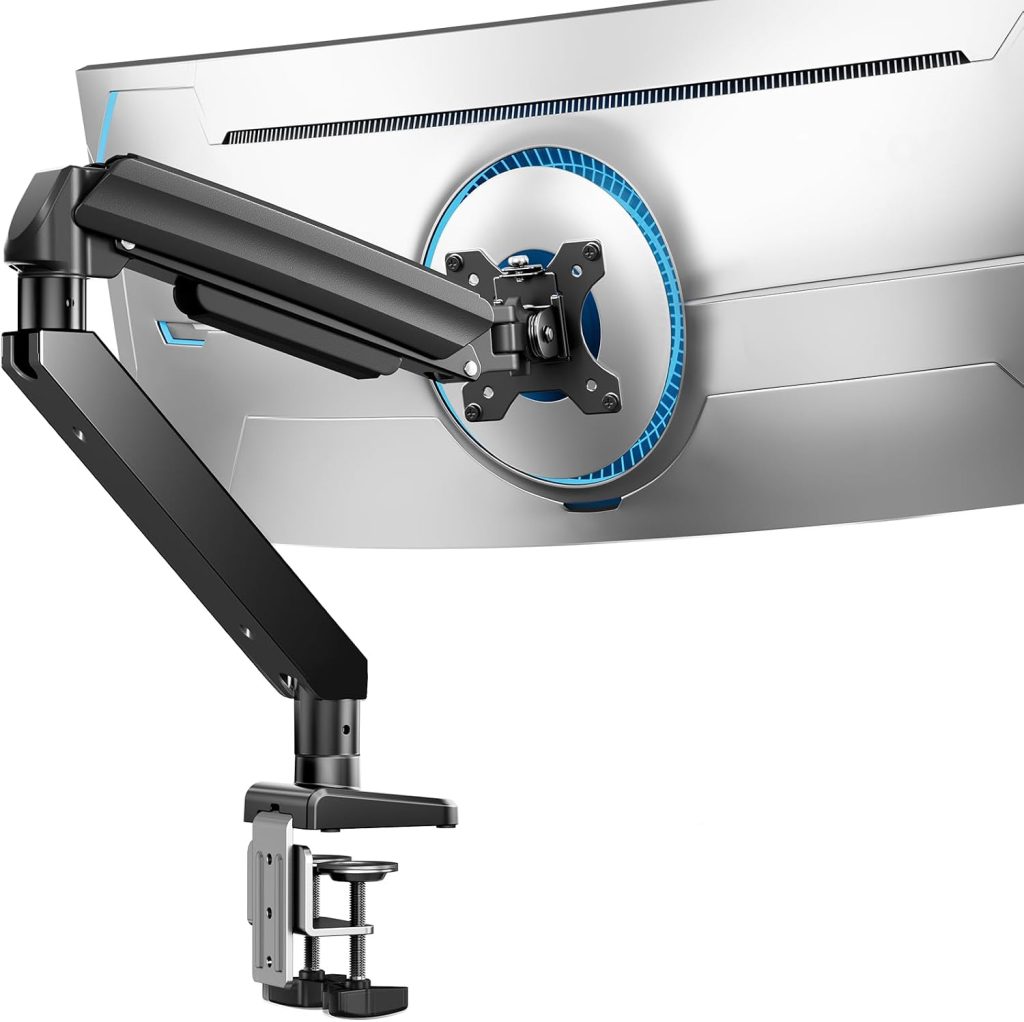
Monitor Arm Buying Guide
A thick desktop can make installing a monitor arm surprisingly difficult. Even if an arm supports your monitor’s weight, its desk clamp may not open wide enough to fit the tabletop. The best monitor arm for a thick desk needs sufficient clamp clearance, compatible mounting hardware, and a secure installation that suits your desk’s construction.
Quick Buying Advice
- Best first choice: A monitor arm whose documented clamp opening exceeds your measured desk thickness.
- Best alternative when the clamp is too small: A compatible grommet mount, if your desk has a suitable existing hole or can safely accommodate one.
- Best for custom desktops: A mounting system with manufacturer-approved hardware and clearly documented thickness limits.
- Most important check: Measure the complete thickness at the exact mounting point, including any edge lip or structural frame that affects clamp clearance.
Clamp limits vary by model. Confirm the current specifications and installation instructions before purchasing.
1. What to Look for in a Monitor Arm for a Thick Desk
Monitor arms typically attach to a desk using a C-clamp or a grommet mount. Both can work well, but your desk’s thickness and construction determine which option is practical.
A C-clamp grips the desk edge. Its maximum opening is therefore one of the first specifications to check. A grommet mount passes through a hole in the desktop and secures the arm with hardware underneath, so it can be a useful alternative when the desk edge is too thick for a standard clamp.
Before choosing a product, check these four factors:
- Maximum clamp opening: The manufacturer’s specified maximum desk thickness for the exact mounting configuration.
- Mounting clearance: The space required underneath the desk for the clamp plate, screw, and adjustment handle.
- Desktop construction: Whether the desk is solid wood, engineered wood, a laminate surface, or another material that can safely support the load.
- Monitor compatibility: The arm’s weight range, VESA pattern, and screen-size or depth restrictions.
A high weight capacity does not mean an arm can fit a thick desktop. Clamp compatibility and monitor compatibility are separate requirements, and both must be satisfied.
2. Monitor Arm Options for Thick Desks
Standard C-Clamp Monitor Arm — Best When the Opening Is Sufficient
A conventional C-clamp is usually the simplest option if its maximum opening is large enough for your desktop. It generally avoids drilling a hole and can make installation straightforward when the desk edge is accessible.
However, do not assume that all monitor arms have the same clamp range. Some compact arms are designed for relatively thin desktops, while other models accommodate thicker surfaces. Check the installation diagram or specification sheet for the exact maximum thickness.
Also inspect the underside of the desk. A deep apron, support rail, drawer, or metal frame may prevent the clamp from reaching the mounting position even if the desktop itself is within the specified thickness range.
Best for: Thick desktops with an accessible edge and enough clearance for the arm’s standard clamp.
Compare Monitor Arms with Large Clamp Openings
Heavy-Duty Monitor Arm — Best for Larger Displays When Desk Fit Is Confirmed
A heavy-duty monitor arm may be appropriate for a large or heavy display, but its load rating does not automatically guarantee compatibility with a thick desktop. Some heavy-duty models have substantial mounting hardware, while others may still have limited clamp clearance.
When comparing heavy-duty models, verify both the supported monitor weight and the clamp’s maximum opening. Check whether the manufacturer offers alternative mounting hardware for the same arm, and confirm that the alternative is approved for the intended model.
Do not force a clamp beyond its designed opening or substitute improvised hardware. An arm that is not properly secured can damage the desk or allow the display to fall.
Best for: Users with a thick desk and a larger monitor who need both adequate load capacity and documented mounting compatibility.
Explore Heavy-Duty Monitor Arms
Grommet-Mount Monitor Arm — Best Alternative to a Clamp
If your desk is too thick for a C-clamp, a grommet mount may solve the problem. Instead of gripping the outside edge, this mounting method uses a hole through the desktop and secures the arm with hardware underneath.
Before choosing this option, confirm the following:
- The required hole diameter matches the mounting hardware.
- The desk has enough clear space underneath for the fastening plate and hardware.
- The desktop material and thickness are suitable for the mounting method.
- The mounting hole is not obstructed by a frame, drawer, cable tray, or other structure.
- The manufacturer permits the chosen configuration for your monitor’s weight.
Some desks have an existing cable-management opening that may be suitable, but its diameter and position must match the mount. Do not assume that every cable hole can support a monitor arm. If drilling is required, verify that the desk can safely be modified before proceeding.
Best for: Desks whose edges cannot accommodate a C-clamp, provided a suitable grommet installation is possible.
Shop Grommet-Mount Monitor Arms
Monitor Arm with Alternative Mounting Hardware — Best for Custom Setups
Some monitor-arm product lines offer different mounting configurations or compatible accessories. This can be useful if you have an unusually thick desktop, a built-in desk frame, or limited access to the rear edge.
Check the manufacturer’s documentation to see whether a different clamp or grommet kit is available for the exact arm model. Confirm the permitted desk thickness, mounting-hole requirements, and installation method before ordering the accessory.
Compatibility should be documented rather than assumed. A mounting accessory designed for one product family may not fit another arm from the same brand.
Best for: Custom desks where the standard mounting configuration does not fit, but a manufacturer-approved alternative is available.
Explore Alternative Mounting Options
3. How to Measure Desk Thickness Before Buying
Measuring your desk takes only a few minutes and can help prevent an incompatible purchase.
- Choose the intended mounting point. Measure where the clamp or grommet will actually be installed, not just at the front edge of the desk.
- Measure the full desktop thickness. Use a ruler or tape measure to record the vertical distance from the top surface to the underside.
- Check for an edge lip or frame. Some desks have a beveled edge, apron, reinforcement bar, or metal frame that changes the available clamp clearance.
- Inspect the underside. Check whether the clamp screw and lower plate can fit without hitting drawers, support rails, or cable trays.
- Compare the measurement with the official limit. Use the maximum desk thickness specified for the exact mounting configuration.
For example, if your desk measures 3 inches thick, a clamp with a smaller documented maximum opening will not fit safely. Look for a mount with a compatible opening or consider a suitable alternative mounting method.
Do not rely on the phrase “heavy-duty” as evidence that a clamp will fit a thick desktop. The actual measurement is what matters.
4. What If Your Desk Is Too Thick for the Clamp?
If the standard clamp cannot accommodate your desktop, you have several possible options. The right choice depends on the desk structure and the mount’s approved installation methods.
Option 1: Find a Larger Clamp
Choose an arm with a documented opening that fits the desk and enough room underneath for the clamp hardware.
Option 2: Use a Grommet Mount
Consider this method if the desk has a suitable opening or can safely accommodate one.
Option 3: Use a Freestanding Stand
A stable, appropriately rated stand can avoid clamp-clearance problems altogether.
Avoid stacking loose blocks, improvised spacers, or unapproved extension pieces to make a clamp fit. Do not remove parts or modify mounting hardware unless the manufacturer explicitly permits the modification.
5. Can a Thick Desk Support a Heavy Monitor Arm?
A thick desk is not automatically a strong desk. Thickness is only one part of the equation: material, internal construction, edge design, and the condition of the mounting area all matter.
A solid wood desktop may have different structural characteristics from a hollow-core or particleboard desktop of the same thickness. A thick tabletop can also have a weak edge or an internal frame that prevents proper clamp placement.
Before mounting a heavy monitor, check:
- Whether the desktop material is suitable for the clamp pressure and monitor load.
- Whether the mounting area is free of cracks, damage, or loose surface layers.
- Whether the desk manufacturer provides guidance on accessory mounting.
- Whether the arm’s installation instructions require a reinforcement plate or other approved accessory.
- Whether the desk remains stable when the arm is extended and the monitor is repositioned.
A reinforcement plate may help distribute pressure on a suitable desk, but it cannot make every tabletop safe. If you are unsure whether the desk can support the load, consult the desk manufacturer or choose a mounting solution that does not place an unsuitable load on the desktop.
6. C-Clamp vs. Grommet Mount for Thick Desks
| Feature | C-Clamp | Grommet Mount |
|---|---|---|
| Requires a hole | Usually no | Yes, unless a suitable hole already exists |
| Maximum desk thickness | Limited by the clamp’s specified opening | Limited by the mount’s specified thickness range and hardware |
| Underside clearance | Needed for the clamp plate and screw | Needed for the fastening plate and hardware |
| Best use case | An accessible edge that fits the clamp | A compatible hole and suitable mounting surface |
Neither method is universally stronger or better. The correct choice depends on the exact mount, desktop construction, installation requirements, and monitor load.
7. Frequently Asked Questions
What is the maximum desk thickness for a monitor arm?
There is no universal maximum. Each monitor arm has its own clamp-opening range, and some models offer alternative mounting configurations. Check the manufacturer’s specification for the exact model before purchasing.
Can I use a monitor arm on a 3-inch-thick desk?
Possibly, but only if the mounting system is specifically compatible with that thickness. Measure the desk at the mounting point and compare it with the documented maximum opening. If the clamp does not fit, consider an approved grommet mount or a suitable freestanding stand.
Are heavy-duty monitor arms better for thick desks?
Not necessarily. Heavy-duty describes the monitor arm’s intended load capacity, not the size of its clamp opening. Verify desk-thickness compatibility separately from monitor weight capacity.
Can I drill a hole in my desk for a grommet-mounted monitor arm?
Only if the desk’s construction and the mount’s instructions permit it. Check for internal frames, reinforcement, cables, and other obstructions before drilling. If the desktop is glass, hollow-core, or otherwise unsuitable for modification, consult the desk manufacturer or choose another mounting method.
Will a thicker desk make a monitor arm more stable?
Not by itself. Stability depends on the desk’s material and construction, the mounting method, the arm’s load rating, and correct installation. Thickness alone does not establish that a desk can safely support a monitor arm.
Should I buy a monitor arm with a larger clamp opening than I need?
You should choose a model whose specified mounting range comfortably accommodates your measured desk thickness and installation conditions. A larger maximum opening is useful only if the clamp also fits securely and the desk is suitable for the mount.
Final Verdict: Measure First, Then Choose the Mount
The best monitor arm for a thick desk is one that fits the desktop securely and supports your monitor within the manufacturer’s specifications. A standard C-clamp is convenient when its opening is large enough. A grommet mount may be a practical alternative when the desk edge cannot accommodate a clamp, while a freestanding stand avoids the need for desk-edge mounting altogether.
Before ordering, measure the tabletop, inspect the underside, confirm the mounting hardware, and check the monitor’s weight and VESA compatibility. Do not assume that a heavy-duty arm will automatically fit a thick desk.
Compare Monitor Arms for Thick Desks
Related Monitor Arm Guides
Disclosure: SitBetterLab may earn a commission from qualifying purchases made through affiliate links. Product specifications and availability may change. Always verify compatibility with the manufacturer before purchasing.