
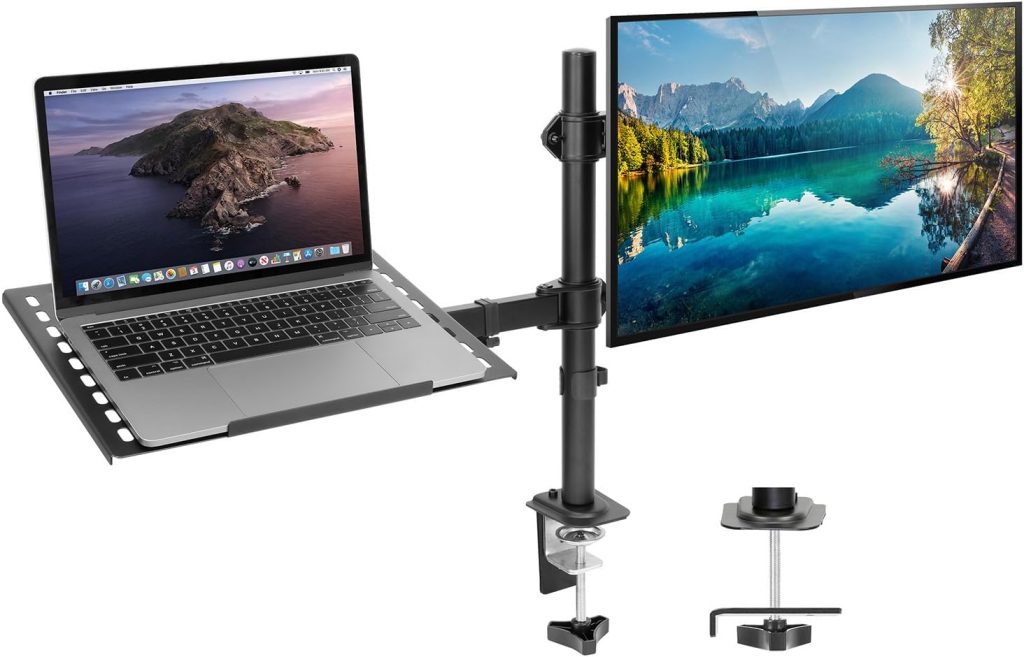
A standard monitor stand eats up the exact square inches you can least afford on a compact desk. You end up pushing your keyboard forward, cramping your mouse hand, or stacking papers on the floor.
The best monitor arm for small desk solves this by lifting your screen off the surface entirely — but only if the clamp, arm reach, and weight rating actually fit your setup. I’ve tested arms on desks as narrow as 16 inches deep, and the wrong model can wobble, overhang, or refuse to clamp at all.
📌 Why a Small Desk Needs a Space-Saving Monitor Arm
Most monitor stands have a footprint of 9–12 inches deep and 10–14 inches wide. On a desk that’s only 20–24 inches deep, that base eats up nearly half your usable surface before you even place a keyboard. A clamp-on monitor arm solves that by mounting to the desk edge or a grommet hole, so the screen floats above the surface and your desk opens up.
The ergonomic upside matters even more in a tight setup. You can raise the screen to eye level, tilt it to cut reflections from a nearby window, and swivel it when you want to share your screen. That adjustability reduces the tendency to lean forward or crane your neck — two habits that get worse in a cramped corner.
Small desks also struggle with limited side-to-side clearance. A low-profile arm with a short lower arm or a tall pole keeps the monitor close to the wall instead of jutting into your walkway. Many units include cable channels along the arm, which helps reduce cord spaghetti and makes a compact workspace feel less cluttered. If you switch between sitting and standing, a gas-spring arm makes repositioning a one-hand job.
🔍 What to Look for in the Best Monitor Arm for Small Desks
Small desks don’t forgive bulky mounts. Before you buy, check five specs that matter more than arm length or color.
- Compact clamp or grommet base. Look for a C-clamp that grips desks under 2 inches thick and occupies less than 4 inches of edge space. A grommet mount can free up even more surface area if your desk has a built-in hole.
- Weight capacity and VESA range. Match the arm to your display. Most arms support 75x75mm and 100x100mm VESA patterns. If your monitor weighs 8 to 20 pounds, choose an arm rated for at least 22 pounds — undersized gas springs sag.
- Adjustment range. Height, tilt, swivel, and 360-degree rotation let you set the screen at eye level without twisting your neck. For small desks, 10 to 13 inches of vertical height adjustment is usually enough.
- Built-in cable management. Clips or channels keep power and video cables off the desktop. It’s a small feature that makes a tiny workspace feel twice as organized.
- Sturdy clamp for thin or compact desks. If your desk top is under 0.75 inches thick, check the clamp’s minimum thickness spec. Some arms include a reinforcement plate to prevent crushing flimsy particleboard.
Two arms that consistently meet these small-desk criteria are the Amazon Basics Single Monitor Arm and the Ergotron LX Desk Mount Arm. Both have compact clamps, solid VESA support, and decent cable routing.
Check Amazon Basics Arm →
Check Ergotron LX →
🔍 Top 5 Best Monitor Arms for Small Desks in 2026
For a small desk, a monitor arm has to do more than hold a screen. I look for a narrow clamp footprint, a compact arm that folds close to the desk when unused, and enough articulation to bring the screen toward you without jamming into the wall. These five are my current picks across different budgets and monitor weights.
| Product | Best For | Key Specs | Price | Check Price |
|---|---|---|---|---|
| Ergotron LX Desk Monitor Arm | ⭐ Best Overall Compact clamp + full articulation |
7–25 lbs; 0.4–2.4″ clamp; 25″ reach | $160–$190 | Check Price → |
| Amazon Basics Single Monitor Arm | 💲 Best Budget Space-saving mount for lighter monitors |
Up to 20 lbs; 13–27″ screens; 0.4–2.4″ clamp | $35–$45 | Check Price → |
| WALI Heavy Duty Single Monitor Arm | 🔩 Best Heavy-Duty High weight capacity, small desk clamp |
Up to 33 lbs; 13–35″ screens; clamp up to 3.5″ | $45–$60 | Check Price → |
| VIVO Single Monitor Arm with Reinforced C-Clamp | 🪚 Best for Thin Desks Reinforced clamp + pad |
Up to 22 lbs; 0.4–2.5″ clamp range | $30–$40 | Check Price → |
| HUANUO Gas Spring Single Monitor Arm | 🎈 Best Gas Spring Smooth height adjustment in compact setups |
14–27 lbs; clamp up to 3.54″; 13–32″ screens | $55–$70 | Check Price → |
The Ergotron LX earns the top spot because its compact clamp and polished arm don’t dominate a 40″ desk. For a budget 24″ setup, the Amazon Basics arm is still the one I recommend most. And if your small desk holds a monster monitor, the WALI’s 33-pound limit gives you real headroom.
⚡ Comparison Table: Top Small Desk Monitor Arms at a Glance
Below is a side-by-side look at the five small-desk-friendly monitor arms covered in the reviews above. I focused on the specs that matter most when your desk has limited depth and you’re working with a clamp or grommet hole.
| Monitor Arm | Weight Capacity | Desk Thickness | VESA Size | Articulation | Cable Management | Check Price |
|---|---|---|---|---|---|---|
| Ergotron LX | 7–25 lbs | 0.4–2.4″ (clamp) | 75×75, 100×100 | Full tilt/pan/swivel | Built-in | Check Price → |
| Amazon Basics Premium | 5–25 lbs | 0.4–2.4″ (clamp) | 75×75, 100×100 | Full tilt/pan/swivel | Built-in | Check Price → |
| VIVO Single LCD Mount | 13–22 lbs | 0.4–3.25″ (clamp) | 75×75, 100×100 | Full tilt/pan/swivel | Clips | Check Price → |
| HUANUO Single Mount | 4.4–14.3 lbs | 0.4–1.97″ (clamp) | 75×75, 100×100 | Full tilt/pan/swivel | Built-in | Check Price → |
| WALI Single Mount | 4.4–17.6 lbs | 0.4–2.5″ (clamp) | 75×75, 100×100 | Full tilt/pan/swivel | Built-in | Check Price → |
Key Specs to Compare Before Buying
- Clamp vs grommet mount: Clamp mounts need a lip at the desk edge and usually save more surface area on a small desk. Grommet mounts use an existing hole and work well if your desk has one built in.
- Arm material: Aluminum arms are lighter and easier to adjust. Steel arms feel sturdier but add more weight, which can matter on a thin or compact desk.
- Warranty: Ergotron and Amazon Basics typically offer 5-year or longer coverage, which is worth checking if you move the arm frequently.
How to Use This Table
First, check your monitor’s weight and VESA pattern. Then match the desk thickness range to your actual desk. Finally, decide whether you want full articulation or a simpler gas-spring lift. The links above take you to the exact model on Amazon so you can confirm current specs and bundle options.
🔑 How to Install a Monitor Arm on a Small or Thin Desk
Most monitor arm installs on small desks fail for two reasons: a clamp that’s too tight on a thin surface, or a base that blocks the edge you actually use. Start by measuring desk thickness with a ruler — don’t guess.
C-clamp mounts are the easiest for solid wood, metal, or laminate tops between 0.4 and 2.4 inches thick. If your desk has a pre-drilled cable hole, a grommet mount often saves even more surface space and sits farther back.
Positioning matters just as much as the mount. Place the base slightly off-center from your primary sitting spot, not at the far corner. Leave at least 2–3 inches of clearance from the wall so the arm can fold without hitting it. Keep the base clear of desk lamps, chargers, or monitor stands.
If you have a thin desk under 0.6 inches, particleboard, or a hollow-core top, add a metal reinforcement plate above or below the clamp. This spreads pressure and prevents cracking. I keep a small steel plate in my tool bag for exactly this. Avoid clamping directly to glass unless the desk and arm both say it’s safe.
Finally, route cables through the arm’s clips and along the underside. Leave a small slack loop at the joint so the arm can move without yanking the cables.
📌 Ergonomic Setup and Space-Saving Tips for Small Desk Monitor Arms
Most small desk setups sacrifice ergonomics for surface area. That’s backwards. A monitor arm lets you reclaim both comfort and desk space — but only if you set it up with intention.
Start with height and distance. Ideally, the top of your screen should sit at or slightly below eye level, roughly 20–24 inches from your face. On a compact desk, mount the arm toward the back edge or in a corner. That pushes the monitor away from your keyboard zone while keeping your neck neutral.
For desk arrangement, use the freed space under the monitor deliberately. I recommend this order:
- Place your keyboard and mouse directly in front of you, about 2–4 inches from the desk edge.
- Move a laptop to a vertical stand to the side, or close it and use an external display if possible.
- Keep a small riser or drawer under the monitor for the keyboard when you need clear desk space.
Swivel, tilt, and rotation are your best friends in tight quarters. Tilt the panel slightly upward to kill glare from a window behind you. Swivel it out when you need to share the screen with a coworker or client without moving the entire desk.
For long documents, code, or chat windows, rotate the monitor into portrait mode — it can save a surprising amount of horizontal space while making vertical content easier to read.
Cable management makes or breaks a small desk look. Use adhesive clips along the monitor arm, then bundle cables with a spiral wrap or Velcro sleeve. Mount a power strip under the desk instead of leaving it on the floor.
Leave a little cable slack near the arm joints so swiveling and height changes never tug the cords. A single USB-C cable to the monitor can replace three separate connections and clean up the back of a small desk fast.
❓ FAQ: Common Questions About Monitor Arms for Small Desks
Can you use a monitor arm on a desk with a thin or hollow core?
Yes, but you’ll need to be careful. Most clamp mounts work best on solid wood or metal desks. For hollow-core or thin particleboard, add a steel reinforcement plate above and below the clamp to spread the load and prevent the desk surface from crushing.
How much desk thickness do I need for a clamp-on monitor arm?
Most clamp mounts fit desks between 0.4 and 3.5 inches thick. Check the specific arm’s clamp range before buying. If your desk is under 0.4 inches, you’ll usually need a grommet mount or a reinforcement plate to make it work.
What is the minimum desk depth for a monitor arm?
For a small desk, I’d look for a depth of at least 20 to 24 inches. That gives the arm room to fold back without pushing your monitor too close to your face. Compact arms with shorter extensions can work on 18-inch deep desks if you position the base carefully.
Are gas spring monitor arms better for small desks?
Often, yes. Gas spring arms move smoothly with one hand and tend to have a smaller base footprint. They also let you tuck the monitor closer to the wall when you need desk space. But they cost more than basic fixed arms, so a fixed arm is fine if you rarely adjust height.
Will a monitor arm damage my small desk?
It shouldn’t if you use the right clamp pressure and a reinforcement plate on weak surfaces. C-clamps can leave small impressions on soft wood or laminate. To protect the finish, look for arms with padded clamp jaws or add thin rubber padding yourself.
What size monitor works with a compact monitor arm?
Most compact arms support monitors from 13 to 32 inches and up to about 17 to 20 pounds. Check the VESA pattern—75x75mm or 100x100mm covers the vast majority. If you use a larger 34-inch ultrawide, verify the weight limit carefully.