
Monitor Stand Buying Guide
Best Metal Monitor Stands for Desks
Looking for a sturdy metal monitor stand? Compare the Oeveo Rise, Allsop Metal Art, and adjustable dual-monitor options to find the right fit for your screen, desk space, and workspace setup.
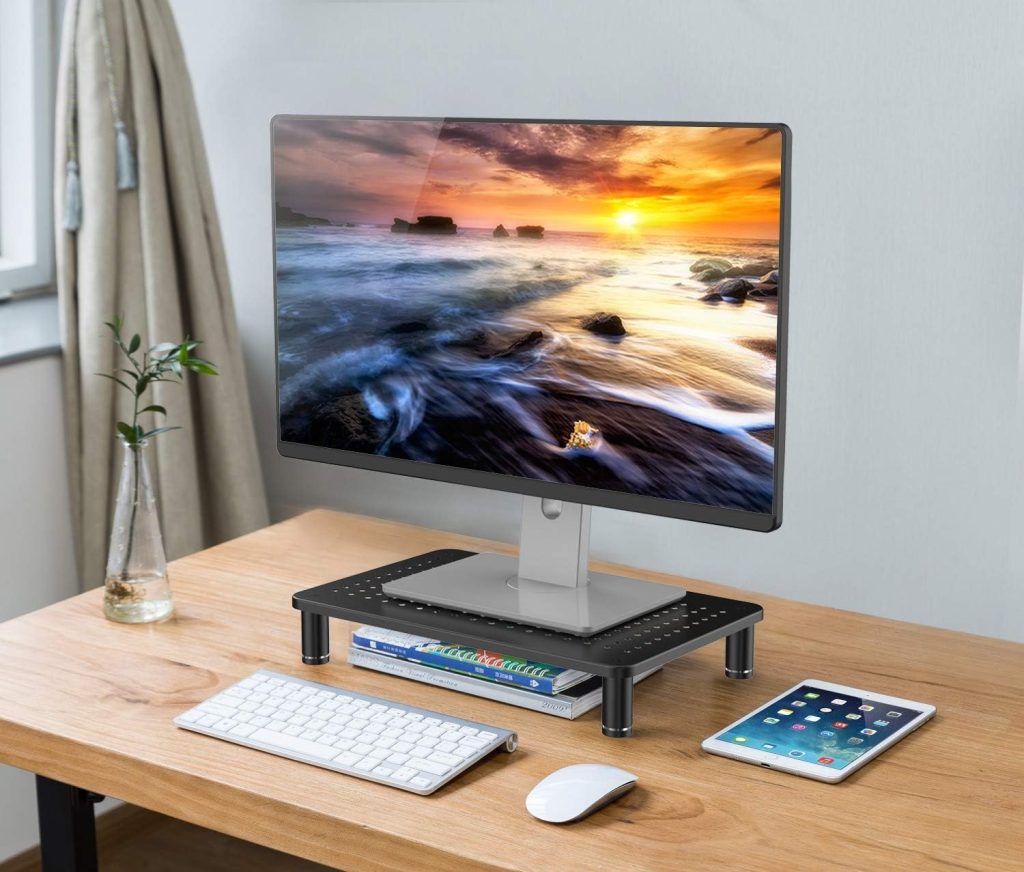
A metal monitor stand can raise your screen, create extra space underneath your monitor, and give your desk a clean, minimalist look. Compared with bulky wooden shelves or plastic risers, metal designs often appeal to people who want a simple frame, a durable-feeling platform, or a ventilated surface for electronics.
However, not every metal computer monitor stand solves the same problem. A fixed riser is usually the simplest option for one monitor, while a dual-platform stand can help you align two displays or a monitor and laptop. Some models also include cable-management features or space underneath for a keyboard.
In this guide, we’ll compare several metal monitor stand styles, explain what to check before buying, and help you choose a stand that fits your actual desk setup.
Quick recommendations
- Best for a clean, modern desk: Oeveo Rise Metal Monitor Stand
- Best for a wide fixed platform: Allsop Metal Art Monitor Stand Large
- Best for two independently positioned screens: Allsop Metal Art ErgoTwin
- Best for a smaller workspace: Allsop Metal Art Jr.
Best Metal Monitor Stands at a Glance
| Monitor stand | Best for | Main advantage | Check before buying |
|---|---|---|---|
| Oeveo Rise | Minimalist desks | Cable slot and open space underneath | Exact platform dimensions and screen-base fit |
| Allsop Metal Art Large | Single monitors and accessories | Wide steel platform and 50 lb rated capacity | Fixed 5.25-inch height |
| Allsop ErgoTwin | Dual monitors or monitor plus laptop | Independently adjustable platforms | 32-inch overall width; designed for screens up to 24 inches |
| Allsop Metal Art Jr. | Compact desks | Smaller footprint | Platform width and depth |
1. Oeveo Rise Metal Monitor Stand
Best for a minimalist desk with cable-management needs.
The Oeveo Rise Metal Monitor Stand is worth considering if you want a metal riser that looks simple and leaves usable desk space underneath. Its design includes a 15-inch-wide base area and a cable-management slot, making it useful for organizing cables while keeping everyday items such as a keyboard or laptop beneath the raised screen.
Unlike a dual-monitor platform, the Rise is aimed at a more straightforward setup. It can also be used with other compatible devices, but you should check the dimensions and stability requirements of the specific device you plan to place on it.
Why consider the Oeveo Rise?
- Metal construction with a rounded, minimalist appearance
- Open space beneath the platform for desk accessories
- Integrated cable-management slot
- Suitable for a range of home-office and workspace arrangements, subject to device compatibility
What to check: Before ordering, confirm the stand’s full dimensions, supported load, and available platform area in the current product specifications. The width of the base alone does not establish whether a large monitor foot will fit securely.
2. Allsop Metal Art Monitor Stand Large
Best for a wide, fixed-height metal platform.
The Allsop Metal Art Monitor Stand Large is a good option to consider if you prefer a traditional riser rather than an adjustable arm. Its steel construction, perforated platform, and open underside make it useful for a conventional desktop setup where you want to lift a monitor and tuck a keyboard out of the way.
According to the manufacturer’s specifications, the stand has outer dimensions of approximately 18.5 inches wide, 12.25 inches deep, and 5.25 inches high. The platform itself is approximately 18 by 10 inches, and the stated load capacity is 50 pounds.
Key specifications
- Material: Powder-coated steel
- Outer size: Approximately 18.5″ W × 12.25″ D × 5.25″ H
- Platform size: Approximately 18″ W × 10″ D
- Rated capacity: Up to 50 lb, according to the manufacturer
- Design: Perforated platform with space underneath
The main trade-off is that the height is fixed. If the screen still sits too low after adding a 5.25-inch riser, an adjustable-height model or a compatible monitor arm may be a better choice. Also measure your monitor’s base: a wide display does not necessarily have a wide or stable stand footprint.
3. Allsop Metal Art ErgoTwin Dual Monitor Stand
Best for two displays that need different heights.
The Allsop Metal Art ErgoTwin takes a different approach from a single-platform metal computer monitor stand. It has two independently adjustable platforms, allowing you to position a monitor and laptop or two compatible displays at different heights. The platforms can also be positioned together to create a shelf-like surface.
One useful detail is that the ErgoTwin does not require VESA mounting. Instead, your existing monitor or laptop rests on each platform. This can be convenient if you want to adjust the position of two screens without installing a conventional monitor arm.
What stands out
- Two independently adjustable platforms
- Designed for monitors or laptops up to 24 inches
- Integrated phone or tablet holder
- Open space beneath the platforms for a keyboard or laptop
- No VESA mount required
The manufacturer’s listed overall dimensions are approximately 32 inches wide by 14 inches deep, with a height range listed as 6–9 inches. Its FAQ describes an elevation range of approximately 6.25–8.6 inches, so check the current instructions for the exact adjustment positions before purchase.
Who should skip it? If you use two large 27-inch or 32-inch monitors, do not assume that the ErgoTwin will be suitable just because the screens can physically fit on your desk. The manufacturer specifies monitors up to 24 inches. Users who need greater freedom to move, rotate, or reposition their screens may be better served by a dual monitor arm.
Check Allsop ErgoTwin on Amazon
4. Allsop Metal Art Jr. Monitor Stand
Best for a smaller desk or a compact monitor setup.
A smaller metal monitor stand can be a better fit if your desk is narrow, your monitor base is compact, or you want to preserve space for speakers and other accessories. The Allsop Metal Art Jr. is worth comparing with larger risers when a wide platform would take up more desk area than you need.
Before buying a compact stand, measure the monitor base rather than relying on screen size alone. Two monitors with the same diagonal measurement can have very different feet. Make sure the entire base sits securely on the platform and that the stand’s rated load is sufficient for your display.
A compact stand is not automatically the best option for an ultrawide display. For a wide monitor, check platform width and depth carefully and consider whether a monitor arm would provide a safer or more flexible arrangement.
How to Choose the Right Metal Monitor Stand
1. Measure the monitor base
Measure the width and depth of the monitor’s feet or stand base. Then compare those measurements with the usable top platform, not just the product’s overall width. The stand should provide stable support without leaving the monitor base partly overhanging the edge.
2. Check the weight capacity
Look at the monitor’s actual weight without its original stand if you plan to use a different mounting arrangement. For a riser, check the manufacturer’s rated load and make sure the monitor’s feet distribute the weight safely. Do not treat a product’s visual sturdiness as proof of its load capacity.
3. Decide between fixed and adjustable height
A fixed-height riser is simple and can work well when you already know how much elevation you need. An adjustable platform gives you more flexibility if you switch between a monitor and laptop or need to align two screens. A monitor arm is generally more suitable if you frequently reposition the display or need swivel, tilt, and rotation.
4. Measure the space underneath
One advantage of a raised metal platform is the open area below it. Measure your keyboard, laptop, or other accessory to confirm that it will slide underneath. Pay attention to the height of the stand’s legs and any crossbars, not only the overall height.
5. Look at ventilation and cable routing
Perforated metal platforms can allow more airflow than a solid surface, while a dedicated cable slot can help guide wires toward the back of the desk. These details may help keep the workspace tidy, but they do not replace checking whether a stand is the right size and height for your setup.
6. Match the stand to your monitor size
For a 24-inch or 27-inch display, many conventional risers may be suitable if the base fits and the weight rating is adequate. For a 34-inch ultrawide or a large curved display, focus on the base footprint, stability, and load rating rather than the screen diagonal alone. A large screen with a wide or heavy stand may need a larger platform or a suitable monitor arm.
Metal Monitor Stand vs. Monitor Arm
A metal riser and a monitor arm solve related but different problems. A riser lifts the monitor while leaving it resting on its original base. A monitor arm attaches to the display’s compatible mounting points and can provide more freedom to move the screen.
| Feature | Metal monitor stand | Monitor arm |
|---|---|---|
| Installation | Usually placed on the desk | Usually clamps or mounts to a desk |
| Screen movement | Limited unless the stand itself adjusts | Often offers height, tilt, swivel, and rotation |
| VESA compatibility | Not usually required | Commonly required; check the exact mount |
| Under-desk space | Can provide a shelf for a keyboard | Can free more desk surface space |
If you want a simple platform and storage underneath, a metal riser is a practical choice. If your priority is frequent adjustment or freeing up as much desk surface as possible, compare options in our monitor arms guide.
Frequently Asked Questions
Are metal monitor stands better than wooden ones?
Neither material is universally better. Metal stands often suit minimalist workspaces and may feature perforated surfaces or open frames. Wooden stands can provide a warmer appearance and may offer drawers or a broader shelf. Compare dimensions, stability, load capacity, and the features you actually need.
Can a metal computer monitor stand hold a large monitor?
It depends on the stand’s rated capacity, usable platform size, and the monitor’s base. Check all three before purchasing. A stand’s advertised compatibility with a certain screen size should not replace checking the physical base and weight of your particular monitor.
Do I need a VESA mount for a metal monitor stand?
Most simple desktop risers do not require VESA mounting because the monitor remains on its original base. The Allsop ErgoTwin is also designed to support compatible monitors or laptops on its platforms without VESA mounts. Monitor arms, by contrast, commonly use VESA mounting points, so confirm your monitor’s compatibility before buying one.
Will a metal monitor stand help with desk organization?
It can. A raised platform creates space underneath for a keyboard or selected accessories, while models with cable slots can help route wires. Measure the space below the stand and check whether your accessories will fit before ordering.
What should I use for two monitors?
If you want two displays at different heights without using VESA mounts, a dual-platform riser such as the Allsop ErgoTwin may be worth considering within its stated size limits. If you use larger monitors or need independent movement and rotation, a compatible dual monitor arm may be more appropriate.
Final Verdict: Which Metal Monitor Stand Should You Choose?
The best metal monitor stand depends on how you work and how much room your desk provides.
- Choose the Oeveo Rise if you prefer a minimalist design with a cable-management slot and open space underneath.
- Choose the Allsop Metal Art Large if you want a wide, fixed-height steel platform with a clearly stated load rating.
- Choose the Allsop ErgoTwin if you need two independently adjustable platforms for compatible monitors or a monitor-and-laptop setup.
- Consider the Allsop Metal Art Jr. if you have a compact desk and a monitor base that fits its smaller platform.
Before you order, measure your monitor base, check the stand’s rated capacity, and confirm that the height suits your viewing position. Those checks are more important than choosing a stand based on material or appearance alone.
Explore more monitor setup guides
Compare more desk accessories and display-positioning solutions:
Disclosure: As an Amazon Associate, SitBetterLab may earn from qualifying purchases at no additional cost to you. Product availability, pricing, and specifications can change, so verify the current listing before purchasing.