
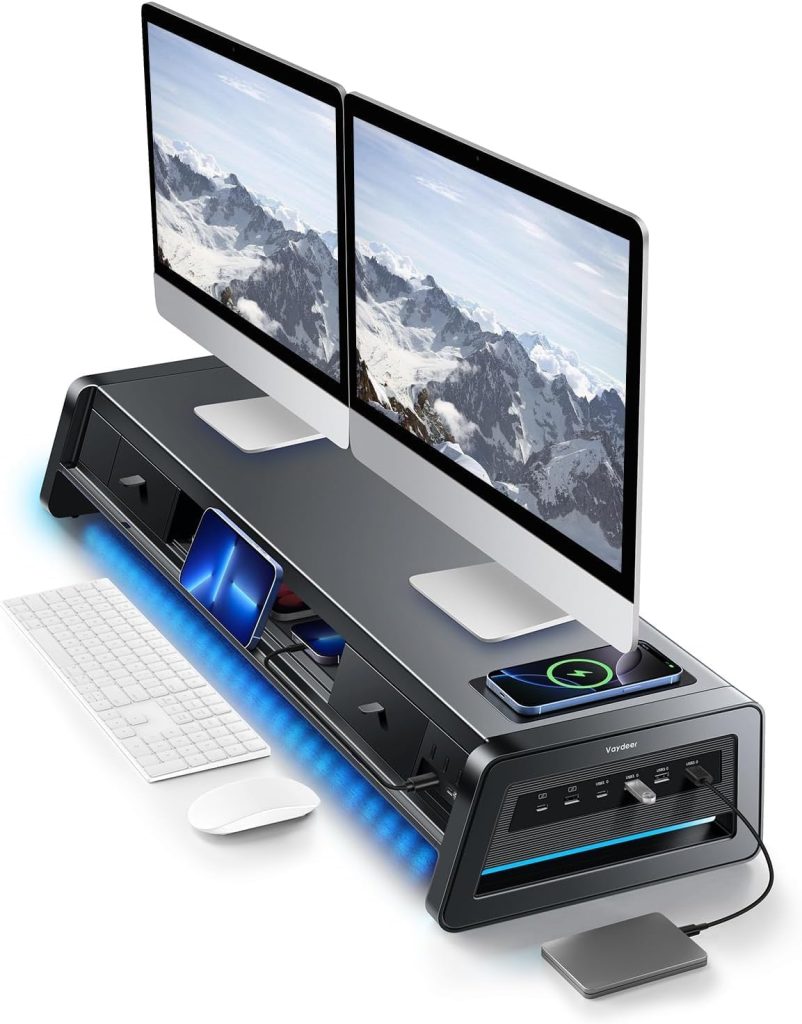
Dual Monitor Desk Setup Guide
Best Dual Monitor Stand Risers for Desk Setups
A dual monitor stand riser can create a more organized workstation by raising two screens and opening up space underneath. The key is choosing a platform with enough width, suitable support, and a layout that works with your monitor bases and desk.
Desk Organization
Storage Options
A dual-monitor workstation can make multitasking easier, but two separate monitor bases can consume a surprising amount of desk space. A dual monitor stand riser gives both displays a shared raised platform and may leave room underneath for a keyboard, notebooks, or small accessories.
The challenge is finding a stand that fits both screens without crowding the desk. Width, depth, maximum load, support design, and fixed height all matter. Some risers are simple shelves, while others include drawers or multiple tiers. This guide explains the differences and provides Amazon search links so you can compare currently available options.
Disclosure: As an Amazon Associate, SitBetterLab earns from qualifying purchases. If you buy through links on this page, we may earn a commission at no additional cost to you. Product availability, prices, specifications, and designs can change. Confirm the details on the current product listing before ordering.
Quick Picks: Dual Monitor Risers
Start by deciding whether you need a wide shelf, extra storage, or a more flexible mounting solution. The options below are product types and brands to investigate; verify the exact model and specifications before buying.
| Option | Best For | Check Before Buying |
|---|---|---|
| WESTREE Dual Monitor Stand Riser | Wide two-screen setups | Shelf width, depth, and total load |
| Vaydeer Dual Monitor Stand with Drawers | Workstations needing storage | Drawer layout, usable width, and materials |
| Wooden Dual Monitor Riser | Warm, minimalist desk setups | Material, platform dimensions, and support |
| Metal Dual Monitor Riser | Simple functional workspaces | Load rating, feet, and platform stability |
| Dual-Monitor Desk Riser for Standing Work | Alternating sitting and standing | Lift capacity, platform size, and adjustment range |
1. WESTREE Dual Monitor Stand Riser
Best to Compare for Wide Desks
WESTREE is a brand worth checking when shopping for a wide dual-monitor riser, including wood-and-metal-style desktop platforms. A shared shelf can give two displays a consistent base and create a separate area underneath for frequently used desk items.
Whether a particular model suits your setup depends on its dimensions and construction. Do not assume that every product under the same brand has identical measurements or load limits.
What to look for
- Enough usable width for both monitor bases, with room to position each screen securely.
- A platform depth that supports the bases without leaving them too close to an edge.
- A stated weight capacity that covers the combined weight of both monitors.
- A stable support structure and feet that help prevent sliding on the desk.
Consider this style if: you want one shared platform for two monitors and prefer a desktop riser over desk-mounted arms.
2. Vaydeer Dual Monitor Stand Riser with Drawers
Best to Compare for Storage
If your desk is covered with USB drives, pens, charging cables, sticky notes, and other small items, a riser with drawers may be more useful than a plain shelf. Vaydeer is a brand to investigate for all-in-one desk organizer products, including dual-monitor riser designs.
The main trade-off is that built-in storage can change the available clearance underneath the platform. Before buying, check whether the drawers and support structure leave enough room for your keyboard and whether the usable top surface fits both monitors.
Check the current product listing for
- The exact width and depth of the top platform.
- Whether the model has one drawer, two drawers, or a different organizer layout.
- The stated load capacity and recommended use.
- The material, assembly requirements, and available color options.
Do not choose a storage model solely because it has more compartments. If the drawers reduce keyboard clearance or leave little space for the monitor bases, a simpler riser may be a better fit.
3. Wooden Dual Monitor Stand Riser
Best for Natural Desk Styling
A wooden dual monitor riser can bring a warmer appearance to a home office, particularly if your desk already has a wood finish. Depending on the product, the platform may be made from solid wood, bamboo, engineered wood, or a wood-look surface paired with metal supports.
Material descriptions matter. A product titled “wood monitor stand” is not necessarily made from solid timber. Read the construction details and inspect customer photos if you want to understand how the finish looks in a real workspace.
Advantages to consider
- A natural-looking finish that coordinates with many home office desks.
- A shared shelf that keeps two monitors on the same platform.
- Potential space underneath for a keyboard or lightweight accessories.
For dual-monitor use, prioritize dimensions and load capacity over appearance. A beautiful shelf is not a good choice if both monitor bases do not fit safely.
4. Metal Dual Monitor Stand Riser
Best for a Minimalist Workspace
A metal monitor riser may suit a desk where you prefer a simple, functional look. Some designs use a single platform with legs, while others have a perforated or ventilated surface. The exact construction varies by model, so compare individual specifications rather than assuming that all metal stands are equally strong.
A metal shelf can be useful if you do not need drawers or multiple storage levels. Pay attention to the shape of the legs and the position of the supports, because these affect how much space remains for a keyboard underneath.
Buying checklist
- Check the load rating and whether it applies to evenly distributed weight.
- Look for stable feet and a platform that does not rock on a flat surface.
- Measure the height to make sure the shelf does not raise your screens too far.
- Check for smooth edges and a finish suitable for daily desk use.
5. Dual-Monitor Desk Riser for Sitting and Standing
Best for Changing Work Positions
If you want to alternate between sitting and standing, a fixed desktop monitor riser may not provide enough flexibility. A standing desk converter or adjustable workstation riser can raise a larger platform, sometimes with space for two monitors and a keyboard.
This is a different category from a simple wooden monitor stand. It generally takes up more desk space and may have a lifting mechanism, so check the product’s full dimensions, adjustment range, and total load rating.
Before choosing an adjustable model
- Confirm that the upper platform accommodates both monitor bases.
- Check the combined weight of monitors and any other equipment placed on the converter.
- Measure the converter’s footprint and the available desk depth.
- Look for enough space for the keyboard and mouse at the intended working height.
If you need frequent height changes, compare the full converter rather than expecting a fixed dual monitor stand riser to provide standing-desk functionality.
How to Choose a Dual Monitor Riser Stand
1. Measure Both Monitor Bases
Do not estimate the required width using screen size alone. Measure the actual monitor bases and decide whether you want the screens side by side, slightly angled inward, or arranged in another configuration. The stand needs enough usable surface for both bases to sit securely.
Allow some room for positioning and cable connections. A shelf that technically fits both bases may still feel cramped if the monitors need to sit right against each other or near the edge.
2. Check the Combined Weight
Look up the weight of each monitor without its original stand if you plan to remove the bases, or with the bases if they will remain attached. Add the equipment that will sit on the riser and compare the total with the manufacturer’s stated load limit.
Never assume a stand can support two monitors simply because it is wide enough. Width and load capacity are separate considerations.
3. Measure the Available Desk Depth
A deep riser can take up space that you need for a keyboard, mouse, notebook, or writing area. Measure the usable depth of your desk and consider where your hands will rest while typing. If your desk is shallow, a more compact shelf or monitor arm may be more practical.
4. Choose the Right Height
A riser raises the screens by a fixed amount, so check your seated eye level before buying. The goal is to view the displays without repeatedly tilting your head up or down. The ideal height depends on your body, chair, monitor size, and working position.
If two monitors have different dimensions, think about how their viewing areas will line up after placing them on the platform. You may need to adjust the original monitor bases or choose a different arrangement.
5. Decide Whether You Need Storage
An open riser can leave space underneath for a keyboard, while drawers and extra tiers provide designated places for accessories. The right choice depends on your workflow. Measure the keyboard and check the clearance underneath before choosing a model with a thick shelf or built-in storage.
6. Consider a Monitor Arm Instead
A desktop riser is simple to set up, but it occupies part of the desk surface. A monitor arm attaches to a compatible desk mounting point and can free up the area beneath the screens. It may also offer more adjustment than a fixed shelf.
However, monitor arms have their own requirements, including VESA compatibility, monitor weight limits, desk thickness, and mounting clearance. Review our monitor arms guide if desk space and flexible screen positioning are your main concerns.
Dual Monitor Stand Riser vs. Dual Monitor Arm
| Feature | Dual Monitor Riser | Dual Monitor Arm |
|---|---|---|
| Desk installation | Usually sits on the desktop | Usually clamps or mounts to the desk |
| Surface space | Uses desk area for the platform | Can free the surface beneath the monitors |
| Adjustability | Typically fixed height | Often adjustable in height and position |
| Storage potential | May include a shelf or drawers | Usually has no desktop storage shelf |
| Compatibility checks | Platform dimensions and load capacity | VESA, monitor weight, desk mounting, and clearance |
Choose a riser if you prefer a straightforward shelf and want to keep the original monitor bases. Choose an arm if adjustability and open desk space matter more. Neither option is universally better; compatibility with your equipment should guide the decision.
Frequently Asked Questions
What is a dual monitor stand riser?
A dual monitor stand riser is a raised desktop platform designed to support two monitors. Depending on the model, it may provide open space underneath, drawers, or multiple tiers for organizing desk accessories.
How wide should a dual monitor riser be?
The required width depends on the actual dimensions and placement of both monitor bases. Measure the bases and leave enough room for safe positioning. Do not rely on the screen diagonal alone to determine the platform width.
Can a dual monitor riser hold two large monitors?
Some models may accommodate two large displays, but the exact platform dimensions and load rating determine suitability. Check the weight of both monitors, the size of their bases, and the manufacturer’s stated limits before buying.
Is a dual monitor stand riser with storage worth it?
It can be useful if you regularly use small accessories and want them off the desktop. However, drawers and extra tiers can reduce keyboard clearance or usable platform space. Compare the storage layout with your actual desk needs.
Is a monitor riser better than a monitor arm for two screens?
A riser is usually simpler to set up and may provide extra storage, but it occupies desktop space. A dual monitor arm can offer more positioning flexibility and free up the area underneath, provided the monitors and desk are compatible with the mounting system.
Can I use a dual monitor riser on a small desk?
Possibly, but measure the desk’s usable width and depth first. A wide shelf can leave little room for a keyboard and mouse. If the platform makes the workspace feel cramped, compare a compact riser or a monitor arm instead.
Final Verdict
The best dual monitor riser stand is one that safely supports both displays and fits the way you work. A wide, simple platform may suit a straightforward two-screen setup. A model with drawers can help organize small items, while an adjustable desk converter is worth considering if you want to alternate between sitting and standing.
Before purchasing, verify the exact model, usable platform dimensions, total load capacity, materials, and assembly requirements. Use Amazon customer photos and recent reviews as additional checks, but rely on the manufacturer’s specifications for compatibility.
Explore More Workspace Guides
Find more ways to organize your workstation and position your screens comfortably.