Office Chair Setup Guide
How to Adjust Lumbar Support on an Office Chair
Learn how to set lumbar support height and depth, position it comfortably against your lower back, and troubleshoot common adjustment problems.
Quick answer: Start by adjusting your chair so your feet are supported and your back rests against the backrest. Position the lumbar support around the natural inward curve of your lower back, then adjust its height and depth in small increments if your chair allows it. The support should feel steady and comfortable—not like it is pushing your back forward or creating a concentrated pressure point. If your chair has fixed lumbar support, adjust your sitting position first and consider a compatible cushion only if needed.
Knowing how to adjust lumbar support on an office chair can make your workspace feel more comfortable without immediately buying a new chair. However, the correct setup depends on the chair’s design, your body proportions, and how you sit throughout the day.
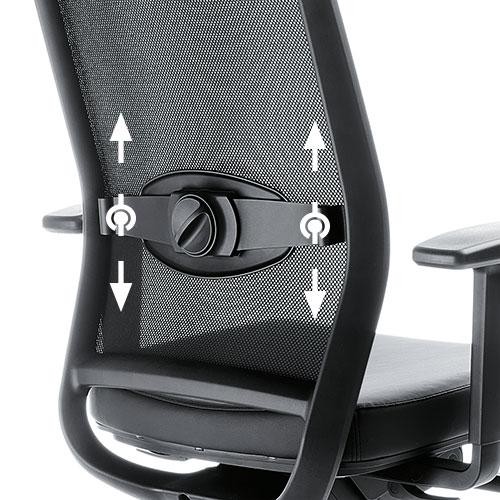
Some office chairs have a built-in lumbar mechanism that moves up and down, forward and backward, or both. Others have a fixed curved backrest, a height-adjustable backrest, or a separate lumbar pillow held in place by straps. These systems cannot all be adjusted in the same way.
This guide walks through a practical setup process, explains the difference between lumbar support height and depth, and shows how to assess the result. The goal is comfortable contact with your lower back—not forcing your spine into one supposedly perfect position.
Depth & Pressure
Fixed vs. Adjustable
Comfort Check
Step 1: Set Up Your Sitting Position First
Before adjusting lumbar support, establish a comfortable sitting position. Otherwise, you may adjust the backrest to compensate for a seat that is too high, too deep, or poorly positioned.
- Adjust seat height: Place your feet on the floor or on a suitable footrest. Your knees should feel comfortable, without pressure building under your thighs.
- Check seat depth: Sit back against the backrest. Leave some space between the front edge of the seat and the backs of your knees rather than forcing yourself onto the front of the seat.
- Set the backrest angle: Choose an angle that lets you rest against the backrest without feeling pushed forward. You do not need to hold a rigid, upright posture all day.
- Relax your shoulders: Let your shoulders settle naturally instead of leaning forward to reach your keyboard or screen.
- Find the lower-back contact area: Notice where your lower back curves inward and where the backrest currently touches you.
Make these adjustments before changing the lumbar mechanism. If your feet are unsupported or you cannot sit back comfortably, the lumbar support may feel incorrectly positioned even when it is not the main problem.
Step 2: Adjust Lumbar Support Height
Office chair lumbar support height determines where the support contacts your back. If it sits too high, it may press into the middle of your back. If it sits too low, it may push against the area near your pelvis instead of comfortably filling the lower-back curve.
Use these steps when your chair has a height-adjustable lumbar mechanism or a movable external cushion:
- Sit fully back in the chair with your feet supported.
- Locate the inward curve of your lower back rather than relying on a fixed measurement from the seat.
- Move the lumbar support up or down a small amount.
- Lean back gently and notice where you feel the contact.
- Repeat until the support feels centered against your lower back without pressing into your ribs or the top of your pelvis.
Signs the Height May Be Wrong
- The support presses into the middle of your back rather than the lower-back curve.
- You feel a hard edge near your pelvis.
- You have to slide forward to avoid the support.
- You feel a concentrated pressure point rather than comfortable contact.
There is no single height that works for everyone. Torso length, backrest shape, and the size of the support all affect placement. Use comfort and contact location as your guide rather than treating a universal measurement as mandatory.
Step 3: Adjust Lumbar Support Depth
Height and depth solve different problems. Height changes where the support touches your back; depth changes how far it projects toward you. A chair may have a separate knob or lever for depth, while another model may offer only a height adjustment.
If your chair allows depth adjustment, start with the least prominent setting and increase it gradually only if you need more contact with your lower back.
- Sit back normally rather than deliberately arching your back to meet the support.
- Adjust the depth control slightly forward or backward.
- Check whether the support fills the gap at your lower back without pushing your torso away from the backrest.
- Relax for a moment and check whether you can breathe, shift position, and lean back comfortably.
- Return to a less prominent setting if you feel excessive pressure or find yourself sitting forward.
More depth is not always better. A strongly protruding lumbar support may feel noticeable at first but become distracting during extended use. The aim is comfortable support, not the maximum possible curve.
Height vs. Depth: What’s the Difference?
| Adjustment | Changes | Try It When |
|---|---|---|
| Height | Vertical position on the backrest. | The support contacts too high or too low on your back. |
| Depth | How far the support projects toward your body. | The support feels too prominent or does not make comfortable contact. |
Step 4: Understand Your Chair’s Lumbar Support Type
Not every chair has a separate height and depth control. Identify the type of support you have before looking for adjustment levers or forcing a part to move.
Adjustable Built-In Support
A knob, slider, lever, or other mechanism changes the lumbar position or prominence. Follow the chair’s manual to identify which control changes height and which changes depth.
Height-Adjustable Backrest
The backrest itself moves up or down, changing the position of its curved lumbar area. Adjust the entire backrest rather than searching for a separate lumbar-depth control that may not exist.
Fixed Lumbar Curve
The support is built into the shape of the backrest and may not move independently. Adjust seat height, seat depth, and backrest position to improve the fit.
Separate Lumbar Pillow
A removable cushion or pillow is repositioned manually, often with straps. Move it in small increments and make sure the attachment remains secure when you recline.
If you cannot find an adjustment control, check the user manual for your exact chair model. Avoid forcing a knob, pulling hard on a backrest panel, or dismantling the chair just to change lumbar position.
Step 5: How to Tell If Lumbar Support Is Adjusted Correctly
There is no single posture that feels ideal for every person, but a properly fitted support should not make ordinary sitting more difficult. Evaluate the setup while sitting naturally, not by holding an exaggerated posture to match the cushion.
Comfortable Contact
The support meets the lower-back curve without pressing sharply into one spot or pushing your torso forward.
Natural Movement
You can lean back, shift position, and relax without constantly fighting against the support.
Stable Sitting Position
You can sit back without sliding toward the seat edge or holding your body away from the backrest.
No New Discomfort
The setup does not introduce new pain, numbness, or persistent pressure that makes you want to avoid the backrest.
Test one adjustment at a time. If you change seat height, backrest angle, lumbar height, and lumbar depth all at once, it becomes difficult to identify which change improved or worsened the fit.
Give yourself a short period to assess the new position during normal work, then make small corrections if needed. Stop using a setting that causes pain, numbness, or worsening symptoms. Persistent symptoms deserve assessment from a qualified healthcare professional rather than repeated chair adjustments alone.
Troubleshooting Common Lumbar Support Problems
| Problem | Possible Reason | What to Adjust |
|---|---|---|
| Support feels too high | The lumbar unit or backrest is positioned above your lower-back curve. | Lower the lumbar unit or adjust the backrest height if the chair permits. |
| Support feels too low | The contact point sits near the pelvis rather than the lower-back curve. | Raise the support or adjust the backrest position. |
| Support pushes too hard | The depth is too prominent or the cushion is too thick. | Reduce depth or try a thinner external cushion. |
| Lower back does not contact support | The support may be too shallow, misplaced, or incompatible with your body proportions. | Recheck height and depth, then assess the chair’s seat and backrest fit. |
| You slide forward | The support may project too far, or seat depth and height may be poorly adjusted. | Reduce lumbar prominence and reassess seat height and depth. |
What If Your Office Chair Has Fixed Lumbar Support?
If your chair has a fixed lumbar curve, you may not be able to change the support’s height or depth independently. You can still improve the overall fit by adjusting other parts of the chair.
- Adjust the seat height: Make sure your feet are supported and your thighs are not forced into an uncomfortable position.
- Check seat depth: If the seat is too deep, you may struggle to sit back against the backrest while keeping comfortable space behind your knees.
- Use the backrest adjustment: If the entire backrest can move up or down, test whether its built-in curve aligns better with your lower back at another height.
- Evaluate the chair’s basic fit: A fixed lumbar curve may simply not match your body proportions. Do not keep forcing yourself into a position that feels uncomfortable.
- Consider a separate cushion carefully: A slim, repositionable lumbar pillow may help fill a gap, but a thick cushion can make the backrest too prominent.
If the chair remains uncomfortable after reasonable adjustments, the issue may be the chair’s overall dimensions or backrest shape rather than a lack of lumbar support.
Should You Add a Lumbar Support Pillow?
An external lumbar pillow can be useful when the chair’s built-in support is missing, not adjustable, or poorly positioned for your body. However, it should be treated as an option—not an automatic upgrade.
- Choose an adjustable attachment if you need to move the cushion vertically.
- Check thickness carefully if your chair already has a curved or padded lumbar area.
- Compare firmness and contour instead of assuming a thicker pillow is better.
- Confirm that straps fit the backrest and keep the cushion from slipping.
- Check whether the cover is removable if regular cleaning matters to you.
If material comfort is your main concern, see our memory foam lumbar support pillow guide for considerations involving firmness, rebound, and heat retention. For gaming chairs with different backrest shapes and attachment systems, our gaming chair lumbar support guide covers fit and replacement options.
Related SitBetterLab Guides
- Lumbar Support Guides — explore support types, fit, and cushion options.
- Best Memory Foam Lumbar Support Pillows — compare foam comfort, firmness, and cover care.
- Best Lumbar Support for Gaming Chairs — check backrest fit and replacement cushions.
- Best Office Chair for Lower Back Pain — consider the full chair setup. Verify this URL before publishing.
Frequently Asked Questions
How high should lumbar support be on an office chair?
Position it so the support meets the natural inward curve of your lower back. The ideal setting varies with torso length, chair design, and the shape of the lumbar unit. Adjust in small increments and avoid a position that presses into your mid-back or pelvis.
Should lumbar support push my lower back forward?
It may make gentle contact with your lower-back curve, but it should not force your torso forward or create a strong pressure point. If it feels too prominent, reduce the depth or reposition the support.
What if my office chair has no lumbar adjustment?
Check whether the backrest itself can move, then adjust seat height, seat depth, and recline to improve the overall fit. A separate lumbar cushion is another option, but its thickness and position should not interfere with the chair’s existing shape.
Should I adjust lumbar height or depth first?
First establish a comfortable seat and backrest position. Then adjust height so the support contacts the lower-back curve. If your chair has a depth control, fine-tune how prominently it contacts your back afterward. Change one setting at a time.
Can lumbar support be too high or too low?
Yes. If it contacts the mid-back or presses near the pelvis, the position may not match your lower-back curve. Move it gradually and reassess while sitting naturally.
How often should I readjust lumbar support?
Recheck the setup if you change chairs, adjust the seat or desk, add a cushion, or notice a change in comfort. You can also vary your sitting position during the day instead of trying to maintain one rigid posture for hours.
Final Takeaway
To adjust lumbar support on an office chair, begin with seat height, seat depth, and backrest angle. Position the support against your lower-back curve, then adjust height and depth separately if the chair allows it.
The right setting should feel comfortable and stable without forcing your body forward. If your chair has fixed lumbar support, work with the adjustments available and consider a separate cushion only when it improves the fit. Comfort, natural movement, and the absence of new pressure or symptoms are more useful guides than maximizing lumbar prominence.
Affiliate disclosure: SitBetterLab may earn a commission from qualifying purchases made through links on this page, at no additional cost to you. This guide provides general ergonomic information and is not a substitute for individualized medical advice.