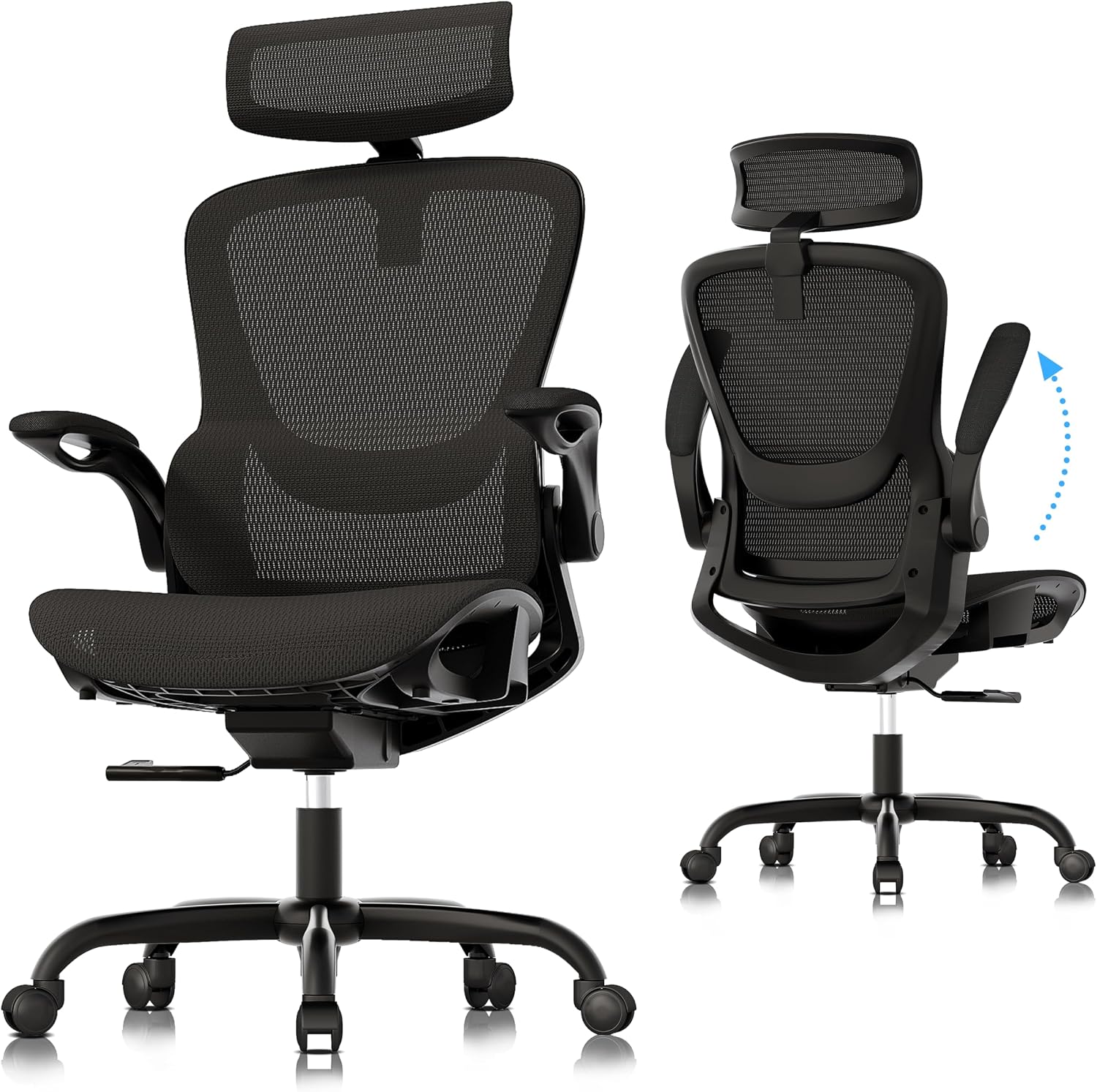
If you spend 8 or more hours a day on calls, your office chair can have a major effect on how comfortable you feel by the end of your shift. Tight hips, pressure behind the knees, shoulder tension, and lower-back discomfort can all become more noticeable when your chair does not fit your body properly.
The best office chair for call center work is not necessarily the chair with the thickest padding. For long shifts, the more important factors are adjustable lumbar support, appropriate seat depth, stable armrests, breathable materials, and a recline mechanism that lets you change position throughout the day.
I compared the chairs below around the features that matter most for extended desk work, including lumbar adjustment, seat comfort, armrest positioning, recline, breathability, durability, and price. The goal is not to find one chair that fits everyone, but to help you identify the right option for your shift length, body size, workspace, and budget.
Quick Answer: What Is the Best Office Chair for Call Center Work?
There is no single office chair that is ideal for every call center employee. Your body size, shift length, desk height, room temperature, and budget all matter. For long shifts, prioritize adjustability over padding.
| Chair | Best For | Price Tier |
|---|---|---|
| Steelcase Leap | Adjustability and long shifts | Premium |
| GABRYLLY Ergonomic Chair | Lower-cost home or office setups | Budget |
| SIHOO M57 | Adjustable lumbar support at a mid-range price | Mid-range |
| Herman Miller Aeron | Breathability and size options | Premium |
| Serta Big & Tall | Larger users who prefer a cushioned seat | Mid-range |
Why a Good Office Chair Matters for Call Center Employees
Call center work combines long periods of sitting with frequent typing, mouse use, headset conversations, and visual attention to a screen. That makes chair fit and workstation setup more important than they might be for occasional desk use.
A chair that is too deep can press against the back of your knees. A seat that is too low can make it difficult to position your legs comfortably. Armrests that are too low or too far apart can encourage elevated shoulders, while poorly positioned lumbar support may create pressure rather than comfort.
This is why adjustable lumbar support, seat depth, armrests, seat height, and recline are particularly useful for people who spend most of their workday at a desk.
A call center chair also needs to be comfortable across repeated shifts. If you constantly shift position because of pressure points or insufficient support, the chair is probably not fitting you correctly.
Key Features to Look for in a Call Center Chair
When comparing office chairs for call center work, focus on the features you will actually use every day rather than marketing terms. These are the specifications worth checking before you buy.
- Adjustable lumbar support — Look for lumbar support that can be positioned vertically and, when available, adjusted for depth or tension. A fixed support may work well for one body shape but feel poorly positioned for another.
- Seat height and seat depth — Seat height should allow your feet to rest comfortably while maintaining a relaxed leg position. Seat depth is particularly important for shorter users because an overly deep seat can create pressure behind the knees.
- Adjustable armrests — Height adjustment is the minimum I would look for in a long-shift chair. Depth, width, and pivot adjustments can make it easier to position your elbows without raising your shoulders.
- Breathable materials — Mesh backs and mesh seats can be useful in warm offices because they allow more airflow. Cushioned seats can also work well, provided the seat does not create excessive heat or pressure.
- Recline and tilt adjustment — A chair that allows controlled movement gives you more options than a chair that locks you into one upright position all day.
- Weight capacity and construction — Check the manufacturer’s stated weight rating rather than relying on the appearance of the chair. For shared call center environments, a higher-capacity model may provide more flexibility across users.
- Warranty — Warranty coverage varies considerably between manufacturers. A longer warranty can be useful when a chair will be used heavily, but always check which components and usage patterns are actually covered.
5 Office Chairs Worth Considering for Call Center Work in 2026
The five chairs below cover different priorities rather than trying to force every shopper into the same type of chair. Prices can change, so use the current product page to verify today’s price, configuration, and availability before buying.
1. Steelcase Leap — A Highly Adjustable Option for Long Shifts
⭐ Highly Adjustable
Premium
The Steelcase Leap is designed around adjustability and movement. Its LiveBack technology is designed to respond to spinal movement, while the chair can be configured with adjustable lumbar support and highly adjustable arms.
For call center employees who spend most of the day at a desk, the Leap’s biggest advantage is the ability to fine-tune the chair instead of relying on one fixed seating position. Steelcase currently states that Leap supports up to 400 pounds and carries a 12-year multi-shift, 24/7 parts-and-labor warranty.
- Highly adjustable seating position
- LiveBack back support
- Multiple armrest configurations
- Strong warranty coverage
- Premium price
- Many configurations can make shopping more complicated
2. GABRYLLY Ergonomic Mesh Office Chair — Budget-Friendly Option
Budget
The GABRYLLY ergonomic chair is aimed at shoppers who want a high-back mesh design without moving into premium-chair pricing. Features such as the headrest, flip-up arms, and breathable back make it worth considering for home-based agents or smaller call center budgets.
Before buying, check the exact version and current specifications because GABRYLLY sells multiple ergonomic chair configurations. Pay particular attention to seat dimensions and armrest height if you will use it for full-day shifts.
- Lower entry price
- Breathable mesh back
- Headrest and adjustable features
- Less adjustment range than premium ergonomic chairs
- Seat firmness may not suit everyone
3. SIHOO M57 Ergonomic Office Chair — Adjustable Lumbar at a Mid-Range Price
Mid-Range
The SIHOO M57 is worth considering if your priority is adjustable lower-back support without paying premium-chair prices. Its high-back mesh design and adjustable components make it a practical option for people who want more flexibility than a basic task chair.
For long call center shifts, pay close attention to the seat depth and armrest position. Even a chair with good lumbar adjustment can feel uncomfortable if the seat is too long for your legs or the armrests force your shoulders upward.
- Adjustable lumbar support
- High-back mesh design
- Useful recline function
- Lumbar support may feel firm to some users
- Fit depends heavily on body proportions
4. Herman Miller Aeron — Breathable Mesh for Long Desk Sessions
⭐ Premium Mesh
Premium
The Herman Miller Aeron is particularly interesting for call center employees who dislike hot, heavily padded seats. Its 8Z Pellicle suspension material, PostureFit SL support, and Harmonic 2 Tilt are designed around weight distribution, support, and movement.
One major advantage for shared workplaces is sizing. Aeron is available in three sizes: A, B, and C, allowing the chair to accommodate a broader range of body dimensions. Herman Miller also lists a 12-year warranty, including parts and labor, with three-shift coverage.
- Excellent breathability
- Three sizes for different body proportions
- Adjustable PostureFit options
- 12-year warranty
- High purchase price
- Mesh feel is different from a traditional padded seat
5. Serta Big and Tall Executive Office Chair — For Larger Users and a Cushioned Feel
Mid-Range
If you prefer a traditional padded executive chair rather than a mesh ergonomic design, a Serta Big and Tall model can be worth considering. The larger frame and generous cushioning are aimed at users who need more seat and back space.
For a call center environment, compare the exact model’s weight capacity, seat dimensions, recline range, and warranty before purchasing. Big-and-tall chairs are not automatically ergonomic simply because they have more padding.
- Roomier design
- Thick cushioning
- Suitable for users who prefer padded chairs
- Can feel warmer than mesh
- Typically fewer fine-tuning adjustments than premium ergonomic chairs
Call Center Office Chair Comparison
| Model | Main Strength | Material | Price Level |
|---|---|---|---|
| Steelcase Leap | Adjustability | Fabric / other options | Premium |
| GABRYLLY | Budget-friendly ergonomics | Mesh | Budget |
| SIHOO M57 | Adjustable lumbar | Mesh | Mid-range |
| Herman Miller Aeron | Breathability and sizing | 8Z Pellicle mesh | Premium |
| Serta Big & Tall | Space and cushioning | Padded upholstery | Mid-range |
How Much Should You Spend on a Call Center Chair?
You do not necessarily need a $1,000+ chair for call center work. The more useful question is whether the chair gives you the adjustments and fit you need for your daily schedule.
Under $250: Look carefully at seat dimensions, lumbar support, armrest adjustment, and warranty. This price range can work for shorter shifts or home-office setups, but fit varies considerably.
$250–$600: This is where you can find many practical ergonomic chairs with adjustable lumbar support, mesh backs, reclining mechanisms, and more useful armrest adjustments.
$800+: Premium chairs become more relevant when you spend most of your workday seated and value finer adjustments, long warranties, replaceable components, or a wider range of body-fit options.
Call Center Office Chair Buying Checklist
Before ordering a chair, use this quick checklist:
- Can you place both feet comfortably on the floor?
- Does the seat leave a small gap behind your knees?
- Can the lumbar support be positioned where your lower back needs it?
- Can you place your elbows comfortably on the armrests without raising your shoulders?
- Can you recline without losing useful back support?
- Will the chair remain comfortable in your office temperature?
- Does the manufacturer’s weight rating comfortably cover the intended user?
- Is the warranty appropriate for the number of hours the chair will be used?
How to Set Up Your Call Center Workstation
Even the best office chair cannot compensate for a poorly positioned desk and monitor. Start with the chair and then adjust the rest of the workstation around your seated position.
1. Adjust seat height: Aim for a comfortable position where your feet are supported and your knees are not forced into an uncomfortable angle.
2. Check seat depth: Make sure the seat is not pressing directly against the backs of your knees. If the seat is too deep, you may compensate by sitting forward.
3. Position the lumbar support: Adjust the support so it contacts the lower-back area comfortably without creating excessive pressure.
- Monitor: Position the screen so you can work without repeatedly bending your neck forward.
- Keyboard and mouse: Keep them close enough that you do not have to reach forward continuously.
- Headset: Use a comfortable headset and adjust the microphone so you do not need to lean toward it while speaking.
- Armrests: Adjust them so your shoulders can remain relaxed while your forearms are supported when appropriate.
Do not treat a chair as a substitute for movement. Even with a highly adjustable ergonomic chair, changing position and taking brief movement breaks throughout a long shift can help reduce stiffness.
What If You Are Short or Tall?
Body proportions matter more than a generic “one-size-fits-all” label. Shorter users often need a shorter seat depth and a lower minimum seat height, while taller users may need a deeper seat and a higher backrest.
If you are below average height, pay particular attention to the minimum seat height and seat depth. If your feet cannot rest comfortably on the floor, a footrest may help, but a chair with a more suitable adjustment range is usually easier to live with.
For taller or larger users, look beyond the advertised weight capacity. Seat width, seat depth, backrest height, armrest range, and clearance around the hips can all affect whether the chair feels comfortable during an entire shift.
FAQ: Best Office Chair for Call Center Work
What is the best office chair for call center employees with lower back discomfort?
Look for a chair with adjustable lumbar support, appropriate seat depth, a supportive backrest, and a recline mechanism. The Steelcase Leap is one option to consider because of its extensive adjustment range and LiveBack design. However, the correct fit depends on your body proportions and how you prefer the chair to feel.
How much should I spend on a good call center chair?
A practical budget is often around $250 to $800, depending on how many hours you sit and how much adjustability you need. Budget chairs can work for lighter use, while premium models become more attractive when the chair is used throughout the workday.
Are mesh chairs better than leather chairs for call center work?
Mesh can be useful for long shifts because it generally allows more airflow than heavily padded upholstery. However, material preference is personal. A well-designed padded chair can still be comfortable for all-day work, especially in a cooler room.
What seat height is best for a call center desk?
There is no universal seat height because desk height and body proportions vary. Adjust the chair so your feet are supported and your legs remain comfortable, then position the desk, keyboard, and monitor around that seated position.
How long does a good call center office chair last?
Lifespan depends on construction, daily usage, user weight, maintenance, and the quality of the moving parts. Instead of assuming a specific number of years, check the manufacturer’s warranty and whether it explicitly covers multi-shift or 24/7 use.
Can I use a gaming chair for call center work?
Yes, but compare the actual ergonomic adjustments rather than the gaming label. Some gaming chairs offer adjustable arms, lumbar support, recline, and seat-height ranges that can work well. Others use fixed lumbar pillows and pronounced side bolsters that may not suit every user for an entire shift.
Is a headrest necessary for call center work?
Not necessarily. A headrest can be useful when you regularly recline or want additional upper-body support during breaks, but it is not the feature that determines whether an office chair fits you. Seat depth, lumbar position, armrests, and overall adjustability are usually more important for active desk work.
Final Buying Advice
The best office chair for call center work is ultimately the one that fits your body and allows you to change position comfortably throughout a long shift.
If adjustability is your priority, consider a chair such as the Steelcase Leap. If breathability and multiple sizes matter most, the Herman Miller Aeron is worth investigating. If your budget is more limited, GABRYLLY and SIHOO provide lower-cost alternatives to compare. And if you need a wider, more heavily padded seat, a Big & Tall model may make more sense.
Before you buy, measure your desk, check the chair’s seat dimensions, verify the weight rating, and read the current warranty terms. A chair with more features is not automatically better if those features do not fit your body or your working style.
Note: Prices, configurations, availability, and product specifications can change. Always verify current details on the retailer or manufacturer’s product page before purchasing. This article is for general product-information purposes and is not medical advice.