🤔 Why Some People Think Gaming Chairs Are Bad
Gaming chairs have a reputation problem. Walk into any electronics store and you’ll see rows of racing-style chairs with aggressive bucket seats, flat backrests, and flashy colors. These chairs are designed to look like racing car seats — not to support a human spine for 8+ hours. The problem is that many people buy the cheapest option, assume it’s “ergonomic” because it looks cool, and end up with back pain.
- Racing seat design: Bucket seats with side bolsters that are too aggressive force your shoulders forward
- No lumbar support: Many budget gaming chairs have a flat backrest with no adjustable lumbar
- Poor adjustability: Fixed armrests and limited seat height range mean the chair doesn’t fit your body
- Cheap materials: Low-density foam that flattens within months
🦴 How Gaming Chairs Affect Your Spine
The spine has a natural S-curve — inward at the neck (cervical lordosis), outward at the upper back (thoracic kyphosis), and inward at the lower back (lumbar lordosis). A chair that doesn’t support this curve creates problems.
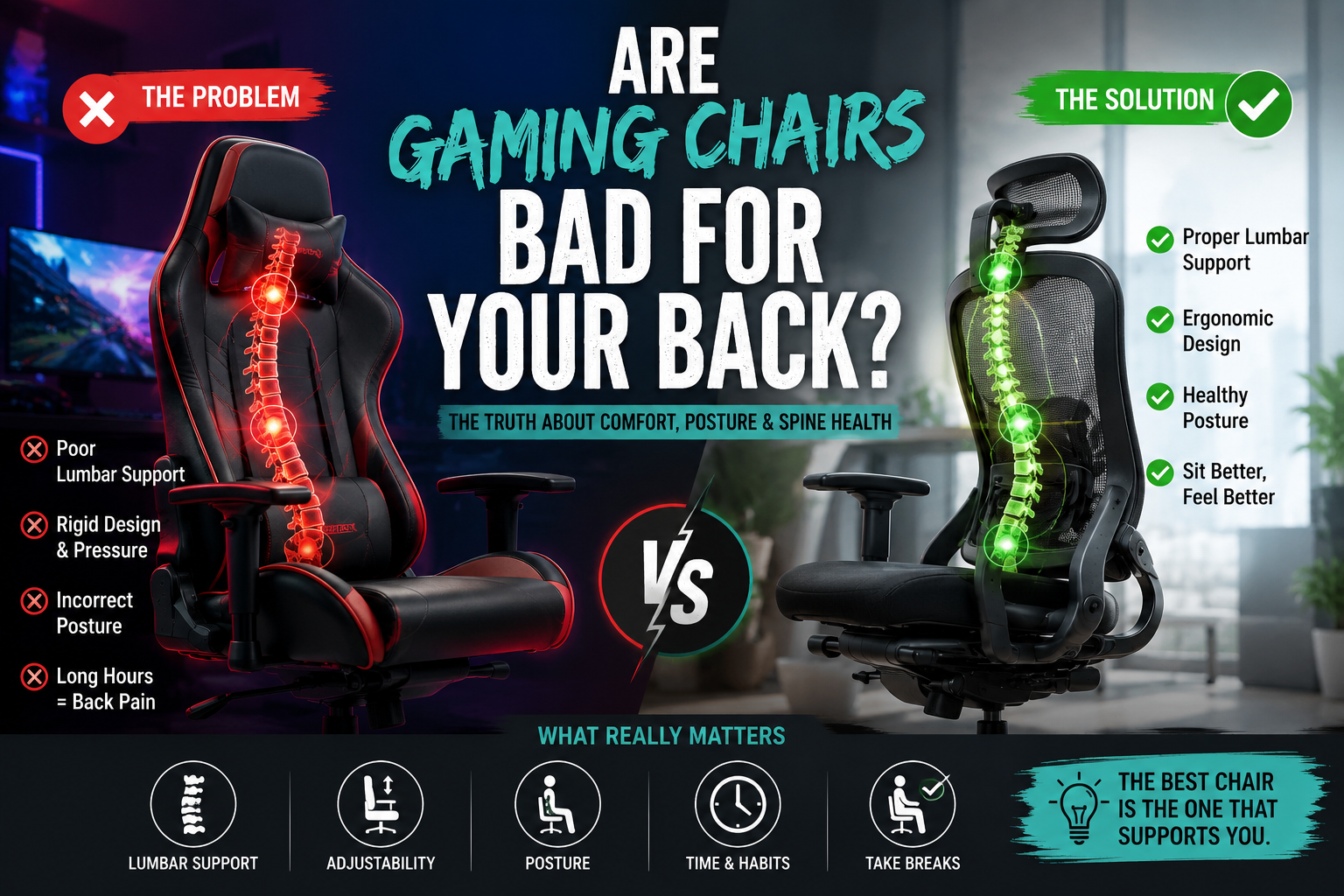
🔴 Bad Gaming Chair
- Flat backrest: No lumbar support → lower back flattens → increased disc pressure
- Bucket seat: Forces shoulders forward → rounded upper back → neck strain
- No adjustability: One-size-fits-none → poor fit for most body types
- Firm seat: Pressure on sit bones → reduced circulation → discomfort
🟢 Good Gaming Chair
- Adjustable lumbar: Supports the natural curve → reduces disc pressure
- Straight backrest: Allows natural shoulder position → reduces neck strain
- 4D armrests: Fits your body → prevents shoulder and wrist strain
- Cold-cured foam: Supports without flattening → long-term comfort
📊 What Research Says About Sitting Posture
The evidence is clear: static sitting is the problem, not the chair itself. Prolonged sitting in any chair — gaming, office, or otherwise — increases the risk of back pain, cardiovascular disease, and metabolic issues. The key is movement, not the chair.
- Static posture: Sitting in one position for more than 30 minutes reduces blood flow to spinal discs
- Micro-movements: Frequent small adjustments in your chair help maintain spinal health
- Active sitting: Chairs that allow movement (rocking, reclining) reduce static load
- Breaks: Standing and walking for 2 minutes every hour is more important than chair choice
❌ When a Gaming Chair Can Be Bad for Your Back
- You buy a cheap chair with no lumbar support: The flat backrest forces your lower back into a C-curve, increasing disc pressure
- You ignore adjustability: If the seat height is too tall or too short, your feet dangle or your knees are higher than your hips, both of which strain the lower back
- You sit for 8+ hours without breaks: Even the best chair won’t save you from the effects of prolonged static sitting
- You slouch: The bucket seat design encourages a rounded posture, which can lead to neck and shoulder pain
- You choose a chair that doesn’t fit your body type: A chair that’s too small or too large will force your body into unnatural positions
✅ When a Gaming Chair Can Actually Help
- You choose a chair with adjustable lumbar support: The Secretlab Titan Evo’s 4-way lumbar system supports the lower back and reduces disc pressure
- You use the adjustability: 4D armrests, seat height, and recline help you find a position that supports your spine
- You take breaks: Standing and moving for 2 minutes every hour counteracts the effects of static sitting
- You maintain good posture: Sitting with your feet flat, knees level with hips, and back supported is possible in a well-designed gaming chair
- You choose a chair that fits your body type: The right size chair supports your natural posture rather than forcing you into an unnatural position
⚖️ Gaming Chair vs Ergonomic Office Chair
| Feature | Gaming Chair | Ergonomic Office Chair |
|---|---|---|
| Design Philosophy | Racing-style, aggressive | Functional, spine-first |
| Lumbar Support | Varies — often pillow-based | Usually built-in, adjustable |
| Armrests | 4D on premium models | 4D standard |
| Materials | PU leather, mesh | Mesh, fabric, leather |
| Price Range | $50–$600+ | $100–$2,000+ |
| Best For | Gamers who want style + function | Long work sessions |
| Back Health Potential | Good (premium) / Bad (cheap) | Good (almost all) |
🔑 Features That Matter More Than the Chair Type
Whether you buy a gaming chair or an office chair, these features determine whether it’s good or bad for your back.
🦴 Lumbar Support
- Adjustable lumbar support is non-negotiable — fixed lumbar only works if you’re average height
- Look for height and depth adjustment
- Separate lumbar cushions (like Secretlab’s 4-way) outperform fixed curves
🔄 Adjustability
- 4D armrests (height, width, depth, pivot) — prevent shoulder and neck strain
- Seat height adjustment — your feet should rest flat
- Recline with lock — allows you to shift positions
💺 Seat Design
- Cold-cured foam doesn’t flatten over time
- Seat depth should match your femurs — if the seat edge presses against your knees, it’s too deep
- Waterfall seat edge reduces pressure on the back of your legs
📐 Fit
- Weight capacity — 250–400 lbs indicates stronger build quality
- Height range — the chair should fit your height
- Seat width — should accommodate your hips without pinching
🧘 How to Sit Properly in a Gaming Chair
- Feet flat on the floor: Adjust seat height so your feet rest flat. Use a footrest if needed
- Knees at 90°: Your knees should be roughly level with your hips
- Lumbar support in the right spot: Adjust the lumbar pad so it supports the curve of your lower back
- Shoulders relaxed: 4D armrests should support your forearms with your shoulders relaxed
- Headrest adjusted: If you have a headrest, it should support your neck, not push your head forward
- Recline occasionally: Shift between upright and reclined positions throughout the day
- Take breaks: Stand up and move for 2 minutes every hour
🌟 Best Gaming Chairs for Back Support
1. Secretlab Titan Evo — Best Overall Back Support
The Secretlab Titan Evo features a 4-way integrated lumbar support system (height and depth adjustment), cold-cured foam, and 4D armrests. The magnetic memory foam head pillow is removable and adjustable. The Titan Evo is available in three sizes and supports users up to 395 lbs.
- ✅ Integrated 4-way lumbar — height and depth adjustment
- ✅ Cold-cured foam — maintains support over time
- ✅ 4D armrests — height, width, depth, and pivot
- ✅ Multiple sizes — Regular and XL options
- ✅ Magnetic memory foam head pillow
- ✅ 165° recline — allows position changes
2. Razer Enki — Best Lumbar Support for Long Sessions
The Razer Enki features a built-in lumbar arch and 110° extended shoulder arches for better posture. The 21-inch ultrawide seat base provides more room to move, and the high-density cushions keep you comfortable for hours.
- ✅ Built-in lumbar arch — consistent lower back support
- ✅ 110° extended shoulder arches — prevents rounded shoulders
- ✅ 21″ ultrawide seat — accommodates a variety of body types
- ✅ 4D armrests — full adjustability
- ✅ 152° recline — position changes
- ✅ Memory foam head cushion
3. AndaSeat Kaiser 4 — Best Lumbar Adjustability
The AndaSeat Kaiser 4 features a 4-level pop-up lumbar design and 4-way built-in lumbar support. The extra-wide seat base and 5D adjustable armrests provide excellent adjustability. It supports users from 175 to 395 lbs.
- ✅ 4-way built-in lumbar — height and depth adjustment
- ✅ 4-level pop-up lumbar design (3°-24° adjustment)
- ✅ 5D adjustable armrests — maximum adjustability
- ✅ Magnetic head pillow
- ✅ Extra-wide seat base — accommodates larger users
- ✅ Weight capacity: 175–395 lbs
4. OPSeat Master Series — Best Budget Back Support
The OPSeat Master Series (~$229) offers memory foam lumbar and head pillows, 4D armrests, and a 180° flat recline. It’s a budget-friendly option that still provides genuine back support.
- ✅ Memory foam lumbar pillow — adjustable via straps
- ✅ 4D armrests — full adjustability
- ✅ Cold-molded foam — supportive and durable
- ✅ 180° flat recline — allows position changes
- ✅ Fits users up to 6’5″
- ✅ 300 lbs weight capacity
5. Noblechairs Icon — Best Premium Leather
The Noblechairs Icon features PU leather upholstery, a built-in adjustable lumbar support system, and 4D armrests. It’s a premium gaming chair that bridges the gap between gaming and executive office style.
- ✅ Built-in adjustable lumbar support
- ✅ 4D armrests — full adjustability
- ✅ PU leather upholstery — professional appearance
- ✅ Supports up to 265 lbs
- ✅ Clean, understated design — works in any setting
🙅 Who Should Avoid Gaming Chairs
- People with existing back pain: If you have chronic back pain, a well-designed ergonomic office chair with adjustable lumbar support is a safer bet
- People who sit 8+ hours a day: The extended sitting time requires the best ergonomic support — a premium office chair may be a better investment
- People on a very tight budget: A $100 gaming chair is almost certainly bad for your back. At that price, a basic ergonomic office chair with adjustable lumbar will be better
- People with a very small or very large frame: If you’re under 5’0″ or over 6’5″, many gaming chairs won’t fit you properly. Look for chairs with multiple size options
❓ Frequently Asked Questions
🏆 Final Verdict
Are gaming chairs bad for your back? It depends entirely on the chair and how you use it.
A cheap gaming chair with no lumbar support, fixed armrests, and poor adjustability will hurt your back. It forces you into a static, unsupported posture that increases disc pressure and leads to chronic pain.
A premium gaming chair with adjustable lumbar support, 4D armrests, and cold-cured foam can support your back — provided you adjust it correctly and take regular breaks.
Key takeaways:
- ✅ Lumbar support is non-negotiable — adjustable is best
- ✅ 4D armrests prevent shoulder strain — fixed armrests cause tension
- ✅ Take breaks — 2 minutes of movement every hour is more important than the chair
- ✅ Avoid cheap chairs — under $150, you’re sacrificing support
- ✅ Choose the right size — a chair that doesn’t fit your body will cause problems
- ✅ Adjust your chair properly — feet flat, knees level, back supported
The best gaming chair for your back is the one that fits your body, supports your spine, and encourages movement. The Secretlab Titan Evo is the gold standard, but the AndaSeat Kaiser 4 and OPSeat Master Series are also excellent options at different price points. Choose wisely — your back will thank you.
📚 You May Also Like
- Secretlab Titan vs Omega: Which Gaming Chair Is Right for You? (2026)
- OPSeat Master Series Review (2026): Is It Worth Buying?
- Best Gaming Chairs Under $300: 7 Picks That Deliver Real Value
- Best Cyberpunk Gaming Chairs (2026): 10 Futuristic Picks for Gamers
2 thoughts on “Are Gaming Chairs Bad for Your Back? (2026 Ergonomic Truth)”